


Credential Expiry Warning Card — Color-Escalating API Key / Certificate Countdown
Credential Expiry Warning Card — Color-Escalating Countdown · Cards · Plain HTML, CSS & JS · Live preview
What's included
Features
About this UI Snippet
Credential Expiry Warning Cards — One Classification, Every Visual Signal
Expired API keys, lapsed SSL certificates, and stale service tokens cause real production incidents, and they usually fail silently until the moment something breaks. A warning card that surfaces "how much time is left" clearly — and escalates its visual urgency correctly as that time shrinks — is a small UI investment against a genuinely costly failure mode. The key implementation detail: every visual signal for a given credential must be derived from the *same* classification, or the card risks showing conflicting severity cues.
One ordered tier list, checked most-urgent-first
classify() checks a credential's daysRemaining against thresholds in a specific order — expired (≤0 days) first, then critical (≤3 days), then warning (≤14 days), falling through to a calm default otherwise. This ordering isn't arbitrary: if the checks ran in the opposite order (warning first), a credential that's actually *already expired* (a negative number) would incorrectly satisfy the "≤14 days" warning check before ever reaching the "≤0" expired check, since a negative number is also less than 14. Checking most-urgent-first and returning immediately on the first match is what guarantees a genuinely overdue credential can never be mis-classified as merely "warning" tier.
Every visual element reads from the same tier object
The returned tier object carries a CSS class name, an icon, and an action-button label all together, as one unit — the card's border color, background tint, icon, and button text are all derived from this single object in one render pass, rather than four separate conditional checks scattered through the markup that could each independently drift out of sync with the others. If a card is styled with the "critical" red border, its icon, message tone, and button label are *guaranteed* to also reflect critical — there's no code path where one signal updates without the others.
Human-readable detail text is a separate concern from tier classification
formatDetail() handles the *wording* ("Expires in 9 days" vs "Expired 3 days ago" vs "Expires tomorrow") entirely independently of classify(), which only handles *which tier applies*. Keeping these separate means the exact day-count thresholds for changing color can be tuned without touching the wording logic, and the wording logic (singular vs plural "days", the "tomorrow" special case) can be refined without touching threshold values — two genuinely distinct concerns, kept as two distinct functions.
Threshold values live in exactly one place
The specific cutoffs (0, 3, 14 days) appear in classify()'s conditionals and nowhere else — there's no duplicated "is this expiring soon" check anywhere else in the rendering logic that could independently drift to a different threshold over time. Changing what counts as "critical" requires editing one number in one function, with every visual consequence of that change following automatically.
Step by step
How to Use
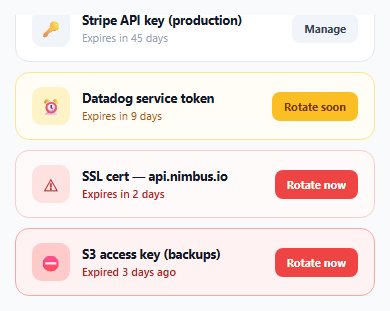
- 1Review the credential listEach row shows a name, a human-readable expiry detail, and a color-coded card matching its urgency tier — calm, warning (amber), critical (red), or expired (dark red).
- 2Notice the already-expired entryThe S3 access key shows a dark "expired" state with a negative-day count correctly converted into "Expired 3 days ago" rather than a confusing negative number.
- 3Click "Rotate now" or "Rotate soon"Confirms the action in this demo — in a real implementation this would trigger an actual credential rotation flow.
- 4Adjust the CREDENTIALS arrayAdd your own credentials with a name and daysRemaining value — classify() and formatDetail() handle rendering generically.
- 5Tune the tier thresholdsChange the day-count cutoffs inside classify() (currently 0, 3, and 14) to match your own organization's rotation policy.
Real-world uses
Common Use Cases
Got questions?
Frequently Asked Questions
Because a negative daysRemaining value (already expired) also technically satisfies a "less than or equal to 3" critical check. Checking the most urgent tier (expired) FIRST and returning immediately on a match guarantees an overdue credential is correctly classified as expired, not accidentally caught by a less urgent, more loosely matching threshold checked earlier.
No — both are read from the exact same tier object returned by a single call to classify(), applied together in one render pass. There is no separate, independently-maintained conditional for the icon versus the border color that could drift out of sync with each other.
formatDetail() explicitly checks for daysRemaining <= 0 and formats it as "Expired X days ago" (using the absolute value and correct singular/plural wording), rather than displaying a confusing raw negative number like "Expires in -3 days."
Edit the threshold numbers directly inside classify() — currently 3 days for critical and 14 days for warning. Because every visual signal is derived from this one function's output, changing these numbers automatically and correctly updates the color, icon, and button label behavior for every credential without touching any other code.
No — formatDetail() and classify() are deliberately separate functions. classify() only determines which urgency tier applies; formatDetail() only determines how to word the specific day count. This separation lets you refine either concern independently without affecting the other.
In this demo, it disables itself and shows a confirmation label — in a real implementation, you'd replace that handler with an actual credential rotation request, likely followed by re-fetching or updating the credential's daysRemaining value once rotation completes.
Build with AI
Build, Understand, Optimize, and Extend It With AI
Ask an AI assistant to explain precisely why the tier-classification checks must run in most-urgent-first order, walking through a concrete example of what would go wrong with a negative daysRemaining value if the order were reversed. It's also worth asking for a version that also computes and displays a specific calendar expiry date (not just a relative day count), or one that groups credentials by tier with a collapsible section per severity level so critical items are impossible to miss even in a long list.
Prompt to recreate it
Copy this into your AI assistant of choice to build the effect from scratch, or as a jumping-off point for your own variant:
Build a credential expiry warning card list in HTML, CSS, and vanilla JavaScript — no external library.

Requirements:
- A list of at least four named credentials (e.g. API keys, a certificate, an access token), each with a numeric "days remaining until expiry" value — including at least one credential that has ALREADY expired (a negative days-remaining value).
- Implement a single classification function that maps a days-remaining number to an urgency tier (e.g. calm/default, warning, critical, expired), checking thresholds in order from MOST urgent to LEAST urgent and returning on the first match — explain in a code comment why this specific ordering is required to correctly handle an already-expired (negative) value.
- The classification function's single result object must supply everything needed to render that credential's card — a CSS class controlling border/background color, an icon, and an action button label — so that a card's color, icon, and button label can never independently disagree about which urgency tier applies.
- Implement a separate function purely for generating human-readable expiry text (e.g. "Expires in 9 days", "Expires tomorrow", "Expired 3 days ago" with correct singular/plural wording) — keep this wording logic entirely separate from the tier-classification logic.
- Render the full list generically from a plain data array of credentials, so adding a new credential requires no additional classification or styling code.
- Clicking a credential's action button should show a visible confirmation state (disabling the button and updating its label), standing in for where a real credential-rotation request would be triggered.
Want to tighten it up first? Run this prompt through the AI Prompt Studio to score it across 8 quality dimensions, catch anti-patterns, and tune the wording for Claude, ChatGPT, or Gemini before you paste it in.
Source Code
<div class="demo" id="demo"></div>* { box-sizing: border-box; margin: 0; padding: 0; }
body { font-family: system-ui, sans-serif; background: #f8fafc; display: flex; align-items: center; justify-content: center; min-height: 100vh; padding: 24px; }
.demo { width: 360px; max-width: 100%; display: flex; flex-direction: column; gap: 10px; }
.cred-card { display: flex; align-items: center; gap: 12px; background: #fff; border: 1.5px solid #e2e8f0; border-radius: 14px; padding: 14px 16px; }
.cred-card.warn { border-color: #fde68a; background: #fffdf5; }
.cred-card.crit { border-color: #fecaca; background: #fffafa; }
.cred-card.expired { border-color: #fca5a5; background: #fef2f2; }
.cred-icon { width: 38px; height: 38px; border-radius: 10px; flex-shrink: 0; display: flex; align-items: center; justify-content: center; font-size: 16px; background: #f1f5f9; color: #64748b; }
.cred-card.warn .cred-icon { background: #fef3c7; color: #b45309; }
.cred-card.crit .cred-icon { background: #fee2e2; color: #b91c1c; }
.cred-card.expired .cred-icon { background: #fecaca; color: #7f1d1d; }
.cred-body { flex: 1; min-width: 0; }
.cred-name { font-size: 12.5px; font-weight: 700; color: #111827; }
.cred-detail { font-size: 11px; color: #94a3b8; margin-top: 2px; }
.cred-card.warn .cred-detail { color: #b45309; }
.cred-card.crit .cred-detail, .cred-card.expired .cred-detail { color: #b91c1c; font-weight: 600; }
.cred-action { flex-shrink: 0; border: none; padding: 7px 12px; border-radius: 8px; font-size: 11px; font-weight: 700; cursor: pointer; font-family: inherit; background: #f1f5f9; color: #334155; }
.cred-card.warn .cred-action { background: #fbbf24; color: #78350f; }
.cred-card.crit .cred-action, .cred-card.expired .cred-action { background: #ef4444; color: #fff; }
.cred-action:hover { filter: brightness(0.95); }const demo = document.getElementById('demo');
// Thresholds and their corresponding icon/tone are defined once, in a
// single ordered list checked top to bottom — the exact days-remaining
// count where the tone changes (safe -> warn -> crit -> expired) lives in
// exactly one place, so the card's color, icon, message, and button label
// can never disagree with each other about which tier a credential is in.
const TIERS = [
{ max: -Infinity, className: 'expired', icon: '⛔', label: 'Rotate now' },
{ max: 3, className: 'crit', icon: '⚠', label: 'Rotate now' },
{ max: 14, className: 'warn', icon: '⏰', label: 'Rotate soon' },
{ max: Infinity, className: '', icon: '🔑', label: 'Manage' },
];
function classify(daysRemaining) {
// Walk tiers from most-urgent to least-urgent, returning the first one
// whose threshold the value satisfies — this ordering matters because
// "expired" (negative days) must be checked before "critical" (<=3 days),
// otherwise a negative number would also incorrectly satisfy <= 3.
if (daysRemaining <= 0) return TIERS[0];
if (daysRemaining <= 3) return TIERS[1];
if (daysRemaining <= 14) return TIERS[2];
return TIERS[3];
}
function formatDetail(name, daysRemaining) {
if (daysRemaining <= 0) return `Expired ${Math.abs(daysRemaining)} day${Math.abs(daysRemaining) === 1 ? '' : 's'} ago`;
if (daysRemaining === 1) return 'Expires tomorrow';
return `Expires in ${daysRemaining} days`;
}
const CREDENTIALS = [
{ name: 'Stripe API key (production)', daysRemaining: 45 },
{ name: 'Datadog service token', daysRemaining: 9 },
{ name: 'SSL cert — api.nimbus.io', daysRemaining: 2 },
{ name: 'S3 access key (backups)', daysRemaining: -3 },
];
function render() {
demo.innerHTML = CREDENTIALS.map((cred) => {
const tier = classify(cred.daysRemaining);
return `
<div class="cred-card ${tier.className}">
<div class="cred-icon">${tier.icon}</div>
<div class="cred-body">
<div class="cred-name">${cred.name}</div>
<div class="cred-detail">${formatDetail(cred.name, cred.daysRemaining)}</div>
</div>
<button class="cred-action" data-name="${cred.name}">${tier.label}</button>
</div>
`;
}).join('');
}
demo.addEventListener('click', (e) => {
const btn = e.target.closest('.cred-action');
if (!btn) return;
btn.textContent = 'Rotated ✓';
btn.disabled = true;
});
render();