



Bootstrap Testimonial Grid with Ratings — Free JS Snippet
Bootstrap Testimonial Grid with Ratings · Cards · Plain HTML, CSS & JS · Live preview
Copy & paste
Source Code
<div class="container py-5">
  <div class="btn-group mb-4" role="group" id="bstgFilter">
    <button type="button" class="btn btn-outline-primary active" data-filter="all">All</button>
    <button type="button" class="btn btn-outline-primary" data-filter="5">5 Stars</button>
    <button type="button" class="btn btn-outline-primary" data-filter="4">4+ Stars</button>
  </div>
  <div class="row g-4" id="bstgGrid">
    <div class="col-12 col-md-6 col-lg-4 bstg-card" data-rating="5">
      <div class="card h-100 p-3">
        <div class="card-body">
          <div class="bstg-stars mb-2"></div>
          <p class="card-text">"Support answered in minutes and actually fixed the issue. Best onboarding experience we've had with any vendor."</p>
          <div class="d-flex align-items-center mt-3">
            <img src="https://i.pravatar.cc/48?img=5" class="rounded-circle me-2" width="48" height="48" alt="Avatar">
            <div><strong class="d-block">Meera Nair</strong><small class="text-muted">Head of Ops, Kite Labs</small></div>
          </div>
        </div>
      </div>
    </div>
    <div class="col-12 col-md-6 col-lg-4 bstg-card" data-rating="4">
      <div class="card h-100 p-3">
        <div class="card-body">
          <div class="bstg-stars mb-2"></div>
          <p class="card-text">"Solid product overall. A couple of features took longer than expected to find, but support helped quickly."</p>
          <div class="d-flex align-items-center mt-3">
            <img src="https://i.pravatar.cc/48?img=15" class="rounded-circle me-2" width="48" height="48" alt="Avatar">
            <div><strong class="d-block">Arjun Verma</strong><small class="text-muted">CTO, Northloop</small></div>
          </div>
        </div>
      </div>
    </div>
    <div class="col-12 col-md-6 col-lg-4 bstg-card" data-rating="3">
      <div class="card h-100 p-3">
        <div class="card-body">
          <div class="bstg-stars mb-2"></div>
          <p class="card-text">"Does what it says. UI could use a refresh but it hasn't slowed our team down at all."</p>
          <div class="d-flex align-items-center mt-3">
            <img src="https://i.pravatar.cc/48?img=25" class="rounded-circle me-2" width="48" height="48" alt="Avatar">
            <div><strong class="d-block">Priya Das</strong><small class="text-muted">PM, Fieldstack</small></div>
          </div>
        </div>
      </div>
    </div>
    <div class="col-12 col-md-6 col-lg-4 bstg-card" data-rating="5">
      <div class="card h-100 p-3">
        <div class="card-body">
          <div class="bstg-stars mb-2"></div>
          <p class="card-text">"Migrated three teams onto this in a week. Genuinely the smoothest rollout we've had."</p>
          <div class="d-flex align-items-center mt-3">
            <img src="https://i.pravatar.cc/48?img=33" class="rounded-circle me-2" width="48" height="48" alt="Avatar">
            <div><strong class="d-block">Sana Iyer</strong><small class="text-muted">Eng Manager, Voltbase</small></div>
          </div>
        </div>
      </div>
    </div>
    <div class="col-12 col-md-6 col-lg-4 bstg-card" data-rating="2">
      <div class="card h-100 p-3">
        <div class="card-body">
          <div class="bstg-stars mb-2"></div>
          <p class="card-text">"Pricing tiers were confusing at first and we hit a couple of bugs during setup."</p>
          <div class="d-flex align-items-center mt-3">
            <img src="https://i.pravatar.cc/48?img=41" class="rounded-circle me-2" width="48" height="48" alt="Avatar">
            <div><strong class="d-block">Karan Bhatt</strong><small class="text-muted">Founder, Loopcart</small></div>
          </div>
        </div>
      </div>
    </div>
    <div class="col-12 col-md-6 col-lg-4 bstg-card" data-rating="4">
      <div class="card h-100 p-3">
        <div class="card-body">
          <div class="bstg-stars mb-2"></div>
          <p class="card-text">"Reliable day to day. We'd like better export options but it covers our core workflow well."</p>
          <div class="d-flex align-items-center mt-3">
            <img src="https://i.pravatar.cc/48?img=47" class="rounded-circle me-2" width="48" height="48" alt="Avatar">
            <div><strong class="d-block">Devika Rao</strong><small class="text-muted">Ops Lead, Marblewave</small></div>
          </div>
        </div>
      </div>
    </div>
  </div>
</div>
.bstg-stars .bi-star-fill,
.bstg-stars span { color: #f5b301; font-size: 1rem; letter-spacing: 1px; }
.bstg-card { transition: opacity 0.15s ease; }
.bstg-card.bstg-hidden { display: none; }function renderStars(container, rating) {
container.innerHTML = '';
for (let i = 1; i <= 5; i++) {
const star = document.createElement('span');
star.textContent = i <= rating ? '\u2605' : '\u2606';
container.appendChild(star);
}
}
const cards = Array.from(document.querySelectorAll('.bstg-card'));
cards.forEach(card => {
const rating = parseInt(card.dataset.rating, 10);
renderStars(card.querySelector('.bstg-stars'), rating);
});
const filterButtons = Array.from(document.querySelectorAll('#bstgFilter button'));
function applyFilter(filter) {
cards.forEach(card => {
const rating = parseInt(card.dataset.rating, 10);
const matches =
filter === 'all' ||
(filter === '5' && rating === 5) ||
(filter === '4' && rating >= 4);
card.classList.toggle('bstg-hidden', !matches);
});
}
filterButtons.forEach(btn => {
btn.addEventListener('click', () => {
filterButtons.forEach(b => b.classList.remove('active'));
btn.classList.add('active');
applyFilter(btn.dataset.filter);
});
});Extend with AI
Take This Snippet Further With AI
The AI prompt for this one is for Patreon supporters ($3 a month, 7 days free), along with a site with no ads. Supporters enter the passcode once and it is remembered in this browser.
What's included
Features
About this UI Snippet
Bootstrap Testimonial Grid with Ratings — HTML, CSS & JavaScript
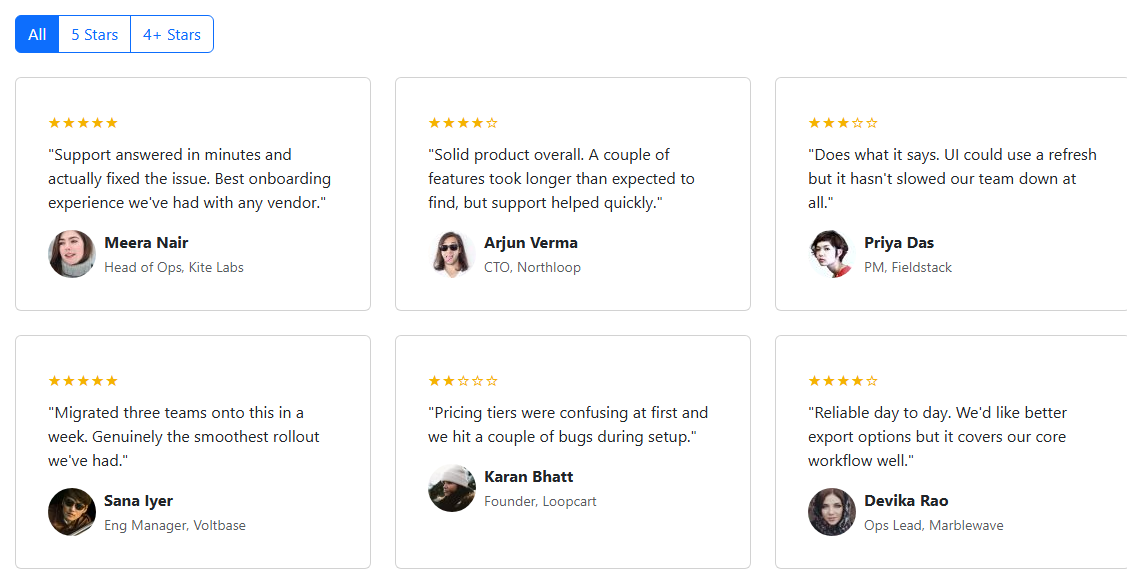
Star ratings are almost always driven by a single numeric value in real data, so this snippet keeps that as the source of truth: each testimonial .bstg-card carries its score in a data-rating attribute rather than the stars being typed directly into the HTML, and renderStars(container, rating) builds the visual row by looping i from 1 to 5 and appending a filled star character (\u2605) when i <= rating or an outline star (\u2606) otherwise. Rendering from a loop instead of hardcoding five <span> elements per card means changing a testimonial's rating in the data automatically produces the correct star pattern with no matching HTML edits required — the kind of drift that's easy to introduce when stars are typed by hand.
The cards themselves sit in a responsive Bootstrap row using col-lg-4/col-md-6 so the grid reflows from three columns down to one as the viewport narrows, each card built from a real Bootstrap card with an avatar image, name, role, and quote — standard Bootstrap component composition rather than a custom layout. Filtering is handled by a Bootstrap btn-group with three buttons (All / 5 Stars / 4+ Stars), each carrying its target filter in a data-filter attribute; clicking one toggles Bootstrap's active class onto only that button and calls applyFilter(filter), which recomputes a matches boolean per card — exact equality for the "5" filter, a >= comparison for the "4+" filter — and toggles a bstg-hidden class (mapped to display: none in CSS) rather than removing cards from the DOM.
Keeping filtered-out cards in the DOM instead of destroying and rebuilding them is the detail worth calling out: it means the star rendering only ever needs to run once, on initial load, rather than being re-executed every time the filter changes, and it avoids the layout thrash of repeatedly creating and destroying the same DOM nodes as a user clicks between filter buttons. The one edge case handled explicitly is the "4+" filter's boundary: a card with data-rating="4" must satisfy rating >= 4 to appear under "4+ Stars" while a data-rating="3" card must not, which the >= comparison gets right without needing a separate range check.
Active-button state is managed the same way Bootstrap itself manages toggled buttons: on every click, active is stripped from all three filter buttons with filterButtons.forEach(b => b.classList.remove('active')) before being re-added to only the one clicked, guaranteeing exactly one filter button is ever marked active regardless of click order, rather than relying on any built-in Bootstrap JavaScript component for what is otherwise plain markup styling.
Step by step
How to Use
- 1Load the snippetA grid of six testimonial cards appears, each showing a star rating rendered above the quote, with "All" selected in the filter above the grid.
- 2Look at the stars on each cardFilled gold stars match the numeric rating (5, 4, 3, 5, 2, or 4) and the remaining stars appear as outlines.
- 3Click "5 Stars"Only the two cards with a perfect 5-star rating remain visible; the rest disappear from the grid.
- 4Click "4+ Stars"Cards rated 4 or 5 stars are shown together, while the 3-star and 2-star cards stay hidden.
- 5Click "All"Every testimonial card reappears in the grid.
- 6Resize the browser narrowerThe grid reflows from three columns to two, then to one, using Bootstrap's responsive column classes.
Real-world uses
Common Use Cases
Got questions?
Frequently Asked Questions
Yes. Store testimonials as an array of objects with a rating field, derive each card's star array with Array.from({length: 5}) mapped against the rating inside the component render (React JSX, Vue template, or Angular *ngFor), and keep the active filter in component state, filtering the array before rendering instead of toggling a hidden CSS class on existing DOM nodes.
They are plain Unicode characters — a filled star (\u2605) and an outline star (\u2606) — inserted as textContent inside generated span elements, so no icon font or SVG library is required.
The filter comparison uses rating >= 4, which evaluates true for both 4 and 5, matching the "4 and above" meaning of the button label rather than only exact matches.
Toggling display: none via a class is far cheaper than repeatedly destroying and recreating card elements on every filter click, and it keeps each card's already-rendered star markup intact so it never needs to be rebuilt when a filter is reapplied.
Yes — replace the card, btn-group, and grid classes with Tailwind's own card, button-group, and grid/flex utilities; the star-rendering loop and the rating-based filter logic operate on data attributes and are entirely independent of which CSS framework styles the markup.
Yes — read each card's data-rating, sort the card elements array by that value, and re-append them to the grid container in the new order using appendChild, which moves existing nodes rather than requiring new ones to be created.