



Bootstrap Pagination with Page Jump Input — Free Snippet
Bootstrap Pagination with Page Jump Input · Navigation · Plain HTML, CSS & JS · Live preview
What's included
Features
About this UI Snippet
Bootstrap Pagination with Page Jump Input — HTML, CSS & JavaScript
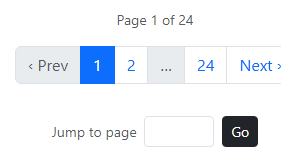
Listing all 24 pages of a real result set would make Bootstrap's .pagination component unusably wide. This snippet builds a windowed pager on top of real Bootstrap 5.3 pagination markup: it always shows the first page, the last page, the current page, and one neighbor on each side, with "…" filling any gap — the same windowing shape used by most real-world paginated interfaces, generated fresh from a pageWindow() function on every navigation rather than a fixed set of links.
Alongside the pager, a small "Jump to page" number input lets a visitor skip straight to any page by number — clamped to the valid 1–24 range and submittable with either the Go button or Enter — for the common case where the page you want is many pages away from your current position and clicking Next repeatedly isn't reasonable.
Step by step
How to Use
- 1Load the snippetClick the snippet in the sidebar Library tab. The preview loads on page 1 of 24.
- 2Click through pagesClick a page number, or Prev/Next — the windowed page list recalculates around your new position.
- 3Jump to a distant pageType "18" into the jump input and click Go (or press Enter) — it navigates straight there.
- 4Try an out-of-range valueType "99" and click Go — it clamps to the last real page (24) instead of breaking.
- 5Adjust the totalChange the TOTAL constant in the JS panel to match your real result count.
Real-world uses
Common Use Cases
Got questions?
Frequently Asked Questions
Yes — it uses Bootstrap 5.3's actual .pagination, .page-item, and .page-link classes loaded from the CDN; only the page-number generation logic and the jump input are custom.
pageWindow() always includes page 1, the last page, the current page, and one page on either side of it, sorts them, and inserts a "…" wherever there's a gap larger than 1 between consecutive included pages.
The jump handler clamps the typed value to between 1 and the total page count with Math.min/Math.max, so an out-of-range or negative number always lands on a valid page instead of breaking.
Yes — replace the TOTAL constant with your real page count (e.g. from an API response), and wire goTo() to actually fetch/render that page's data instead of just updating the display.
Yes — a keydown listener on the input triggers the same Go logic when the Enter key is pressed, so keyboard-only use works identically to clicking.
Yes. While the Bootstrap Pagination with Page Jump Input snippet gives you one pattern to copy, the free Responsive Navbar Builder at webdevpuneet.com/navbar-builder/ designs a whole navigation bar: logo, links and dropdown menus, a mobile hamburger menu (dropdown panel, slide-in drawer or full screen) and a scroll effect (sticky, shrink, hide on scroll or transparent). It has six presets, a live preview that runs the real code, and exports HTML + CSS + vanilla JS, React, Tailwind, Vue 3 or Angular — or you can click Fork & Edit to keep editing it in My Code.
Build with AI
Build, Understand, Optimize, and Extend It With AI
Hand this snippet's HTML, CSS, and JS to an AI coding assistant like Claude and ask it to sync the current page to a ?page= URL query parameter so back/forward navigation and direct links work, or to add a "results per page" selector that recalculates TOTAL from a fixed result count. It's also a good exercise to ask the assistant to add keyboard shortcuts (left/right arrow keys) for Prev/Next.
Prompt to recreate it
Copy this into your AI assistant of choice to build the effect from scratch, or as a jumping-off point for your own variant:
Build a Bootstrap 5.3 pagination component with a page-jump input, using the real Bootstrap CDN framework (bootstrap.min.css and bootstrap.bundle.min.js), not custom CSS made to resemble Bootstrap.

Requirements:
- Use Bootstrap's real pagination component (ul.pagination, li.page-item, a.page-link) for a result set of at least 20 pages.
- Implement windowed pagination: always show the first page, the last page, the current page, and one page on either side of the current page, with "…" filling any gaps — regenerate this window from scratch on every page change, not as a fixed static list.
- Prev/Next controls that disable (via Bootstrap's disabled class) at the first and last page respectively.
- A separate numeric input with a "Go" button (and Enter-key support) that jumps directly to any typed page number, clamped to the valid range so an out-of-bounds value doesn't break anything.
Want to tighten it up first? Run this prompt through the AI Prompt Studio to score it across 8 quality dimensions, catch anti-patterns, and tune the wording for Claude, ChatGPT, or Gemini before you paste it in.
Source Code
<div class="container py-5 text-center">
  <p class="text-muted small mb-3" id="bspageInfo">Page 1 of 24</p>
  <nav aria-label="Page navigation">
    <ul class="pagination justify-content-center bspage-list" id="bspageList"></ul>
  </nav>
  <div class="d-inline-flex align-items-center gap-2 mt-3">
    <span class="small text-muted">Jump to page</span>
    <input type="number" class="form-control form-control-sm" id="bspageInput" style="width:70px" min="1" max="24">
    <button class="btn btn-sm btn-dark" id="bspageGo">Go</button>
  </div>
</div>
.bspage-list .page-link { cursor: pointer; }
.bspage-list .page-item.disabled .page-link { cursor: default; }const TOTAL = 24;
let current = 1;
const list = document.getElementById('bspageList');
const info = document.getElementById('bspageInfo');
const jumpInput = document.getElementById('bspageInput');
// A windowed page list: first, last, current, and one neighbour on each
// side, with "…" gaps — the same windowing shape a search-results pager
// needs once there are more pages than can reasonably fit on one row.
function pageWindow(cur, total) {
const pages = new Set([1, total, cur, cur - 1, cur + 1]);
const sorted = [...pages].filter(p => p >= 1 && p <= total).sort((a, b) => a - b);
const out = [];
let prev = null;
for (const p of sorted) {
if (prev !== null && p - prev > 1) out.push('…');
out.push(p);
prev = p;
}
return out;
}
function render() {
list.innerHTML = '';
const prevLi = document.createElement('li');
prevLi.className = 'page-item' + (current === 1 ? ' disabled' : '');
prevLi.innerHTML = '<a class="page-link">‹ Prev</a>';
prevLi.addEventListener('click', () => goTo(current - 1));
list.appendChild(prevLi);
pageWindow(current, TOTAL).forEach(p => {
const li = document.createElement('li');
if (p === '…') {
li.className = 'page-item disabled';
li.innerHTML = '<span class="page-link">…</span>';
} else {
li.className = 'page-item' + (p === current ? ' active' : '');
li.innerHTML = '<a class="page-link">' + p + '</a>';
li.addEventListener('click', () => goTo(p));
}
list.appendChild(li);
});
const nextLi = document.createElement('li');
nextLi.className = 'page-item' + (current === TOTAL ? ' disabled' : '');
nextLi.innerHTML = '<a class="page-link">Next ›</a>';
nextLi.addEventListener('click', () => goTo(current + 1));
list.appendChild(nextLi);
info.textContent = 'Page ' + current + ' of ' + TOTAL;
jumpInput.value = '';
}
function goTo(p) {
if (p < 1 || p > TOTAL || p === current) return;
current = p;
render();
}
document.getElementById('bspageGo').addEventListener('click', () => {
const val = parseInt(jumpInput.value, 10);
if (!Number.isNaN(val)) goTo(Math.min(TOTAL, Math.max(1, val)));
});
jumpInput.addEventListener('keydown', e => { if (e.key === 'Enter') document.getElementById('bspageGo').click(); });
render();