
KUTE.js SVG Shape Morph — Animated Path Morphing
KUTE.js SVG Shape Morph · Animations · Plain HTML, CSS & JS · Live preview
What's included
Features
About this UI Snippet
KUTE.js SVG Shape Morph — Why Path Morphing Is Harder Than It Looks
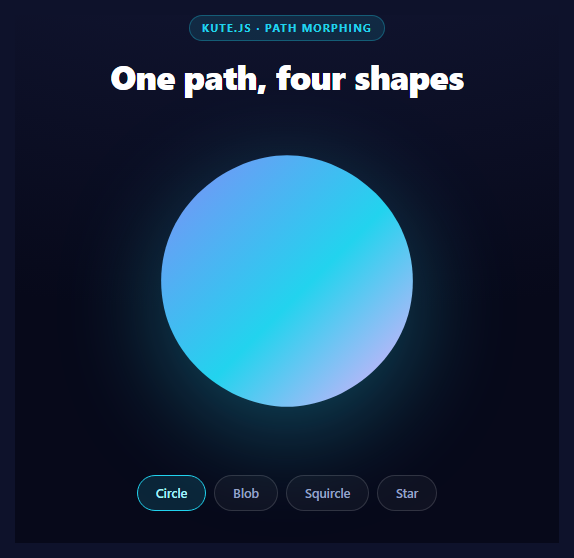
Morphing one SVG shape into another sounds like it should be simple interpolation: take the numbers in one d attribute, take the numbers in another, and blend between them. It is not, and the reason is worth understanding before reaching for a library.
Two SVG paths almost never have the same number of points, the same command types, or the same starting position. A circle drawn with four cubic curves and a star drawn with ten line segments have nothing structurally in common. Interpolating them naively produces garbage — points snapping between unrelated positions, shapes turning inside out.
KUTE.js solves this properly, and this snippet exposes the two options that decide whether the result looks intentional or broken.
The pattern: one live path, several hidden references
Only one path is ever rendered:
<path id="ksmLive" fill="url(#ksmGrad)" d="M150 32 C204 32 ..." />
The other three shapes exist in the SVG purely as geometry references, hidden with display: none. KUTE reads their d attributes; they are never painted. This is the standard morphing architecture and it has a real advantage over storing path strings in JavaScript: the shapes stay editable in a design tool, and the gradient, drop-shadow and fill live on the single visible path so they persist across every morph automatically.
morphPrecision — sampling the path
morphPrecision: 1
To morph between structurally different paths, KUTE first resamples both into comparable point sets. This value controls the sampling interval: lower numbers place points closer together, capturing more detail.
The star is the shape that proves why it matters. Its ten sharp corners need dense sampling to survive; at a coarse precision the points land between the corners and the star arrives visibly rounded, as if it had been smoothed on purpose. The trade is cost — finer sampling means more points to interpolate every frame, which matters on long or numerous paths but is irrelevant for four simple shapes.
morphIndex — where the shapes line up
This is the option that separates a clean morph from an unsettling one:
morphIndex: 0
Once both paths are resampled, KUTE has to decide which point on shape A corresponds to which point on shape B. Left to itself it makes a reasonable guess, but a wrong guess means every point travels to a rotated position — the shape appears to twist as it morphs, an artifact that is instantly recognizable and hard to diagnose if you do not know its cause.
Pinning morphIndex to 0 forces the correspondence to start at the first point of each path. Because all four shapes here are authored starting at the top center and running clockwise, that alignment is correct and the morph reads as a direct transformation.
That authoring discipline is the real lesson: consistent start points and consistent winding direction across your shapes will do more for morph quality than any option. If a morph twists, fix the paths before reaching for the settings.
Cubic curves everywhere
Every path here — even the squircle and the star, which are visually made of straight lines — is written entirely with C cubic bézier commands. Mixing L line commands with C curves gives KUTE two different command types to reconcile, which is more work and more opportunity for artifacts. A straight line expressed as a cubic with collinear control points is geometrically identical and interpolates cleanly against real curves. Most design tools have an option to output all-cubic paths; it is worth enabling before exporting shapes for morphing.
All four also share the same viewBox coordinate space, so no scaling is needed to reconcile them.
Interrupting a morph
if (tween) tween.stop();
Clicking a second shape while the first morph is running would otherwise start a second tween writing to the same d attribute, and the two fight, producing stutter or a stuck shape. Stopping the previous tween first means the new one starts from wherever the path currently is — so rapid clicking chains smoothly rather than breaking.
Reusing it
Export your shapes at the same viewBox, all-cubic, each starting at the same relative position and running the same direction. Keep one visible path for styling and hide the rest. If a morph looks wrong, check start points before precision, and precision before anything else. For simpler icon transitions there is morph SVG icons, and for stroke-drawing rather than shape-blending, Vivus SVG draw covers that case.
Step by step
How to Use
- 1Add the KUTE.js CDNThe core kute.min.js build already bundles the SVG morph plugin.
- 2Paste HTML, CSS, and JSA gradient circle renders with three hidden reference shapes.
- 3Pick a shapeThe visible path morphs toward the chosen reference geometry.
- 4Click rapidlyEach morph stops the previous tween and continues from the current shape.
- 5Watch the star cornersmorphPrecision 1 samples finely enough to keep the points sharp.
- 6Add your own shapesSame viewBox, all-cubic paths, matching start point and direction.
Real-world uses
Common Use Cases
morphIndex 0 stops the shape twisting halfway through.morphPrecision 1 keeping star corners sharp.Got questions?
Frequently Asked Questions
Because they almost never share a structure — different numbers of points, different command types, different start positions. A circle made of four cubic curves and a star made of ten line segments have nothing in common numerically, so naive interpolation snaps points between unrelated positions and turns shapes inside out. KUTE resamples both paths into comparable point sets first.
The interval at which KUTE samples each path when resampling it. Lower values place sample points closer together and capture more detail. The star demonstrates why it matters: its sharp corners need dense sampling to survive, and at a coarse precision the points fall between the corners so the star arrives visibly rounded. Finer sampling costs more interpolation per frame.
After resampling, KUTE must decide which point on the source corresponds to which point on the target. Left to guess, a wrong pairing makes every point travel to a rotated position, so the shape appears to twist mid-morph. Setting morphIndex to 0 forces correspondence to begin at the first point of each path, which is correct here because all four shapes are authored starting at top center and running clockwise.
Mixing L line commands with C curve commands gives KUTE two command types to reconcile, which adds work and artifacts. A straight line expressed as a cubic with collinear control points is geometrically identical but interpolates cleanly against real curves. Most design tools can export all-cubic paths, and it is worth enabling before exporting shapes intended for morphing.
Keeping them as hidden paths means the geometry stays editable in a design tool, and because only one path is ever rendered, the gradient fill, drop shadow and styling live on that single element and persist across every morph automatically. The hidden paths are read for their d attribute and never painted.
Render the SVG with the visible path and hidden reference paths in your template, then create KUTE tweens in an effect or handler using refs — not during render, since KUTE mutates the DOM node directly. Keep the current tween in a ref and call stop() on it before starting a new one, and stop any running tween in the unmount cleanup so a detached node is not still being animated.
Build with AI
Build, Understand, Optimize, and Extend It With AI
Path morphing has a small number of failure modes that are obvious once named and baffling until then, which makes this a productive snippet to interrogate. Paste the HTML, CSS, and JS into an AI assistant like Claude and ask it to explain why two SVG paths with different point counts and command types cannot simply be interpolated, and what KUTE does to make them comparable. Then ask specifically what morphIndex does — have it describe the visual artifact of an incorrect point correspondence, and try removing the option to see whether the star twists. Ask why every path here is written with cubic C commands even for straight edges. For optimization, ask what morphPrecision costs at higher detail and how you would decide the value for a path with hundreds of points rather than a dozen. To extend it: have it add a continuous auto-cycle through the shapes, morph the gradient stops alongside the path, drive the morph from scroll progress instead of clicks, or add a fifth shape and explain how to author it so the correspondence stays correct. Treat the code less like a finished artifact and more like a starting point for a conversation.
Prompt to recreate it
Copy this into your AI assistant of choice to build the effect from scratch, or as a jumping-off point for your own variant:
Build an SVG shape morphing animation using KUTE.js (the core kute.min.js build from a CDN, which already bundles the SVG morph plugin) in plain HTML, CSS, and JavaScript.

Requirements:
- Render ONE visible path carrying all the styling (an SVG linearGradient fill and a drop-shadow filter), plus three or four additional paths in the same SVG that are hidden with display: none and exist purely as geometry references for the morph. Explain that this keeps the target shapes editable as real SVG rather than path strings in JS, and means the gradient and styling persist across every morph automatically because only one element is ever rendered.
- Author every path in the SAME viewBox coordinate space so no scaling reconciliation is needed.
- Write ALL paths using only cubic C bezier commands — even shapes with visually straight edges like a squircle or a star. Explain that mixing L line commands with C curves gives KUTE two command types to reconcile, whereas a straight line expressed as a cubic with collinear control points is geometrically identical and interpolates cleanly.
- Author every path starting at the same relative position (top center) and running in the same direction (clockwise), and explain that consistent start points and winding direction do more for morph quality than any library option.
- Morph with KUTE.to(liveElement, { path: targetSelector }, options) using a duration around 900ms and an ease-in-out easing, and set these two options explicitly with comments explaining each:
  1. morphPrecision — controls how finely KUTE resamples each path into comparable point sets. Use a low value (1) and explain that the star's sharp corners need dense sampling to survive, since coarse sampling places points between the corners and the star arrives visibly rounded.
  2. morphIndex: 0 — forces which point on the source corresponds to which point on the target. Explain that without it KUTE guesses, and a wrong pairing makes every point travel to a rotated position so the shape visibly twists mid-morph.
- Keep a reference to the running tween and call stop() on it before starting a new one, so rapid clicking chains smoothly from the current shape instead of two tweens fighting over the same d attribute.
- Skip the morph entirely if the requested shape is already active, and style it as a dark centered page with pill-shaped shape-selector chips.
Want to tighten it up first? Run this prompt through the AI Prompt Studio to score it across 8 quality dimensions, catch anti-patterns, and tune the wording for Claude, ChatGPT, or Gemini before you paste it in.
Source Code
<div class="ksm-wrap">
  <span class="ksm-tag">kute.js · path morphing</span>
  <h2>One path, four shapes</h2>

  <div class="ksm-stage">
    <svg viewBox="0 0 300 300" class="ksm-svg">
      <defs>
        <linearGradient id="ksmGrad" x1="0" y1="0" x2="1" y2="1">
          <stop offset="0%" stop-color="#818cf8"/>
          <stop offset="55%" stop-color="#22d3ee"/>
          <stop offset="100%" stop-color="#f0abfc"/>
        </linearGradient>
      </defs>

      <path id="ksmLive" fill="url(#ksmGrad)"
        d="M150 32 C204 32 268 78 268 150 C268 222 204 268 150 268 C96 268 32 222 32 150 C32 78 96 32 150 32 Z"/>

      <path id="ksmBlob" class="ksm-hidden"
        d="M150 30 C214 44 262 74 264 142 C266 214 210 258 148 266 C82 274 40 218 36 152 C32 84 92 18 150 30 Z"/>
      <path id="ksmSquare" class="ksm-hidden"
        d="M74 46 C74 46 226 46 226 46 C242 46 254 58 254 74 C254 74 254 226 254 226 C254 242 242 254 226 254 C226 254 74 254 74 254 C58 254 46 242 46 226 C46 226 46 74 46 74 C46 58 58 46 74 46 Z"/>
      <path id="ksmStar" class="ksm-hidden"
        d="M150 26 C150 26 186 108 186 108 C186 108 274 118 274 118 C274 118 208 178 208 178 C208 178 226 266 226 266 C226 266 150 222 150 222 C150 222 74 266 74 266 C74 266 92 178 92 178 C92 178 26 118 26 118 C26 118 114 108 114 108 C114 108 150 26 150 26 Z"/>
    </svg>
  </div>

  <div class="ksm-shapes" id="ksmShapes">
    <button class="ksm-chip is-on" data-target="#ksmLive">Circle</button>
    <button class="ksm-chip" data-target="#ksmBlob">Blob</button>
    <button class="ksm-chip" data-target="#ksmSquare">Squircle</button>
    <button class="ksm-chip" data-target="#ksmStar">Star</button>
  </div>
</div>*{box-sizing:border-box;margin:0;padding:0}
body{font-family:system-ui,-apple-system,sans-serif;background:radial-gradient(120% 90% at 50% 0%,#151a3a,#07091a 62%);color:#fff;min-height:100vh;display:flex;align-items:center;justify-content:center;padding:26px}
.ksm-wrap{text-align:center;width:min(480px,94vw)}
.ksm-tag{display:inline-block;font-size:10.5px;font-weight:700;letter-spacing:.14em;text-transform:uppercase;color:#22d3ee;background:rgba(34,211,238,.12);border:1px solid rgba(34,211,238,.3);padding:5px 12px;border-radius:99px;margin-bottom:12px}
.ksm-wrap h2{font-size:clamp(24px,5vw,34px);font-weight:800;letter-spacing:-.02em}
.ksm-stage{margin:22px auto 0;width:min(320px,80vw)}
.ksm-svg{width:100%;height:auto;filter:drop-shadow(0 26px 50px rgba(34,211,238,.32))}
/* Reference geometry only — never rendered, only read by the morph. */
.ksm-hidden{display:none}
.ksm-shapes{display:flex;gap:8px;justify-content:center;flex-wrap:wrap;margin-top:30px}
.ksm-chip{padding:9px 18px;border-radius:99px;border:1px solid rgba(255,255,255,.14);background:rgba(255,255,255,.04);color:#98a2c6;font:600 12.5px system-ui;cursor:pointer;transition:color .16s,border-color .16s,background .16s}
.ksm-chip:hover{color:#fff;background:rgba(255,255,255,.09)}
.ksm-chip.is-on{border-color:#22d3ee;color:#a5f3fc;background:rgba(34,211,238,.14)}var live = document.getElementById('ksmLive');
var current = '#ksmLive';
var tween = null;
function morphTo(selector) {
if (selector === current) return;
if (tween) tween.stop();
tween = KUTE.to(live, { path: selector }, {
duration: 900,
easing: 'easingCubicInOut',
// Lower numbers sample the path more finely. 1 keeps corners crisp on the
// star; raising it smooths detail away but is cheaper on long paths.
morphPrecision: 1,
// Without this KUTE picks a start point automatically and shapes can
// visibly rotate mid-morph as points are matched to the wrong neighbours.
morphIndex: 0
});
tween.start();
current = selector;
}
document.getElementById('ksmShapes').addEventListener('click', function (e) {
var chip = e.target.closest('.ksm-chip');
if (!chip) return;
document.querySelectorAll('.ksm-chip').forEach(function (c) { c.classList.remove('is-on'); });
chip.classList.add('is-on');
morphTo(chip.dataset.target);
});