


Base64 & URL-Safe Encoder/Decoder — Free HTML CSS JS Snippet
Base64 & URL-Safe Encoder/Decoder · Dev · Plain HTML, CSS & JS · Live preview
Copy & paste
Source Code
<div class="wrap">
  <div class="head">
    <h2>Base64 Playground</h2>
    <label class="url-toggle">
      <input type="checkbox" id="urlsafe-toggle" />
      URL-safe variant
    </label>
  </div>

  <div class="grid">
    <div class="col">
      <div class="col-label">Plain text</div>
      <textarea id="plain-input" placeholder="Type or paste text here...">Hello, World! 👋</textarea>
    </div>
    <div class="controls">
      <button class="icon-btn" id="btn-encode" title="Encode →">→</button>
      <button class="icon-btn" id="btn-decode" title="← Decode">←</button>
    </div>
    <div class="col">
      <div class="col-label">Base64</div>
      <textarea id="b64-input" placeholder="Base64 output appears here..."></textarea>
    </div>
  </div>

  <div class="row-actions">
    <button class="btn" id="btn-copy-b64">Copy Base64</button>
    <button class="btn" id="btn-copy-plain">Copy Plain Text</button>
    <span class="size-note" id="size-note"></span>
  </div>

  <div class="file-zone" id="file-zone">
    <span>Drop a file here (or click) to base64-encode it as a data URI</span>
    <input type="file" id="file-input" hidden />
  </div>
  <pre class="file-out" id="file-out"></pre>
  <div class="error" id="error-msg"></div>
</div>
* { box-sizing: border-box; margin: 0; padding: 0; }
body { font-family: system-ui, -apple-system, sans-serif; background: #f8fafc; min-height: 100vh; padding: 28px 20px; }
.wrap { max-width: 760px; margin: 0 auto; background: #fff; border: 1px solid #e2e8f0; border-radius: 16px; padding: 22px; }
.head { display: flex; align-items: center; justify-content: space-between; margin-bottom: 16px; }
h2 { font-size: 18px; font-weight: 800; color: #1e293b; }
.url-toggle { display: flex; align-items: center; gap: 6px; font-size: 12.5px; color: #64748b; cursor: pointer; user-select: none; }
.url-toggle input { accent-color: #6366f1; width: 15px; height: 15px; }
.grid { display: grid; grid-template-columns: 1fr auto 1fr; gap: 12px; align-items: stretch; }
.col { display: flex; flex-direction: column; gap: 6px; }
.col-label { font-size: 11px; font-weight: 700; color: #94a3b8; text-transform: uppercase; letter-spacing: 0.04em; }
textarea { width: 100%; min-height: 150px; resize: vertical; padding: 12px; border: 1.5px solid #e2e8f0; border-radius: 10px; font-family: "SF Mono", Consolas, monospace; font-size: 12.5px; line-height: 1.6; color: #1e293b; }
textarea:focus { outline: none; border-color: #6366f1; }
.controls { display: flex; flex-direction: column; justify-content: center; gap: 10px; padding-top: 20px; }
.icon-btn { width: 38px; height: 38px; border-radius: 10px; border: 1.5px solid #e2e8f0; background: #f8fafc; color: #6366f1; font-size: 16px; font-weight: 700; cursor: pointer; transition: all 0.15s; }
.icon-btn:hover { background: #eef2ff; border-color: #6366f1; }
.row-actions { display: flex; align-items: center; gap: 10px; margin-top: 12px; flex-wrap: wrap; }
.btn { font-size: 12.5px; font-weight: 600; padding: 8px 14px; border-radius: 8px; border: 1.5px solid #e2e8f0; background: #fff; color: #374151; cursor: pointer; transition: all 0.15s; }
.btn:hover { border-color: #6366f1; color: #6366f1; }
.size-note { font-size: 11.5px; color: #94a3b8; margin-left: auto; }
.file-zone { margin-top: 18px; border: 2px dashed #cbd5e1; border-radius: 12px; padding: 22px; text-align: center; font-size: 12.5px; color: #64748b; cursor: pointer; transition: all 0.15s; }
.file-zone:hover, .file-zone.drag { border-color: #6366f1; background: #eef2ff; color: #6366f1; }
.file-out { margin-top: 10px; max-height: 120px; overflow: auto; background: #0f172a; color: #86efac; padding: 10px 12px; border-radius: 8px; font-size: 11px; font-family: monospace; word-break: break-all; white-space: pre-wrap; display: none; }
.file-out.shown { display: block; }
.error { color: #dc2626; font-size: 12px; margin-top: 8px; min-height: 16px; }const plainInput = document.getElementById('plain-input');
const b64Input = document.getElementById('b64-input');
const urlSafeToggle = document.getElementById('urlsafe-toggle');
const errorMsg = document.getElementById('error-msg');
const sizeNote = document.getElementById('size-note');
const fileZone = document.getElementById('file-zone');
const fileInput = document.getElementById('file-input');
const fileOut = document.getElementById('file-out');
function toUrlSafe(b64) {
return b64.replace(/\+/g, '-').replace(/\//g, '_').replace(/=+$/, '');
}
function fromUrlSafe(str) {
let s = str.replace(/-/g, '+').replace(/_/g, '/');
while (s.length % 4) s += '=';
return s;
}
function utf8ToB64(str) {
const bytes = new TextEncoder().encode(str);
let binary = '';
bytes.forEach(b => { binary += String.fromCharCode(b); });
return btoa(binary);
}
function b64ToUtf8(b64) {
const binary = atob(b64);
const bytes = new Uint8Array(binary.length);
for (let i = 0; i < binary.length; i++) bytes[i] = binary.charCodeAt(i);
return new TextDecoder('utf-8').decode(bytes);
}
function setError(msg) { errorMsg.textContent = msg || ''; }
function encode() {
setError('');
try {
let out = utf8ToB64(plainInput.value);
if (urlSafeToggle.checked) out = toUrlSafe(out);
b64Input.value = out;
updateSize();
} catch (e) {
setError('Could not encode: ' + e.message);
}
}
function decode() {
setError('');
try {
let raw = b64Input.value.trim();
if (urlSafeToggle.checked) raw = fromUrlSafe(raw);
plainInput.value = b64ToUtf8(raw);
updateSize();
} catch (e) {
setError('Invalid base64 input: ' + e.message);
}
}
function updateSize() {
const plainBytes = new TextEncoder().encode(plainInput.value).length;
const b64Chars = b64Input.value.length;
sizeNote.textContent = plainBytes + ' bytes plain \u2192 ' + b64Chars + ' chars base64 (~' + Math.round((b64Chars / Math.max(plainBytes,1)) * 100) + '% of original)';
}
document.getElementById('btn-encode').addEventListener('click', encode);
document.getElementById('btn-decode').addEventListener('click', decode);
urlSafeToggle.addEventListener('change', () => { if (b64Input.value) encode(); });
document.getElementById('btn-copy-b64').addEventListener('click', () => {
navigator.clipboard.writeText(b64Input.value);
});
document.getElementById('btn-copy-plain').addEventListener('click', () => {
navigator.clipboard.writeText(plainInput.value);
});
fileZone.addEventListener('click', () => fileInput.click());
['dragenter', 'dragover'].forEach(evt => fileZone.addEventListener(evt, (e) => { e.preventDefault(); fileZone.classList.add('drag'); }));
['dragleave', 'drop'].forEach(evt => fileZone.addEventListener(evt, (e) => { e.preventDefault(); fileZone.classList.remove('drag'); }));
fileZone.addEventListener('drop', (e) => {
const file = e.dataTransfer.files[0];
if (file) handleFile(file);
});
fileInput.addEventListener('change', () => {
if (fileInput.files[0]) handleFile(fileInput.files[0]);
});
function handleFile(file) {
const reader = new FileReader();
reader.onload = () => {
fileOut.textContent = reader.result;
fileOut.classList.add('shown');
};
reader.readAsDataURL(file);
}
encode();Extend with AI
Take This Snippet Further With AI
The AI prompt for this one is for Patreon supporters ($3 a month, 7 days free), along with a site with no ads. Supporters enter the passcode once and it is remembered in this browser.
What's included
Features
About this UI Snippet
Base64 Playground — UTF-8 Safe Encode/Decode, URL-Safe Variant & File-to-Data-URI

Base64 turns arbitrary binary data into a text string using only 64 printable characters, which is why it shows up everywhere text-only channels need to carry binary payloads: embedding images as data URIs in CSS, putting a token in a URL query parameter, or attaching a small file to a JSON API request. This snippet is a two-way playground: type or paste text on either side and convert it, or drop a file to see its full base64 data URI.
Why btoa() alone breaks on unicode text
The browser's native btoa() function only understands strings where every character code point fits in a single byte (Latin1). Call btoa('👋') directly and it throws InvalidCharacterError, because an emoji is a multi-byte UTF-8 sequence. utf8ToB64() works around this correctly: it first runs the input through TextEncoder().encode() to get the actual UTF-8 byte sequence as a Uint8Array, converts each byte to its character code with String.fromCharCode, concatenates that into a Latin1-safe binary string, and only then calls btoa() on the result. Decoding reverses the same three steps: atob() back to a binary string, rebuild the Uint8Array, and run it through TextDecoder('utf-8'). Skipping this byte-array round trip is the single most common bug in hand-rolled base64 tools — try the emoji in the default input and toggle back and forth to see it survive intact.
The URL-safe variant is a different alphabet, not different data
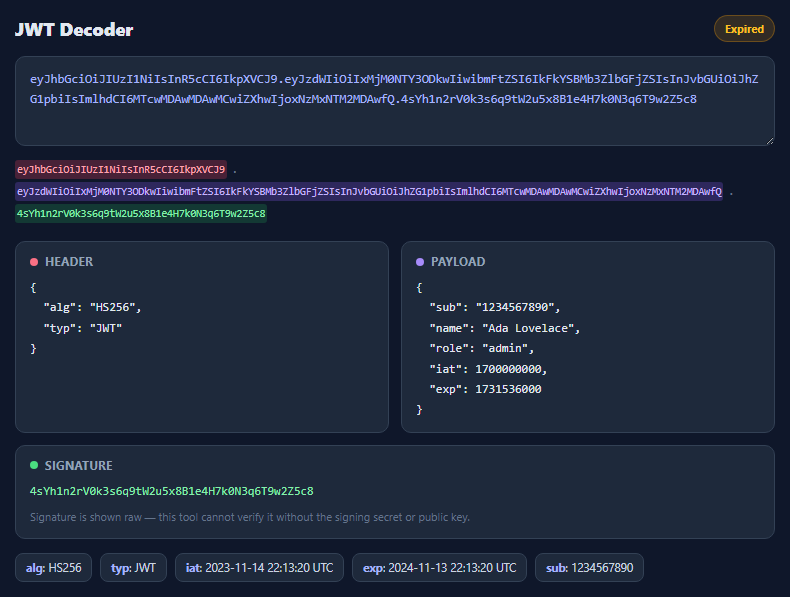
Standard base64 uses + and / in its 64-character alphabet, both of which have reserved meaning inside a URL (+ often means "space", / is a path separator). RFC 4648 §5 defines a URL-safe variant that substitutes - for + and _ for /, and conventionally strips the trailing = padding since it can always be reconstructed from the string length. The urlsafe-toggle checkbox calls toUrlSafe() (a simple character substitution plus a padding-stripping regex) on encode, and fromUrlSafe() (reverse substitution plus re-padding to a multiple of four) before decode. This is exactly what JWTs, many OAuth flows, and short-link services use under the hood — see also the JWT decoder for a real-world consumer of URL-safe base64.
Live byte-size comparison
updateSize() measures the actual UTF-8 byte length of the plain text via TextEncoder().encode(...).length (not .length on the string, which counts UTF-16 code units and would misreport multi-byte characters) and compares it against the base64 output's character count. Base64 always expands data by roughly 33% because it packs 3 bytes of input into 4 output characters — seeing that ratio update live for your own input makes the "base64 costs about 4/3 the size" rule concrete instead of abstract.
File-to-data-URI via FileReader
The drop zone accepts a dragged or clicked-and-browsed file and reads it with FileReader.readAsDataURL(), which the browser natively encodes as a data:<mime-type>;base64,<data> string — the exact syntax you'd paste into an <img src>, a CSS background-image, or embed inline in HTML/CSS to avoid an extra network request for a small icon or font.
Step by step
How to Use
- 1Type or paste text on the leftClick the → arrow (or it happens automatically for the default text) to base64-encode it into the right panel.
- 2Paste base64 on the rightClick the ← arrow to decode it back into readable text on the left. Invalid base64 shows an inline error instead of throwing.
- 3Toggle URL-safe variantCheck the box to swap + and / for - and _ and strip padding — the format used by JWTs, OAuth state parameters, and short URLs.
- 4Watch the size comparisonThe note below the buttons shows the exact byte count of your plain text versus the character count of the base64 output, updating live.
- 5Copy either valueUse "Copy Base64" or "Copy Plain Text" to grab the current value of either panel to your clipboard.
- 6Drop a file for a data URIDrag a file onto the dashed zone (or click to browse) to see its full data:mime/type;base64,... string, ready to paste into an <img> src or CSS.
Real-world uses
Common Use Cases
Got questions?
Frequently Asked Questions
btoa() only accepts strings where every character fits in one byte (Latin1). Emoji and many non-Latin characters are multi-byte UTF-8 sequences, so btoa() throws InvalidCharacterError on them directly. This tool first encodes the string to actual UTF-8 bytes with TextEncoder, converts each byte to a Latin1-safe character, and only then calls btoa() — the standard workaround for unicode-safe base64 in the browser.
Standard base64's alphabet includes + and /, both of which have reserved meaning inside a URL. The URL-safe variant (RFC 4648 section 5) substitutes - for + and _ for /, and conventionally omits the trailing = padding characters since they can be reconstructed from the string length alone. JWTs and many OAuth flows use this variant.
Base64 encodes every 3 bytes of input as 4 output characters, so the encoded size is always about 4/3 (roughly 33% larger) of the original byte count, regardless of what the data contains. The size-note line shows this ratio for whatever you've typed.
It reads the dropped or selected file with the browser's FileReader.readAsDataURL() method, which natively produces a data:<mime-type>;base64,<encoded-data> string — the exact format usable directly as an <img> src or a CSS background-image value.
No. Every operation uses only browser built-ins (btoa, atob, TextEncoder, TextDecoder, FileReader) running locally in the page. Nothing is uploaded or transmitted, which makes it safe to test with real tokens or private file contents.