



Bootstrap Hero Section with Gradient Background — Free Snippet
Bootstrap Hero Section with Gradient Background · Heroes · Plain HTML, CSS & JS · Live preview
Copy & paste
Source Code
<section class="bshero-section">
  <div class="container py-5">
    <div class="row align-items-center gy-4">
      <div class="col-lg-6 text-center text-lg-start">
        <span class="badge rounded-pill bshero-badge mb-3">New · v2.4 launched</span>
        <h1 class="bshero-title">Ship your product page in an afternoon.</h1>
        <p class="bshero-sub">A Bootstrap 5 hero section with a real, working email capture form — type an address, submit, and watch it get validated and added to the list below, no page reload.</p>
        <form id="bsheroForm" class="row g-2 justify-content-center justify-content-lg-start bshero-form" novalidate>
          <div class="col-sm-7">
            <input type="email" class="form-control form-control-lg" id="bsheroEmail" placeholder="[email protected]" required>
            <div class="invalid-feedback" id="bsheroError">Enter a valid email address.</div>
          </div>
          <div class="col-sm-auto">
            <button class="btn btn-light btn-lg fw-bold text-nowrap" type="submit">Get early access</button>
          </div>
        </form>
        <div class="bshero-signups" id="bsheroSignups">
          <span class="text-white-50 small">No signups yet — be the first.</span>
        </div>
      </div>
      <div class="col-lg-6">
        <div class="bshero-card">
          <div class="bshero-card-dots"><span></span><span></span><span></span></div>
          <div class="bshero-card-body">
            <div class="bshero-stat">
              <div class="bshero-stat-label">Weekly signups</div>
              <div class="bshero-stat-value" id="bsheroCount">0</div>
            </div>
            <div class="bshero-bars">
              <div class="bshero-bar" style="--h:40%"></div>
              <div class="bshero-bar" style="--h:65%"></div>
              <div class="bshero-bar" style="--h:52%"></div>
              <div class="bshero-bar" style="--h:80%"></div>
              <div class="bshero-bar bshero-bar-active" style="--h:95%"></div>
            </div>
          </div>
        </div>
      </div>
    </div>
  </div>
</section>
body { margin: 0; }
.bshero-section {
background: linear-gradient(135deg, #4f46e5 0%, #7c3aed 50%, #db2777 100%);
color: #fff;
}
.bshero-badge {
background: rgba(255,255,255,.16);
color: #fff;
font-size: 12px;
font-weight: 600;
padding: 6px 14px;
}
.bshero-title {
font-size: clamp(1.8rem, 1.4rem + 1.5vw, 2.6rem);
font-weight: 800;
letter-spacing: -0.02em;
line-height: 1.15;
margin-bottom: 14px;
}
.bshero-sub {
color: rgba(255,255,255,.85);
font-size: 15px;
line-height: 1.65;
margin-bottom: 22px;
max-width: 480px;
}
.bshero-form .form-control {
border: none;
}
.bshero-form .form-control.is-invalid { box-shadow: 0 0 0 3px rgba(220,38,38,.35); }
.bshero-signups {
margin-top: 14px;
min-height: 20px;
font-size: 13px;
}
.bshero-signups .badge { margin-right: 6px; }
.bshero-card {
background: rgba(255,255,255,.1);
border: 1px solid rgba(255,255,255,.18);
border-radius: 16px;
backdrop-filter: blur(6px);
overflow: hidden;
}
.bshero-card-dots {
display: flex;
gap: 6px;
padding: 12px 16px;
border-bottom: 1px solid rgba(255,255,255,.14);
}
.bshero-card-dots span {
width: 9px; height: 9px; border-radius: 50%;
background: rgba(255,255,255,.35);
}
.bshero-card-body { padding: 26px; }
.bshero-stat-label { font-size: 12px; color: rgba(255,255,255,.7); margin-bottom: 4px; }
.bshero-stat-value { font-size: 32px; font-weight: 800; margin-bottom: 20px; transition: transform .15s ease; }
.bshero-stat-value.bshero-pop { transform: scale(1.12); }
.bshero-bars {
display: flex;
align-items: flex-end;
gap: 10px;
height: 100px;
}
.bshero-bar {
flex: 1;
height: var(--h);
background: rgba(255,255,255,.28);
border-radius: 5px 5px 0 0;
transition: height .3s ease, background .3s ease;
}
.bshero-bar-active { background: #fff; }const form = document.getElementById('bsheroForm');
const emailInput = document.getElementById('bsheroEmail');
const signupsEl = document.getElementById('bsheroSignups');
const countEl = document.getElementById('bsheroCount');
const lastBar = document.querySelector('.bshero-bar-active');
let count = 0;
const added = [];
form.addEventListener('submit', e => {
e.preventDefault();
const value = emailInput.value.trim();
if (!emailInput.checkValidity()) {
emailInput.classList.add('is-invalid');
return;
}
emailInput.classList.remove('is-invalid');
count++;
added.unshift(value);
countEl.textContent = count;
countEl.classList.add('bshero-pop');
setTimeout(() => countEl.classList.remove('bshero-pop'), 200);
// Grow the live bar a little with each signup, capped so it never
// overflows the chart — a small visual payoff tied to a real action.
const currentH = parseFloat(lastBar.style.getPropertyValue('--h'));
lastBar.style.setProperty('--h', Math.min(100, currentH + 3) + '%');
signupsEl.innerHTML = added.slice(0, 4).map(e =>
'<span class="badge bg-light text-dark">' + e + '</span>'
).join('');
form.reset();
});
emailInput.addEventListener('input', () => emailInput.classList.remove('is-invalid'));Extend with AI
Take This Snippet Further With AI
The AI prompt for this one is for Patreon supporters ($3 a month), along with a site with no ads. Supporters enter the passcode once and it is remembered in this browser.
What's included
Features
About this UI Snippet
Bootstrap Hero Section with Gradient Background — HTML, CSS & JavaScript
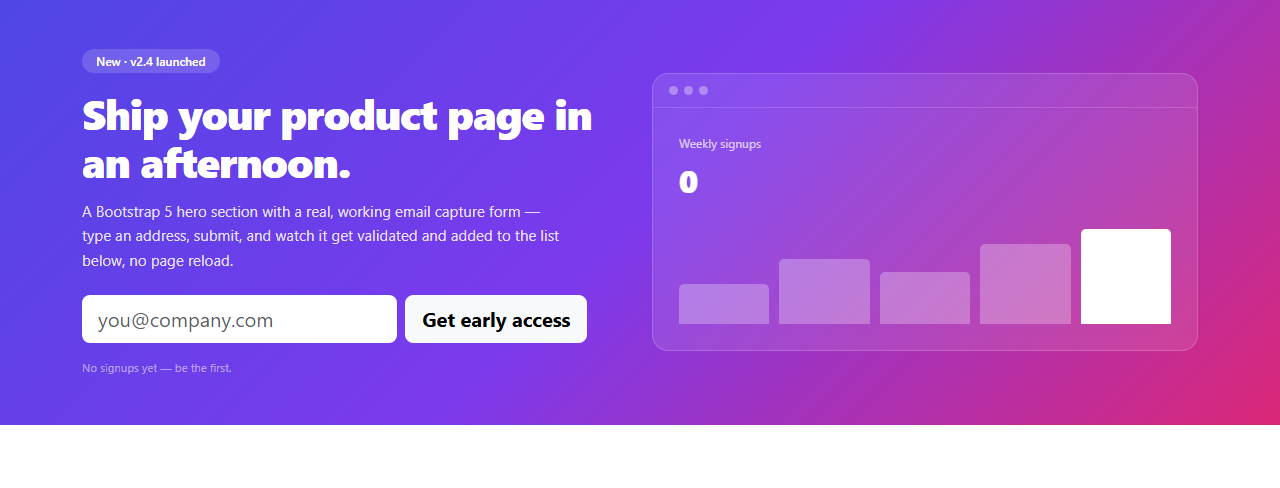
A landing page hero has one job: get a visitor to take the first step, usually entering an email address or clicking a primary CTA. This snippet builds that hero as a real Bootstrap 5.3 layout — a two-column row/col-lg-6 grid, Bootstrap's own form controls and validation classes, loaded from the actual Bootstrap CDN — with a genuinely working email capture form on the left and a live, animating stat card on the right, instead of static placeholder numbers.
Real validation, not a decorative form
The form is a real <form> with an email input marked required. On submit, emailInput.checkValidity() runs Bootstrap-compatible native HTML5 validation — an invalid or empty address adds Bootstrap's .is-invalid class (which drives both a red focus ring and, if you add a sibling .invalid-feedback, an inline error message) and the submission stops there. A valid address clears any error state, gets added to a running list rendered as badges under the form, and bumps a signup counter with a small scale "pop" animation — a genuine confirmation that something happened, not just an emptied input box.
The stat card is driven by the same submit event
Rather than a chart library, the bar chart on the right is five plain divs sized with a CSS custom property (--h) controlling height via inline style. Each successful signup nudges the last (highlighted) bar's height up slightly, capped at 100% — a small, honest piece of "your action changed something" feedback rather than a chart that's purely decorative.
The gradient and glass card
The background is a three-stop linear-gradient (indigo → violet → pink) applied to the whole <section>, and the stat card on the right uses backdrop-filter: blur(6px) over a translucent white background — a common combination for making a card read as "floating" above a colored gradient rather than sitting flatly on top of it.
Step by step
How to Use
- 1Load the snippetClick "Bootstrap Hero Section with Gradient Background" in the sidebar Library tab. The preview loads with a zero-signup stat card.
- 2Submit an invalid emailType something that isn't a valid email (or leave it blank) and click "Get early access" — the input gets a red Bootstrap invalid state and the form does not submit.
- 3Submit a real emailType a properly formatted address and submit — it appears as a badge below the form, the counter increments with a pop animation, and the highlighted bar in the stat card grows slightly.
- 4Submit a few moreRepeat with different addresses to watch the signup list, counter, and bar chart all update live from real form submissions.
- 5Restyle the gradientIn the CSS panel, edit the linear-gradient on .bshero-section to swap in your own brand colors.
- 6Export in your formatClick "HTML" for a standalone file, "JSX" for React, or "Tailwind" for React + Tailwind CSS.
Real-world uses
Common Use Cases
Got questions?
Frequently Asked Questions
It's real. The submit handler calls the input's native checkValidity(), which enforces the browser's built-in email format rules. An invalid or empty address is rejected with Bootstrap's is-invalid styling; only a properly formatted address is accepted and added to the signup list.
Nowhere outside the page — this is a front-end demo, so submissions are held in a plain JavaScript array and rendered as badges. Wire the submit handler to your own API endpoint (fetch/POST) to actually collect signups.
Each bar is a div whose height is set via a CSS custom property (--h) read by its own height: var(--h) rule. The highlighted bar's --h value is nudged upward by a few percent on each successful signup, with a CSS transition producing the smooth grow animation.
Yes — edit the linear-gradient() value on .bshero-section in the CSS panel. Any valid CSS gradient works; keep at least two stops with enough contrast for the white text to stay readable.
Yes — it uses Bootstrap's standard row/col-lg-6 grid, so the two columns stack vertically on screens narrower than Bootstrap's lg breakpoint (992px), with the copy and form centered.
Yes — add a second Bootstrap button (e.g. btn btn-outline-light) inside or beside the form row; it won't interfere with the existing submit handler as long as it doesn't have type="submit" unless you want it to trigger the same validation.