


Canvas Noise Terrain Generator — Free Perlin FBM Heightmap Snippet
Canvas Noise Terrain Generator · Animations · Plain HTML, CSS & JS · Live preview
Copy & paste
Source Code
<div class="nt-wrap">
  <canvas id="ntCanvas" class="nt-canvas"></canvas>
  <div class="nt-panel">
    <span class="nt-tag">perlin noise · procedural</span>
    <div class="nt-row">
      <label>Scale <span id="ntScaleVal">0.008</span></label>
      <input type="range" id="ntScale" min="2" max="20" value="8" step="1" />
    </div>
    <div class="nt-row">
      <label>Octaves <span id="ntOctVal">4</span></label>
      <input type="range" id="ntOct" min="1" max="6" value="4" step="1" />
    </div>
    <button class="nt-btn" id="ntRegen">Regenerate</button>
  </div>
</div>*{box-sizing:border-box;margin:0;padding:0}
body{font-family:system-ui,-apple-system,sans-serif;background:#0a0d12;color:#e6ebf2;min-height:100vh;display:flex;align-items:center;justify-content:center;padding:24px}
.nt-wrap{display:flex;flex-direction:column;align-items:center;gap:16px;width:min(780px,96vw)}
.nt-canvas{width:100%;aspect-ratio:16/9;background:#0a0d12;border-radius:18px;border:1px solid rgba(255,255,255,.08);display:block}
.nt-panel{width:100%;display:flex;flex-wrap:wrap;align-items:center;gap:18px;background:rgba(255,255,255,.03);border:1px solid rgba(255,255,255,.08);border-radius:14px;padding:14px 18px}
.nt-tag{font-size:10.5px;font-weight:700;letter-spacing:.12em;text-transform:uppercase;color:#86efac;background:rgba(134,239,172,.1);border:1px solid rgba(134,239,172,.3);padding:4px 10px;border-radius:99px}
.nt-row{display:flex;align-items:center;gap:8px;font-size:12px;color:#c4cbdc}
.nt-row input{accent-color:#4ade80}
.nt-btn{margin-left:auto;background:#16321f;border:1px solid rgba(134,239,172,.3);color:#86efac;font-size:12.5px;font-weight:600;padding:8px 14px;border-radius:9px;cursor:pointer}
.nt-btn:hover{background:#1c4028}const canvas = document.getElementById('ntCanvas');
const ctx = canvas.getContext('2d');
const scaleSlider = document.getElementById('ntScale');
const octSlider = document.getElementById('ntOct');
const scaleVal = document.getElementById('ntScaleVal');
const octVal = document.getElementById('ntOctVal');
const regenBtn = document.getElementById('ntRegen');
let width, height, dpr;
// --- Classic Perlin-style gradient noise, implemented from scratch ---
// A permutation table maps integer lattice coordinates to a pseudo-random
// gradient direction; noise between lattice points is a smoothed
// interpolation between the dot products of those gradients.
let perm = new Uint8Array(512);
function seedNoise() {
const p = new Uint8Array(256);
for (let i = 0; i < 256; i++) p[i] = i;
for (let i = 255; i > 0; i--) {
const j = Math.floor(Math.random() * (i + 1));
const t = p[i]; p[i] = p[j]; p[j] = t;
}
for (let i = 0; i < 512; i++) perm[i] = p[i & 255];
}
function fade(t) { return t * t * t * (t * (t * 6 - 15) + 10); }
function lerp(a, b, t) { return a + t * (b - a); }
function grad(hash, x, y) {
const h = hash & 3;
const u = h < 2 ? x : y;
const v = h < 2 ? y : x;
return ((h & 1) ? -u : u) + ((h & 2) ? -v : v);
}
function noise2D(x, y) {
const X = Math.floor(x) & 255, Y = Math.floor(y) & 255;
const xf = x - Math.floor(x), yf = y - Math.floor(y);
const u = fade(xf), v = fade(yf);
const aa = perm[perm[X] + Y], ab = perm[perm[X] + Y + 1];
const ba = perm[perm[X + 1] + Y], bb = perm[perm[X + 1] + Y + 1];
const x1 = lerp(grad(aa, xf, yf), grad(ba, xf - 1, yf), u);
const x2 = lerp(grad(ab, xf, yf - 1), grad(bb, xf - 1, yf - 1), u);
return (lerp(x1, x2, v) + 1) / 2;
}
// Fractal Brownian Motion: stack several noise octaves at increasing
// frequency and decreasing amplitude so the terrain has both broad rolling
// hills (low octaves) and fine jagged detail (high octaves).
function fbm(x, y, octaves) {
let value = 0, amp = 0.5, freq = 1, max = 0;
for (let i = 0; i < octaves; i++) {
value += noise2D(x * freq, y * freq) * amp;
max += amp;
amp *= 0.5;
freq *= 2;
}
return value / max;
}
const BANDS = [
{ t: 0.30, color: [16, 42, 74] },
{ t: 0.38, color: [30, 90, 130] },
{ t: 0.42, color: [214, 199, 150] },
{ t: 0.55, color: [64, 130, 70] },
{ t: 0.68, color: [46, 92, 54] },
{ t: 0.82, color: [110, 106, 100] },
{ t: 1.00, color: [244, 248, 252] }
];
function colorFor(h) {
for (let i = 0; i < BANDS.length; i++) {
if (h <= BANDS[i].t) {
const prev = BANDS[i - 1] ? BANDS[i - 1].color : BANDS[0].color;
const prevT = BANDS[i - 1] ? BANDS[i - 1].t : 0;
const band = BANDS[i];
const local = (h - prevT) / (band.t - prevT || 1);
const c = prev.map((v, idx) => Math.round(v + (band.color[idx] - v) * local));
return c;
}
}
return BANDS[BANDS.length - 1].color;
}
function generate() {
const scale = parseInt(scaleSlider.value, 10) / 1000;
const octaves = parseInt(octSlider.value, 10);
scaleVal.textContent = scale.toFixed(3);
octVal.textContent = String(octaves);
const step = 3; // px per sample for perf
const cols = Math.ceil(width / step);
const rows = Math.ceil(height / step);
const img = ctx.createImageData(canvas.width, canvas.height);
const data = img.data;
const cw = canvas.width, chStep = step * dpr;
for (let gy = 0; gy < rows; gy++) {
for (let gx = 0; gx < cols; gx++) {
const wx = gx * step, wy = gy * step;
const h = fbm(wx * scale, wy * scale, octaves);
const [r, g, b] = colorFor(h);
const startX = Math.round(gx * chStep), startY = Math.round(gy * chStep);
const endX = Math.min(startX + Math.ceil(chStep), cw);
const endY = Math.min(startY + Math.ceil(chStep), canvas.height);
for (let y = startY; y < endY; y++) {
let idx = (y * cw + startX) * 4;
for (let x = startX; x < endX; x++) {
data[idx] = r; data[idx + 1] = g; data[idx + 2] = b; data[idx + 3] = 255;
idx += 4;
}
}
}
}
ctx.putImageData(img, 0, 0);
}
function resize() {
dpr = Math.min(window.devicePixelRatio || 1, 1.5);
width = canvas.clientWidth;
height = canvas.clientHeight;
canvas.width = width * dpr;
canvas.height = height * dpr;
generate();
}
function regenerate() { seedNoise(); generate(); }
scaleSlider.addEventListener('input', generate);
octSlider.addEventListener('input', generate);
regenBtn.addEventListener('click', regenerate);
window.addEventListener('resize', resize);
seedNoise();
resize();Extend with AI
Take This Snippet Further With AI
The AI prompt for this one is for Patreon supporters ($3 a month), along with a site with no ads. Supporters enter the passcode once and it is remembered in this browser.
What's included
Features
About this UI Snippet
Canvas Noise Terrain Generator — Perlin Noise and Elevation Banding
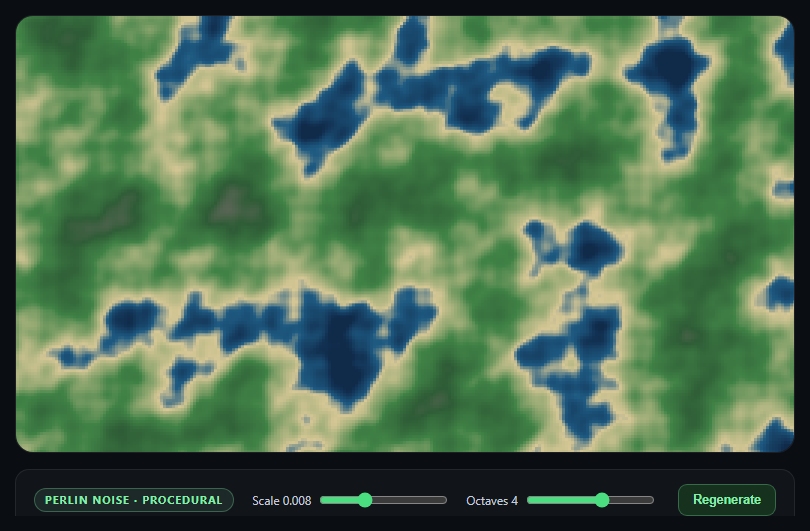
This snippet generates a topographic-map-style terrain from nothing but math — a from-scratch Perlin-style gradient noise implementation, stacked into fractal Brownian motion, colored by elevation band, and rasterized directly into ImageData.
Gradient noise, not value noise
noise2D() implements classic Perlin noise: a shuffled permutation table (seedNoise()) assigns each integer lattice point a pseudo-random gradient direction, and the noise value at any point is a smoothed (fade()-eased) interpolation between the dot products of the surrounding lattice gradients and the offset vectors to them. This produces smooth, organic-looking randomness — unlike naive per-pixel random values, which look like static rather than terrain.
Fractal Brownian Motion builds detail at multiple scales
A single noise octave produces smooth, blobby shapes with no fine detail. fbm() samples the same noise function multiple times at doubling frequency and halving amplitude, summing the results — broad, low-frequency octaves establish sweeping hills and valleys, while higher-frequency, lower-amplitude octaves layer in coastline roughness and small-scale variation on top. This is exactly the technique real terrain-generation and cloud-rendering systems use to avoid the "obviously smooth math function" look.
Elevation bands, not a raw gradient
Rather than mapping height directly to a smooth color gradient, colorFor() steps through a fixed sequence of elevation thresholds (deep water, shallow water, beach, grassland, forest, rock, snow) and linearly interpolates color only *within* each band. That banding, plus interpolation at the boundaries, is what makes the noise field read as a legible topographic map rather than an abstract color blob.
Rasterizing at reduced resolution
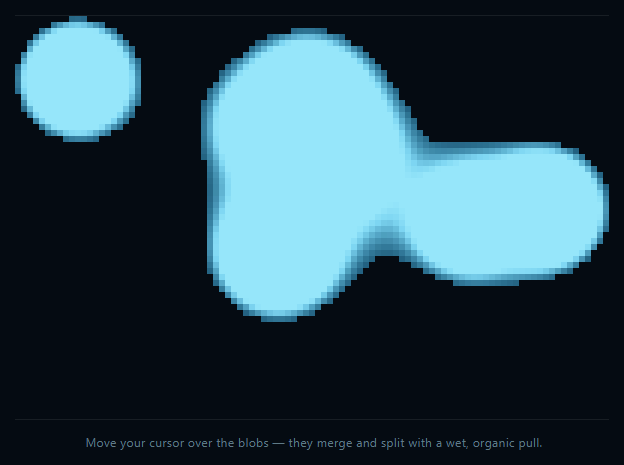
Sampling the noise function at every device pixel would be unnecessarily slow for a real-time regenerate button. Instead the field is sampled every few CSS pixels and each sample fills a small block in the pixel buffer — a resolution/performance trade-off similar to the one in canvas metaball blobs.
Step by step
How to Use
- 1Paste HTML, CSS, and JSA colored terrain heightmap renders immediately.
- 2Adjust ScaleLower values zoom into broader, smoother terrain features.
- 3Adjust OctavesMore octaves add finer, rougher detail on top of the base shape.
- 4Click RegenerateA new random permutation table produces an entirely new landscape.
- 5Read the elevation bandsDeep water, shallow water, beach, grass, forest, rock, and snow.
- 6Resize the windowThe terrain regenerates to fill the new canvas size.
Real-world uses
Common Use Cases
ImageData, giving a technical audience something they can adjust and explore.Got questions?
Frequently Asked Questions
Simple per-pixel random values produce visual static with no spatial coherence between neighboring pixels. Perlin (gradient) noise instead assigns pseudo-random gradient directions to a lattice of integer points and smoothly interpolates between them, so nearby points produce similar, correlated values — that spatial smoothness is what makes it look like organic terrain rather than TV static.
A single noise octave produces smooth, rounded, blobby shapes with no fine texture at any scale. fbm() sums several octaves at doubling frequency and halving amplitude, so low-frequency octaves set the broad hills and valleys while higher-frequency octaves add progressively finer roughness on top — the combination is what gives the terrain both large-scale structure and small-scale detail simultaneously.
Regenerate calls seedNoise(), which reshuffles the 256-entry permutation table using Math.random(). Since every noise lookup depends on that table to determine gradient directions at each lattice point, a freshly shuffled table produces an entirely different noise field and therefore an entirely different terrain layout, even though the fbm and coloring logic are unchanged.
colorFor() intentionally steps through a fixed list of elevation bands (water, beach, grass, forest, rock, snow) rather than mapping height to a single smooth color ramp. Interpolating color only within each band, and switching bands at fixed height thresholds, is what produces the legible, map-like banding instead of an abstract, unreadable color blend.
Yes — sample the noise field with an offset that increases each frame (e.g. fbm((x + t) * scale, y * scale, octaves) with t incrementing slowly) and call generate() inside a requestAnimationFrame loop instead of only on slider/button events. Because noise2D is a pure function of its input coordinates, shifting those coordinates over time produces a smoothly scrolling terrain with no other changes needed.