


CSS Anchor-Positioned Tooltip Menu — Free Native Anchor Positioning Demo
CSS Anchor-Positioned Tooltip Menu · Navigation · Plain HTML, CSS & JS · Live preview
Copy & paste
Source Code
<div class="demo-wrap">
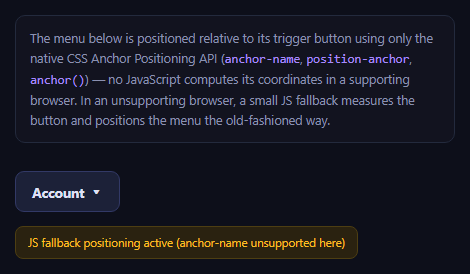
<p class="demo-note">The menu below is positioned relative to its trigger button using only the native CSS Anchor Positioning API (<code>anchor-name</code>, <code>position-anchor</code>, <code>anchor()</code>) — no JavaScript computes its coordinates in a supporting browser. In an unsupporting browser, a small JS fallback measures the button and positions the menu the old-fashioned way.</p>
<div class="trigger-row">
<button class="anchor-btn" id="anchorBtn" popovertarget="anchorMenu" aria-haspopup="menu">
Account <span aria-hidden="true">▾</span>
</button>
</div>
<ul class="anchor-menu" id="anchorMenu" popover role="menu">
<li role="none"><button role="menuitem" class="menu-item">Profile</button></li>
<li role="none"><button role="menuitem" class="menu-item">Billing</button></li>
<li role="none"><button role="menuitem" class="menu-item">Team settings</button></li>
<li role="none" class="menu-divider"></li>
<li role="none"><button role="menuitem" class="menu-item danger">Sign out</button></li>
</ul>
<div class="fallback-badge" id="fallbackBadge" hidden>JS fallback positioning active (anchor-name unsupported here)</div>
</div>* { box-sizing: border-box; margin: 0; padding: 0; }
body{font-family: system-ui, -apple-system, sans-serif; background: #0d0f1a; color: #dfe1f0; min-height: 100vh;display:flex;align-items:center;justify-content:center}
.demo-wrap { max-width: 480px; margin: 0 auto; padding: 60px 20px 220px; }
.demo-note { font-size: 12.5px; color: #8b91b0; line-height: 1.6; background: #12131f; border: 1px solid #232a3d; border-radius: 10px; padding: 12px 14px; margin-bottom: 28px; }
.demo-note code { font-family: 'SFMono-Regular', Consolas, monospace; color: #a78bfa; }
.trigger-row { display: flex; }
.anchor-btn {
font-family: inherit; font-size: 13.5px; font-weight: 700;
background: #1c2138; color: #dfe1f5; border: 1px solid #323966;
padding: 10px 16px; border-radius: 9px; cursor: pointer;
display: flex; align-items: center; gap: 6px;
/* Names this button as an anchor other elements can position against.
A plain custom-ident, scoped to this element only. */
anchor-name: --account-anchor;
}
.anchor-btn:hover { border-color: #6366f1; }
.anchor-btn:focus-visible { outline: 3px solid #6366f1; outline-offset: 2px; }
.anchor-menu {
list-style: none;
margin: 0;
width: 220px;
background: #171a28;
border: 1px solid #2c3350;
border-radius: 12px;
padding: 6px;
box-shadow: 0 20px 50px rgba(0,0,0,0.45);
/* Popover API resets browser default UA styling for [popover] */
color: inherit;
}
.anchor-menu:not(:popover-open) { display: none; }
.menu-item {
width: 100%; text-align: left;
font-family: inherit; font-size: 13.5px; font-weight: 600;
background: transparent; color: #dfe1f5; border: none;
padding: 9px 12px; border-radius: 8px; cursor: pointer;
}
.menu-item:hover { background: #232a45; }
.menu-item:focus-visible { outline: 2px solid #6366f1; outline-offset: -2px; }
.menu-item.danger { color: #fca5a5; }
.menu-divider { height: 1px; background: #2c3350; margin: 6px 4px; }
.fallback-badge { margin-top: 14px; font-size: 11.5px; color: #fbbf24; background: #2a2210; border: 1px solid #4d3e12; border-radius: 8px; padding: 8px 12px; display: inline-block; }
/* ---- Native CSS Anchor Positioning ----
position-anchor ties this element to the anchor-name declared above;
the anchor() function then reads that anchor's edges directly in CSS,
with no JS measuring pass. This is a genuinely new API: full support
landed in Chrome/Edge 125+ (2024); as of 2026 it is NOT yet supported
in Firefox or Safari, both still tracking the spec. */
@supports (anchor-name: --a) {
.anchor-menu {
position: fixed;
position-anchor: --account-anchor;
top: anchor(--account-anchor bottom);
left: anchor(--account-anchor left);
margin-top: 8px;
}
}const anchorBtn = document.getElementById('anchorBtn');
const anchorMenu = document.getElementById('anchorMenu');
const fallbackBadge = document.getElementById('fallbackBadge');
// Feature-detect the Anchor Positioning API. If the browser doesn't
// understand anchor-name, CSS.supports reports it and we fall back to a
// plain JS-computed position instead of leaving the menu mispositioned.
const supportsAnchorPositioning =
typeof CSS !== 'undefined' && CSS.supports && CSS.supports('anchor-name: --a');
if (!supportsAnchorPositioning) {
fallbackBadge.hidden = false;
function positionMenuManually() {
const rect = anchorBtn.getBoundingClientRect();
anchorMenu.style.position = 'fixed';
anchorMenu.style.top = (rect.bottom + 8) + 'px';
anchorMenu.style.left = rect.left + 'px';
anchorMenu.style.margin = '0';
}
anchorBtn.addEventListener('click', () => {
// The popover API itself (open/close/light-dismiss) is broadly
// supported independent of anchor positioning, so we only need to
// patch the *position*, not the show/hide behavior.
requestAnimationFrame(positionMenuManually);
});
window.addEventListener('resize', () => {
if (anchorMenu.matches(':popover-open')) positionMenuManually();
});
window.addEventListener('scroll', () => {
if (anchorMenu.matches(':popover-open')) positionMenuManually();
}, true);
}Extend with AI
Take This Snippet Further With AI
The AI prompt for this one is for Patreon supporters ($3 a month, 7 days free), along with a site with no ads. Supporters enter the passcode once and it is remembered in this browser.
What's included
Features
About this UI Snippet
CSS Anchor-Positioned Tooltip Menu — Positioning a Popover With Pure CSS
Every dropdown, tooltip, and popover library on the web has historically needed JavaScript to compute where the floating element should sit relative to its trigger — measuring the trigger's getBoundingClientRect(), accounting for scroll and viewport edges, and repositioning on every resize. The CSS Anchor Positioning API changes that for browsers that support it: an element can be tied to another element's edges directly in CSS, with the browser recalculating position on scroll, resize, and layout changes automatically.
The three pieces: anchor-name, position-anchor, anchor()
The trigger button declares anchor-name: --account-anchor, a custom-ident that names it as an anchor other elements can reference. The menu then sets position-anchor: --account-anchor to link itself to that specific anchor, and uses the anchor() function inside its top/left values — top: anchor(--account-anchor bottom) reads the anchor's bottom edge directly, and left: anchor(--account-anchor left) reads its left edge — so the menu's position is expressed declaratively against the button's real, live layout box, not a JS-computed snapshot.
Paired with the Popover API
This menu also uses the native popover attribute and popovertarget (see the native popover API demo for that piece in isolation) for the actual show/hide and light-dismiss behavior — clicking outside or pressing Escape closes it natively, with zero JS event listeners for that part. Anchor positioning and the Popover API are separate specs that happen to compose extremely well together: popover handles *whether* the menu is visible, anchor positioning handles *where* it sits.
Honest support status
Anchor Positioning is genuinely new and, as of 2026, Chromium-only: full support landed in Chrome and Edge 125 in 2024, but Firefox and Safari have not shipped it yet, both still tracking the specification. This is not a "safe everywhere with a vendor prefix" situation — it's an active, ongoing rollout. This snippet feature-detects with CSS.supports('anchor-name: --a') in JavaScript and, when unsupported, falls back to a small manual positioning routine using getBoundingClientRect(), re-run on open, resize, and scroll — the exact JS logic that anchor positioning exists to eventually make unnecessary.
Why bother with anchor positioning if you still need a JS fallback today
Even with a required fallback in 2026, the CSS-only path is worth adopting incrementally: browsers that support it get automatically correct positioning through scroll, resize, and dynamic content changes with no listeners at all, which is strictly less code running and fewer edge cases than a fully JS-driven solution — while the fallback guarantees nothing breaks elsewhere. As support broadens, the fallback branch simply stops running, and you can eventually delete it. Pair this with the native dialog showcase or the anchor positioning menu for more of this same emerging pattern.
Step by step
How to Use
- 1Click "Account"The menu opens via the native Popover API, positioned just below the button.
- 2Check for the fallback badgeIn a browser without Anchor Positioning support, a yellow badge confirms JS fallback positioning is active.
- 3Resize or scroll while it is openIn a supporting browser, CSS repositions it automatically; in the fallback, a resize/scroll listener recalculates it.
- 4Press Escape or click outsideThe popover light-dismisses natively, independent of the positioning method.
- 5Inspect anchor-name and anchor()See how top/left read the button's live edges directly in CSS.
- 6Swap the anchor edgeChange anchor(--account-anchor bottom) to top/right/left to reposition the menu.
Real-world uses
Common Use Cases
anchor-name and anchor() in pure CSS, with no getBoundingClientRect calls.CSS.supports.Got questions?
Frequently Asked Questions
anchor-name assigns a custom-ident (a name you choose, prefixed with --) to an element, marking it as something other elements can position themselves relative to. It doesn't move or style the element itself — it only makes its layout box available as a named reference for the anchor() function elsewhere in the stylesheet.
The menu sets position-anchor: --account-anchor to link itself to that specific named anchor, then uses the anchor() function inside its top and left values, e.g. top: anchor(--account-anchor bottom), which reads the anchor element's real, live bottom edge directly in CSS. The browser keeps this position correct through scroll and layout changes without any JavaScript recalculating it.
As of 2026, it is Chromium-only: Chrome and Edge shipped full support starting from version 125 in 2024. Firefox and Safari have not shipped the Anchor Positioning API yet, both still tracking the specification, so any production use needs a genuine fallback rather than assuming universal support.
It checks CSS.supports('anchor-name: --a') once on load. If that returns false, it shows a visible fallback badge and switches to a getBoundingClientRect()-based positioning routine, re-run whenever the menu opens, the window resizes, or the page scrolls while the menu is open — the same recalculation triggers native anchor positioning would otherwise handle for free.
No — they are separate CSS/HTML specifications that happen to compose very well together. The Popover API (broadly supported in current browsers) handles whether an element is shown, hidden, and dismissed by clicking outside or pressing Escape; Anchor Positioning handles where a positioned element sits relative to another element. This snippet uses both, but you can use either independently.
Yes. While the CSS Anchor-Positioned Tooltip Menu snippet gives you one pattern to copy, the free Responsive Navbar Builder at webdevpuneet.com/navbar-builder/ designs a whole navigation bar: logo, links and dropdown menus, a mobile hamburger menu (dropdown panel, slide-in drawer or full screen) and a scroll effect (sticky, shrink, hide on scroll or transparent). It has six presets, a live preview that runs the real code, and exports HTML + CSS + vanilla JS, React, Tailwind, Vue 3 or Angular — or you can click Fork & Edit to keep editing it in My Code.