


CSS Scroll Timeline Gauge Needle — Native animation-timeline: scroll()
CSS Scroll Timeline Gauge Needle · Scroll · Plain HTML, CSS & JS · Live preview
What's included
Features
About this UI Snippet
CSS Scroll Timeline Gauge Needle — A Conic-Gradient Dial Driven by scroll(root)
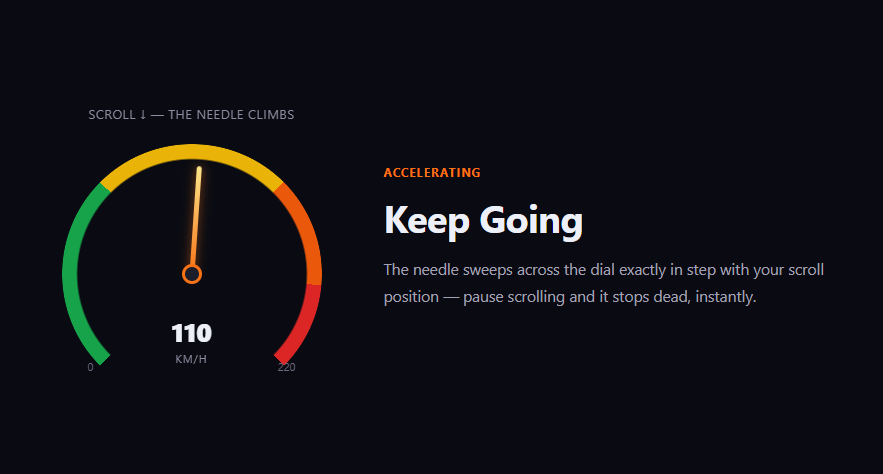
A gauge needle that sweeps as you scroll is a distinctive way to show progress that reads as physical and analog rather than as a flat bar. This snippet builds the whole dial — arc, needle, and numeric readout — from a masked conic-gradient, a single rotating div, and native animation-timeline: scroll(root), with no JavaScript touching the needle's angle.
The arc is a masked conic-gradient, not an SVG path
.gng-arc paints four colored zones (green, yellow, orange, red) across a 270deg sweep with a single conic-gradient — starting at from 225deg so the gradient's own 0deg lands on the lower-left "0" mark, running clockwise through the left side, the top, and the right side, and leaving the remaining 90deg at the bottom transparent for the classic speedometer gap. A radial mask then punches out the center so only a ring remains — a real gauge shape built with zero SVG markup and zero draw calls, just two stacked CSS gradients.
A rotating div is the needle
The needle itself is a plain, narrow div pivoted at the ring's center via bottom: 50% plus transform-origin: bottom center, so rotating it with transform: rotate() pivots it exactly around that center point like a real gauge needle mounted on a hub. @keyframes gng-sweep rotates it from -135deg (pointing down-left, the "0" reading) to 135deg (pointing down-right, the "220" reading), passing through 0deg — straight up — at the midpoint reading, exactly matching the arc's own 270deg sweep. Binding that animation to animation-timeline: scroll(root) means the needle's angle at any moment is a direct, deterministic function of scroll position — not of elapsed time.
A stepped numeric readout, matching the needle — and why counter-increment doesn't work here
The digits below the needle animate via content, not a CSS counter: twenty-one keyframe stops each set an absolute literal value ("0", "11", "22" ... "220"), wrapped in steps(20), bound to the identical scroll(root) timeline the needle uses. The obvious-looking alternative — counter-reset plus a counter-increment: 11 at every keyframe — looks correct but silently breaks on a scroll-driven timeline: counter-increment is a *delta* from whatever the running total already was, which only accumulates correctly when an animation actually plays through each keyframe in sequence over real time. A scroll-linked timeline instead jumps straight to whichever keyframe matches the current scroll position without "passing through" the others, so only that one keyframe's +11 ever applies — the readout would freeze at 11 no matter how far you scrolled. Writing the absolute value directly into content at each step sidesteps the problem entirely, since there's no running total to lose track of.
Why rotate() and not clip-path for the dial fill
Unlike the progress ring's stroke-dashoffset unwind, a needle is a single pointer rather than a filling arc, so a rotating transform is the natural primitive — no dash array or path length calculation is needed at all.
Browser support
Chromium-based browsers (Chrome, Edge, Opera, Brave) support animation-timeline: scroll() today; Firefox and Safari support is still landing. The @supports not (animation-timeline: scroll()) fallback fixes the needle at a static mid-dial angle and the readout at a matching static number, rather than leaving either pinned at zero.
Customizing it
Change the conic-gradient zone angles to reflect different thresholds, adjust the rotate(-135deg) to rotate(135deg) sweep range (and the arc's matching from angle and transparent gap) for a narrower or wider dial, or relabel the unit and max value for a different metric entirely (battery percentage, temperature, load). Pair it with CSS Scroll Timeline Progress Ring for a related scroll-bound readout using a different visual metaphor.
Step by step
How to Use
- 1Paste the HTML, CSS, and JSA sticky gauge and numeric readout render beside three full-height content blocks.
- 2Scroll from top to bottomWatch the needle sweep across the dial and the readout climb in sync, purely via animation-timeline: scroll(root).
- 3Scroll back upThe needle and readout rewind exactly, since they read a live scroll timeline, not a one-shot trigger.
- 4Change the dial rangeAdjust the rotate(-135deg) to rotate(135deg) sweep in @keyframes gng-sweep (and the arc’s matching conic-gradient angles) for a different angular range.
- 5Relabel the metricSwap gng-unit’s text and the readout’s keyframe values for a different gauge (battery, temperature, load).
- 6Export in your formatClick "HTML" for a standalone file, "JSX" for a React component, or "Tailwind" for a React + Tailwind version.
Real-world uses
Common Use Cases
animation-timeline: scroll(root) and no JavaScript.conic-gradient with no SVG required.Got questions?
Frequently Asked Questions
A single conic-gradient paints four colored zones around a full circle, then a radial mask (mask: radial-gradient(circle, transparent 62%, #000 63%, #000 100%)) removes the center, leaving only a colored ring visible — no SVG path or stroke is involved.
The needle div is positioned so its bottom edge sits at the gauge’s pivot hub. Setting transform-origin: bottom center makes rotate() pivot the needle exactly around that base point, the same way a real gauge needle rotates around its mounting pin rather than around its own visual center.
No — both are bound to the identical animation-timeline: scroll(root), so any given scroll position always produces the same needle angle and the same counter value; there is no separate JavaScript computation that could drift from the CSS-driven rotation.
The dial’s maximum reading is 220 and the readout uses twenty 5%-wide keyframe steps to reach it, so 220 divided by 20 steps is 11 per step — chosen to land exactly on the stated maximum rather than leaving a rounding gap at the top of the dial.
A CSS counter animated via counter-increment only accumulates correctly when an animation plays through its keyframes in sequence over real time — each step adds its delta to whatever the running total already was. A scroll-linked timeline instead jumps directly to whichever keyframe matches the current scroll position without passing through the others, so only that one keyframe’s increment would ever apply, and the number would freeze after the first step no matter how far you scrolled. Writing the absolute value straight into content at each step has no running total to lose, so it stays correct at any scroll position.
The @supports not (animation-timeline: scroll()) block fixes the needle at a static mid-dial angle and the readout at a matching static number, so Firefox and Safari users see an intentional, complete-looking gauge rather than one stuck pointing at zero.
Build with AI
Build, Understand, Optimize, and Extend It With AI
You don't have to work out the conic-gradient masking or the rotation math by hand. Paste this snippet's HTML, CSS, and JS into an AI coding assistant like Claude and ask it to explain exactly how the masked conic-gradient produces a colored arc without any SVG, and why transform-origin: bottom center is essential for the needle to pivot correctly. The same assistant is useful for extending the effect: ask it to add tick marks radiating from the hub, change the color zone boundaries to reflect different thresholds, or add a subtle needle-wobble easing so the motion feels slightly more mechanical rather than perfectly linear. Treat the code less like a finished artifact and more like a starting point for a conversation.
Prompt to recreate it
Copy this into your AI assistant of choice to build the effect from scratch, or as a jumping-off point for your own variant:
Build a speedometer-style gauge with a needle that sweeps across a colored dial purely from native CSS animation-timeline: scroll(root) — no JavaScript scroll listener, no requestAnimationFrame loop.

Requirements:
- A dial face built from a single conic-gradient with several distinct colored angle ranges (for example green, yellow, orange, red zones), with a radial mask applied to remove the center so only a ring-shaped arc remains — no SVG.
- A needle element (a narrow div) positioned with its base at the dial's pivot point and transform-origin set to that base, so rotating it with transform: rotate() pivots it exactly like a real gauge needle.
- A @keyframes animation rotating the needle from one extreme angle (for example -135deg, pointing down-left at the dial's minimum) to the opposite extreme (for example 135deg, pointing down-right at the dial's maximum, passing through 0deg/straight up at the midpoint), matching the arc's own angular sweep, bound to animation-timeline: scroll(root) so the needle's angle at any moment is a direct function of scroll position, not elapsed time.
- A numeric readout built by animating a pseudo-element's content property directly, with each of at least fifteen to twenty explicit keyframe stops setting a literal absolute string value (e.g. content: "110") rather than using counter-reset/counter-increment — a CSS counter's increment is a delta that only accumulates correctly under real sequential time-based playback, and silently fails to reach later values when driven by a scroll-scrubbed, directly-seekable timeline. Bind the same animation-timeline: scroll(root) the needle uses so the displayed number and the needle's angle can never drift out of sync with each other.
- A sticky-positioned stage that pins the gauge in the viewport while several full-height content sections scroll past beside it.
- Add an @supports not (animation-timeline: scroll()) fallback that fixes the needle at a reasonable static mid-dial angle and the readout at a matching static number, rather than leaving either stuck at the minimum in unsupported browsers.
- Keep any JavaScript limited to a one-time CSS.supports('animation-timeline: scroll()') feature check logged to the console — it must never drive or read scroll position itself.
Want to tighten it up first? Run this prompt through the AI Prompt Studio to score it across 8 quality dimensions, catch anti-patterns, and tune the wording for Claude, ChatGPT, or Gemini before you paste it in.
Source Code
<div class="gng-page">
  <aside class="gng-stage">
    <p class="gng-hint">Scroll ↓ — the needle climbs</p>
    <div class="gng-gauge">
      <div class="gng-arc"></div>
      <div class="gng-needle"></div>
      <div class="gng-hub"></div>
      <div class="gng-reading"><span class="gng-num"></span><span class="gng-unit">km/h</span></div>
      <span class="gng-lo">0</span><span class="gng-hi">220</span>
    </div>
  </aside>
  <main class="gng-sections">
    <section class="gng-block"><span class="gng-tag">Idle</span><h2>A Needle Bound to Scroll, Not Time</h2><p>This speedometer needle does not animate on a timer — its rotation is a direct, deterministic function of how far you've scrolled, via <code>animation-timeline: scroll(root)</code>.</p></section>
    <section class="gng-block"><span class="gng-tag">Accelerating</span><h2>Keep Going</h2><p>The needle sweeps across the dial exactly in step with your scroll position — pause scrolling and it stops dead, instantly.</p></section>
    <section class="gng-block"><span class="gng-tag">Redline</span><h2>Top of the Dial</h2><p>By the bottom of the page the needle has swept to its maximum reading — scroll back up and watch it fall in perfect reverse.</p></section>
  </main>
</div>*{box-sizing:border-box;margin:0;padding:0}
body{font-family:system-ui,-apple-system,sans-serif;background:#0a0b12;color:#eef0f9}
code{background:rgba(234,88,12,.18);color:#fdba8c;padding:2px 6px;border-radius:5px;font-size:.9em;font-family:ui-monospace,Consolas,monospace}
.gng-page{display:flex;max-width:1020px;margin:0 auto}
.gng-stage{position:sticky;top:0;height:100vh;width:320px;flex-shrink:0;display:flex;flex-direction:column;align-items:center;justify-content:center;gap:22px;padding:0 24px}
.gng-hint{font-size:12.5px;letter-spacing:.06em;color:#8f8ba0;text-align:center;text-transform:uppercase}
.gng-gauge{position:relative;width:260px;height:260px}
.gng-arc{
position:absolute;inset:0;width:260px;height:260px;border-radius:50%;
/* 270deg sweep with a 90deg gap centered at the bottom -- a real
speedometer shape, not a flat top-half semicircle. "from 225deg"
starts the gradient's own 0deg at the lower-left (the "0" mark), so
the colored 0-270deg run sweeps clockwise through the left side, the
top, and the right side, ending at the lower-right (the "220" mark);
270-360deg (the untouched remainder) is the transparent bottom gap. */
background:conic-gradient(from 225deg,
#16a34a 0deg, #16a34a 90deg,
#eab308 90deg, #eab308 180deg,
#ea580c 180deg, #ea580c 230deg,
#dc2626 230deg, #dc2626 270deg,
transparent 270deg, transparent 360deg);
-webkit-mask:radial-gradient(circle,transparent 62%,#000 63%,#000 100%);
mask:radial-gradient(circle,transparent 62%,#000 63%,#000 100%);
}
.gng-needle{
position:absolute;left:50%;bottom:50%;width:5px;height:108px;
background:linear-gradient(to top,#f97316,#fde68a);
border-radius:4px;transform-origin:bottom center;
/* 0deg = straight up. The dial's 270deg sweep runs from -135deg (lower-
left, "0") to +135deg (lower-right, "220"), passing through 0deg
(straight up) at the midpoint reading -- the same rotate() range the
conic-gradient above traces, just expressed as a signed angle instead
of a clockwise-from-225deg one. */
transform:translateX(-50%) rotate(-135deg);
box-shadow:0 0 10px rgba(249,115,22,.6);
animation:gng-sweep linear both;
animation-timeline:scroll(root);
}
@keyframes gng-sweep{ to{ transform:translateX(-50%) rotate(135deg) } }
.gng-hub{position:absolute;left:50%;bottom:50%;width:20px;height:20px;border-radius:50%;background:#1c1e2c;border:3px solid #f97316;transform:translate(-50%,50%)}
.gng-reading{position:absolute;left:50%;bottom:38px;transform:translateX(-50%);display:flex;flex-direction:column;align-items:center;gap:2px}
.gng-num{font-size:26px;font-weight:800;font-variant-numeric:tabular-nums}
.gng-num::before{content:"0";animation:gng-count-up steps(20) both;animation-timeline:scroll(root)}
@keyframes gng-count-up{
0%{content:"0"}
5%{content:"11"}
10%{content:"22"}
15%{content:"33"}
20%{content:"44"}
25%{content:"55"}
30%{content:"66"}
35%{content:"77"}
40%{content:"88"}
45%{content:"99"}
50%{content:"110"}
55%{content:"121"}
60%{content:"132"}
65%{content:"143"}
70%{content:"154"}
75%{content:"165"}
80%{content:"176"}
85%{content:"187"}
90%{content:"198"}
95%{content:"209"}
100%{content:"220"}
}
.gng-unit{font-size:11px;color:#8f8ba0;letter-spacing:.08em;text-transform:uppercase}
/* Positioned near the arc's actual endpoints (roughly the -135deg/+135deg
marks, lower-left and lower-right of the ring) rather than the box's
flush corners, now that the dial is a 270deg sweep instead of a flat
top-half semicircle. */
.gng-lo,.gng-hi{position:absolute;bottom:30px;font-size:11px;color:#6d6a80;font-variant-numeric:tabular-nums}
.gng-lo{left:26px}
.gng-hi{right:26px}
.gng-sections{flex:1;min-width:0}
.gng-block{min-height:88vh;display:flex;flex-direction:column;justify-content:center;gap:12px;padding:0 32px;max-width:520px}
.gng-tag{font-size:12px;font-weight:700;letter-spacing:.08em;text-transform:uppercase;color:#f97316}
.gng-block h2{font-size:clamp(26px,4.4vw,38px);letter-spacing:-.02em}
.gng-block p{color:#a3a1b4;font-size:15.5px;line-height:1.75}
@media (max-width:760px){
.gng-page{flex-direction:column}
.gng-stage{position:static;height:auto;padding:40px 24px}
}
@supports not (animation-timeline: scroll()){
.gng-needle{transform:translateX(-50%) rotate(20deg);animation:none}
.gng-num::before{content:"143"}
}// The needle's rotation and the numeric readout are both driven entirely
// by CSS animation-timeline: scroll(root) -- there is no scroll listener,
// no requestAnimationFrame loop, and no other runtime code in this file
// at all.