


Row-Level Diff Table — Compare Two Datasets HTML CSS JS
Row-Level Diff Table · Tables · Plain HTML, CSS & JS · Live preview
Copy & paste
Source Code
<div class="dft-card">
  <div class="dft-head">
    <h3>Config diff — v1.4 vs v1.5</h3>
    <div class="dft-legend">
      <span><i class="dft-sw dft-added"></i>Added</span>
      <span><i class="dft-sw dft-removed"></i>Removed</span>
      <span><i class="dft-sw dft-changed"></i>Changed</span>
    </div>
  </div>
  <table class="dft-table">
    <thead><tr><th>Key</th><th>Value</th><th>Owner</th><th>Env</th></tr></thead>
    <tbody id="dftBody"></tbody>
  </table>
</div>*{box-sizing:border-box;margin:0;padding:0}
body{font-family:system-ui,-apple-system,sans-serif;background:#0d1117;color:#e6edf3;min-height:100vh;display:flex;align-items:center;justify-content:center;padding:24px}
.dft-card{background:#161b22;border-radius:14px;padding:18px;width:100%;max-width:620px;border:1px solid #262c36;box-shadow:0 18px 44px rgba(0,0,0,.4)}
.dft-head{display:flex;justify-content:space-between;align-items:center;margin-bottom:12px;flex-wrap:wrap;gap:8px}
.dft-head h3{font-size:14px;font-weight:800}
.dft-legend{display:flex;gap:14px;font-size:11px;color:#8b949e;font-weight:600}
.dft-legend span{display:flex;align-items:center;gap:5px}
.dft-sw{width:10px;height:10px;border-radius:3px;display:inline-block}
.dft-added{background:#2ea043}
.dft-removed{background:#f85149}
.dft-changed{background:#d29922}
.dft-table{width:100%;border-collapse:collapse;font-size:12.5px}
.dft-table th{text-align:left;padding:8px 12px;color:#8b949e;font-weight:700;font-size:11px;text-transform:uppercase;letter-spacing:.03em;border-bottom:1px solid #262c36}
.dft-table td{padding:9px 12px;border-bottom:1px solid #1c2129;color:#c9d1d9;font-family:ui-monospace,SFMono-Regular,Consolas,monospace}
.dft-row-added{background:rgba(46,160,67,.12)}
.dft-row-added td:first-child{border-left:3px solid #2ea043}
.dft-row-removed{background:rgba(248,81,73,.1)}
.dft-row-removed td:first-child{border-left:3px solid #f85149}
.dft-row-removed td{text-decoration:line-through;color:#8b949e}
.dft-row-changed{background:rgba(210,153,34,.1)}
.dft-row-changed td:first-child{border-left:3px solid #d29922}
.dft-cell-changed{position:relative;background:rgba(210,153,34,.22);border-radius:4px}
.dft-old{display:block;font-size:10.5px;color:#8b949e;text-decoration:line-through}
.dft-new{display:block;color:#f0d78c}
.dft-badge{font-size:9.5px;font-weight:800;text-transform:uppercase;letter-spacing:.04em;padding:2px 6px;border-radius:4px;margin-left:8px}
.dft-badge-added{background:#2ea04333;color:#4ade80}
.dft-badge-removed{background:#f8514933;color:#fca5a5}
.dft-badge-changed{background:#d2992233;color:#fbbf24}var BEFORE = [
{ key: 'api.timeout', value: '30s', owner: 'platform', env: 'prod' },
{ key: 'api.retries', value: '3', owner: 'platform', env: 'prod' },
{ key: 'cache.ttl', value: '600s', owner: 'infra', env: 'prod' },
{ key: 'feature.betaSearch', value: 'false', owner: 'search', env: 'staging' },
{ key: 'db.poolSize', value: '20', owner: 'infra', env: 'prod' },
{ key: 'legacy.exportJob', value: 'enabled', owner: 'ops', env: 'prod' },
];
var AFTER = [
{ key: 'api.timeout', value: '45s', owner: 'platform', env: 'prod' },
{ key: 'api.retries', value: '3', owner: 'platform', env: 'prod' },
{ key: 'cache.ttl', value: '600s', owner: 'data', env: 'prod' },
{ key: 'feature.betaSearch', value: 'true', owner: 'search', env: 'staging' },
{ key: 'db.poolSize', value: '20', owner: 'infra', env: 'prod' },
{ key: 'feature.newOnboarding', value: 'true', owner: 'growth', env: 'staging' },
];
// Real row-by-row and cell-by-cell comparison of two datasets keyed by "key".
function diff(before, after) {
var beforeMap = {};
before.forEach(function (r) { beforeMap[r.key] = r; });
var afterMap = {};
after.forEach(function (r) { afterMap[r.key] = r; });
var keys = [];
before.forEach(function (r) { if (keys.indexOf(r.key) === -1) keys.push(r.key); });
after.forEach(function (r) { if (keys.indexOf(r.key) === -1) keys.push(r.key); });
return keys.map(function (key) {
var b = beforeMap[key];
var a = afterMap[key];
if (b && !a) return { key: key, status: 'removed', row: b, changedFields: [] };
if (!b && a) return { key: key, status: 'added', row: a, changedFields: [] };
var changedFields = Object.keys(a).filter(function (field) { return field !== 'key' && a[field] !== b[field]; });
return { key: key, status: changedFields.length ? 'changed' : 'unchanged', row: a, before: b, changedFields: changedFields };
});
}
function fieldCell(entry, field) {
var value = entry.row[field];
if (entry.status === 'changed' && entry.changedFields.indexOf(field) !== -1) {
return '<td class="dft-cell-changed"><span class="dft-old">' + entry.before[field] + '</span><span class="dft-new">' + value + '</span></td>';
}
return '<td>' + value + '</td>';
}
function badge(status) {
if (status === 'unchanged') return '';
var label = status.charAt(0).toUpperCase() + status.slice(1);
return '<span class="dft-badge dft-badge-' + status + '">' + label + '</span>';
}
var results = diff(BEFORE, AFTER);
document.getElementById('dftBody').innerHTML = results.map(function (entry) {
var rowClass = entry.status !== 'unchanged' ? ' dft-row-' + entry.status : '';
return '<tr class="' + rowClass + '">' +
'<td>' + entry.key + badge(entry.status) + '</td>' +
fieldCell(entry, 'value') +
fieldCell(entry, 'owner') +
fieldCell(entry, 'env') +
'</tr>';
}).join('');Extend with AI
Take This Snippet Further With AI
The AI prompt for this one is for Patreon supporters ($3 a month), along with a site with no ads. Supporters enter the passcode once and it is remembered in this browser.
What's included
Features
About this UI Snippet
Row-Level Diff Table — Real Computed Added / Removed / Changed Highlighting
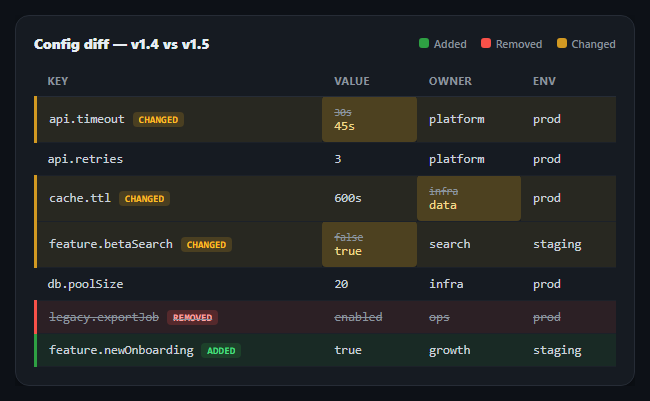
Comparing two versions of a dataset — a config before and after a deploy, a spreadsheet import against the current database, an API response across two environments — is much easier to audit as a single table than as two separate ones. This snippet computes a genuine row-by-row and field-by-field diff between two arrays in plain JavaScript and renders it as one table with added rows in green, removed rows struck through in red, and changed rows in yellow with only the specific cells that actually differ called out.
Keyed comparison, not positional
The diff function builds a lookup map from each dataset keyed by a unique field (key in the demo, but any unique id works), then walks the union of keys present in either version. This is deliberate: comparing row 3 of one array against row 3 of another only works if nothing was reordered, inserted, or removed above it, which is rarely true in practice. Keying by identity means a row that moved position between the two datasets is still correctly matched and compared, not falsely flagged as removed-then-added.
Three real outcomes per key
For every key, the diff falls into exactly one of three buckets computed live: present only in before (removed), present only in after (added), or present in both. For the "present in both" case, Object.keys(a).filter(...) compares every field's value between the two rows and collects which specific fields actually differ — a key with all identical fields is marked unchanged and rendered like a normal row, no highlighting applied.
Cell-level highlighting, not just row-level
A changed row doesn't turn every cell yellow — only the cells whose value actually differs get the dft-cell-changed treatment, showing the old value struck through in small text above the new value in full color. This is what makes the diff genuinely useful: with a row-only highlight you'd know *something* changed but have to hunt for what; the cell-level detail answers that directly, sourced from the changedFields array the comparison function actually computed, not hardcoded per row.
Visual language borrowed from code diffs
The color scheme and left-border accent mirror the added/removed/changed convention from git diffs and code review tools — green for added, red-with-strikethrough for removed, yellow for modified — because that visual vocabulary is already familiar to anyone who reviews changes for a living, making the table legible at a glance without reading the legend.
Fully data-driven, add a row and it just works
Nothing about which rows are added, removed, or changed is precomputed or hand-annotated in the arrays — BEFORE and AFTER are just plain data, and every highlight in the rendered table is the live output of the diff() function running against whatever is currently in those two arrays. Change a value, add a key, remove one, and the table's highlighting updates correctly with no manual bookkeeping.
Customizing it
Swap the identity field, diff nested objects field-by-field recursively, or add a filter to show only changed rows. Pair it with an editable table for the "before" state or a sortable table to reorder the diff results.
Step by step
How to Use
- 1Paste HTML, CSS, and JSA config diff renders comparing two sample datasets, BEFORE and AFTER.
- 2Read the legendGreen marks added rows, red-strikethrough marks removed rows, yellow marks changed rows.
- 3Inspect a changed rowOnly the specific cells that differ are highlighted, showing the old value struck through above the new one.
- 4Edit BEFORE or AFTERAdd, remove, or change a value in either array — the diff recomputes and the highlighting follows automatically.
- 5Change the identity keySwap 'key' for any unique field in your data — the comparison is keyed, not positional.
- 6Add more fieldsAdd properties to the row objects; changedFields is computed generically over Object.keys, so new fields diff automatically.
Real-world uses
Common Use Cases
Got questions?
Frequently Asked Questions
The diff function marks it status: 'unchanged' since changedFields comes back empty, and the row renders with no highlight class and no badge — it looks like a completely normal row, which is the correct behavior since nothing about it actually changed.
Build a composite key by concatenating multiple fields (e.g. row.category + '|' + row.name) when constructing beforeMap and afterMap, and use that same composite when building the keys union array — the rest of the diff logic is unaffected since it only cares that the key uniquely identifies a row.
Replace the simple a[field] !== b[field] comparison with a deep-equality check (a small recursive function, or JSON.stringify(a[field]) !== JSON.stringify(b[field]) for simple cases) so a field whose value is itself an object or array is correctly detected as changed only when its contents actually differ.
Filter the results array from diff() with results.filter(function(e){ return e.status !== 'unchanged'; }) before mapping it to row HTML — the diff computation itself doesn't need to change, only what you choose to render from its output.
Keep the diff(before, after) function exactly as-is — it's pure JavaScript with no DOM dependency, so wrap it in a useMemo (React), computed (Vue), or getter (Angular) keyed on your before/after data, and map the returned array to row components applying the same status-based classes.