


File Checksum Verifier — Free HTML CSS JS Snippet
File Checksum Verifier · Tools · Plain HTML, CSS & JS · Live preview
Copy & paste
Source Code
<div class="fcv-card">
<div class="fcv-head">
<h2>File Checksum Verifier</h2>
<p>Drop a file to compute its SHA-256 checksum and compare it against an expected value.</p>
</div>
<div class="fcv-drop" id="fcvDrop">
<svg width="28" height="28" viewBox="0 0 24 24" fill="none" stroke="currentColor" stroke-width="1.8"><path d="M12 3v12"/><path d="M7 9l5-6 5 6"/><path d="M4 16v3a2 2 0 0 0 2 2h12a2 2 0 0 0 2-2v-3"/></svg>
<span id="fcvDropLabel">Drag & drop a file, or click to choose</span>
<input type="file" id="fcvFileInput" hidden />
</div>
<div class="fcv-file-row" id="fcvFileRow">
<div class="fcv-file-icon">FILE</div>
<div class="fcv-file-meta">
<div class="fcv-file-name" id="fcvFileName">demo-payload.txt</div>
<div class="fcv-file-size" id="fcvFileSize">Simulated demo file (42 bytes)</div>
</div>
<span class="fcv-badge" id="fcvBadge">Hashed</span>
</div>
<div class="fcv-field">
<label>SHA-256 digest</label>
<div class="fcv-hash-row">
<code id="fcvHashOutput">computing…</code>
<button class="fcv-copy" id="fcvCopyHash" type="button">Copy</button>
</div>
</div>
<div class="fcv-field">
<label for="fcvExpected">Expected checksum</label>
<input type="text" id="fcvExpected" placeholder="Paste the expected SHA-256 checksum here" autocomplete="off" spellcheck="false" />
</div>
<div class="fcv-result" id="fcvResult">
<span class="fcv-result-icon" id="fcvResultIcon">?</span>
<span id="fcvResultText">Paste an expected checksum above to compare.</span>
</div>
</div>*{box-sizing:border-box}
body{font-family:system-ui,-apple-system,sans-serif;background:#0b0d14;min-height:100vh;display:flex;align-items:center;justify-content:center;padding:24px}
.fcv-card{font-family:system-ui,-apple-system,sans-serif;background:#12141f;color:#e7e9f5;border:1px solid #262a3d;border-radius:16px;padding:26px;max-width:440px;width:100%}
.fcv-head h2{margin:0 0 6px;font-size:19px}
.fcv-head p{margin:0 0 18px;font-size:13px;color:#9096b3;line-height:1.5}
.fcv-drop{border:1.5px dashed #333955;border-radius:12px;padding:22px;display:flex;flex-direction:column;align-items:center;gap:8px;text-align:center;color:#8b90ab;cursor:pointer;transition:border-color .15s,background .15s;margin-bottom:16px}
.fcv-drop:hover,.fcv-drop.fcv-drag{border-color:#6366f1;background:rgba(99,102,241,.06);color:#c7cae6}
.fcv-drop span{font-size:12.5px}
.fcv-file-row{display:flex;align-items:center;gap:12px;background:#181b2a;border:1px solid #262a3d;border-radius:10px;padding:10px 12px;margin-bottom:16px}
.fcv-file-icon{width:34px;height:34px;border-radius:8px;background:rgba(99,102,241,.16);color:#a5a9ff;font-size:9px;font-weight:800;letter-spacing:.03em;display:flex;align-items:center;justify-content:center;flex-shrink:0}
.fcv-file-meta{flex:1;min-width:0}
.fcv-file-name{font-size:13px;font-weight:600;white-space:nowrap;overflow:hidden;text-overflow:ellipsis}
.fcv-file-size{font-size:11px;color:#8b90ab;margin-top:2px}
.fcv-badge{font-size:10.5px;font-weight:700;background:rgba(74,222,128,.14);color:#4ade80;padding:4px 9px;border-radius:999px;white-space:nowrap}
.fcv-field{margin-bottom:14px}
.fcv-field label{display:block;font-size:11.5px;font-weight:600;color:#9096b3;text-transform:uppercase;letter-spacing:.04em;margin-bottom:6px}
.fcv-hash-row{display:flex;align-items:center;gap:8px;background:#0e1019;border:1px solid #262a3d;border-radius:10px;padding:10px 12px}
.fcv-hash-row code{flex:1;font-family:ui-monospace,SFMono-Regular,Menlo,monospace;font-size:11.5px;word-break:break-all;color:#c7cae6}
.fcv-copy{flex-shrink:0;background:#20243a;border:1px solid #333955;color:#dfe2f6;font-size:11.5px;font-weight:600;padding:6px 10px;border-radius:7px;cursor:pointer}
.fcv-copy:hover{background:#282d47}
.fcv-field input[type="text"]{width:100%;background:#0e1019;border:1px solid #262a3d;border-radius:10px;padding:10px 12px;color:#e7e9f5;font-family:ui-monospace,SFMono-Regular,Menlo,monospace;font-size:12px}
.fcv-field input[type="text"]:focus{outline:none;border-color:#6366f1}
.fcv-result{display:flex;align-items:center;gap:10px;padding:12px 14px;border-radius:10px;background:#181b2a;border:1px solid #262a3d;font-size:12.5px;color:#c7cae6}
.fcv-result-icon{width:22px;height:22px;border-radius:50%;display:flex;align-items:center;justify-content:center;font-size:12px;font-weight:800;flex-shrink:0;background:#262a3d;color:#9096b3}
.fcv-result.fcv-match{border-color:#2f6e46}
.fcv-result.fcv-match .fcv-result-icon{background:rgba(74,222,128,.18);color:#4ade80}
.fcv-result.fcv-mismatch{border-color:#7a2f3a}
.fcv-result.fcv-mismatch .fcv-result-icon{background:rgba(248,113,113,.18);color:#f87171}// Converts an ArrayBuffer to a lowercase hex string.
function bufferToHex(buffer) {
var bytes = new Uint8Array(buffer);
var hex = '';
for (var i = 0; i < bytes.length; i++) {
hex += bytes[i].toString(16).padStart(2, '0');
}
return hex;
}
async function hashArrayBuffer(buffer) {
var digest = await crypto.subtle.digest('SHA-256', buffer);
return bufferToHex(digest);
}
var currentHash = '';
var hashOutput = document.getElementById('fcvHashOutput');
var fileNameEl = document.getElementById('fcvFileName');
var fileSizeEl = document.getElementById('fcvFileSize');
var badgeEl = document.getElementById('fcvBadge');
var expectedInput = document.getElementById('fcvExpected');
var resultBox = document.getElementById('fcvResult');
var resultIcon = document.getElementById('fcvResultIcon');
var resultText = document.getElementById('fcvResultText');
var dropZone = document.getElementById('fcvDrop');
var fileInput = document.getElementById('fcvFileInput');
var dropLabel = document.getElementById('fcvDropLabel');
var copyBtn = document.getElementById('fcvCopyHash');
function compareChecksum() {
var expected = expectedInput.value.trim().toLowerCase();
if (!expected) {
resultBox.className = 'fcv-result';
resultIcon.textContent = '?';
resultText.textContent = 'Paste an expected checksum above to compare.';
return;
}
if (expected === currentHash.toLowerCase()) {
resultBox.className = 'fcv-result fcv-match';
resultIcon.textContent = '\u2713';
resultText.textContent = 'Checksum matches — file integrity verified.';
} else {
resultBox.className = 'fcv-result fcv-mismatch';
resultIcon.textContent = '\u2715';
resultText.textContent = 'Checksum does not match the computed digest.';
}
}
async function processFile(file) {
hashOutput.textContent = 'computing…';
badgeEl.textContent = 'Hashing…';
fileNameEl.textContent = file.name;
fileSizeEl.textContent = file.size + ' bytes';
dropLabel.textContent = 'Drop another file to re-hash';
var buffer = await file.arrayBuffer();
currentHash = await hashArrayBuffer(buffer);
hashOutput.textContent = currentHash;
badgeEl.textContent = 'Hashed';
compareChecksum();
}
dropZone.addEventListener('click', function () { fileInput.click(); });
fileInput.addEventListener('change', function (e) {
if (e.target.files && e.target.files[0]) processFile(e.target.files[0]);
});
dropZone.addEventListener('dragover', function (e) { e.preventDefault(); dropZone.classList.add('fcv-drag'); });
dropZone.addEventListener('dragleave', function () { dropZone.classList.remove('fcv-drag'); });
dropZone.addEventListener('drop', function (e) {
e.preventDefault();
dropZone.classList.remove('fcv-drag');
if (e.dataTransfer.files && e.dataTransfer.files[0]) processFile(e.dataTransfer.files[0]);
});
expectedInput.addEventListener('input', compareChecksum);
copyBtn.addEventListener('click', function () {
if (!currentHash) return;
navigator.clipboard.writeText(currentHash).then(function () {
copyBtn.textContent = 'Copied!';
setTimeout(function () { copyBtn.textContent = 'Copy'; }, 1500);
});
});
// Idle-state demo: hash a hardcoded string simulating a small text file so
// the UI shows a real computed digest immediately, without requiring a click.
(async function seedDemo() {
var demoText = 'demo-payload.txt contents used for the idle-state preview';
var encoder = new TextEncoder();
var buffer = encoder.encode(demoText).buffer;
currentHash = await hashArrayBuffer(buffer);
hashOutput.textContent = currentHash;
expectedInput.value = currentHash;
compareChecksum();
})();Extend with AI
Take This Snippet Further With AI
The AI prompt for this one is for Patreon supporters ($3 a month, 7 days free), along with a site with no ads. Supporters enter the passcode once and it is remembered in this browser.
What's included
Features
About this UI Snippet
File Checksum Verifier — SHA-256 Digest and Live Match Indicator
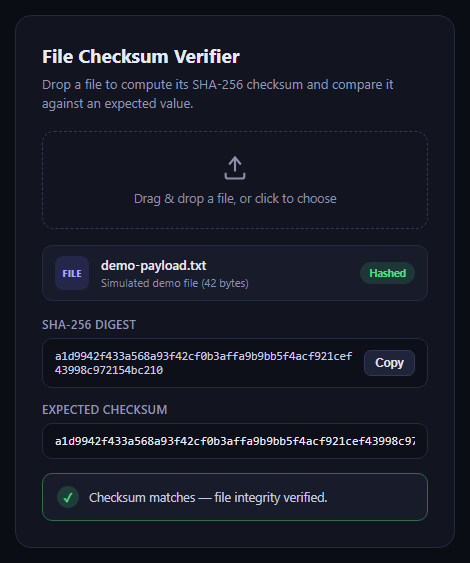
This snippet is a self-contained checksum verification tool: a user drops or selects a file, its bytes are read into an ArrayBuffer, and the browser's native Web Crypto API hashes them into a SHA-256 digest shown as a hex string. Pasting an expected checksum into the text field triggers a live comparison with a clear match or mismatch state.
Real hashing, not a placeholder
The core of the tool is crypto.subtle.digest('SHA-256', buffer), called on the raw ArrayBuffer produced by file.arrayBuffer(). The returned digest is a binary ArrayBuffer, which bufferToHex() walks byte by byte, converting each to a two-character hex pair, to produce the familiar lowercase hex checksum string.
Idle-state demo data
Since the embedded preview has no real file to hash on load, an IIFE encodes a small hardcoded string with TextEncoder and hashes it the same way a dropped file would be hashed, so the UI shows a genuine computed digest and a pre-filled matching "expected checksum" the instant the snippet loads.
Drag-and-drop and click-to-browse
The drop zone listens for dragover, dragleave, and drop events, toggling a highlighted border style during a drag, and also forwards clicks to a hidden file input for the traditional browse flow. Both paths funnel into the same processFile() function.
Step by step
How to Use
- 1Load the snippetClick "File Checksum Verifier" in the sidebar to load its HTML, CSS, and JS into the editor panels. The preview updates instantly.
- 2Edit the codeModify any panel — HTML, CSS, or JS. The preview refreshes as you type. Use Reset in each panel header to restore the original.
- 3Preview on devicesClick the Mobile (375px), Tablet (768px), or Desktop buttons in the preview header to check responsiveness.
- 4Export in your formatClick "HTML" to download a standalone file, "JSX" for a React component, "Tailwind" for a React + Tailwind CSS component, "Tailwind HTML" for a standalone HTML file with Tailwind CDN, "Vue" for a Vue 3 SFC with <template>/<script setup>/<style scoped>, or "Angular" for a standalone Angular .component.ts file. "Copy all" copies the full code to clipboard.
- 5Save your versionClick "Save as", type a name, and press Enter. Your snippet saves to IndexedDB and appears in the Saved tab.
Real-world uses
Common Use Cases
crypto.subtle.digest with no external hashing library and no upload to any server.ArrayBuffer and hashing it, with an idle-state demo hash so the UI never looks empty.Got questions?
Frequently Asked Questions
No. The file is read locally with file.arrayBuffer() and hashed entirely in-browser via crypto.subtle.digest — nothing is uploaded anywhere.
On load, the script hashes a hardcoded demo string the same way it would hash a real file, so the interface demonstrates real computed output immediately.
Yes — change the algorithm name passed to crypto.subtle.digest, e.g. 'SHA-1' or 'SHA-512'; the browser's SubtleCrypto implementation supports several digest algorithms.