

Live Caption Overlay — Free HTML CSS JS Snippet
Live Caption Overlay · Media · Plain HTML, CSS & JS · Live preview
Copy & paste
Source Code
<div class="phone">
  <div class="phone-notch"></div>
  <div class="video-area">
    <div class="video-fake">
      <div class="video-blob blob-1"></div>
      <div class="video-blob blob-2"></div>
      <div class="rec-badge"><span class="rec-dot"></span>REC</div>
    </div>
  </div>

  <div class="caption-overlay">
    <div class="transcript-log" id="transcript-log"></div>
    <div class="live-line-wrap">
      <svg class="mic-icon" width="14" height="14" viewBox="0 0 24 24" fill="none" stroke="currentColor" stroke-width="2" stroke-linecap="round" stroke-linejoin="round"><path d="M12 2a3 3 0 0 0-3 3v6a3 3 0 0 0 6 0V5a3 3 0 0 0-3-3z"/><path d="M19 10v1a7 7 0 0 1-14 0v-1M12 18v4"/></svg>
      <div class="live-line" id="live-line" aria-live="polite"></div>
    </div>
  </div>
</div>
* { box-sizing: border-box; margin: 0; padding: 0; }
body { font-family: system-ui, -apple-system, sans-serif; background: #f8fafc; min-height: 100vh; display: flex; align-items: center; justify-content: center; padding: 24px; }
.phone { position: relative; width: 300px; height: 540px; background: #0f172a; border-radius: 32px; overflow: hidden; box-shadow: 0 12px 40px rgba(0,0,0,0.25); border: 6px solid #1e293b; }
.phone-notch { position: absolute; top: 8px; left: 50%; transform: translateX(-50%); width: 70px; height: 16px; background: #1e293b; border-radius: 10px; z-index: 20; }
.video-area { position: absolute; inset: 0; }
.video-fake { position: absolute; inset: 0; background: linear-gradient(160deg, #1e1b4b 0%, #312e81 45%, #0f172a 100%); overflow: hidden; }
.video-blob { position: absolute; border-radius: 50%; filter: blur(40px); opacity: 0.55; }
.blob-1 { width: 180px; height: 180px; background: #6366f1; top: 10%; left: -20px; animation: drift1 9s ease-in-out infinite; }
.blob-2 { width: 160px; height: 160px; background: #ec4899; bottom: 10%; right: -30px; animation: drift2 11s ease-in-out infinite; }
@keyframes drift1 { 0%,100% { transform: translate(0,0); } 50% { transform: translate(30px,20px); } }
@keyframes drift2 { 0%,100% { transform: translate(0,0); } 50% { transform: translate(-25px,-15px); } }
.rec-badge { position: absolute; top: 26px; left: 16px; display: flex; align-items: center; gap: 5px; background: rgba(0,0,0,0.4); color: #fff; font-size: 10px; font-weight: 700; letter-spacing: 0.06em; padding: 4px 9px; border-radius: 20px; }
.rec-dot { width: 6px; height: 6px; border-radius: 50%; background: #ef4444; animation: pulse-dot 1.4s ease-in-out infinite; }
@keyframes pulse-dot { 0%,100% { opacity: 1; } 50% { opacity: 0.3; } }
.caption-overlay { position: absolute; left: 10px; right: 10px; bottom: 22px; z-index: 10; display: flex; flex-direction: column; gap: 6px; }
.transcript-log { display: flex; flex-direction: column; gap: 4px; max-height: 88px; overflow: hidden; mask-image: linear-gradient(to bottom, transparent, #000 35%); }
.transcript-line { font-size: 12px; color: rgba(255,255,255,0.45); background: rgba(15,23,42,0.55); backdrop-filter: blur(4px); border-radius: 8px; padding: 5px 10px; line-height: 1.4; animation: line-in 0.3s ease; }
@keyframes line-in { from { opacity: 0; transform: translateY(6px); } to { opacity: 1; transform: translateY(0); } }
.live-line-wrap { display: flex; align-items: flex-start; gap: 8px; background: rgba(15,23,42,0.72); backdrop-filter: blur(6px); border-radius: 12px; padding: 10px 12px; min-height: 22px; border: 1px solid rgba(255,255,255,0.08); }
.mic-icon { color: #a5b4fc; flex-shrink: 0; margin-top: 2px; }
.live-line { font-size: 15px; font-weight: 600; color: #fff; line-height: 1.4; }
.word { display: inline-block; margin-right: 5px; color: rgba(255,255,255,0.35); transition: color 0.15s; }
.word.spoken { color: rgba(255,255,255,0.55); }
.word.current { position: relative; color: #fff; }
.word.current::after {
content: ''; position: absolute; left: -2px; right: -2px; bottom: -2px; height: 3px;
background: linear-gradient(90deg, #818cf8, #f472b6); border-radius: 2px;
animation: sweep 0.55s ease forwards;
}
@keyframes sweep { from { transform: scaleX(0); transform-origin: left; } to { transform: scaleX(1); transform-origin: left; } }const SCRIPT = [
{ text: 'So', pause: 260 },
{ text: 'the', pause: 180 },
{ text: 'main', pause: 260 },
{ text: 'idea', pause: 300 },
{ text: 'here', pause: 260 },
{ text: 'is', pause: 200 },
{ text: 'to', pause: 180 },
{ text: 'keep', pause: 280 },
{ text: 'the', pause: 180 },
{ text: 'caption', pause: 380, breakAfter: true },
{ text: 'always', pause: 300 },
{ text: 'one', pause: 220 },
{ text: 'sentence', pause: 340 },
{ text: 'behind', pause: 320 },
{ text: 'what', pause: 220 },
{ text: 'is', pause: 180 },
{ text: 'actually', pause: 340 },
{ text: 'being', pause: 260 },
{ text: 'said,', pause: 420, breakAfter: true },
{ text: 'so', pause: 220 },
{ text: 'it', pause: 180 },
{ text: 'feels', pause: 280 },
{ text: 'live', pause: 280 },
{ text: 'without', pause: 320 },
{ text: 'ever', pause: 240 },
{ text: 'getting', pause: 300 },
{ text: 'ahead', pause: 300 },
{ text: 'of', pause: 180 },
{ text: 'the', pause: 180 },
{ text: 'speaker.', pause: 500, breakAfter: true },
];
const liveLine = document.getElementById('live-line');
const transcriptLog = document.getElementById('transcript-log');
let currentWords = [];
let scriptIndex = 0;
let timerId = null;
/*
* State machine: each scripted word moves through three visual states as
* playback advances - unspoken (dim, not yet reached), current (bright,
* with a karaoke-style highlight sweep drawn under it), and spoken (dimmer
* again, but a little brighter than "unspoken" so recently-said words are
* still easy to read). Only one word is ever "current" at a time. When a
* word is flagged breakAfter, the whole accumulated line is pushed into the
* scrolling transcript log and the live line resets to empty.
*/
function renderLiveLine() {
liveLine.innerHTML = currentWords.map((w, i) => {
const cls = w.state === 'current' ? 'word current' : w.state === 'spoken' ? 'word spoken' : 'word';
return '<span class="' + cls + '">' + w.text + '</span>';
}).join('');
}
function commitLine() {
const text = currentWords.map(w => w.text).join(' ');
if (!text.trim()) return;
const div = document.createElement('div');
div.className = 'transcript-line';
div.textContent = text;
transcriptLog.appendChild(div);
transcriptLog.scrollTop = transcriptLog.scrollHeight;
while (transcriptLog.children.length > 3) {
transcriptLog.removeChild(transcriptLog.firstChild);
}
currentWords = [];
liveLine.innerHTML = '';
}
function step() {
if (scriptIndex >= SCRIPT.length) {
scriptIndex = 0;
currentWords = [];
liveLine.innerHTML = '';
timerId = setTimeout(step, 900);
return;
}
const entry = SCRIPT[scriptIndex];
currentWords.forEach(w => { if (w.state === 'current') w.state = 'spoken'; });
currentWords.push({ text: entry.text, state: 'current' });
renderLiveLine();
scriptIndex++;
if (entry.breakAfter) {
timerId = setTimeout(() => {
commitLine();
timerId = setTimeout(step, 260);
}, entry.pause);
} else {
timerId = setTimeout(step, entry.pause);
}
}
step();Extend with AI
Take This Snippet Further With AI
The AI prompt for this one is for Patreon supporters ($3 a month), along with a site with no ads. Supporters enter the passcode once and it is remembered in this browser.
What's included
Features
About this UI Snippet
Live Caption Overlay — Word-by-Word Karaoke Highlight State Machine & Auto-Scrolling Transcript in Vanilla JS
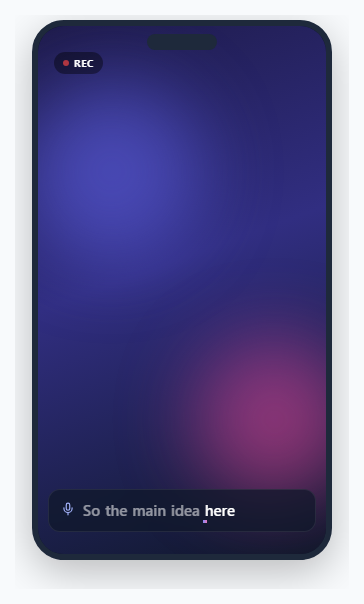
Live captioning UIs — the bar in a video call, the OS-level "Live Caption" feature, or a livestream's auto-generated subtitles — share a distinct visual language: words appear one at a time rather than the whole sentence popping in at once, the word currently being spoken is visually emphasized, already-said words fade back so the eye is drawn to what is new, and older lines scroll up and out to make room. This snippet reproduces that exact behavior using a scripted array standing in for a real speech recognizer, a small per-word state machine, and CSS-driven highlight and scroll animations — no video call SDK, no actual audio, no external captioning service.
The three-state word model
Every word in the currently-forming caption line carries one of three states, tracked directly on a plain JS object: unspoken (the default, dimmest, meaning "not reached yet" — though in this simulation words are only added to the array once reached, so this state mostly matters for words that just finished their sweep), current (the single word actively being "spoken," rendered at full brightness with the highlight sweep), and spoken (previously-current words, faded to a middle opacity so they remain legible but clearly de-emphasized). renderLiveLine() maps this state directly to a CSS class per word — .word, .word.current, or .word.spoken — so the visual treatment is entirely declarative CSS, not manually toggled inline styles.
The karaoke sweep
The .word.current::after pseudo-element is an absolutely positioned bar sitting just under the word's baseline, given a horizontal gradient and animated from scaleX(0) to scaleX(1) with transform-origin: left over 0.55s. Because scaleX animates the pseudo-element's own width rather than the word's opacity or color, it reads as a highlight physically sweeping left-to-right underneath the word — the same visual metaphor karaoke apps and Instagram/TikTok caption styles use to show exactly which syllable is "now."
Word timing via a scripted array
SCRIPT is an ordered array of { text, pause, breakAfter } objects. step() advances through it with plain setTimeout chains rather than setInterval: each word's pause value is the delay before the NEXT word appears, which lets the simulation vary its own cadence — short words like "the" get a quick 180ms pause, longer or more emphatic words get 300-500ms — mimicking the uneven rhythm of real speech far better than a fixed-interval timer would. Chaining individual setTimeout calls (each one scheduling the next only after it fires) also means the timing never drifts the way a naive setInterval can under tab-throttling or long task queues, since each step only ever waits relative to when the previous one actually completed.
Line breaks and the scrolling transcript
Some script entries carry breakAfter: true, marking a natural sentence or clause boundary. When step() reaches one, after that word's own pause it calls commitLine(), which joins the accumulated currentWords into one string, appends it as a new .transcript-line div above the live line, sets transcriptLog.scrollTop to its scrollHeight so it auto-scrolls to reveal the newest line, and trims old entries once more than three lines have accumulated so the log never grows unbounded. The live line then empties and a short 260ms pause plays before the next line starts building, giving a small visual breath between clauses the way a real captioner's paragraph breaks do. A CSS mask-image gradient over the whole transcript-log container fades older (visually higher, scrolled-past) lines toward transparent, reinforcing the sense that they are receding rather than just sitting in a plain list.
Swapping in the real Web Speech API
To replace the simulated array with an actual live transcript, create a SpeechRecognition (or webkitSpeechRecognition) instance with continuous = true and interimResults = true, and listen for its result event. Each result carries a list of alternatives; the isFinal flag on a result distinguishes a settled transcript chunk from an interim, still-changing guess. In place of step()'s scripted word-by-word loop, you would split the interim transcript's latest text delta into words as they arrive, push each new word into currentWords with state: 'current' (demoting the previous current word to spoken, exactly as this snippet already does), and call commitLine() whenever a result arrives with isFinal true rather than relying on a hand-authored breakAfter flag. The rendering, state model, and transcript-scrolling code all carry over unchanged — only the source of "what word arrived next and when" needs to be swapped from the SCRIPT array to the recognizer's event stream.
Step by step
How to Use
- 1Watch words appear one at a time in the live lineA scripted sentence plays back word by word at varying speed, each new word appearing at full brightness with a gradient sweep animating underneath it.
- 2Notice the previous word dim as the next one arrivesAs soon as a new word becomes current, the previously-current word fades to a lower opacity — the classic already-spoken look of a live captioning bar.
- 3See a full clause slide into the transcript log aboveWhen a sentence or clause finishes, the whole line moves up into a small scrolling history above the live line, and the live line clears to start the next one.
- 4Watch older transcript lines fade near the topA soft gradient mask fades the topmost, oldest lines toward transparent as new lines push in from below, keeping the log from feeling like a static list.
- 5Watch the cycle repeatOnce the scripted sentence finishes, the whole simulation pauses briefly and restarts from the beginning, so the pattern is easy to observe on loop.
Real-world uses
Common Use Cases
Got questions?
Frequently Asked Questions
setInterval fires on a fixed period regardless of how long the previous tick took to run, so under load (or when a browser tab is throttled in the background) its ticks can bunch up or drift out of sync with real elapsed time. Chaining individual setTimeout calls, where each one only schedules the next after the current word has finished rendering, guarantees each pause is measured relative to the actual previous step rather than an absolute clock — and it also lets every word have its own distinct pause duration, which a single fixed setInterval period cannot express.
Use the Web Speech API: const recognition = new (window.SpeechRecognition || window.webkitSpeechRecognition)(); set recognition.continuous = true and recognition.interimResults = true, then listen to the result event. Each event.results entry has an isFinal flag; treat interim (isFinal false) text as still-arriving words you push into currentWords with state "current" the same way step() does, and call commitLine() when a result's isFinal becomes true instead of relying on a breakAfter flag. The rendering and transcript-scrolling logic need no changes at all.
The mask-image: linear-gradient(...) applied to .transcript-log fades content near the top of the container toward transparent continuously, so lines feel like they are receding into history rather than abruptly vanishing. The actual DOM removal (transcriptLog.removeChild) only happens once more than three lines have accumulated, which is a separate, purely structural cleanup step from the visual fade.
Yes. In React, move the SCRIPT-stepping setTimeout chain into a useEffect, store the pending timeout id in a ref, and call clearTimeout on that ref in the effect's cleanup function so a fast unmount does not leave a stray timer trying to update unmounted state. In Vue, start the chain in onMounted and clear the pending timeout in onUnmounted. In Angular, start it in ngAfterViewInit and clear it in ngOnDestroy. If you wire up the real SpeechRecognition API instead of the simulated script, also call recognition.stop() in the same cleanup hook so the microphone is released when the component unmounts.
Restructure SCRIPT so each entry is a single character with a very short pause (roughly 30-60ms) instead of a whole word, and remove the space-joining logic in renderLiveLine and commitLine since characters concatenate directly. Note this changes the visual metaphor from "live captioning" (which is always word-granular, matching how speech recognizers emit results) to a typewriter effect, which reads differently and is a distinct, separately-documented UI pattern.