


Live Edit Presence — Free HTML CSS JS Card Snippet
Live Edit Presence · Cards · Plain HTML, CSS & JS · Live preview
Copy & paste
Source Code
<div class="wrap">
  <div class="doc-card">
    <div class="doc-header">
      <div class="doc-title">Product Launch Notes</div>
      <div class="live-dot"><span class="dot-pulse"></span>Live</div>
    </div>

    <div class="block" data-block="0">
      <div class="presence-tag" id="tag-0"></div>
      Our Q3 launch strategy centers on three pillars: onboarding simplicity, pricing transparency, and a faster time-to-value for new teams evaluating the product.
    </div>
    <div class="block" data-block="1">
      <div class="presence-tag" id="tag-1"></div>
      The onboarding flow currently takes an average of eleven minutes from signup to first meaningful action, which is roughly double what our top competitors report.
    </div>
    <div class="block" data-block="2">
      <div class="presence-tag" id="tag-2"></div>
      Pricing page bounce rate has improved since we added the comparison table, but mobile conversion still lags desktop by a wide and unexplained margin.
    </div>
    <div class="block" data-block="3">
      <div class="presence-tag" id="tag-3"></div>
      Next steps: finalize the revised trial length, ship the redesigned empty states, and schedule a review with design before the end of the sprint.
    </div>
  </div>
</div>
* { box-sizing: border-box; margin: 0; padding: 0; }
body { font-family: system-ui, sans-serif; background: #f8fafc; min-height: 100vh; display: flex; align-items: center; justify-content: center; padding: 32px; }
.wrap { width: 100%; max-width: 520px; }
.doc-card { background: #fff; border: 1px solid #e2e8f0; border-radius: 16px; padding: 22px 24px; box-shadow: 0 1px 2px rgba(15,23,42,0.04); }
.doc-header { display: flex; align-items: center; justify-content: space-between; margin-bottom: 16px; }
.doc-title { font-size: 16px; font-weight: 700; color: #0f172a; }
.live-dot { display: flex; align-items: center; gap: 6px; font-size: 11px; font-weight: 700; color: #16a34a; letter-spacing: 0.03em; text-transform: uppercase; }
.dot-pulse { width: 7px; height: 7px; border-radius: 50%; background: #22c55e; box-shadow: 0 0 0 0 rgba(34,197,94,0.6); animation: pulseDot 1.8s infinite; }
@keyframes pulseDot { 0% { box-shadow: 0 0 0 0 rgba(34,197,94,0.5); } 70% { box-shadow: 0 0 0 7px rgba(34,197,94,0); } 100% { box-shadow: 0 0 0 0 rgba(34,197,94,0); } }
.block { position: relative; font-size: 14px; line-height: 1.7; color: #334155; padding: 10px 12px 10px 14px; margin-bottom: 4px; border-radius: 8px; border-left: 3px solid transparent; background: transparent; transition: background-color 1.1s ease, border-left-color 1.1s ease; }
.block.highlight { background-color: var(--hl-bg); border-left-color: var(--hl-border); }
.presence-tag { position: absolute; top: -11px; left: 10px; display: flex; align-items: center; gap: 5px; padding: 3px 8px 3px 4px; border-radius: 999px; background: var(--hl-border); color: #fff; font-size: 10.5px; font-weight: 700; white-space: nowrap; opacity: 0; transform: translateY(4px) scale(0.9); transition: opacity 0.35s ease, transform 0.35s ease; pointer-events: none; z-index: 2; }
.presence-tag.show { opacity: 1; transform: translateY(0) scale(1); }
.presence-avatar { width: 16px; height: 16px; border-radius: 50%; background: rgba(255,255,255,0.35); display: flex; align-items: center; justify-content: center; font-size: 8.5px; font-weight: 800; }var COLLABORATORS = [
{ id: 'ana', name: 'Ana', initial: 'A', bg: 'rgba(99,102,241,0.10)', border: '#6366f1' },
{ id: 'raj', name: 'Raj', initial: 'R', bg: 'rgba(236,72,153,0.10)', border: '#ec4899' },
{ id: 'mei', name: 'Mei', initial: 'M', bg: 'rgba(16,185,129,0.10)', border: '#10b981' },
{ id: 'theo', name: 'Theo', initial: 'T', bg: 'rgba(245,158,11,0.10)', border: '#f59e0b' }
];
var BLOCK_COUNT = 4;
var AVATAR_VISIBLE_MS = 1800;
var HIGHLIGHT_VISIBLE_MS = 2600;
function pickRandom(arr) {
return arr[Math.floor(Math.random() * arr.length)];
}
function triggerEdit(blockIndex) {
var collaborator = pickRandom(COLLABORATORS);
var block = document.querySelector('.block[data-block="' + blockIndex + '"]');
var tag = document.getElementById('tag-' + blockIndex);
if (!block || !tag) return;
block.style.setProperty('--hl-bg', collaborator.bg);
block.style.setProperty('--hl-border', collaborator.border);
tag.innerHTML = '<span class="presence-avatar">' + collaborator.initial + '</span>' + collaborator.name + ' edited this';
block.classList.add('highlight');
requestAnimationFrame(function () { tag.classList.add('show'); });
setTimeout(function () {
tag.classList.remove('show');
}, AVATAR_VISIBLE_MS);
setTimeout(function () {
block.classList.remove('highlight');
}, HIGHLIGHT_VISIBLE_MS);
}
function scheduleNextEdit() {
var delay = 1800 + Math.random() * 2600;
setTimeout(function () {
var blockIndex = Math.floor(Math.random() * BLOCK_COUNT);
triggerEdit(blockIndex);
scheduleNextEdit();
}, delay);
}
triggerEdit(1);
scheduleNextEdit();Extend with AI
Take This Snippet Further With AI
The AI prompt for this one is for Patreon supporters ($3 a month), along with a site with no ads. Supporters enter the passcode once and it is remembered in this browser.
What's included
Features
About this UI Snippet
Live Edit Presence — Notion & Figma-Style Collaborator Highlight Card in Vanilla JS
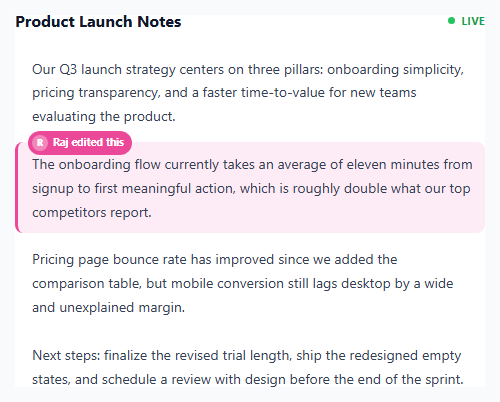
Tools like Notion, Google Docs, and Figma all share a small but instantly recognizable UI moment: a block of content briefly flashes a colored highlight the instant a collaborator edits it, with a small name label appearing to identify who did it, before both fade away and leave the content looking normal again. That moment does real communicative work — without it, simultaneous editing feels invisible and confusing; with it, every teammate's presence becomes legible at a glance. This snippet recreates that exact interaction on a static card using nothing but setTimeout scheduling, CSS custom properties, and two independently-timed fade transitions, standing in for what a real product would drive from WebSocket or CRDT change events.
Per-collaborator color assignment: a small fixed palette keyed by user id
The COLLABORATORS array is the entire identity system: four objects, each with an id, display name, avatar initial, and a matching pair of colors — a soft background tint (bg) and a saturated border/badge color (border). Critically, these colors are assigned once, per person, not generated randomly per edit. This mirrors how real collaboration tools work: your cursor and highlights are always the same shade of blue (or pink, or green) no matter which document you are in or which block you touch, because the color is a stable property of your user id, not a property of the current action. Here that stability comes from simply reading a fixed array entry; in a production app the same idea scales to hashing a user id into an index in a fixed palette array, guaranteeing the same person always maps to the same color even across sessions without needing to persist a color choice anywhere.
Applying color per-block with CSS custom properties
Rather than generating a new CSS class for every possible collaborator/block combination, each block element receives two inline custom properties at edit time — element.style.setProperty('--hl-bg', collaborator.bg) and --hl-border — which the stylesheet's .block.highlight rule simply references via var(--hl-bg) and var(--hl-border). This means the CSS only has to define the highlight and border-left treatment once, and any of the four (or four hundred) possible collaborator colors can be applied to any block just by setting two custom properties before toggling the .highlight class, keeping styling and identity cleanly separated.
The two-stage fade: why the label disappears before the highlight does
This is the detail that makes the effect read as polished rather than jarring. Two separate setTimeout calls are scheduled from the same triggerEdit() call: one at AVATAR_VISIBLE_MS (1800ms) removes the .show class from the presence tag, fading out just the little name badge, while a second, longer timeout at HIGHLIGHT_VISIBLE_MS (2600ms) removes the .highlight class from the block itself, fading the background tint back to transparent. If both faded on the same timer, the highlight would vanish at the exact moment attention was still on the name label, making the "who did this" information feel like it was snatched away. Staggering them lets the reader register who made the edit first, then gives the background tint extra time to visually fade on its own, mimicking the way Notion's own highlight lingers slightly after the little avatar toast disappears.
Staggered scheduling instead of a fixed interval
Rather than a single setInterval firing edits at a constant, predictable cadence, scheduleNextEdit() recursively calls itself with a new random delay between 1800ms and 4400ms each time, chosen fresh on every call via 1800 + Math.random() * 2600. This recursive-setTimeout pattern (sometimes called a "self-adjusting timer") produces a much more organic, bursty rhythm that reads as several independent people typing at their own pace, rather than the mechanically even cadence a fixed setInterval would produce — and because each call schedules only the next single edit, it is trivial to change the delay range or pause scheduling entirely without clearing and resetting a recurring interval.
Step by step
How to Use
- 1Watch the card on loadOne paragraph immediately flashes a colored highlight with a small avatar badge showing which teammate "just edited" it, simulating a document you have just opened mid-collaboration.
- 2Keep watching as more edits arriveEvery couple of seconds, a different random paragraph lights up in a different collaborator's color — never the same predictable rhythm twice, since each edit schedules its own random delay before the next one.
- 3Notice the name badge fading firstThe small pill showing the collaborator's avatar and name fades out after about 1.8 seconds, while the colored background tint on the paragraph itself lingers a little longer before fading.
- 4Compare colors across multiple edits to the same personWatch for repeated edits from the same collaborator (Ana, Raj, Mei, or Theo) — notice their highlight color is always identical, because color is tied to the person, not the individual edit.
- 5See two edits land on different blocks close togetherBecause scheduling is independent per edit, occasionally two different blocks will show active highlights at nearly the same time, which is intentional — real collaborative documents often have several people editing different sections at once.
Real-world uses
Common Use Cases
Got questions?
Frequently Asked Questions
Call triggerEdit(blockIndex) directly with the zero-based index of the block you want to highlight — it internally picks a random collaborator from the COLLABORATORS array. To force a specific collaborator instead of a random one, temporarily edit pickRandom to return a chosen entry, or refactor triggerEdit to accept an optional collaborator argument and fall back to pickRandom(COLLABORATORS) only when none is passed.
Replace the scheduleNextEdit() recursive timer with your WebSocket, Server-Sent Events, or CRDT change-event listener, and call triggerEdit(blockIndex) whenever a real remote edit event arrives for that block, using the real collaborator's id to look up their color in COLLABORATORS instead of picking randomly. Everything downstream — the CSS custom property assignment, the two-stage fade timers — works identically whether the trigger is random or real.
They are driven by two separate setTimeout calls with different durations (AVATAR_VISIBLE_MS at 1800ms, HIGHLIGHT_VISIBLE_MS at 2600ms) started from the same triggerEdit() call. Fading the small name badge out first keeps the "who did this" information from lingering awkwardly after it has served its purpose, while letting the subtler background tint fade more slowly afterward, mimicking how Notion and Figma let a highlight tint linger a beat past the identity toast.
Yes. Model each block's highlight state (active collaborator id, whether the tag is showing, whether the highlight is showing) as component state rather than toggling classes on DOM nodes directly, and keep the color-to-user mapping as a plain constant object or array exactly as here. Start the recursive scheduling timer inside useEffect (React), onMounted (Vue), or ngAfterViewInit (Angular), and make sure to track the latest setTimeout id so it can be cleared in the effect cleanup, onUnmounted, or ngOnDestroy — otherwise the recursive scheduler keeps firing state updates after the component has unmounted.
Add a new object to the COLLABORATORS array with a unique id, name, initial, and a bg/border color pair that reads clearly against the card's light background — keep the bg value as a low-opacity rgba() tint (around 8-12% alpha) so highlighted text stays fully readable, and pick a border color saturated enough to stand out as a small badge.