

Video Buffering Overlay — Player Chrome Buffering Spinner
Video Buffering Overlay · Loaders · Plain HTML, CSS & JS · Live preview
Copy & paste
Source Code
<div class="vb-player" id="vbPlayer">
  <div class="vb-frame">
    <div class="vb-scene"></div>
    <div class="vb-buffer-overlay" id="vbOverlay">
      <div class="vb-ring">
        <span></span><span></span><span></span>
      </div>
    </div>
  </div>

  <div class="vb-controls">
    <button type="button" class="vb-play" id="vbPlay" aria-label="Play">▶</button>
    <div class="vb-track">
      <div class="vb-buffered" id="vbBuffered"></div>
      <div class="vb-played" id="vbPlayed"></div>
      <div class="vb-scrubber" id="vbScrubber"></div>
    </div>
    <span class="vb-time" id="vbTime">0:00 / 2:41</span>
    <button type="button" class="vb-mute" aria-label="Mute">🔊</button>
  </div>
</div>
<button type="button" class="vb-demo" id="vbDemo">Simulate a rebuffer</button>*{box-sizing:border-box;margin:0;padding:0}
body{font-family:system-ui,-apple-system,sans-serif;background:#0b0f1a;min-height:100vh;display:flex;flex-direction:column;align-items:center;justify-content:center;gap:16px;padding:24px}
.vb-player{width:100%;max-width:420px;background:#000;border-radius:14px;overflow:hidden;box-shadow:0 18px 44px rgba(0,0,0,.5)}
.vb-frame{position:relative;aspect-ratio:16/9;overflow:hidden}
.vb-scene{position:absolute;inset:0;background:
radial-gradient(circle at 30% 25%, rgba(129,140,248,.35), transparent 45%),
radial-gradient(circle at 75% 70%, rgba(34,211,238,.3), transparent 50%),
linear-gradient(160deg,#141a2e,#05070d)}
.vb-buffer-overlay{position:absolute;inset:0;background:rgba(0,0,0,.5);display:flex;align-items:center;justify-content:center;opacity:0;pointer-events:none;transition:opacity .25s ease}
.vb-buffer-overlay.show{opacity:1}
/* Three dots orbiting a shared centre — the classic "buffering" ring used by
video platforms, distinct from a generic full-page spinner because it's
scoped tightly to the video frame and sits above the paused/frozen scene. */
.vb-ring{position:relative;width:52px;height:52px;animation:vbRotate 1.1s linear infinite}
.vb-ring span{position:absolute;width:9px;height:9px;border-radius:50%;background:#fff;opacity:.9}
.vb-ring span:nth-child(1){top:0;left:50%;transform:translateX(-50%)}
.vb-ring span:nth-child(2){bottom:6px;left:6px}
.vb-ring span:nth-child(3){bottom:6px;right:6px}
@keyframes vbRotate{to{transform:rotate(360deg)}}
.vb-controls{display:flex;align-items:center;gap:10px;padding:10px 14px;background:#0c0e16}
.vb-play,.vb-mute{width:30px;height:30px;border-radius:8px;border:none;background:#1c2338;color:#fff;font-size:12px;cursor:pointer;flex-shrink:0}
.vb-play:hover,.vb-mute:hover{background:#242c47}
.vb-track{position:relative;flex:1;height:5px;background:#232a41;border-radius:3px}
.vb-buffered{position:absolute;inset:0;width:0%;background:#3a4267;border-radius:3px}
.vb-played{position:absolute;inset:0;width:0%;background:#818cf8;border-radius:3px}
.vb-scrubber{position:absolute;top:50%;width:10px;height:10px;border-radius:50%;background:#fff;transform:translate(-50%,-50%);left:0%;box-shadow:0 0 0 3px rgba(129,140,248,.3)}
.vb-time{font-size:11px;color:#8a93ad;flex-shrink:0;font-variant-numeric:tabular-nums}
.vb-demo{padding:9px 16px;background:#1c2338;border:1px solid #2b3350;color:#c3cadf;border-radius:10px;font-size:13px;font-weight:700;cursor:pointer;font-family:inherit}
.vb-demo:hover{background:#242c47}var overlay = document.getElementById('vbOverlay');
var playBtn = document.getElementById('vbPlay');
var played = document.getElementById('vbPlayed');
var buffered = document.getElementById('vbBuffered');
var scrubber = document.getElementById('vbScrubber');
var timeLabel = document.getElementById('vbTime');
var demoBtn = document.getElementById('vbDemo');
var DURATION = 161; // 2:41 in seconds
var current = 34; // start partway through, already playing
var bufferedAhead = 46;
var playing = true;
var playTimer = null;
var rebuffering = false;
function fmt(sec) {
var m = Math.floor(sec / 60);
var s = Math.floor(sec % 60);
return m + ':' + (s < 10 ? '0' : '') + s;
}
function render() {
played.style.width = (current / DURATION * 100).toFixed(2) + '%';
buffered.style.width = (bufferedAhead / DURATION * 100).toFixed(2) + '%';
scrubber.style.left = (current / DURATION * 100).toFixed(2) + '%';
timeLabel.textContent = fmt(current) + ' / ' + fmt(DURATION);
playBtn.textContent = playing ? '❚❚' : '▶';
}
function tick() {
if (!playing || rebuffering) return;
if (current >= bufferedAhead) {
// Playback caught up to the buffered edge — this is what a real
// "waiting" event means: start showing the overlay until more data
// arrives, rather than just freezing the frame silently.
startBuffering();
return;
}
current += 1;
bufferedAhead = Math.min(DURATION, bufferedAhead + 0.6);
render();
}
function startBuffering() {
rebuffering = true;
overlay.classList.add('show');
// Simulate the network catching up: buffer ahead faster than playback
// consumes it, then resume once there's enough runway again.
var fillTimer = setInterval(function () {
bufferedAhead = Math.min(DURATION, bufferedAhead + 4);
render();
if (bufferedAhead - current > 8 || bufferedAhead >= DURATION) {
clearInterval(fillTimer);
rebuffering = false;
overlay.classList.remove('show');
}
}, 260);
}
playBtn.addEventListener('click', function () {
playing = !playing;
render();
});
demoBtn.addEventListener('click', function () {
if (rebuffering) return;
bufferedAhead = current + 0.5; // force playback to hit the buffered edge almost immediately
startBuffering();
});
render();
setInterval(tick, 1000);Extend with AI
Take This Snippet Further With AI
The AI prompt for this one is for Patreon supporters ($3 a month), along with a site with no ads. Supporters enter the passcode once and it is remembered in this browser.
What's included
Features
About this UI Snippet
Video Buffering Overlay — A Spinner Driven by the Playback/Buffer Relationship
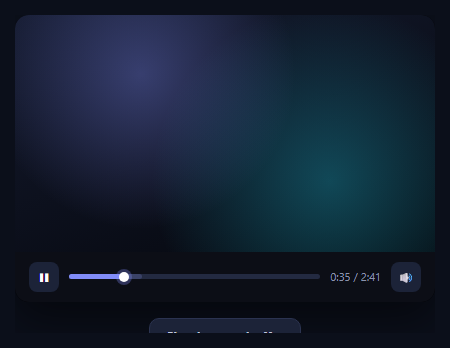
A generic page spinner communicates "wait," full stop. A video buffering overlay needs to communicate something more specific: playback has caught up to how much has actually downloaded, and it will resume the instant enough new data arrives — the same distinction YouTube, Netflix, and every serious video player make between an initial load and a mid-playback stall. This snippet builds real player chrome — a scene area, a scrubber with separate played and buffered ranges, play/mute controls — and drives its centred buffering spinner directly off the relationship between a simulated playback position and a simulated buffered position, not a fixed timer.
A scrubber with two independent ranges
The track shows two overlapping fills: .vb-played (how far playback has progressed) and .vb-buffered (how much has downloaded ahead of that, the lighter grey range players like YouTube show past the red played bar). These are two separate widths driven by two separate numbers (current and bufferedAhead), which is what lets the buffering logic be meaningful rather than decorative — a real player computes exactly this same gap to decide whether it needs to stall.
The overlay appears exactly when playback catches the buffer
tick() runs once a second and only advances current if it's still behind bufferedAhead. The moment current >= bufferedAhead — playback has consumed everything that's downloaded — startBuffering() fires: the spinner overlay fades in over the frozen scene, and a separate faster interval grows bufferedAhead (simulating the network catching up) until there's enough runway ahead of the current position again, at which point the overlay fades out and normal playback resumes. This mirrors the real waiting/playing events a <video> element fires — the overlay is a direct visualisation of the playback-versus-download race, not a spinner shown for a fixed duration.
Styled as player chrome, not a page loader
The buffering ring sits centred over a scene area styled like dark ambient video content, above the transport controls (play/pause, scrubber, timestamp, mute) rather than floating over the whole page. The overlay itself is a semi-transparent black scrim (rgba(0,0,0,.5)) rather than the light backdrop-blur of a page-level loading overlay, because the convention for video players is a darkened frame with three orbiting dots, immediately recognisable as "your video, waiting" rather than "the whole app, waiting."
A demo control to force a stall on demand
A "Simulate a rebuffer" button snaps bufferedAhead down to just ahead of current, so the very next tick() triggers startBuffering() immediately — useful for seeing the overlay's fade-in and the scrubber's buffered range visibly regrow without waiting for natural playback to catch up on its own.
Wiring it to a real <video> element
Replace the simulated current/bufferedAhead numbers with a real <video> element's currentTime and its buffered TimeRanges object, and swap the manual tick()/startBuffering() calls for the element's native waiting and playing (or canplay) events — show the overlay on waiting, hide it on playing. The scrubber, controls, and overlay CSS all carry over unchanged. Pair it with a loading overlay for the page shell around the player.
Step by step
How to Use
- 1Paste HTML, CSS, and JSA dark video player renders, already "playing" with a growing scrubber.
- 2Let it runPlayback eventually catches up to the buffered edge and the spinner appears automatically.
- 3Watch it resolveThe buffered range refills faster than playback, then the overlay fades and playback resumes.
- 4Click "Simulate a rebuffer"Force the stall immediately to see the overlay without waiting.
- 5Toggle play/pausePlayback (and the tick loop) pauses; buffering logic only runs while playing.
- 6Wire a real videoSwap the simulated numbers for a real <video>'s currentTime/buffered and waiting/playing events.
Real-world uses
Common Use Cases
bufferedAhead, where the overlay hides again once enough runway has rebuilt ahead of the playhead.Got questions?
Frequently Asked Questions
tick() only advances the current playback position while it remains behind bufferedAhead. The instant current catches up to bufferedAhead — meaning playback has consumed everything that's downloaded — startBuffering() fires. This mirrors a real video element's waiting event, which fires for exactly the same reason: the browser has run out of buffered data to play.
played (an indigo fill) tracks how far the user has actually watched, driven by current. buffered (a lighter grey fill) tracks how much has downloaded ahead of that, driven by bufferedAhead — the same range shown as a lighter grey bar past the red played indicator on YouTube. They're two independent values, which is what makes it possible to detect and visualize the moment playback outruns the download.
Once startBuffering() fires, a separate faster interval grows bufferedAhead well ahead of the normal playback rate (simulating the network catching up), checking after each tick whether there's now more than 8 seconds of runway between bufferedAhead and current. Once that gap is large enough (or the video is fully buffered), the interval clears itself and the overlay fades out — no fixed "spin for N seconds" timer decides when it ends.
Video platforms consistently scope the buffering indicator to the player itself — a darkened video frame with a centered spinner — so the rest of the page (comments, related videos, navigation) stays fully usable and unobscured while only the video is waiting. A full-page loading overlay would incorrectly suggest the entire app, not just the video, is stalled.
Replace the simulated current and bufferedAhead numbers with the real element's currentTime property and its buffered TimeRanges (video.buffered.end(0) for the nearest buffered range), and listen for the element's native waiting and playing (or canplay) events to show and hide the overlay, instead of computing the catch-up condition manually in tick(). The scrubber math, controls, and overlay CSS all carry over unchanged.