

Lottie Button Micro Loader — Free HTML CSS JS Snippet
Lottie Button Micro Loader · Buttons · Plain HTML, CSS & JS · Live preview
Copy & paste
Source Code
<div class="lbm-wrap">
  <button class="lbm-btn" id="lbmBtn" type="button">
    <span class="lbm-label" id="lbmLabel">Save changes</span>
    <span class="lbm-lottie" id="lbmLottie"></span>
  </button>
</div>*{box-sizing:border-box}
body{font-family:system-ui,-apple-system,sans-serif;background:#0b0d14;min-height:100vh;display:flex;align-items:center;justify-content:center;padding:24px}
.lbm-wrap{display:flex;align-items:center;justify-content:center}
.lbm-btn{position:relative;display:inline-flex;align-items:center;justify-content:center;gap:8px;background:#6366f1;color:#fff;border:none;font-size:14px;font-weight:700;padding:13px 26px;border-radius:10px;cursor:pointer;min-width:150px;font-family:system-ui,-apple-system,sans-serif;transition:background .15s}
.lbm-btn:hover{background:#4f52e0}
.lbm-btn:disabled{cursor:default;opacity:.9}
.lbm-lottie{width:22px;height:22px;display:none}
.lbm-lottie.lbm-active{display:inline-block}// Small looping Lottie animation, rendered at 22x22px inside the button
// while the "loading" state is active.
var animData = {
v: "5.7.4", fr: 30, ip: 0, op: 60, w: 200, h: 200, nm: "pulse", ddd: 0, assets: [],
layers: [{
ddd: 0, ind: 1, ty: 4, nm: "circle", sr: 1,
ks: {
o: { a: 1, k: [
{ i: { x: [0.667], y: [1] }, o: { x: [0.333], y: [0] }, t: 0, s: [100], e: [40] },
{ i: { x: [0.667], y: [1] }, o: { x: [0.333], y: [0] }, t: 30, s: [40], e: [100] },
{ t: 60, s: [100] }
] },
r: { a: 0, k: 0 },
p: { a: 0, k: [100, 100, 0] },
a: { a: 0, k: [0, 0, 0] },
s: { a: 1, k: [
{ i: { x: [0.667, 0.667, 0.667], y: [1, 1, 1] }, o: { x: [0.333, 0.333, 0.333], y: [0, 0, 0] }, t: 0, s: [70, 70, 100], e: [100, 100, 100] },
{ i: { x: [0.667, 0.667, 0.667], y: [1, 1, 1] }, o: { x: [0.333, 0.333, 0.333], y: [0, 0, 0] }, t: 30, s: [100, 100, 100], e: [70, 70, 100] },
{ t: 60, s: [70, 70, 100] }
] }
},
ao: 0,
shapes: [{
ty: "gr",
it: [
{ ty: "el", p: { a: 0, k: [0, 0] }, s: { a: 0, k: [120, 120] } },
{ ty: "fl", c: { a: 0, k: [1, 1, 1, 1] }, o: { a: 0, k: 100 } },
{ ty: "tr", p: { a: 0, k: [0, 0] }, a: { a: 0, k: [0, 0] }, s: { a: 0, k: [100, 100] }, r: { a: 0, k: 0 }, o: { a: 0, k: 100 } }
]
}],
ip: 0, op: 60, st: 0, bm: 0
}]
};
var btn = document.getElementById('lbmBtn');
var label = document.getElementById('lbmLabel');
var lottieContainer = document.getElementById('lbmLottie');
var lottieInstance = null;
var originalLabel = label.textContent;
var busy = false;
btn.addEventListener('click', function () {
if (busy) return;
busy = true;
btn.disabled = true;
label.style.display = 'none';
lottieContainer.classList.add('lbm-active');
lottieInstance = lottie.loadAnimation({
container: lottieContainer,
renderer: 'svg',
loop: true,
autoplay: true,
animationData: animData,
});
setTimeout(function () {
lottieInstance.destroy();
lottieContainer.classList.remove('lbm-active');
label.style.display = '';
label.textContent = 'Done';
btn.disabled = false;
busy = false;
setTimeout(function () {
label.textContent = originalLabel;
}, 1600);
}, 1500);
});Extend with AI
Take This Snippet Further With AI
The AI prompt for this one is for Patreon supporters ($3 a month), along with a site with no ads. Supporters enter the passcode once and it is remembered in this browser.
What's included
Features
About this UI Snippet
Lottie Button Micro Loader — Inline Animated Loading State for Buttons

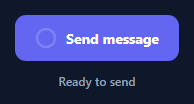
This snippet replaces the usual CSS spinner inside a loading button with a real Lottie animation from the lottie-web library, rendered small enough to sit inline where the button's label normally lives.
Swapping label for animation
On click, the button's text label is hidden and a 22×22px container becomes visible, into which lottie.loadAnimation({ container, renderer: 'svg', loop: true, autoplay: true, animationData }) renders the looping animation using the same inline animation JSON object pattern as the other Lottie snippets in this library — no external .json file is fetched.
Timed completion
After roughly 1.5 seconds, a setTimeout callback destroys the Lottie instance, hides its container, and restores the label — first showing "Done" briefly, then reverting to the button's original text, giving the user clear confirmation the action completed before the button returns to its idle state.
Guarding against double-clicks
A busy flag combined with disabling the button during the loading phase prevents a second click from starting an overlapping animation instance while one is already running.
Step by step
How to Use
- 1Load the snippetClick "Lottie Button Micro Loader" in the sidebar to load its HTML, CSS, and JS into the editor panels. The preview updates instantly.
- 2Edit the codeModify any panel — HTML, CSS, or JS. The preview refreshes as you type. Use Reset in each panel header to restore the original.
- 3Preview on devicesClick the Mobile (375px), Tablet (768px), or Desktop buttons in the preview header to check responsiveness.
- 4Export in your formatClick "HTML" to download a standalone file, "JSX" for a React component, "Tailwind" for a React + Tailwind CSS component, "Tailwind HTML" for a standalone HTML file with Tailwind CDN, "Vue" for a Vue 3 SFC with <template>/<script setup>/<style scoped>, or "Angular" for a standalone Angular .component.ts file. "Copy all" copies the full code to clipboard.
- 5Save your versionClick "Save as", type a name, and press Enter. Your snippet saves to IndexedDB and appears in the Saved tab.
Real-world uses
Common Use Cases
animationData at a small size inside an existing control.Got questions?
Frequently Asked Questions
No, this demo simulates the delay with setTimeout; replace the setTimeout body with your actual async request and trigger the completion state in its .then() or await continuation.
Calling destroy() releases the SVG DOM nodes and internal timers Lottie created, preventing memory and animation-frame leaks if the button is clicked many times.
Yes — increase the .lbm-lottie width and height in the CSS; the SVG renderer scales the same animationData cleanly to any size.