


Lottie Notification Bell Nav — Free HTML CSS JS Snippet
Lottie Notification Bell Nav · Navigation · Plain HTML, CSS & JS · Live preview
Copy & paste
Source Code
<nav class="lnb-nav">
  <span class="lnb-brand">Acme</span>
  <div class="lnb-actions">
    <button class="lnb-bell-btn" id="lnbBellBtn" type="button" aria-label="Notifications">
      <svg id="lnbBellIcon" width="20" height="20" viewBox="0 0 24 24" fill="none" stroke="currentColor" stroke-width="2" stroke-linecap="round" stroke-linejoin="round">
        <path d="M18 8a6 6 0 0 0-12 0c0 7-3 9-3 9h18s-3-2-3-9" />
        <path d="M13.73 21a2 2 0 0 1-3.46 0" />
      </svg>
      <span class="lnb-lottie-ring" id="lnbLottieRing"></span>
      <span class="lnb-badge" id="lnbBadge" hidden>0</span>
    </button>
  </div>
</nav>
<div class="lnb-log" id="lnbLog">Waiting for new notifications…</div>*{box-sizing:border-box}
body{font-family:system-ui,-apple-system,sans-serif;background:#0b0d14;min-height:100vh;margin:0;padding:24px}
.lnb-nav{font-family:system-ui,-apple-system,sans-serif;display:flex;align-items:center;justify-content:space-between;background:#12141f;border:1px solid #262a3d;border-radius:12px;padding:14px 20px;max-width:480px;margin:0 auto}
.lnb-brand{font-size:16px;font-weight:800;color:#e7e9f5}
.lnb-actions{display:flex;align-items:center;gap:14px}
.lnb-bell-btn{position:relative;background:#181b2a;border:1px solid #262a3d;color:#c7cae6;width:38px;height:38px;border-radius:10px;display:flex;align-items:center;justify-content:center;cursor:pointer}
.lnb-bell-btn:hover{background:#20233a}
.lnb-lottie-ring{position:absolute;inset:0;pointer-events:none;display:none}
.lnb-lottie-ring.lnb-active{display:block}
.lnb-badge{position:absolute;top:-5px;right:-5px;background:#ef4444;color:#fff;font-size:10px;font-weight:800;min-width:17px;height:17px;border-radius:999px;display:flex;align-items:center;justify-content:center;padding:0 4px;border:2px solid #12141f}
.lnb-log{max-width:480px;margin:14px auto 0;font-size:12.5px;color:#8b90ab;text-align:center}
@keyframes lnbShake{0%,100%{transform:rotate(0)}20%{transform:rotate(-14deg)}40%{transform:rotate(12deg)}60%{transform:rotate(-8deg)}80%{transform:rotate(6deg)}}
.lnb-shake{animation:lnbShake .5s ease}// Small looping Lottie "ring" animation played briefly behind the bell
// icon whenever a new notification arrives.
var animData = {
v: "5.7.4", fr: 30, ip: 0, op: 60, w: 200, h: 200, nm: "pulse", ddd: 0, assets: [],
layers: [{
ddd: 0, ind: 1, ty: 4, nm: "circle", sr: 1,
ks: {
o: { a: 1, k: [
{ i: { x: [0.667], y: [1] }, o: { x: [0.333], y: [0] }, t: 0, s: [100], e: [40] },
{ i: { x: [0.667], y: [1] }, o: { x: [0.333], y: [0] }, t: 30, s: [40], e: [100] },
{ t: 60, s: [100] }
] },
r: { a: 0, k: 0 },
p: { a: 0, k: [100, 100, 0] },
a: { a: 0, k: [0, 0, 0] },
s: { a: 1, k: [
{ i: { x: [0.667, 0.667, 0.667], y: [1, 1, 1] }, o: { x: [0.333, 0.333, 0.333], y: [0, 0, 0] }, t: 0, s: [70, 70, 100], e: [100, 100, 100] },
{ i: { x: [0.667, 0.667, 0.667], y: [1, 1, 1] }, o: { x: [0.333, 0.333, 0.333], y: [0, 0, 0] }, t: 30, s: [100, 100, 100], e: [70, 70, 100] },
{ t: 60, s: [70, 70, 100] }
] }
},
ao: 0,
shapes: [{
ty: "gr",
it: [
{ ty: "el", p: { a: 0, k: [0, 0] }, s: { a: 0, k: [120, 120] } },
{ ty: "fl", c: { a: 0, k: [0.937, 0.267, 0.267, 1] }, o: { a: 0, k: 100 } },
{ ty: "tr", p: { a: 0, k: [0, 0] }, a: { a: 0, k: [0, 0] }, s: { a: 0, k: [100, 100] }, r: { a: 0, k: 0 }, o: { a: 0, k: 100 } }
]
}],
ip: 0, op: 60, st: 0, bm: 0
}]
};
var bellBtn = document.getElementById('lnbBellBtn');
var bellIcon = document.getElementById('lnbBellIcon');
var ringContainer = document.getElementById('lnbLottieRing');
var badge = document.getElementById('lnbBadge');
var log = document.getElementById('lnbLog');
var lottieInstance = null;
var notificationCount = 0;
function playRingAnimation() {
ringContainer.classList.add('lnb-active');
if (lottieInstance) lottieInstance.destroy();
lottieInstance = lottie.loadAnimation({
container: ringContainer,
renderer: 'svg',
loop: false,
autoplay: true,
animationData: animData,
});
bellIcon.classList.remove('lnb-shake');
void bellIcon.offsetWidth;
bellIcon.classList.add('lnb-shake');
setTimeout(function () {
ringContainer.classList.remove('lnb-active');
if (lottieInstance) {
lottieInstance.destroy();
lottieInstance = null;
}
}, 900);
}
function receiveNotification() {
notificationCount += 1;
badge.textContent = String(notificationCount);
badge.hidden = false;
playRingAnimation();
log.textContent = 'New notification received (' + notificationCount + ' total).';
}
bellBtn.addEventListener('click', function () {
log.textContent = notificationCount > 0
? 'Showing ' + notificationCount + ' notification' + (notificationCount === 1 ? '' : 's') + '.'
: 'No notifications yet.';
});
// Simulate a new notification arriving shortly after the nav loads.
setTimeout(receiveNotification, 2000);Extend with AI
Take This Snippet Further With AI
The AI prompt for this one is for Patreon supporters ($3 a month), along with a site with no ads. Supporters enter the passcode once and it is remembered in this browser.
What's included
Features
About this UI Snippet
Lottie Notification Bell Nav — Animated Bell With Live Badge Counter
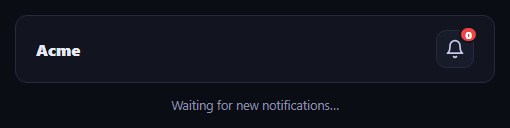
This snippet builds a notification bell for a navigation bar that reacts to new notifications with both a CSS shake and a real Lottie ring animation from the lottie-web library, instead of a silent badge number change.
Simulating a new notification
A setTimeout fires receiveNotification() about two seconds after the page loads, standing in for a real push event from a WebSocket or polling call. Each call increments notificationCount, updates the badge text, and reveals it if it was hidden.
The ring animation
playRingAnimation() calls lottie.loadAnimation({ container, renderer: 'svg', loop: false, autoplay: true, animationData }) against an inline animation JSON object, layering a brief non-looping burst behind the bell icon, while a CSS keyframe shake is retriggered on the icon itself by removing and re-adding its animation class (forcing a reflow with offsetWidth so the animation restarts).
Cleanup between triggers
Each call destroys any previous Lottie instance before creating a new one and removes the ring container from view after the animation finishes, so repeated notifications never stack multiple running Lottie players.
Step by step
How to Use
- 1Load the snippetClick "Lottie Notification Bell Nav" in the sidebar to load its HTML, CSS, and JS into the editor panels. The preview updates instantly.
- 2Edit the codeModify any panel — HTML, CSS, or JS. The preview refreshes as you type. Use Reset in each panel header to restore the original.
- 3Preview on devicesClick the Mobile (375px), Tablet (768px), or Desktop buttons in the preview header to check responsiveness.
- 4Export in your formatClick "HTML" to download a standalone file, "JSX" for a React component, "Tailwind" for a React + Tailwind CSS component, "Tailwind HTML" for a standalone HTML file with Tailwind CDN, "Vue" for a Vue 3 SFC with <template>/<script setup>/<style scoped>, or "Angular" for a standalone Angular .component.ts file. "Copy all" copies the full code to clipboard.
- 5Save your versionClick "Save as", type a name, and press Enter. Your snippet saves to IndexedDB and appears in the Saved tab.
Real-world uses
Common Use Cases
setTimeout notification incrementing the counter in the demo.animationData so no external JSON file is fetched.Got questions?
Frequently Asked Questions
Simulated — a setTimeout fires it once, two seconds after load, standing in for a real event from a WebSocket, server-sent event, or polling call in a production app.
The ring is meant to play once as a brief burst reacting to a specific event, not loop continuously like a background decorative animation, so it is destroyed shortly after it finishes.
The class is removed, the element's offsetWidth is read to force a synchronous reflow, and the class is re-added — without that reflow, browsers would not restart an already-applied CSS animation.
Yes. While the Lottie Notification Bell Nav snippet gives you one pattern to copy, the free Responsive Navbar Builder at webdevpuneet.com/navbar-builder/ designs a whole navigation bar: logo, links and dropdown menus, a mobile hamburger menu (dropdown panel, slide-in drawer or full screen) and a scroll effect (sticky, shrink, hide on scroll or transparent). It has six presets, a live preview that runs the real code, and exports HTML + CSS + vanilla JS, React, Tailwind, Vue 3 or Angular — or you can click Fork & Edit to keep editing it in My Code.