



Lottie Onboarding Mascot Modal — Free HTML CSS JS Snippet
Lottie Onboarding Mascot Modal · Modals · Plain HTML, CSS & JS · Live preview
Copy & paste
Source Code
<div class="lom-backdrop">
  <div class="lom-modal" role="dialog" aria-modal="true">
    <div class="lom-mascot" id="lomMascot"></div>
    <h2 class="lom-title">Welcome aboard!</h2>
    <p class="lom-copy">We're glad you're here. Let's take two minutes to set up your workspace so it fits exactly how you work.</p>
    <button class="lom-cta" id="lomGetStarted" type="button">Get started</button>
    <button class="lom-skip" id="lomSkip" type="button">Skip for now</button>
  </div>
</div>*{box-sizing:border-box}
body{font-family:system-ui,-apple-system,sans-serif;background:#0b0d14;min-height:100vh;margin:0;padding:24px}
.lom-backdrop{min-height:100vh;display:flex;align-items:center;justify-content:center;background:rgba(0,0,0,.5)}
.lom-modal{font-family:system-ui,-apple-system,sans-serif;background:#12141f;color:#e7e9f5;border:1px solid #262a3d;border-radius:18px;padding:32px 28px;max-width:340px;width:100%;text-align:center;box-shadow:0 20px 60px rgba(0,0,0,.4)}
.lom-mascot{width:120px;height:120px;margin:0 auto 12px}
.lom-title{font-size:20px;margin:0 0 10px;font-weight:800}
.lom-copy{font-size:13.5px;color:#9096b3;line-height:1.6;margin:0 0 24px}
.lom-cta{width:100%;background:#6366f1;border:none;color:#fff;font-size:14px;font-weight:700;padding:12px;border-radius:10px;cursor:pointer;margin-bottom:12px}
.lom-cta:hover{background:#4f52e0}
.lom-skip{background:none;border:none;color:#8b90ab;font-size:13px;font-weight:600;cursor:pointer;padding:4px}
.lom-skip:hover{color:#c7cae6;text-decoration:underline}
.lom-status{margin-top:14px;font-size:12px;color:#4ade80;font-weight:600;min-height:16px}// Same minimal Lottie animation JSON as the other snippets in this set,
// used here as a small looping onboarding mascot/icon animation.
var animData = {
v: "5.7.4", fr: 30, ip: 0, op: 60, w: 200, h: 200, nm: "pulse", ddd: 0, assets: [],
layers: [{
ddd: 0, ind: 1, ty: 4, nm: "circle", sr: 1,
ks: {
o: { a: 1, k: [
{ i: { x: [0.667], y: [1] }, o: { x: [0.333], y: [0] }, t: 0, s: [100], e: [40] },
{ i: { x: [0.667], y: [1] }, o: { x: [0.333], y: [0] }, t: 30, s: [40], e: [100] },
{ t: 60, s: [100] }
] },
r: { a: 0, k: 0 },
p: { a: 0, k: [100, 100, 0] },
a: { a: 0, k: [0, 0, 0] },
s: { a: 1, k: [
{ i: { x: [0.667, 0.667, 0.667], y: [1, 1, 1] }, o: { x: [0.333, 0.333, 0.333], y: [0, 0, 0] }, t: 0, s: [70, 70, 100], e: [100, 100, 100] },
{ i: { x: [0.667, 0.667, 0.667], y: [1, 1, 1] }, o: { x: [0.333, 0.333, 0.333], y: [0, 0, 0] }, t: 30, s: [100, 100, 100], e: [70, 70, 100] },
{ t: 60, s: [70, 70, 100] }
] }
},
ao: 0,
shapes: [{
ty: "gr",
it: [
{ ty: "el", p: { a: 0, k: [0, 0] }, s: { a: 0, k: [120, 120] } },
{ ty: "fl", c: { a: 0, k: [0.984, 0.749, 0.141, 1] }, o: { a: 0, k: 100 } },
{ ty: "tr", p: { a: 0, k: [0, 0] }, a: { a: 0, k: [0, 0] }, s: { a: 0, k: [100, 100] }, r: { a: 0, k: 0 }, o: { a: 0, k: 100 } }
]
}],
ip: 0, op: 60, st: 0, bm: 0
}]
};
var mascotContainer = document.getElementById('lomMascot');
lottie.loadAnimation({
container: mascotContainer,
renderer: 'svg',
loop: true,
autoplay: true,
animationData: animData,
});
function showStatus(message) {
var modal = document.querySelector('.lom-modal');
var existing = modal.querySelector('.lom-status');
if (existing) existing.remove();
var status = document.createElement('div');
status.className = 'lom-status';
status.textContent = message;
modal.appendChild(status);
}
document.getElementById('lomGetStarted').addEventListener('click', function () {
showStatus('Starting the setup walkthrough…');
});
document.getElementById('lomSkip').addEventListener('click', function () {
showStatus('Onboarding skipped — you can restart it anytime from settings.');
});Extend with AI
Take This Snippet Further With AI
The AI prompt for this one is for Patreon supporters ($3 a month), along with a site with no ads. Supporters enter the passcode once and it is remembered in this browser.
What's included
Features
About this UI Snippet
Lottie Onboarding Mascot Modal — Animated Welcome Screen for New Users
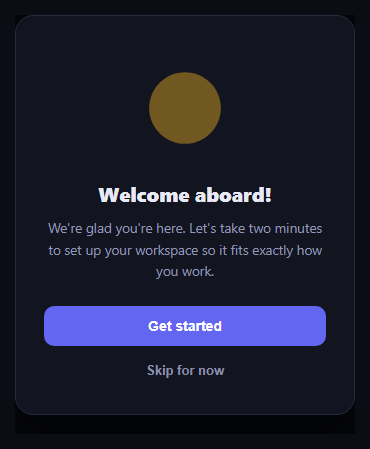
First impressions matter, and this onboarding modal uses a real Lottie animation from lottie-web as a friendly animated mascot at the top of a welcome screen, rather than a static logo or icon.
The mascot animation
The lottie-web UMD script loads from a CDN via cdnUrls, and on page load the snippet calls lottie.loadAnimation({ container, renderer: 'svg', loop: true, autoplay: true, animationData }) against an inline animation JSON object, so the mascot pulses continuously behind the welcome copy without any external .json request.
Welcome copy and primary action
Below the mascot, a bold headline and one short paragraph explain what's about to happen, followed by a full-width primary "Get started" button that would normally kick off a setup wizard or product tour.
A real skip path
A secondary "Skip for now" link sits below the primary button, giving users who already know the product an obvious way out without hunting for a close icon — both actions in this demo render a status message confirming which path was taken.
Step by step
How to Use
- 1Load the snippetClick "Lottie Onboarding Mascot Modal" in the sidebar to load its HTML, CSS, and JS into the editor panels. The preview updates instantly.
- 2Edit the codeModify any panel — HTML, CSS, or JS. The preview refreshes as you type. Use Reset in each panel header to restore the original.
- 3Preview on devicesClick the Mobile (375px), Tablet (768px), or Desktop buttons in the preview header to check responsiveness.
- 4Export in your formatClick "HTML" to download a standalone file, "JSX" for a React component, "Tailwind" for a React + Tailwind CSS component, "Tailwind HTML" for a standalone HTML file with Tailwind CDN, "Vue" for a Vue 3 SFC with <template>/<script setup>/<style scoped>, or "Angular" for a standalone Angular .component.ts file. "Copy all" copies the full code to clipboard.
- 5Save your versionClick "Save as", type a name, and press Enter. Your snippet saves to IndexedDB and appears in the Saved tab.
Real-world uses
Common Use Cases
animationData.lottie-web.Got questions?
Frequently Asked Questions
Yes, loop is set to true, so the animation plays continuously for as long as the modal is visible.
In this demo it shows a status message; in a real app you would close the modal and record that the user opted out of onboarding, typically in a user preference or flag.
Yes — export a mascot animation from After Effects with the Bodymovin/Lottie plugin as JSON and pass it as the animationData object in place of the inline example.