

Mobile Search Screen — Free HTML CSS JS UI Snippet
Mobile Search Screen · Mobile · Plain HTML, CSS & JS · Live preview
Copy & paste
Source Code
<div class="msc-phone">
<div class="msc-screen">
<div class="msc-status"><span>9:41</span><span class="msc-batt"><i></i></span></div>
<div class="msc-bar">
<div class="msc-field">
<span class="msc-mag">⚲</span>
<input id="mscInput" type="text" placeholder="Search" autocomplete="off">
<button class="msc-x" id="mscX" aria-label="Clear" hidden>×</button>
</div>
<button class="msc-cancel" id="mscCancel">Cancel</button>
</div>
<div class="msc-scroll">
<div class="msc-default" id="mscDefault">
<div class="msc-shd"><span>Recent</span><button class="msc-clr" id="mscClr">Clear</button></div>
<div class="msc-chips" id="mscRecent">
<button class="msc-chip">wireless earbuds</button>
<button class="msc-chip">running shoes</button>
<button class="msc-chip">coffee grinder</button>
<button class="msc-chip">desk lamp</button>
</div>
<div class="msc-shd"><span>Trending</span></div>
<div class="msc-trend" id="mscTrend"></div>
</div>
<div class="msc-results" id="mscResults" hidden></div>
<p class="msc-none" id="mscNone" hidden>No results for "<span id="mscQ"></span>"</p>
</div>
</div>
</div>*{box-sizing:border-box;margin:0;padding:0}
html{scrollbar-width:none;-ms-overflow-style:none}
html::-webkit-scrollbar{display:none}
body{font-family:system-ui,-apple-system,sans-serif;background:#1e293b;display:flex;justify-content:center;align-items:center;min-height:100vh;padding:24px;scrollbar-width:none;-ms-overflow-style:none}
body::-webkit-scrollbar{display:none}
.msc-phone{width:288px;height:600px;background:#0b1220;border-radius:46px;padding:12px;box-shadow:0 30px 60px -20px rgba(0,0,0,.6),inset 0 0 0 2px #1e293b}
.msc-screen{width:100%;height:100%;border-radius:34px;overflow:hidden;background:#fff;color:#0f172a;display:flex;flex-direction:column}
.msc-status{display:flex;justify-content:space-between;align-items:center;padding:13px 24px 4px;font-size:13px;font-weight:700}
.msc-batt{width:22px;height:11px;border:1.4px solid currentColor;border-radius:3px;position:relative;display:inline-block}
.msc-batt::after{content:'';position:absolute;right:-3px;top:3px;width:2px;height:5px;background:currentColor;border-radius:0 1px 1px 0}
.msc-batt i{position:absolute;left:1.4px;top:1.4px;bottom:1.4px;width:70%;background:currentColor;border-radius:1px}
.msc-bar{display:flex;align-items:center;gap:6px;padding:6px 12px 12px;border-bottom:1px solid #f1f5f9}
.msc-field{flex:1;display:flex;align-items:center;gap:7px;background:#f1f5f9;border-radius:11px;padding:9px 12px;transition:box-shadow .15s}
.msc-field:focus-within{box-shadow:0 0 0 2px #c7d2fe;background:#fff}
.msc-mag{color:#94a3b8;font-size:14px}
.msc-field input{flex:1;border:none;background:none;outline:none;font-size:13.5px;font-family:inherit;color:inherit}
.msc-x{background:#cbd5e1;color:#fff;border:none;width:18px;height:18px;border-radius:50%;font-size:13px;cursor:pointer;display:flex;align-items:center;justify-content:center;line-height:1}
.msc-cancel{background:none;border:none;color:#6366f1;font-size:13px;font-weight:600;cursor:pointer;white-space:nowrap;max-width:0;overflow:hidden;opacity:0;transition:max-width .2s,opacity .2s}
.msc-cancel.show{max-width:60px;opacity:1}
.msc-scroll{flex:1;overflow-y:auto;padding:12px 14px 18px;scrollbar-width:none;-ms-overflow-style:none}
.msc-scroll::-webkit-scrollbar{display:none}
.msc-shd{display:flex;align-items:center;justify-content:space-between;margin:6px 2px 10px}
.msc-shd span{font-size:13px;font-weight:800}
.msc-clr{background:none;border:none;color:#6366f1;font-size:12px;font-weight:700;cursor:pointer}
.msc-chips{display:flex;flex-wrap:wrap;gap:8px;margin-bottom:20px}
.msc-chip{background:#f1f5f9;border:none;border-radius:99px;padding:8px 14px;font-size:12.5px;color:#334155;cursor:pointer;font-family:inherit;font-weight:500;transition:background .15s}
.msc-chip:hover{background:#e2e8f0}
.msc-trend{display:flex;flex-direction:column;gap:2px}
.msc-trow{display:flex;align-items:center;gap:12px;padding:9px 4px;cursor:pointer;border-radius:8px}
.msc-trow:hover{background:#f8fafc}
.msc-trank{font-size:14px;font-weight:800;color:#6366f1;width:16px}
.msc-tname{flex:1;font-size:13px;font-weight:500}
.msc-tup{font-size:11px;color:#22c55e;font-weight:700}
.msc-results{display:flex;flex-direction:column}
.msc-rrow{display:flex;align-items:center;gap:11px;padding:10px 4px;cursor:pointer;border-radius:8px}
.msc-rrow:hover{background:#f8fafc}
.msc-ric{width:34px;height:34px;border-radius:9px;background:#eef2ff;display:flex;align-items:center;justify-content:center;font-size:16px;flex-shrink:0}
.msc-rname{flex:1;font-size:13px}
.msc-rname mark{background:#fde68a;color:inherit;border-radius:2px;padding:0 1px}
.msc-rcat{font-size:11px;color:#94a3b8}
.msc-none{text-align:center;color:#94a3b8;font-size:13px;padding:40px 16px}var CATALOG = [
{ name: 'Wireless Earbuds Pro', cat: 'Electronics', icon: '🎧' },
{ name: 'Running Shoes', cat: 'Sportswear', icon: '👟' },
{ name: 'Coffee Grinder', cat: 'Kitchen', icon: '☕' },
{ name: 'LED Desk Lamp', cat: 'Home Office', icon: '💡' },
{ name: 'Mechanical Keyboard', cat: 'Electronics', icon: '⌨' },
{ name: 'Yoga Mat', cat: 'Sportswear', icon: '🧘' },
{ name: 'Ceramic Mug Set', cat: 'Kitchen', icon: '🍵' },
{ name: 'Noise-Cancelling Headphones', cat: 'Electronics', icon: '🎧' },
{ name: 'Water Bottle', cat: 'Sportswear', icon: '🍶' },
{ name: 'Standing Desk', cat: 'Home Office', icon: '🪑' }
];
var TRENDING = [
{ name: 'smart watch', up: '+42%' },
{ name: 'air fryer', up: '+31%' },
{ name: 'mechanical keyboard', up: '+18%' },
{ name: 'linen shirt', up: '+12%' }
];
var input = document.getElementById('mscInput');
var clearX = document.getElementById('mscX');
var cancel = document.getElementById('mscCancel');
var def = document.getElementById('mscDefault');
var results = document.getElementById('mscResults');
var none = document.getElementById('mscNone');
var qEl = document.getElementById('mscQ');
// build trending list
var trend = document.getElementById('mscTrend');
TRENDING.forEach(function(t, i){
var row = document.createElement('div');
row.className = 'msc-trow';
row.innerHTML = '<span class="msc-trank">' + (i+1) + '</span><span class="msc-tname">' + t.name + '</span><span class="msc-tup">▲ ' + t.up + '</span>';
row.addEventListener('click', function(){ input.value = t.name; run(); });
trend.appendChild(row);
});
function esc(s){ return s.replace(/[.*+?^${}()|[\]\\]/g, '\\$&'); }
function run(){
var q = input.value.trim();
clearX.hidden = q === '';
cancel.classList.toggle('show', q !== '' || document.activeElement === input);
if (q === ''){
def.hidden = false; results.hidden = true; none.hidden = true; return;
}
def.hidden = true;
var matches = CATALOG.filter(function(item){ return item.name.toLowerCase().indexOf(q.toLowerCase()) > -1; });
if (!matches.length){
results.hidden = true; none.hidden = false; qEl.textContent = q; return;
}
none.hidden = true; results.hidden = false;
var re = new RegExp('(' + esc(q) + ')', 'ig');
results.innerHTML = matches.map(function(item){
var hi = item.name.replace(re, '<mark>$1</mark>');
return '<div class="msc-rrow"><span class="msc-ric">' + item.icon + '</span><div class="msc-rname">' + hi + '<div class="msc-rcat">' + item.cat + '</div></div></div>';
}).join('');
}
input.addEventListener('input', run);
input.addEventListener('focus', function(){ cancel.classList.add('show'); });
clearX.addEventListener('click', function(){ input.value = ''; input.focus(); run(); });
cancel.addEventListener('click', function(){ input.value = ''; input.blur(); cancel.classList.remove('show'); run(); });
document.querySelectorAll('.msc-chip').forEach(function(chip){
chip.addEventListener('click', function(){ input.value = chip.textContent; input.focus(); run(); });
});
document.getElementById('mscClr').addEventListener('click', function(){
document.getElementById('mscRecent').innerHTML = '<span style="font-size:12px;color:#94a3b8">No recent searches</span>';
});Extend with AI
Take This Snippet Further With AI
The AI prompt for this one is for Patreon supporters ($3 a month), along with a site with no ads. Supporters enter the passcode once and it is remembered in this browser.
What's included
Features
About this UI Snippet
Mobile Search Screen — Live Search UI
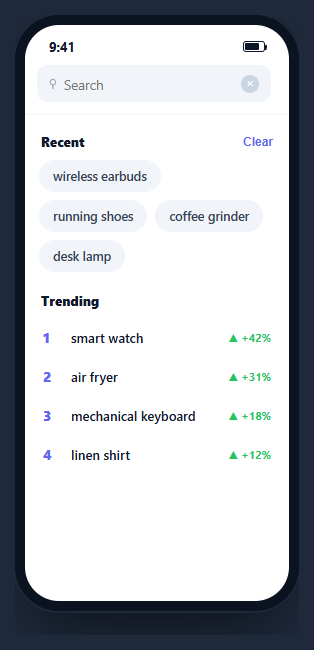
A search screen has two faces — a resting state with recent searches and trending queries, and an active state that filters results live as you type. This snippet builds a complete, interactive one inside a CSS phone frame: typing filters a catalog and highlights the matched substring, recent chips and trending rows prefill the query, a cancel button slides in on focus, and a no-results state names what you searched — in HTML, CSS, and vanilla JavaScript with no dependency.
Two states from one input
When the field is empty, the default view shows recent-search chips and a ranked trending list; the moment you type, that view hides and a results list takes its place. A single run() function reads the input, decides which view to show, and renders — so every entry point (typing, tapping a chip, tapping a trend row) funnels through the same logic and the screen stays consistent.
Live filtering with highlighted matches
Typing filters a catalog array by a case-insensitive substring test, then renders each match with the matched portion wrapped in a <mark>. The highlight is built by replacing the query with a captured group using a RegExp, and the query is escaped first so special characters like . or ( cannot break the pattern — the safety step most naive highlighters miss. Each result shows an icon, the highlighted name, and its category.
The sliding cancel button
Focusing the field slides a Cancel button in from zero width using a max-width and opacity transition, and tapping it clears the query, blurs the field, and returns to the default view — the exact iOS search-bar behavior. A small clear (×) button inside the field appears only when there is text.
Prefill from recent and trending
Recent searches are tappable chips and trending queries are a ranked list with a rising-percentage badge; tapping either drops its text into the input and runs the search immediately, so common queries are one tap away. The "Clear" action empties the recent list and leaves a quiet placeholder in its place.
A named empty state
When nothing matches, the results are hidden and a message echoes the exact query — "No results for …" — so the user knows the search ran and simply found nothing, rather than staring at a blank screen wondering if it is loading.
Accessibility and performance
The field is a real text input and the recent chips, trending rows, cancel, and clear controls are all buttons, so the screen is fully keyboard-operable. When you adapt this, wrap the results region in an aria-live="polite" container so the match count is announced as you type, give the input role="searchbox" semantics, and make sure the highlighted <mark> does not swallow the readable text — screen readers still read marked text, so the emphasis is purely visual. Performance is fine for a client-side catalog: filtering is a single indexOf pass over the array per keystroke and the results render with one innerHTML write. The important safety detail is escaping the query before building the highlight RegExp, which prevents both broken patterns and needless re-compilation errors. For a real backend, debounce the input by a couple hundred milliseconds so you are not firing a request per character, and guard against out-of-order responses by tracking the latest query. Rendering matches by splitting on the match, rather than injecting HTML, avoids any escaping concerns entirely when you port to a framework.
Reusing it
Swap the catalog for your data or an async endpoint (debounce the input for network calls), persist recent searches, and wire results to detail screens. Lift it out of the phone frame for a responsive web search, or keep it framed beside an expandable search field to present a full flow.
Step by step
How to Use
- 1Paste HTML, CSS, and JSA search screen renders with recent chips and a ranked trending list.
- 2Focus the fieldA Cancel button slides in from the right edge.
- 3Type a queryThe default view hides and matching catalog items appear with the typed text highlighted.
- 4Tap a chip or trendRecent chips and trending rows prefill the query and run the search instantly.
- 5Clear or cancelThe inline × clears the text; Cancel resets everything to the default view.
- 6See no resultsSearch for something absent and a message echoes your exact query.
Real-world uses
Common Use Cases
run() function for every entry point.Got questions?
Frequently Asked Questions
Each result name has the query wrapped in a mark tag. The code builds a case-insensitive RegExp from the query with a capture group and replaces the match with the same text inside mark. Crucially it escapes the query first, so characters like . ( or [ are treated literally and cannot break the pattern.
User input can contain regex metacharacters. Without escaping, typing an open parenthesis or a plus would create an invalid or unintended pattern and either throw or highlight the wrong thing. Escaping those characters first makes the search treat the query as literal text, which is what a user expects.
A single run() function reads the input value. If it is empty, the recent-and-trending default view shows and the results hide; if there is text, the default hides and results render. Because typing, chips, and trending taps all call run(), the two states never get out of sync.
Cancel starts at max-width zero with opacity zero. Focusing the field adds a class that transitions its max-width and opacity up, sliding it into view. Tapping it clears the query, blurs the field, and removes the class so it slides away — the standard iOS search-bar interaction.
Hold the query in state and derive results with a filter in useMemo (React), computed (Vue), or a pipe (Angular). For a live API, debounce the input and fetch in an effect, guarding against out-of-order responses. Render highlights by splitting on the match rather than using innerHTML. Persist recents in storage. Tailwind expresses the field, chips, and rows with utilities.