


Motion One Spring Cards — Free Spring-Physics Card Grid Snippet
Motion One Spring Cards · Cards · Plain HTML, CSS & JS · Live preview
Copy & paste
Source Code
<section class="msc-wrap">
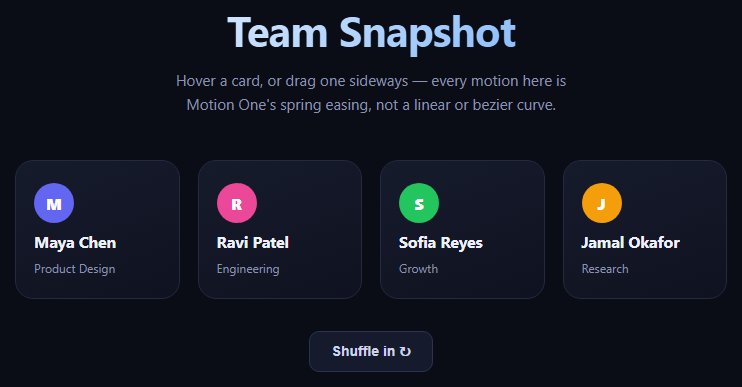
  <header class="msc-head"><h1>Team Snapshot</h1><p>Hover a card, or drag one sideways — every motion here is Motion One's spring easing, not a linear or bezier curve.</p></header>
  <div class="msc-grid" id="mscGrid">
    <div class="msc-card" data-drag="true"><span class="msc-avatar" style="background:#6366f1">M</span><h3>Maya Chen</h3><p>Product Design</p></div>
    <div class="msc-card" data-drag="true"><span class="msc-avatar" style="background:#ec4899">R</span><h3>Ravi Patel</h3><p>Engineering</p></div>
    <div class="msc-card" data-drag="true"><span class="msc-avatar" style="background:#22c55e">S</span><h3>Sofia Reyes</h3><p>Growth</p></div>
    <div class="msc-card" data-drag="true"><span class="msc-avatar" style="background:#f59e0b">J</span><h3>Jamal Okafor</h3><p>Research</p></div>
  </div>
  <button class="msc-shuffle" id="mscShuffle">Shuffle in ↻</button>
</section>*{box-sizing:border-box;margin:0;padding:0}
body{font-family:system-ui,-apple-system,sans-serif;background:#0a0d16;color:#eef1fb;min-height:100vh}
.msc-wrap{max-width:760px;margin:0 auto;padding:60px 24px}
.msc-head{text-align:center;margin-bottom:44px}
.msc-head h1{font-size:clamp(28px,5vw,42px);letter-spacing:-.02em;margin-bottom:10px;background:linear-gradient(135deg,#fff,#60a5fa);-webkit-background-clip:text;-webkit-text-fill-color:transparent;background-clip:text}
.msc-head p{color:#8b93b0;font-size:15px;max-width:440px;margin:0 auto;line-height:1.6}
.msc-grid{display:grid;grid-template-columns:repeat(auto-fit,minmax(150px,1fr));gap:18px;margin-bottom:32px}
.msc-card{
background:linear-gradient(160deg,#161b2c,#0f1220);border:1px solid #232a41;border-radius:18px;
padding:22px 18px;display:flex;flex-direction:column;align-items:flex-start;gap:8px;
cursor:grab;touch-action:pan-y;opacity:0;transform:scale(.85);
}
.msc-card:active{cursor:grabbing}
.msc-avatar{width:40px;height:40px;border-radius:50%;display:flex;align-items:center;justify-content:center;font-weight:800;font-size:16px;color:#fff}
.msc-card h3{font-size:16px;letter-spacing:-.01em}
.msc-card p{font-size:12px;color:#8b93b0}
.msc-shuffle{display:block;margin:0 auto;padding:11px 22px;border-radius:10px;border:1px solid #2b3350;background:#151a2c;color:#cdd4ee;font-size:14px;font-weight:600;cursor:pointer}
.msc-shuffle:hover{background:#1d2440}// Motion One is loaded globally from the CDN as `Motion` (UMD build),
// exposing animate(), stagger(), and spring().
const { animate, stagger, spring } = Motion;
const cards = document.querySelectorAll('.msc-card');
const shuffleBtn = document.getElementById('mscShuffle');
// Entrance: spring physics instead of a duration/easing curve — spring()
// takes stiffness/damping-style parameters and settles naturally.
function enter() {
animate(
cards,
{ opacity: [0, 1], scale: [0.85, 1], y: [24, 0] },
{ delay: stagger(0.08), easing: spring({ stiffness: 220, damping: 18 }) }
);
}
enter();
// Hover: a quick spring "pop" on scale, independent per card.
cards.forEach(card => {
card.addEventListener('mouseenter', () => {
animate(card, { scale: 1.05, y: -6 }, { easing: spring({ stiffness: 300, damping: 14 }) });
});
card.addEventListener('mouseleave', () => {
animate(card, { scale: 1, y: 0 }, { easing: spring({ stiffness: 300, damping: 18 }) });
});
// Drag: simple pointer-driven horizontal drag that springs back to
// center on release, using the same spring() easing as the entrance.
let startX = 0, originX = 0, dragging = false;
card.addEventListener('pointerdown', e => {
dragging = true;
startX = e.clientX;
originX = 0;
card.setPointerCapture(e.pointerId);
});
card.addEventListener('pointermove', e => {
if (!dragging) return;
originX = e.clientX - startX;
card.style.transform = `translateX(${originX}px) rotate(${originX / 20}deg)`;
});
card.addEventListener('pointerup', () => {
dragging = false;
animate(card, { x: 0, rotate: 0 }, { easing: spring({ stiffness: 260, damping: 16 }) });
card.style.transform = '';
});
});
// Shuffle button: replay the staggered spring entrance.
shuffleBtn.addEventListener('click', () => {
animate(cards, { opacity: [1, 0], scale: [1, 0.85], y: [0, 24] }, { duration: 0.15 })
.finished.then(enter);
});Extend with AI
Take This Snippet Further With AI
The AI prompt for this one is for Patreon supporters ($3 a month, 7 days free), along with a site with no ads. Supporters enter the passcode once and it is remembered in this browser.
What's included
Features
About this UI Snippet
Motion One Spring Cards — Spring Physics Entrances, Hover Pops & Drag-Back with Motion One
Most CSS and JS animation relies on easing curves — bezier functions that approximate motion but never quite capture the springy overshoot-and-settle of a real physical object. This snippet uses Motion One, a small (under 5KB core) animation library built directly on the native Web Animations API, to drive card entrances, hover states, and drag interactions entirely with spring() easing instead of duration-based curves.
Why spring easing instead of bezier curves
A cubic-bezier easing curve is defined by four fixed control points and always takes the same shape regardless of how far an element travels. A spring, by contrast, is defined by physical parameters — stiffness and damping — and its motion emerges from simulating those forces frame by frame. This means a spring naturally travels faster over a longer distance and settles at a consistent, physical rate, which is why UI built with real device-like motion (iOS, native apps) tends to feel more responsive than web UI relying purely on timed curves. Motion One's spring() helper exposes this as a drop-in easing option for its animate() calls, so this snippet uses the exact same pattern as Scroll Reveal Grid's stagger, just with spring physics instead of a power curve.
Staggered spring entrance
On load, animate(cards, {...}, { delay: stagger(0.08), easing: spring({ stiffness: 220, damping: 18 }) }) animates every card's opacity, scale, and y-offset together, with each card's start delayed by 0.08s more than the previous one via Motion One's stagger() helper — the same staggered-wave idea as a GSAP-based reveal, but expressed with a two-line API and no separate plugin.
Hover pop and drag-back
Hovering a card triggers a snappier spring (stiffness: 300, damping: 14) that lifts and scales it slightly — high stiffness with low damping produces a small overshoot, giving the hover a lively "pop" rather than a flat linear lift. Dragging a card horizontally via pointer events, then releasing it, animates it back to x: 0, rotate: 0 using another spring — so letting go of a card doesn't just snap it back instantly, it bounces back the way a card on a real desk would.
Loading Motion One from a CDN
This snippet loads Motion One's UMD build directly via a <script> tag from jsDelivr, which exposes a global Motion object with animate, stagger, and spring — no bundler or import statement required, matching how this snippet library loads other CDN-based effects. If you're working in a module-based project instead, the same functions are available as named exports from the motion npm package or its ESM CDN build.
Customizing it
Tune stiffness/damping for snappier or looser motion (higher stiffness = faster, lower damping = more bounce), change the stagger delay, or swap the horizontal-only drag for a full 2D drag using Motion One's built-in drag utilities. Pair this with Feature Cards or a Product Card grid for a livelier catalog entrance.
Step by step
How to Use
- 1Add the Motion One CDNInclude the motion.js UMD build from the CDN panel — it exposes a global Motion object.
- 2Paste HTML, CSS, and JSA team card grid and a shuffle button render.
- 3Watch the entranceCards spring in with a staggered 0.08s delay between each.
- 4Hover a cardIt springs up and scales slightly with a snappy pop.
- 5Drag a card sidewaysRelease it — it springs back to center with a slight bounce.
- 6Click Shuffle inCards fade out quickly, then replay the staggered spring entrance.
Real-world uses
Common Use Cases
stagger(0.08) to delay each card in turn.Got questions?
Frequently Asked Questions
stiffness controls how strongly the spring pulls toward its target — higher values move faster and more urgently. damping controls how much the motion is resisted as it approaches the target — lower damping allows more oscillation and overshoot before settling, higher damping approaches smoothly with little or no bounce. Motion One simulates these forces frame by frame rather than interpolating along a fixed curve, which is why the resulting motion looks different depending on how far the element travels.
Motion One is a much smaller library (a few KB versus GSAP's larger core plus plugins) built directly on the browser's native Web Animations API, which makes it a good fit when spring easing and simple entrance/hover/drag animations are all you need. GSAP remains the stronger choice for complex timelines, scroll-triggered sequencing, or SVG morphing — see Scroll Reveal Grid for a GSAP-based example doing exactly that.
Pointer events (pointerdown/pointermove/pointerup) track horizontal movement and directly set a translateX/rotate transform on the card while dragging, giving instant 1:1 feedback. On pointerup, Motion One's animate() call takes over, animating x and rotate back to 0 using spring() easing — so the release feels like a physical snap-back rather than an abrupt jump.
Yes. This snippet loads the UMD build via a <script> tag so animate, stagger, and spring are available as the global Motion object with no bundler. In a module-based project, install the motion npm package and import { animate, stagger, spring } from 'motion' directly, or import from an ESM CDN like esm.sh/motion if you're not using a bundler but want ES module syntax.
Import animate, stagger, and spring from the motion package (or reference the CDN global if not bundling), then call animate() inside a mount effect (useEffect, onMounted, or ngAfterViewInit) targeting refs to your card elements rather than querySelectorAll. Attach the pointer event handlers as React/Vue/Angular event bindings instead of addEventListener, keeping the same spring() easing values.