

Neon Flicker Sign — CSS Glowing Text With Dying Tubes
Neon Flicker Sign · Text Animation · Plain HTML, CSS & JS · Live preview
Copy & paste
Source Code
<main class="wall">
<div class="sign" id="sign">
<p class="kicker">Diner & Bar · Since 1987</p>
<h1 class="neon pink" aria-label="Open">
<span aria-hidden="true">O</span><span aria-hidden="true" class="flick">P</span><span aria-hidden="true">E</span><span aria-hidden="true" class="flick late">N</span>
</h1>
<p class="neon cyan sub">All night long</p>
</div>
<button type="button" class="power" id="power" aria-pressed="true">Cut the power</button>
</main>*{box-sizing:border-box;margin:0;padding:0}
body{min-height:100vh;display:grid;place-items:center;background:#0b0710;font-family:system-ui,sans-serif;overflow:hidden}
.wall{width:100%;min-height:100vh;display:grid;place-items:center;align-content:center;gap:36px;padding:24px;background:
radial-gradient(ellipse at 50% 40%,rgba(255,45,149,.10),transparent 60%),
repeating-linear-gradient(0deg,#120a1a 0 38px,#0e0815 38px 40px)}
.sign{text-align:center;padding:34px 54px 30px;border:3px solid #2a1535;border-radius:22px;background:rgba(10,5,16,.7)}
.kicker{font-size:12px;letter-spacing:.34em;text-transform:uppercase;color:#7c6a8c;margin-bottom:10px}
.neon{font-family:'Brush Script MT','Segoe Script',cursive;font-weight:400;line-height:1;transition:color .2s,text-shadow .2s}
.neon.pink{font-size:clamp(80px,17vw,150px);letter-spacing:.06em;color:#ffe3f1;--glow:#ff2d95;
text-shadow:0 0 4px #fff,0 0 10px var(--glow),0 0 24px var(--glow),0 0 48px var(--glow),0 0 90px var(--glow)}
.neon.cyan{font-size:clamp(26px,5vw,40px);letter-spacing:.12em;color:#dffbff;--glow:#18e0ff;margin-top:6px;
text-shadow:0 0 3px #fff,0 0 9px var(--glow),0 0 22px var(--glow),0 0 44px var(--glow)}
.pink span{display:inline-block}
/* Two tubes are failing: they drop out in short, uneven bursts */
.flick{animation:flicker 3.6s linear infinite}
.flick.late{animation-duration:5.2s;animation-delay:1.1s}
@keyframes flicker{
0%,17%,22%,26%,52%,56%,100%{opacity:1}
18%,21%,24%,53%,55%{opacity:.18;text-shadow:none;color:#6b3a58}
}
/* Power off: every tube goes dark. Power on: each one stutters back, left to right */
.sign.off .neon{color:#3b2a45;text-shadow:none}
.sign.off .flick{animation:none}
.sign.warming .pink span{animation:strike .9s steps(1,end) both;animation-delay:calc(var(--i) * .22s)}
@keyframes strike{0%{opacity:.15}15%{opacity:1}30%{opacity:.1}45%{opacity:.9}60%{opacity:.2}100%{opacity:1}}
.power{font:600 13px system-ui,sans-serif;letter-spacing:.08em;text-transform:uppercase;color:#d9c7e6;background:#1a1024;border:1px solid #3a2550;border-radius:999px;padding:11px 24px;cursor:pointer}
.power:hover{background:#241533}
.power:focus-visible{outline:2px solid #18e0ff;outline-offset:3px}
@media (prefers-reduced-motion:reduce){.flick,.sign.warming .pink span{animation:none!important}}var sign = document.getElementById('sign');
var btn = document.getElementById('power');
var letters = sign.querySelectorAll('.pink span');
letters.forEach(function (el, i) { el.style.setProperty('--i', i); });
btn.addEventListener('click', function () {
var on = sign.classList.contains('off'); // clicking while off turns it on
if (!on) {
sign.classList.remove('warming');
sign.classList.add('off');
} else {
sign.classList.remove('off');
sign.classList.add('warming');
setTimeout(function () { sign.classList.remove('warming'); }, 2000);
}
btn.setAttribute('aria-pressed', String(on));
btn.textContent = on ? 'Cut the power' : 'Switch on';
});Extend with AI
Take This Snippet Further With AI
Ask an AI coding assistant to explain why the flicker keyframes hold full opacity for most of the cycle and only dip in short bursts, instead of easing smoothly, and how giving the two failing letters different durations and delays stops the sign looking like a loop. A useful follow-up is how the power-on stagger is built from one CSS variable set in JavaScript, and whether it could be done with no JavaScript using sibling selectors.
Prompt to recreate it
Copy this into your AI assistant of choice to build the effect from scratch, or as a jumping-off point for your own variant:
Build a neon sign text effect in plain HTML, CSS and a little JavaScript, with no libraries.

Requirements:
- A sign panel on a dark brick-style background with a small kicker line, a large script-font word where every letter is its own span, and a smaller second neon line in a different colour.
- The glow is a stack of text-shadow layers: a tight white core, then wide coloured halos at roughly 10, 24, 48 and 90px, with the colour held in a CSS custom property so the sign can be recoloured in one place.
- Only some letters flicker. Give those a flicker keyframe animation that stays at full opacity for long stretches and drops to about 18% opacity with the shadow removed in short uneven bursts, and give a second flickering letter a different duration and a delay so the pattern never lines up.
- A "Cut the power" toggle button with aria-pressed. When off, every tube goes dark with no shadow. When switched back on, each letter plays a short stutter animation delayed by its index (set as a CSS variable from JavaScript), so the sign relights left to right.
- Put the word in a real heading with an aria-label and hide the decorative letter spans from assistive technology.
- Remove every animation under prefers-reduced-motion so the sign stays steadily lit.
Want to tighten it up first? Run this prompt through the AI Prompt Studio to score it across 8 quality dimensions, catch anti-patterns, and tune the wording for Claude, ChatGPT, or Gemini before you paste it in.
What's included
Features
--glow variable recolours everything.flick stutter, each with its own duration and delay, so the pattern feels broken rather than looped.animation-delay, ending in the steady glow.<h1> with an aria-label, the decorative letter spans are hidden from assistive tech, and the toggle exposes aria-pressed.prefers-reduced-motion set, all flicker and relight animations are removed and the sign stays steadily lit.About this UI Snippet
Neon Flicker Sign — Layered Text-Shadow Glow and Uneven Keyframe Flicker
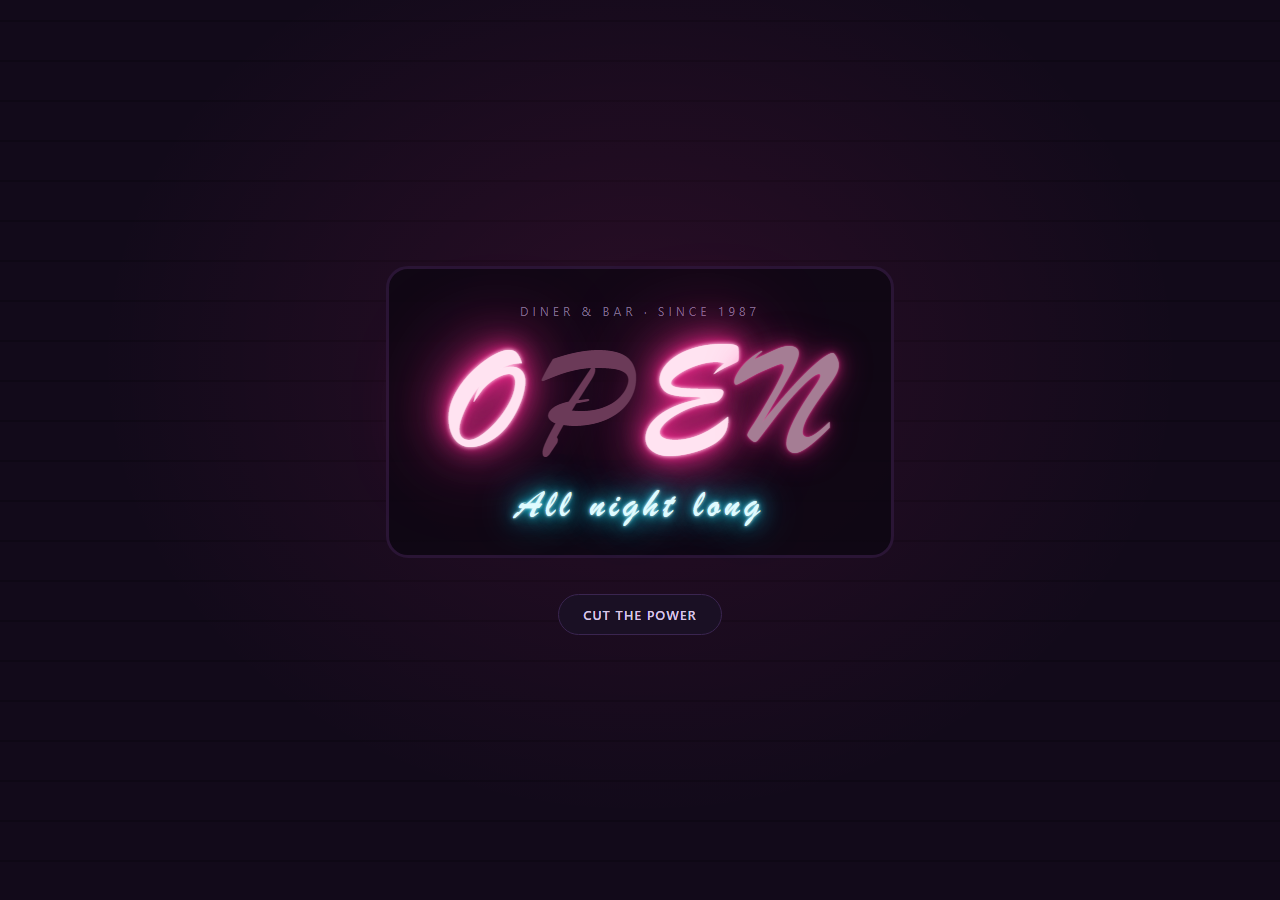
Glowing text is easy; believable neon is harder. A real tube sign doesn't pulse smoothly, it stutters: one letter drops out for a split second, comes back, drops again, and the rest of the sign stays steady. This snippet reproduces that with a diner-style "OPEN" sign where only two of the four letters misbehave, each on its own cycle length, so the pattern never looks like a loop.
The glow is five shadows deep
Each neon line stacks text-shadow layers from tight to wide: a 4px white core, then three to four coloured halos at 10, 24, 48 and 90px. The near-white core is what sells "hot tube"; the wide halos are what light up the brick wall around it. The colour lives in a --glow custom property, so recolouring the whole sign is one line.
Flicker is a keyframe with gaps, not a sine wave
The flicker keyframes sit at full brightness for long stretches and then drop to 18% opacity with the shadow stripped and the letter tinted a dead plum, in bursts at 18%, 21%, 24%, 53% and 55%. The second flickering letter reuses the keyframes but runs 5.2s with a 1.1s delay, so the two never line up.
Power off, power on
The button toggles an off class that kills every shadow, then a warming class on the way back, where each letter runs a one-shot strike animation delayed by its index (--i, set from JS), so the sign relights left to right like a real transformer warming up. Without JavaScript the sign still glows and flickers. Reduced-motion users get the steady, fully lit sign.
Step by step
How to Use
- 1Paste the three blocksA dark brick-wall scene renders a pink script "OPEN" with a cyan "All night long" line underneath and a pill button below. Two of the four letters already flicker on their own.
- 2Change the sign textEdit the letters inside the
<h1>and keep each one in its own<span>so it can be lit independently. Updatearia-labelto the full word so screen readers read it as text rather than four letters. - 3Pick which tubes failAdd the
flickclass to any letter you want to misbehave. Addlatefor the slower cycle with a delay. Letters without the class stay solid. - 4Recolour the glowChange
--glowon.neon.pinkor.neon.cyan. Keep the text colour a pale tint of the same hue, since the near-white core is what makes the glow read as light. - 5Tune the stutterIn the
flickerkeyframes, move the percentage stops to change when the dropouts happen, or add more. The animation duration sets how often the pattern repeats.
Real-world uses
Common Use Cases
Got questions?
Frequently Asked Questions
One blur looks like a drop shadow. A tight white core plus several wider coloured halos imitates how light spreads from a glass tube: bright at the centre, fading in steps. Remove the outer two layers for a subtler sign.
Large blurs repaint when animated. Here only opacity animates for the flicker, and the colour change on dropout is instant, so it stays cheap. Avoid animating the blur radius itself.
Wrap each word instead of each letter in a span with the flick class. Whole-word dropouts read more like a failing sign than letter-by-letter noise does on long text.
Yes. Replace the font-family on .neon with a web font such as Monoton or Tilt Neon, and keep the same shadow stack. Thin-stroke fonts need less blur to stay readable.