


Pixel Platformer Game: 3 Levels, Enemies & Checkpoints
Pixel Platformer Game · Games · Plain HTML, CSS & JS · Live preview
For supporters
Source Code
Want the source code?
Play the game for free. Become a WebDevPuneet supporter to unlock the complete HTML, CSS and JavaScript source code, the exports (HTML, React, Vue, Angular, Tailwind) and Fork.
Extend with AI
Take This Snippet Further With AI
The AI prompt for this one is for Patreon supporters ($3 a month), along with a site with no ads. Supporters enter the passcode once and it is remembered in this browser.
What's included
Features
About this UI Snippet
Pixel Platformer: Tile Levels, Stomping Enemies and Game Feel on Canvas
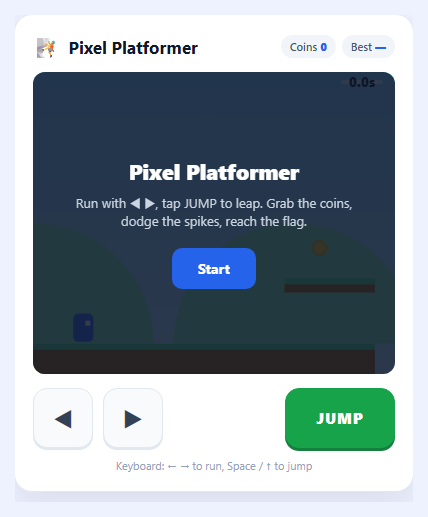
A platformer is the classic proving ground for 2D game programming because a small game has to get several hard things right at once: gravity and collision against a tile map, enemies that can be stomped, a camera that follows the player through a level wider than the screen, and the many small touches that make a jump feel good. This snippet is a complete three-level pixel platformer on a single HTML5 <canvas>, with no libraries and no image files: the sprites are drawn from strings of characters, the sound is synthesised with the Web Audio API, and the levels are plain data. It plays with the arrow keys or A / D and Space, and with an on-screen ◀ ▶ D-pad and JUMP button on a phone.
Levels as data, tiles as a grid
Each level is an object listing ground stretches, one-way planks, brick blocks, spike runs, coins, walkers, bats, springs, checkpoints and the goal flag, all in tile coordinates. buildLevel() turns that into a two-dimensional grid of tile types, and everything else (collision, drawing, enemy edge detection) asks the grid with one function, tileAt(column, row). Adding a fourth level means adding one more object to the LEVELS array. The three included levels (Green Hills, Sunset Ridge and Midnight Run) change the colour theme, the sky, the parallax mountains and the difficulty, and the third adds a moon and stars.
Collision that resolves one axis at a time
The player moves horizontally first and is pushed out of any solid tile it overlaps, then moves vertically and is resolved the same way. Resolving one axis at a time is what stops a character from snagging on the seams between tiles. Planks are one-way: they only catch the player when falling and when the bottom edge was above the plank on the previous step, so you can jump up through a plank and land on it from above. Spikes use a hitbox smaller than their tile so near misses feel fair.
Game feel: coyote time, jump buffering and variable jump height
Three small rules separate a platformer that feels fair from one that feels stiff. *Coyote time* lets you still jump for a few frames after running off a ledge. *Jump buffering* remembers a jump press made a few frames before landing, so you never lose a jump by pressing slightly early. *Variable jump height* cuts the upward speed when you release the button, so a tap is a hop and holding the button is a full jump. Landing and jumping also squash and stretch the sprite, and dust, coin sparkles and a short screen shake give each action weight.
Enemies you can stomp
Mushroom walkers patrol the ground and turn around at walls and at the edge of a platform by checking the tile ahead and below them. Bats fly a sine-wave path. Both are defeated by landing on them from above, which bounces you up, and both cost a life if you touch them from the side, followed by a short blinking invulnerability so one mistake is not a chain of deaths. Springs launch you high, and checkpoint flags set where you restart after a fall or a spike.
A fixed timestep, a smooth camera and a synthesised soundtrack
The simulation advances in fixed 1/60-second steps drained from an accumulator, so jump height and run speed are identical on a 60Hz or a 144Hz display and fast falls cannot tunnel through thin planks. The camera eases toward the player with a little look-ahead and is clamped to the level. Sound effects (jump, coin, stomp, hurt, spring, checkpoint and a short win jingle) are generated with oscillators, with a mute button, and your best score is kept in localStorage.
Step by step
How to Use
- 1Start the gamePress Start (or Enter). You begin level 1 with 3 lives, and a banner shows the level name.
- 2Run and jumpUse the arrow keys or A / D to run, and Space, the up arrow or W to jump; on a phone use the ◀ ▶ buttons and JUMP. Hold jump for a full jump and tap it for a hop.
- 3Stomp enemiesLand on a mushroom or a bat to defeat it and bounce. Touching one from the side costs a life, followed by a short moment of invulnerability.
- 4Collect coins and use checkpointsEach coin is worth 10 points and stomps are worth 50. Passing a checkpoint flag turns it green and sets where you restart after a fall or a spike.
- 5Reach the flagThe goal flag ends the level. You get a bonus for finishing quickly and for every coin collected, then move on to the next of the three levels.
- 6Edit the levelsThe LEVELS array near the top of the JS holds every level as data in tile coordinates. Move planks, add spikes or enemies, or add a new level object, and tune GRAV, RUN and JUMP_V to change how the game feels.
Real-world uses
Common Use Cases
Got questions?
Frequently Asked Questions
Coyote time gives you a few frames after you walk off a ledge during which a jump still works, and jump buffering remembers a jump pressed a few frames before you land and fires it on touchdown. Both are set by two constants, COYOTE and BUFFER, near the top of the JS. They make the game forgive timing the player could not reasonably see, and setting either to 0 shows how stiff the game feels without it.
Jumping sets a strong upward speed, and while the jump button is held the character rises fully. If the button is released while still moving up faster than JUMP_CUT, the upward speed is clamped to that value, so a quick tap gives a small hop and holding gives a full jump. Bounces from springs and stomps set a flag that skips the clamp.
A variable step lets a fast-falling character move past a thin plank between two frames, and it makes jump height depend on the frame rate. The loop adds the elapsed time to an accumulator and runs update() once for every 1/60 of a second in it, so the game behaves the same on a 60Hz and a 144Hz display, while drawing still happens once per frame.
Each level in the LEVELS array lists ground stretches as [from, to] columns, planks as [column, row, length], bricks as [column, row, width, height], spikes, coins, walkers (column), bats ([column, row]), springs, checkpoints and the flag column. Row 13 is the ground surface. Keep gaps under about 5 tiles or add a plank over them, because a jump covers about 6 tiles.
The sprites are arrays of strings where each character is a colour from the PAL object, drawn as 2x2 squares with fillRect, and flipped by mirroring the column. The sounds are short oscillator tones with a falling or rising frequency, made with the Web Audio API the first time one plays, so there are no image or audio files, and the mute button simply skips them.