
Pomodoro Countdown Timer — Free HTML CSS JS Snippet
Pomodoro Countdown Timer · Tools · Plain HTML, CSS & JS · Live preview
What's included
Features
About this UI Snippet
Pomodoro Countdown Timer — Drift-Free Focus and Break Countdown
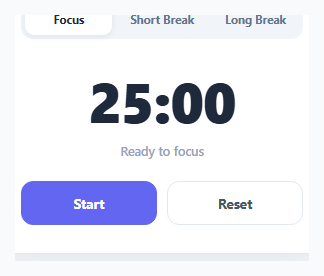
A naive countdown timer that just decrements a counter every second inside setInterval will drift over time, because setInterval isn't guaranteed to fire exactly every 1000ms — background tabs, GC pauses, and CPU load all introduce small delays that accumulate into visible skew over a 25-minute session. This timer avoids that by never trusting the interval's timing directly.
Timestamp-based countdown instead of a decrementing counter
When the timer starts, start() computes endTime = Date.now() + remainingMs once. From then on, every tick (running every 250ms for a responsive display) recomputes remainingMs = endTime - Date.now() fresh from the wall clock, rather than subtracting a fixed amount each tick. Because the remaining time is always derived from two real timestamps, any delay in when a particular tick actually fires has no effect on accuracy — the displayed time is always correct at the moment it's read.
Pause preserves exact remaining time
Pausing calls clearInterval and recomputes remainingMs one final time from endTime - Date.now() before stopping, so resuming later calls start() again with that exact remaining value and computes a fresh endTime — there's no accumulated rounding error across multiple pause/resume cycles.
Three modes, one shared engine
Focus (25 min), Short Break (5 min), and Long Break (15 min) are just three different durationMs values applied to the same setMode()/start()/tick() functions — switching tabs resets remainingMs to the new mode's duration and updates the active tab styling, but uses identical timing logic underneath.
Auto-advance on completion
When remainingMs reaches zero, the timer shows "Time's up!" and, after a short pause, automatically switches to the logically next mode (focus after a break, short break after a focus session) via a lookup table, so a full focus/break cycle can run without the user manually re-selecting a tab each time.
Step by step
How to Use
- 1Load the snippetClick "Pomodoro Countdown Timer" in the sidebar to load its HTML, CSS, and JS into the editor panels. The preview updates instantly.
- 2Edit the codeModify any panel — HTML, CSS, or JS. The preview refreshes as you type. Use Reset in each panel header to restore the original.
- 3Preview on devicesClick the Mobile (375px), Tablet (768px), or Desktop buttons in the preview header to check responsiveness.
- 4Export in your formatClick "HTML" to download a standalone file, "JSX" for a React component, "Tailwind" for a React + Tailwind CSS component, "Tailwind HTML" for a standalone HTML file with Tailwind CDN, "Vue" for a Vue 3 SFC with <template>/<script setup>/<style scoped>, or "Angular" for a standalone Angular .component.ts file. "Copy all" copies the full code to clipboard.
- 5Save your versionClick "Save as", type a name, and press Enter. Your snippet saves to IndexedDB and appears in the Saved tab.
Real-world uses
Common Use Cases
Date.now() plus a duration on every tick.setInterval drifts over time, due to background tabs, garbage collection and CPU load.Got questions?
Frequently Asked Questions
setInterval callbacks are not guaranteed to fire at exactly the requested interval — delays accumulate over a 25-minute session and cause visible drift. By recomputing remainingMs as endTime - Date.now() on every tick, the displayed time is always correct regardless of exactly when a given tick fires.
Pausing captures the exact remaining milliseconds (endTime - Date.now()) and stops the interval. Resuming computes a brand new endTime from that exact remaining value, so no time is lost or gained across multiple pause/resume cycles.
Yes — when a session reaches zero, after a short "Time's up!" pause it automatically switches to the logically next mode (a break after focus, focus after a break) using a lookup table, though you can start or reset manually at any time.
Yes — edit the data-mins attribute on each tab button in the HTML (and the fallback minute values in the auto-advance logic in the JS) to whatever durations you want for each mode.
Build with AI
Build, Understand, Optimize, and Extend It With AI
Hand this snippet's HTML, CSS, and JavaScript to an AI coding assistant like Claude and ask it to adapt "Pomodoro Countdown Timer" to your project — restyle it to match your design system, wire it up to real data instead of the static example, or port it to the framework you're building in.
Prompt to recreate it
Copy this into your AI assistant of choice to build the effect from scratch, or as a jumping-off point for your own variant:
Build a tools component called "Pomodoro Countdown Timer" using plain HTML, CSS, and vanilla JavaScript — no framework, no build step.

Requirements:
- Match the structure and behavior of the "Pomodoro Countdown Timer" snippet from the UI Snippets Library.
- Keep the markup semantic and the styling self-contained (no external dependencies beyond what the original snippet uses).
- Keep the JavaScript vanilla, with no framework runtime required.
- Make it easy to restyle via CSS custom properties or class overrides so it can be dropped into a real project.
Want to tighten it up first? Run this prompt through the AI Prompt Studio to score it across 8 quality dimensions, catch anti-patterns, and tune the wording for Claude, ChatGPT, or Gemini before you paste it in.
Source Code
<div class="pcd-wrap">
  <div class="pcd-tabs" id="pcdTabs">
    <button class="pcd-tab pcd-tab-active" data-mode="focus" data-mins="25">Focus</button>
    <button class="pcd-tab" data-mode="short" data-mins="5">Short Break</button>
    <button class="pcd-tab" data-mode="long" data-mins="15">Long Break</button>
  </div>

  <div class="pcd-display" id="pcdDisplay">25:00</div>
  <div class="pcd-status" id="pcdStatus">Ready to focus</div>

  <div class="pcd-controls">
    <button class="pcd-btn pcd-btn-primary" id="pcdStartBtn">Start</button>
    <button class="pcd-btn" id="pcdResetBtn">Reset</button>
  </div>
</div>
* { box-sizing: border-box; margin: 0; padding: 0; }
body { font-family: system-ui, -apple-system, sans-serif; background: #f8fafc; min-height: 100vh; display: flex; align-items: center; justify-content: center; padding: 24px; }
.pcd-wrap { width: 100%; max-width: 340px; background: #fff; border: 1px solid #e2e8f0; border-radius: 20px; padding: 28px; text-align: center; box-shadow: 0 16px 36px rgba(30,41,59,0.08); }
.pcd-tabs { display: flex; gap: 6px; background: #f1f5f9; padding: 4px; border-radius: 12px; margin-bottom: 24px; }
.pcd-tab {
flex: 1; padding: 8px 6px; border: none; background: none; border-radius: 9px; font-family: inherit;
font-size: 11.5px; font-weight: 700; color: #64748b; cursor: pointer; transition: background 0.15s, color 0.15s;
}
.pcd-tab-active { background: #fff; color: #1e293b; box-shadow: 0 2px 6px rgba(30,41,59,0.08); }
.pcd-display { font-size: 56px; font-weight: 800; color: #1e293b; font-variant-numeric: tabular-nums; letter-spacing: -1px; margin-bottom: 6px; }
.pcd-display.pcd-done { color: #ef4444; }
.pcd-status { font-size: 12.5px; color: #94a3b8; font-weight: 600; margin-bottom: 22px; }
.pcd-controls { display: flex; gap: 10px; }
.pcd-btn {
flex: 1; padding: 12px; border-radius: 12px; border: 1.5px solid #e2e8f0; background: #fff; color: #475569;
font-size: 13.5px; font-weight: 700; font-family: inherit; cursor: pointer; transition: all 0.15s;
}
.pcd-btn:hover { background: #f8fafc; }
.pcd-btn-primary { background: #6366f1; border-color: #6366f1; color: #fff; }
.pcd-btn-primary:hover { background: #4f46e5; }const MODE_LABELS = { focus: 'Ready to focus', short: 'Time for a short break', long: 'Time for a long break' };
const NEXT_MODE = { focus: 'short', short: 'focus', long: 'focus' };
const tabs = document.querySelectorAll('.pcd-tab');
const display = document.getElementById('pcdDisplay');
const statusEl = document.getElementById('pcdStatus');
const startBtn = document.getElementById('pcdStartBtn');
const resetBtn = document.getElementById('pcdResetBtn');
let currentMode = 'focus';
let durationMs = 25 * 60 * 1000;
let endTime = null;
let remainingMs = durationMs;
let running = false;
let tickId = null;
function formatTime(ms) {
const totalSeconds = Math.max(0, Math.ceil(ms / 1000));
const mins = Math.floor(totalSeconds / 60);
const secs = totalSeconds % 60;
return String(mins).padStart(2, '0') + ':' + String(secs).padStart(2, '0');
}
function render() {
display.textContent = formatTime(remainingMs);
display.classList.toggle('pcd-done', remainingMs <= 0);
}
function setMode(mode, mins, skipStatusReset) {
currentMode = mode;
durationMs = mins * 60 * 1000;
remainingMs = durationMs;
running = false;
endTime = null;
clearInterval(tickId);
startBtn.textContent = 'Start';
if (!skipStatusReset) statusEl.textContent = MODE_LABELS[mode];
tabs.forEach((t) => t.classList.toggle('pcd-tab-active', t.dataset.mode === mode));
render();
}
function tick() {
remainingMs = endTime - Date.now();
if (remainingMs <= 0) {
remainingMs = 0;
render();
clearInterval(tickId);
running = false;
statusEl.textContent = "Time's up!";
startBtn.textContent = 'Start';
const next = NEXT_MODE[currentMode];
const nextMins = next === 'focus' ? 25 : (next === 'short' ? 5 : 15);
setTimeout(() => {
setMode(next, nextMins, true);
statusEl.textContent = MODE_LABELS[next] + ' (up next)';
}, 1800);
return;
}
render();
}
function start() {
if (running) return;
running = true;
endTime = Date.now() + remainingMs;
statusEl.textContent = currentMode === 'focus' ? 'Focusing...' : 'On a break...';
startBtn.textContent = 'Pause';
tickId = setInterval(tick, 250);
}
function pause() {
running = false;
clearInterval(tickId);
remainingMs = Math.max(0, endTime - Date.now());
startBtn.textContent = 'Start';
statusEl.textContent = 'Paused';
render();
}
startBtn.addEventListener('click', () => {
if (running) pause();
else start();
});
resetBtn.addEventListener('click', () => {
const mins = parseInt(document.querySelector('.pcd-tab-active').dataset.mins, 10);
setMode(currentMode, mins);
});
tabs.forEach((tab) => {
tab.addEventListener('click', () => {
setMode(tab.dataset.mode, parseInt(tab.dataset.mins, 10));
});
});
render();