



Pricing Slider — Per-Seat Price Slider HTML CSS JS
Pricing Slider · Pricing · Plain HTML, CSS & JS · Live preview
Copy & paste
Source Code
<div class="ps-card">
  <div class="ps-plan" id="psPlan"></div>
  <div class="ps-head">
    <h3 id="psName"></h3>
    <p class="ps-seats"><b id="psSeats"></b> team members</p>
  </div>
  <input type="range" id="psRange" class="ps-range" min="1" max="100" value="8">
  <div class="ps-ticks"><span>1</span><span>25</span><span>50</span><span>75</span><span>100</span></div>
  <div class="ps-price">
    <span class="ps-amt" id="psAmt"></span>
    <span class="ps-per">/ month</span>
  </div>
  <p class="ps-note" id="psNote"></p>
  <button type="button" class="ps-cta" id="psCta"></button>
</div>*{box-sizing:border-box;margin:0;padding:0}
body{font-family:system-ui,-apple-system,sans-serif;background:#f1f5f9;min-height:100vh;display:flex;align-items:center;justify-content:center;padding:24px}
.ps-card{background:#fff;border-radius:18px;padding:26px;width:100%;max-width:380px;box-shadow:0 18px 44px rgba(15,23,42,.1);text-align:center}
.ps-plan{display:inline-block;font-size:11px;font-weight:800;text-transform:uppercase;letter-spacing:.05em;padding:4px 12px;border-radius:999px;margin-bottom:14px;transition:background .2s,color .2s}
.ps-head h3{font-size:15px;font-weight:800;color:#0f172a;margin-bottom:3px}
.ps-seats{font-size:13px;color:#64748b}
.ps-seats b{color:#0f172a;font-weight:800}
.ps-range{-webkit-appearance:none;appearance:none;width:100%;height:7px;border-radius:5px;background:#e2e8f0;margin:22px 0 6px;outline:none}
.ps-range::-webkit-slider-thumb{-webkit-appearance:none;width:24px;height:24px;border-radius:50%;background:#6366f1;border:4px solid #fff;box-shadow:0 2px 8px rgba(99,102,241,.5);cursor:pointer}
.ps-range::-moz-range-thumb{width:24px;height:24px;border-radius:50%;background:#6366f1;border:4px solid #fff;box-shadow:0 2px 8px rgba(99,102,241,.5);cursor:pointer}
.ps-ticks{display:flex;justify-content:space-between;font-size:10.5px;font-weight:700;color:#94a3b8;margin-bottom:18px}
.ps-price{display:flex;align-items:baseline;justify-content:center;gap:4px;margin-bottom:6px}
.ps-amt{font-size:40px;font-weight:800;color:#0f172a;font-variant-numeric:tabular-nums}
.ps-per{font-size:14px;font-weight:600;color:#94a3b8}
.ps-note{font-size:12px;color:#64748b;margin-bottom:18px;min-height:16px}
.ps-cta{width:100%;background:#6366f1;color:#fff;border:none;border-radius:11px;padding:13px;font-size:15px;font-weight:700;cursor:pointer;font-family:inherit;transition:background .15s}
.ps-cta:hover{background:#4f46e5}// Tiered per-seat pricing: bigger teams get a lower per-seat rate, and the plan
// name + accent change with team size.
var TIERS = [
{ upTo: 5, name: 'Starter', perSeat: 12, color: '#0ea5e9', bg: '#e0f2fe' },
{ upTo: 20, name: 'Team', perSeat: 10, color: '#6366f1', bg: '#eef2ff' },
{ upTo: 50, name: 'Business', perSeat: 8, color: '#8b5cf6', bg: '#f3e8ff' },
{ upTo: 100, name: 'Enterprise', perSeat: 6, color: '#ec4899', bg: '#fce7f3' },
];
var range = document.getElementById('psRange');
var planEl = document.querySelector('.ps-plan');
function tierFor(seats) {
for (var i = 0; i < TIERS.length; i++) if (seats <= TIERS[i].upTo) return TIERS[i];
return TIERS[TIERS.length - 1];
}
function update() {
var seats = +range.value;
var tier = tierFor(seats);
var total = seats * tier.perSeat;
// Fill the slider track up to the thumb with the tier colour.
var pct = ((seats - range.min) / (range.max - range.min)) * 100;
range.style.background = 'linear-gradient(90deg,' + tier.color + ' ' + pct + '%,#e2e8f0 ' + pct + '%)';
planEl.textContent = tier.name;
planEl.style.background = tier.bg;
planEl.style.color = tier.color;
document.getElementById('psName').textContent = tier.name + ' plan';
document.getElementById('psSeats').textContent = seats;
document.getElementById('psAmt').textContent = '$' + total.toLocaleString();
document.getElementById('psNote').textContent = '$' + tier.perSeat + ' per member · billed monthly';
document.getElementById('psCta').textContent = seats >= 100 ? 'Contact sales' : 'Start ' + tier.name;
document.getElementById('psCta').style.background = tier.color;
}
range.addEventListener('input', update);
update();Extend with AI
Take This Snippet Further With AI
The AI prompt for this one is for Patreon supporters ($3 a month, 7 days free), along with a site with no ads. Supporters enter the passcode once and it is remembered in this browser.
What's included
Features
About this UI Snippet
Pricing Slider — Drag Team Size to See the Plan, Per-Seat Rate, and Total
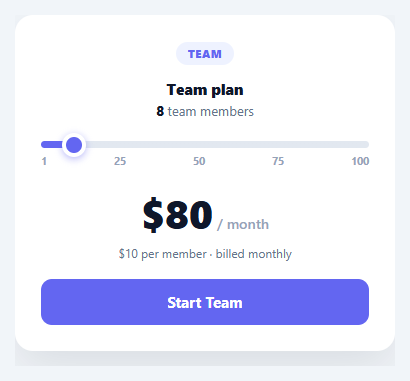
A pricing slider lets a prospect drag to their team size (or usage) and instantly see what they'd pay — turning a static pricing table into an interactive, personalised quote. This snippet builds it in plain HTML, CSS, and vanilla JavaScript, with tiered per-seat pricing, a plan name and accent colour that change with size, and a slider track that fills as you drag — no library.
Tiered, volume-based pricing
The pricing isn't flat: bigger teams get a lower per-seat rate, defined by a TIERS table (up to 5 seats → $12/seat Starter, up to 20 → $10 Team, and so on). tierFor(seats) finds the tier the current size falls into, and the total is seats × that tier's rate. Encoding volume discounts as a tier table — rather than a formula — makes the pricing easy to read, change, and match to your real plans, and it's how most SaaS per-seat pricing actually works.
The plan changes as you drag
Crossing a tier boundary doesn't just change the rate — the plan name, the accent colour, the badge, the note, and even the CTA all update (the top tier flips the button to "Contact sales"). Reflecting the whole plan identity from the slider position makes the interaction feel like exploring real plans, not just watching a number tick. Everything derives from the current tier, so it stays consistent.
A filled slider track
The native range input's track is filled up to the thumb with the tier's colour using a linear-gradient whose stop is the slider's percentage — recomputed on every input. This gives the standard "progress-filled" slider look (which native inputs don't provide) and ties the fill colour to the current tier, so the control itself reinforces which plan you're in. Custom thumb styling via ::-webkit-slider-thumb and ::-moz-range-thumb keeps it on-brand across browsers.
Live total, instantly
Dragging recomputes the seats, tier, per-seat rate, and total on every input event, so the big price updates in real time. Showing the live total (with the per-seat breakdown beneath) answers the prospect's actual question — "what will this cost *me*?" — far more effectively than a grid of fixed numbers, which research links to higher pricing-page conversion.
Data-driven and drop-in
Edit the TIERS table to match your plans and rates, change the slider range to your seat or usage limits, and wire the CTA to checkout with the current seat count. It's a clear reference for tiered pricing logic, a colour-filled range input, and slider-driven plan selection. A native <input type="range"> is also keyboard- and screen-reader-friendly out of the box — arrow keys nudge the value and the accessible name comes from a label — which a custom drag-to-position div slider would have to reimplement, so it's worth keeping the real range element even after the heavy visual restyling applied here.
Step by step
How to Use
- 1Paste HTML, CSS, and JSA pricing card renders with a team-size slider and a live total.
- 2Drag the sliderAs you change team size, the plan, per-seat rate, total, and accent update live.
- 3Cross a tierPassing a tier boundary changes the plan name, colour, and CTA (top tier → Contact sales).
- 4Edit the tiersChange the TIERS table to your plans, seat caps, and per-seat rates.
- 5Set the rangeAdjust the slider min/max to your seat or usage limits.
- 6Wire checkoutSend the current seat count to your checkout from the CTA handler.
Real-world uses
Common Use Cases
Got questions?
Frequently Asked Questions
A TIERS table lists, for each tier, the maximum seats it covers and the per-seat rate (smaller for bigger teams). tierFor(seats) returns the first tier whose upTo is at least the current seat count, and the total is seats × that tier's per-seat rate. Using a table rather than a formula makes volume discounts easy to read and to match to your real published plans.
Native range inputs don't show a filled portion by default. The snippet sets the input's background to a linear-gradient with a hard stop at the current value's percentage — coloured up to the thumb, grey after — and recomputes that percentage on every input event. The stop colour is the current tier's accent, so the fill also signals which plan you're in. Custom thumb styling makes it consistent across browsers.
Updating the plan name, accent colour, badge, note, and CTA as the slider crosses tiers makes the interaction feel like exploring your actual plans, not just scrubbing a price. It connects the cost to a named plan with its own identity, which is more persuasive and informative than a bare number — and it sets up the top-tier "Contact sales" handoff for enterprise.
Read the current seat count (range.value) and tier in the CTA's click handler, then pass them to your checkout — e.g. redirect to Stripe with the right price ID and quantity, or open your signup with the seat count prefilled. For the top tier, route to a contact-sales form instead. The slider is the configurator; your checkout consumes its output.
Hold the seat count in state, derive the tier and total with a computed/useMemo, and bind them to the display and the slider's fill style. In React use useState with an onChange; in Vue v-model with computed; in Angular ngModel with a getter. The TIERS lookup and pricing math are framework-agnostic — only the state and bindings move into the framework.