


Recursion Tree Visualizer — Free HTML CSS JS Snippet
Recursion Tree Visualizer · Visualizers · Plain HTML, CSS & JS · Live preview
Copy & paste
Source Code
<div class="wrap">
  <div class="toolbar">
    <div class="field">
      <label class="label">fib(n)</label>
      <input type="number" id="n-input" value="6" min="1" max="10" />
    </div>
    <button class="btn btn-primary" id="btn-run">Run</button>
    <label class="memo-toggle">
      <input type="checkbox" id="memo-check" />
      <span>Memoize</span>
    </label>
  </div>
  <div class="main-row">
    <div class="tree-panel">
      <svg id="tree-svg"></svg>
      <div class="tree-nodes" id="tree-nodes"></div>
    </div>
    <div class="stack-panel">
      <div class="stack-title">Call Stack</div>
      <div class="stack-list" id="stack-list"></div>
    </div>
  </div>
  <div class="stats-row">
    <div class="stat"><span class="stat-label">Calls</span><span class="stat-val" id="stat-calls">0</span></div>
    <div class="stat"><span class="stat-label">Skipped (memo)</span><span class="stat-val" id="stat-skipped">0</span></div>
  </div>
</div>
* { box-sizing: border-box; margin: 0; padding: 0; }
body { font-family: system-ui, -apple-system, sans-serif; background: #f8fafc; min-height: 100vh; display: flex; align-items: center; justify-content: center; padding: 24px; }
.wrap { width: 100%; max-width: 720px; background: #fff; border: 1px solid #e2e8f0; border-radius: 16px; padding: 20px; }
.toolbar { display: flex; align-items: flex-end; gap: 12px; flex-wrap: wrap; margin-bottom: 14px; }
.field { display: flex; flex-direction: column; gap: 4px; }
.label { font-size: 11px; font-weight: 700; color: #94a3b8; text-transform: uppercase; letter-spacing: 0.05em; }
.field input { width: 70px; padding: 8px 10px; border: 1.5px solid #e2e8f0; border-radius: 8px; font-size: 14px; color: #0f172a; }
.field input:focus { outline: none; border-color: #6366f1; }
.btn { font-size: 13px; font-weight: 600; padding: 9px 16px; border-radius: 8px; border: 1.5px solid #e2e8f0; background: #fff; color: #374151; cursor: pointer; transition: all 0.15s; }
.btn:hover { border-color: #cbd5e1; background: #f8fafc; }
.btn-primary { background: #6366f1; border-color: #6366f1; color: #fff; }
.btn-primary:hover { background: #4f46e5; border-color: #4f46e5; }
.btn:disabled { opacity: 0.5; cursor: not-allowed; }
.memo-toggle { display: flex; align-items: center; gap: 6px; font-size: 13px; font-weight: 600; color: #374151; cursor: pointer; margin-left: auto; }
.memo-toggle input { accent-color: #6366f1; width: 16px; height: 16px; }
.main-row { display: flex; gap: 14px; }
.tree-panel { flex: 1; position: relative; height: 300px; background: #f8fafc; border: 1px solid #eef2f7; border-radius: 10px; overflow: auto; }
#tree-svg { position: absolute; top: 0; left: 0; width: 100%; height: 100%; overflow: visible; pointer-events: none; }
.tree-nodes { position: relative; width: 100%; height: 100%; }
.node { position: absolute; width: 40px; height: 28px; margin-left: -20px; margin-top: -14px; border-radius: 7px; background: #cbd5e1; color: #1e293b; display: flex; align-items: center; justify-content: center; font-size: 11px; font-weight: 700; transition: background-color 0.25s ease, transform 0.2s ease, opacity 0.25s ease; opacity: 0; transform: scale(0.5); }
.node.shown { opacity: 1; transform: scale(1); }
.node.active { background: #f59e0b; color: #fff; }
.node.done { background: #6366f1; color: #fff; }
.node.memo-hit { background: #e2e8f0; color: #94a3b8; opacity: 0.55; }
.edge { stroke: #cbd5e1; stroke-width: 1.5; transition: stroke 0.25s ease; }
.edge.active { stroke: #f59e0b; }
.stack-panel { width: 160px; background: #f8fafc; border: 1px solid #eef2f7; border-radius: 10px; padding: 10px; display: flex; flex-direction: column; }
.stack-title { font-size: 10.5px; font-weight: 700; color: #94a3b8; text-transform: uppercase; letter-spacing: 0.05em; margin-bottom: 8px; }
.stack-list { display: flex; flex-direction: column-reverse; gap: 4px; overflow-y: auto; max-height: 260px; }
.stack-item { font-size: 12px; font-weight: 700; font-family: ui-monospace, monospace; background: #6366f1; color: #fff; padding: 6px 8px; border-radius: 6px; animation: pushIn 0.2s ease; }
@keyframes pushIn { from { transform: translateY(-6px); opacity: 0; } to { transform: translateY(0); opacity: 1; } }
.stats-row { display: flex; gap: 20px; margin-top: 14px; padding-top: 14px; border-top: 1px solid #f1f5f9; }
.stat { display: flex; flex-direction: column; gap: 2px; }
.stat-label { font-size: 10.5px; font-weight: 700; color: #94a3b8; text-transform: uppercase; letter-spacing: 0.05em; }
.stat-val { font-size: 15px; font-weight: 700; color: #0f172a; }let events = [];
let running = false;
let calls = 0;
let skipped = 0;
let nodeCounter = 0;
function buildEvents(n, memoize) {
events = [];
const memo = {};
let idCounter = 0;
function fib(k, depth, x, parentId) {
const id = idCounter++;
if (memoize && memo[k] !== undefined) {
events.push({ type: 'memo-hit', id, k, depth, x, parentId });
events.push({ type: 'return', id, value: memo[k] });
return { id, value: memo[k] };
}
events.push({ type: 'call', id, k, depth, x, parentId });
if (k <= 1) {
events.push({ type: 'return', id, value: k });
if (memoize) memo[k] = k;
return { id, value: k };
}
const spread = Math.max(1.6, 5 - depth * 0.6);
const left = fib(k - 1, depth + 1, x - spread, id);
const right = fib(k - 2, depth + 1, x + spread, id);
const value = left.value + right.value;
events.push({ type: 'combine', id, value });
events.push({ type: 'return', id, value });
if (memoize) memo[k] = value;
return { id, value };
}
fib(n, 0, 50, null);
return events;
}
function reset() {
document.getElementById('tree-nodes').innerHTML = '';
document.getElementById('tree-svg').innerHTML = '';
document.getElementById('stack-list').innerHTML = '';
calls = 0;
skipped = 0;
document.getElementById('stat-calls').textContent = '0';
document.getElementById('stat-skipped').textContent = '0';
}
function nodePos(x, depth) {
const px = 8 + x * 4.4;
const py = 24 + depth * 56;
return { px, py };
}
function addEdge(parentId, id, parentPos, pos) {
const svg = document.getElementById('tree-svg');
const line = document.createElementNS('http://www.w3.org/2000/svg', 'line');
line.setAttribute('x1', parentPos.px + '%');
line.setAttribute('y1', parentPos.py);
line.setAttribute('x2', pos.px + '%');
line.setAttribute('y2', pos.py);
line.setAttribute('class', 'edge');
line.dataset.id = id;
svg.appendChild(line);
return line;
}
const positions = {};
function pushStack(k) {
const item = document.createElement('div');
item.className = 'stack-item';
item.textContent = 'fib(' + k + ')';
item.dataset.marker = 'stack-' + Math.random();
document.getElementById('stack-list').appendChild(item);
return item;
}
async function play(n, memoize) {
const evs = buildEvents(n, memoize);
reset();
const container = document.getElementById('tree-nodes');
const stackEls = [];
for (const ev of evs) {
if (ev.type === 'call') {
calls++;
document.getElementById('stat-calls').textContent = calls;
const pos = nodePos(ev.x, ev.depth);
positions[ev.id] = pos;
const node = document.createElement('div');
node.className = 'node active';
node.textContent = ev.k;
node.style.left = pos.px + '%';
node.style.top = pos.py + 'px';
node.dataset.id = ev.id;
container.appendChild(node);
requestAnimationFrame(() => node.classList.add('shown'));
if (ev.parentId !== null && positions[ev.parentId]) {
addEdge(ev.parentId, ev.id, positions[ev.parentId], pos);
}
const stackEl = pushStack(ev.k);
stackEls.push(stackEl);
await wait(speedDelay());
} else if (ev.type === 'memo-hit') {
skipped++;
document.getElementById('stat-skipped').textContent = skipped;
const pos = nodePos(ev.x, ev.depth);
positions[ev.id] = pos;
const node = document.createElement('div');
node.className = 'node memo-hit';
node.textContent = ev.k;
node.style.left = pos.px + '%';
node.style.top = pos.py + 'px';
container.appendChild(node);
requestAnimationFrame(() => node.classList.add('shown'));
if (ev.parentId !== null && positions[ev.parentId]) {
addEdge(ev.parentId, ev.id, positions[ev.parentId], pos);
}
await wait(speedDelay() * 0.4);
} else if (ev.type === 'combine') {
const node = container.querySelector('[data-id="' + ev.id + '"]');
if (node) node.textContent = ev.value;
} else if (ev.type === 'return') {
const node = container.querySelector('[data-id="' + ev.id + '"]');
if (node) { node.classList.remove('active'); node.classList.add('done'); }
const el = stackEls.pop();
if (el) el.remove();
await wait(speedDelay() * 0.3);
}
}
}
function speedDelay() { return 260; }
function wait(ms) { return new Promise(res => setTimeout(res, ms)); }
async function run() {
if (running) return;
running = true;
document.getElementById('btn-run').disabled = true;
const n = Math.max(1, Math.min(10, Number(document.getElementById('n-input').value) || 6));
const memoize = document.getElementById('memo-check').checked;
await play(n, memoize);
running = false;
document.getElementById('btn-run').disabled = false;
}
document.getElementById('btn-run').addEventListener('click', run);
reset();Extend with AI
Take This Snippet Further With AI
The AI prompt for this one is for Patreon supporters ($3 a month, 7 days free), along with a site with no ads. Supporters enter the passcode once and it is remembered in this browser.
What's included
Features
About this UI Snippet
Recursion Tree Visualizer — Animated Fibonacci Call Tree, Live Call Stack Panel & Memoization Toggle in Vanilla JS
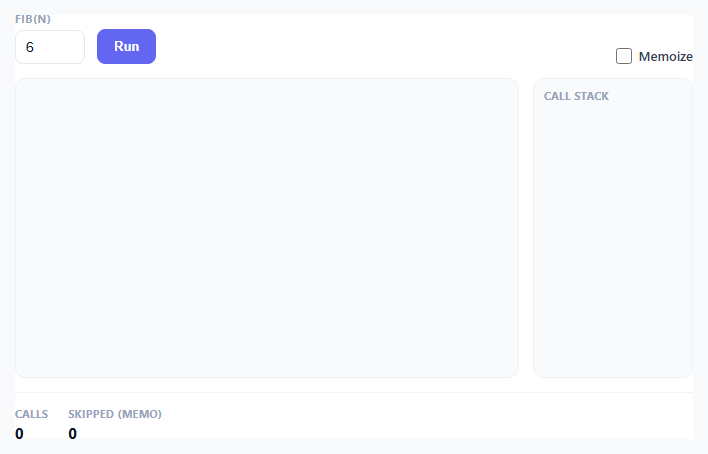
Recursion is usually explained with a diagram of a tree that's already fully drawn, which skips the part that actually confuses people: the tree is built by a program that calls itself, descending and returning in a very specific order. This snippet makes that order visible by animating naive recursive Fibonacci as it actually executes — nodes appear as calls happen, a call-stack panel pushes and pops in real time next to the tree, and a memoize toggle lets you watch exponential blowup collapse into linear work.
Event pre-computation, same architecture as the other visualizers
buildEvents(n, memoize) runs the actual recursive fib() function to completion before any animation happens, but instead of just returning a number it pushes a timeline of events as it goes: call when a function invocation begins, memo-hit when a cached result short-circuits a would-be call, combine when a node's two children's results are summed, and return when a call finishes and should pop off the stack. This is the same separation-of-concerns pattern used by the sorting and pathfinding visualizers in this library — the recursive algorithm never touches the DOM or timing, it only narrates itself into a flat event list that gets replayed afterward.
Why naive Fibonacci is O(2^n): the branching made visible
Naive recursive fib(k) calls fib(k-1) and fib(k-2), and neither call knows anything the other computed. fib(5) calls fib(4) and fib(3); fib(4) calls fib(3) and fib(2) — notice fib(3) gets computed twice, entirely from scratch, with its own full sub-tree of calls each time. Every node in the tree spawns two more nodes until the base case (k <= 1) is hit, so the total call count roughly doubles with each increment of n — the textbook definition of O(2^n) exponential growth. Run this visualizer at n = 10 with Memoize off and watch the Calls counter: it climbs into the hundreds, and the tree visibly balloons sideways because fib(3), fib(2), and fib(1) are each independently re-derived dozens of times.
How the memoize toggle collapses the tree to O(n)
When the Memoize checkbox is on, buildEvents keeps a plain memo object keyed by the Fibonacci input k. Before making a real recursive call, fib() checks memo[k] !== undefined; if the value is already cached, it pushes a memo-hit event instead of a full call event and returns immediately without recursing further. On screen, memo-hit nodes render grey and semi-transparent, connected to their parent but visually distinct from an actively-computed orange node — you can watch entire sub-trees that would normally re-expand get reduced to a single dimmed leaf. Because every distinct k value from 0 to n is computed at most once when memoized, the total call count grows linearly with n instead of exponentially — the Calls and Skipped (memo) counters made this concrete: run fib(10) twice, once with memoize off and once on, and compare the final Calls numbers directly.
The call stack panel: pushing and popping in sync with recursion
The .stack-list panel uses flex-direction: column-reverse so the most recently pushed call visually sits on top, mimicking how a real call stack grows upward. Every call event appends a new .stack-item div labeled fib(k) with a small pushIn keyframe animation; every matching return event removes the most recently pushed still-present item. Because JavaScript's own function call stack is what's driving buildEvents's recursion in the first place, the push/pop order in this panel is not a simulation of a call stack, it is a direct visualization of the real one — the depth-first descent (call, call, call, base case, return, return) plays out in the exact order V8 itself would execute it.
Tree layout without a charting library
Node positions are computed with plain arithmetic in nodePos(x, depth): vertical position is depth * 56 pixels, and horizontal position starts each recursive call at its parent's x offset by a spread value that shrinks as depth increases (Math.max(1.6, 5 - depth * 0.6)), so left and right children fan out proportionally to how many levels of the tree remain — deep nodes cluster tightly, shallow nodes spread wide, which keeps a tree of a few hundred nodes from overlapping. Edges are drawn as SVG <line> elements appended to a plain <svg> overlay positioned absolutely over the node container, connecting each new node to its already-positioned parent the instant the child call event fires.
Step by step
How to Use
- 1Set n for fib(n) using the number inputChoose a value from 1 to 10. Larger values without memoization produce a dramatically bigger tree, so start around 6-7 to see clean branching before trying larger numbers.
- 2Click Run with Memoize off firstWatch orange "active" nodes appear one at a time as each recursive call fires, tracing a depth-first path down the left branch before backtracking to the right.
- 3Watch the call stack panel push and popEach call adds a fib(k) entry to the top of the stack list; each return removes it, mirroring exactly what the JavaScript engine's real call stack is doing underneath.
- 4Note the final Calls counter, then toggle Memoize onRe-run the same n value with Memoize checked. Repeated sub-calls now render as dimmed grey "memo-hit" nodes instead of full orange call sequences.
- 5Compare the two Calls counts side by sideThe unmemoized run grows roughly exponentially with n; the memoized run grows roughly linearly, since every distinct fib(k) value is computed only once and reused.
- 6Try increasing n to 9 or 10 in both modesWithout memoization, the tree visibly balloons and the run takes noticeably longer to finish animating. With memoization, the extra nodes are almost entirely grey and the run finishes just as fast.
Real-world uses
Common Use Cases
Got questions?
Frequently Asked Questions
Yes. Move buildEvents() into a utils function — it is pure and takes n/memoize as arguments, returning a plain array. In React, run the playback loop (the async play() function) inside a useEffect or a click handler, and store any pending setTimeout id in a ref so you can clear it in the cleanup function if the component unmounts mid-animation. In Vue, call play() from a method and guard state updates after each await with a local "cancelled" flag set in onUnmounted. In Angular, do the same with an isDestroyed flag checked after every await and set true in ngOnDestroy. Because the timeline is just await-delayed DOM updates rather than a persistent interval, the main cleanup concern is stopping in-flight awaits from touching removed DOM nodes, not clearing a running timer.
Every call to fib(k) where k > 1 makes two further recursive calls, fib(k-1) and fib(k-2), and neither call is aware of what the other already computed. Because the two subtrees overlap heavily (fib(k-2) is recomputed as part of both fib(k-1) and fib(k) itself, and so on down the tree), the total number of calls roughly doubles with each increment to n, giving the same growth shape as 2^n. This snippet's Calls counter shows that growth directly: fib(10) without memoization takes roughly 15x more calls than fib(6).
With a memo cache keyed by the input value, each distinct fib(k) for k from 0 to n is computed at most once — every subsequent request for that same k is answered instantly from the cache instead of re-recursing. Since there are only n+1 distinct values to ever compute, and each one does O(1) work beyond its (now-skipped) recursive calls, total work becomes linear in n. This snippet visualizes that exact mechanism: memo-hit events replace what would otherwise be entire re-expanded subtrees.
The horizontal spread passed to each recursive call is computed as Math.max(1.6, 5 - depth * 0.6), so it shrinks as depth increases. This is purely a layout choice to prevent sibling subtrees from overlapping — since deeper levels have exponentially more nodes competing for the same width, giving each one a smaller horizontal offset keeps the whole tree readable instead of nodes stacking on top of each other.
Yes. Replace the fib() function inside buildEvents with any other recursive function, as long as you push the same four event types (call, memo-hit if applicable, combine, return) at the equivalent points in your logic. Factorial is simpler (single recursive branch, so no fan-out, just a straight vertical line of nodes) and a good first modification; tree traversals or the merge step of merge sort are good next steps since they naturally produce two-child branching like Fibonacci does.