





Scroll Blinds Reveal — Free GSAP Slat Flip Snippet
Scroll Blinds Reveal · Scroll · Plain HTML, CSS & JS · Live preview
Copy & paste
Source Code
<section class="sbr-top"><p>Scroll ↓</p></section>
<section class="sbr-stage" id="sbrStage">
  <div class="sbr-behind">
    <span class="sbr-eyebrow">Revealed</span>
    <h2>Let the light in</h2>
    <p>Seven slats tilt open like venetian blinds to uncover this section.</p>
  </div>
  <div class="sbr-blinds" id="sbrBlinds"></div>
</section>
<section class="sbr-bottom"><p>Scroll up and the blinds tilt shut again.</p></section>*{box-sizing:border-box;margin:0;padding:0}
body{font-family:system-ui,-apple-system,sans-serif;background:#07080d;color:#fff}
.sbr-top,.sbr-bottom{min-height:70vh;display:flex;justify-content:center;align-items:center;color:#8a90a8;font-size:15px;letter-spacing:.1em;text-transform:uppercase}
.sbr-stage{position:relative;height:100vh;overflow:hidden}
.sbr-behind{position:absolute;inset:0;display:flex;flex-direction:column;align-items:center;justify-content:center;gap:14px;text-align:center;padding:24px;background:radial-gradient(85% 70% at 50% 35%,#20305f,#0a0e1c)}
.sbr-eyebrow{font-size:13px;font-weight:700;letter-spacing:.22em;text-transform:uppercase;color:#9fb4ff}
.sbr-behind h2{font-size:clamp(38px,8vw,92px);font-weight:800;letter-spacing:-.03em;background:linear-gradient(120deg,#fde68a,#fb923c);-webkit-background-clip:text;background-clip:text;color:transparent}
.sbr-behind p{color:#aeb4ca;font-size:clamp(15px,2.2vw,19px);max-width:440px}
.sbr-blinds{position:absolute;inset:0;z-index:2;display:flex;flex-direction:column;perspective:900px}
.sbr-slat{flex:1;background:linear-gradient(180deg,#181d33,#0e1224);border-bottom:1px solid rgba(255,255,255,.05);transform-origin:50% 0%;backface-visibility:hidden;will-change:transform,opacity;display:flex;align-items:center;justify-content:center}
.sbr-slat:first-child span{font-size:13px;letter-spacing:.16em;text-transform:uppercase;color:#7e88a0}gsap.registerPlugin(ScrollTrigger);
// Build the slats — change SLATS for chunkier or finer blinds.
var SLATS = 7;
var wrap = document.getElementById('sbrBlinds');
for (var i = 0; i < SLATS; i++) {
var slat = document.createElement('div');
slat.className = 'sbr-slat';
if (i === 0) slat.innerHTML = '<span>keep scrolling</span>';
wrap.appendChild(slat);
}
var tl = gsap.timeline({
scrollTrigger: {
trigger: '#sbrStage',
start: 'top top',
end: '+=150%',
scrub: 0.4,
pin: true
}
});
// Each slat tilts around its own top edge, staggered from the top down,
// like pulling the cord on a set of venetian blinds.
tl.to('.sbr-slat', {
rotationX: -92,
opacity: 0,
ease: 'none',
stagger: 0.12
}, 0)
.from('.sbr-behind h2', { y: 50, opacity: 0.2, ease: 'none' }, 0.25)
.from('.sbr-behind p', { y: 30, opacity: 0, ease: 'none' }, 0.45);Extend with AI
Take This Snippet Further With AI
The AI prompt for this one is for Patreon supporters ($3 a month, 7 days free), along with a site with no ads. Supporters enter the passcode once and it is remembered in this browser.
What's included
Features
About this UI Snippet
Scroll Blinds Reveal — Tilt Slats Open Like Venetian Blinds on Scroll
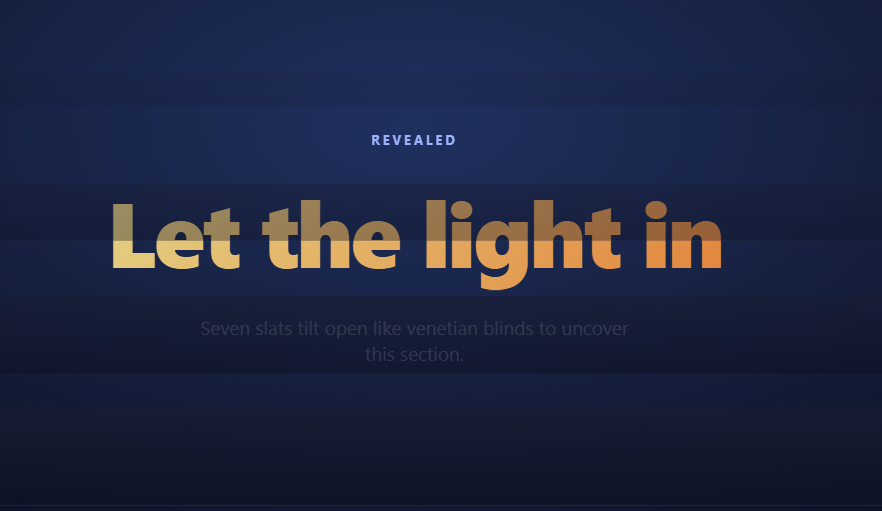
The scroll blinds reveal covers a section with a stack of horizontal slats, then tilts each one open in 3D as you scroll — like pulling the cord on venetian blinds — so the content behind appears through widening gaps that sweep from top to bottom. Scrolling up tilts them shut again. This snippet builds it with GSAP ScrollTrigger (from a CDN), generated slat elements, and one staggered rotationX tween.
Slats are generated, not hand-written
A small loop builds SLATS (7) equal-height divs into the cover layer, each flex: 1 of a full-viewport column. Generating them means the slat count is a single constant: bump it to 12 for finer, faster-feeling blinds or drop to 4 for chunky panels — the CSS and the tween need no edits because both target the shared .sbr-slat class.
rotationX around the top edge is what sells "blinds"
Each slat has transform-origin: 50% 0%, so it rotates around its own top edge, exactly like a physical slat hanging from its rail. The tween takes every slat to rotationX: -92° — just past parallel-to-the-viewer, at which point the slat is edge-on and effectively invisible. The parent's perspective: 900px gives the rotation real foreshortening; without it, rotateX just squashes the slat vertically with no depth cue.
A stagger turns seven flips into one cord-pull
The single tween uses stagger: 0.12, offsetting each slat's start down the stack. On a scrubbed timeline that reads as a wave: the top slat is fully open while the bottom is just starting, and the diagonal front of "openness" travels down the screen like light spilling through blinds. One tween plus a stagger replaces seven hand-placed tweens and stays trivially retunable.
Opacity assists the edge-on illusion
Real slats vanish at edge-on angles, but an anti-aliased 1px line can linger on screen. Tweening opacity: 0 alongside the rotation guarantees each slat fully disappears at the end of its flip, and backface-visibility: hidden prevents the mirror image from flashing if a slat overshoots −90°.
The revealed content arrives, it doesn't just sit there
On the same timeline, the headline rises from y: 50 starting at position 0.25 and the paragraph follows at 0.45 — timed so the content is settling into place while the middle slats are opening. Sharing one scrubbed timeline keeps the cover's exit and the content's entrance locked together at every scroll position.
Pinned so the reveal owns its distance
The stage pins for +=150%, mapping the full cord-pull onto 1.5 viewport-heights of scrolling with scrub: 0.4 smoothing. Transform-and-opacity-only animation keeps the whole reveal compositor-friendly even with seven layers moving.
Slats stay geometrically simple, which is why the effect scales
Each slat is a plain flex child with no absolute positioning or manual sizing — flex: 1 on equal siblings guarantees even heights at any viewport size, and the generator loop means adding a slat is changing one number, not hand-placing a new element. That simplicity is what makes the 3D perspective cheap: seven (or seventy) identical transform origins mean the browser can batch the compositor work identically per layer, so raising SLATS costs GPU time linearly rather than triggering new layout paths.
Customizing it
Rotate slats to +92° to open downward, switch to vertical slats with flex-direction: row and rotationY, or map an image across the slats with a shared background-image and per-slat background-position. Related reveals: the sliding scroll curtain reveal, the parting scroll split panels, and the clip-path scroll image mask.
Step by step
How to Use
- 1Add the GSAP CDNsInclude gsap and ScrollTrigger from the CDN panel.
- 2Paste HTML, CSS, and JSSeven slats generate and cover the section.
- 3Scroll into the stageSlats start tilting open from the top down.
- 4Watch the sweepThe open-wave travels down like a cord pull.
- 5Scroll back upThe blinds tilt shut — fully scrubbed.
- 6Tune SLATSChange one constant for finer or chunkier blinds.
Real-world uses
Common Use Cases
SLATS constant controlling how many blinds there are.Got questions?
Frequently Asked Questions
Each slat has transform-origin: 50% 0%, so a rotationX tween swings it around its own top edge — the hinge a physical slat hangs from. The parent's perspective: 900px provides foreshortening so nearer edges grow and farther edges shrink; without perspective, rotateX just squashes the slat flat with no depth.
At exactly −90° a slat is edge-on, but anti-aliasing can leave a shimmering 1px line, and floating-point scrub positions may hover a hair before the end. Overshooting to −92° with a simultaneous opacity fade guarantees clean disappearance, while backface-visibility: hidden stops the slat's mirror side from flashing past −90°.
A single tween targets all slats with stagger: 0.12, offsetting each one's start time down the stack. Under a scrubbed timeline that offset becomes spatial: at any scroll position the top slats are further through their flip than the lower ones, so the front of openness travels downward like a cord being pulled.
Yes — put anything in .sbr-behind; it's just a layered section under the slat stack. You can also print an image on the blinds themselves: give every slat the same background-image with background-size: 100% 700% and per-slat background-position offsets so the picture reads whole when closed and shreds open as they tilt.
Minimally — every slat is an identical flex child with the same transform-origin and rotationX property, so the compositor batches them uniformly rather than computing distinct layout paths per slat. Cost scales roughly linearly with count on the GPU, not the CPU, since the only JavaScript work is building the initial DOM and running one staggered tween; the scroll-driven updates themselves are pure compositor transforms.
Render the slats from an array (v-for / map / *ngFor) instead of the DOM loop, then create the timeline in a mount effect — useEffect, onMounted, or ngAfterViewInit — inside gsap.context scoped to the stage ref, reverting it on cleanup so the pin is removed on unmount. Slat styles are simple enough to express as Tailwind utilities on the mapped element.