

Scroll Polaroid Stack Flip — Free HTML CSS JS Snippet
Scroll Polaroid Stack Flip · Scroll · Plain HTML, CSS & JS · Live preview
Copy & paste
Source Code
<div class="hint">Scroll ↓ to sort the photo stack</div>
<div class="polaroid-wrap">
  <div class="polaroid-stage">
    <div class="grid-slots" id="gridSlots">
      <div class="slot" style="--gx:0;--gy:0"></div>
      <div class="slot" style="--gx:1;--gy:0"></div>
      <div class="slot" style="--gx:2;--gy:0"></div>
      <div class="slot" style="--gx:0;--gy:1"></div>
      <div class="slot" style="--gx:1;--gy:1"></div>
      <div class="slot" style="--gx:2;--gy:1"></div>
    </div>
    <div class="stack" id="stack">
      <div class="polaroid" style="--hue:200;--mr:-8deg" data-photo="1"><div class="photo"></div><div class="caption">Beach Day</div></div>
      <div class="polaroid" style="--hue:20;--mr:6deg" data-photo="2"><div class="photo"></div><div class="caption">Road Trip</div></div>
      <div class="polaroid" style="--hue:280;--mr:-4deg" data-photo="3"><div class="photo"></div><div class="caption">Sunset</div></div>
      <div class="polaroid" style="--hue:100;--mr:9deg" data-photo="4"><div class="photo"></div><div class="caption">Friends</div></div>
      <div class="polaroid" style="--hue:340;--mr:-11deg" data-photo="5"><div class="photo"></div><div class="caption">Camping</div></div>
      <div class="polaroid" style="--hue:50;--mr:5deg" data-photo="6"><div class="photo"></div><div class="caption">City Lights</div></div>
    </div>
  </div>
</div>
* { box-sizing: border-box; }
body { margin: 0; font-family: 'Georgia', serif; background: #ede3d0; }
.hint { text-align: center; padding: 28px 16px; font-size: 14px; color: #8a7a5c; font-family: system-ui, sans-serif; }
.polaroid-wrap { height: 500vh; position: relative; }
.polaroid-stage { position: sticky; top: 0; height: 100vh; display: flex; align-items: center; justify-content: center; overflow: hidden; background: radial-gradient(ellipse at 50% 50%, #f5ecd9, #e2d3b0 85%); perspective: 1200px; }
.grid-slots { position: relative; width: min(480px, 86vw); height: min(320px, 58vw); display: grid; grid-template-columns: repeat(3, 1fr); grid-template-rows: repeat(2, 1fr); gap: 10px; }
.slot { border: 2px dashed rgba(138,122,92,0.25); border-radius: 8px; }
.stack { position: absolute; top: 50%; left: 50%; width: 130px; height: 158px; margin: -79px 0 0 -65px; }
.polaroid { position: absolute; top: 0; left: 0; width: 130px; height: 158px; background: #fffdf6; padding: 10px 10px 26px; border-radius: 3px; box-shadow: 0 8px 18px rgba(74,59,40,0.35); transform: rotate(var(--mr)); transform-style: preserve-3d; }
.photo { width: 100%; height: 108px; background: linear-gradient(135deg, hsl(var(--hue) 55% 68%), hsl(calc(var(--hue) + 40) 55% 55%)); border-radius: 2px; }
.caption { text-align: center; font-size: 11px; color: #4a3b28; margin-top: 8px; font-family: 'Georgia', serif; }
@media (max-width: 640px) {
.grid-slots { width: 92vw; height: 62vw; gap: 6px; }
.stack { width: 100px; height: 124px; margin: -62px 0 0 -50px; }
.polaroid { width: 100px; height: 124px; padding: 7px 7px 20px; }
.photo { height: 82px; }
.caption { font-size: 9px; margin-top: 5px; }
}gsap.registerPlugin(ScrollTrigger);
const polaroids = gsap.utils.toArray('.polaroid');
const slots = gsap.utils.toArray('.slot');
const gridSlots = document.getElementById('gridSlots');
const n = polaroids.length;
gsap.set(polaroids, { zIndex: (i) => n - i });
function getSlotOffset(index) {
const slot = slots[index];
const stackRect = document.getElementById('stack').getBoundingClientRect();
const slotRect = slot.getBoundingClientRect();
return {
x: slotRect.left - stackRect.left + (slotRect.width - 130) / 2,
y: slotRect.top - stackRect.top + (slotRect.height - 158) / 2,
};
}
const tl = gsap.timeline({
scrollTrigger: {
trigger: '.polaroid-wrap',
start: 'top top',
end: 'bottom bottom',
scrub: true,
},
});
polaroids.forEach((card, i) => {
const segStart = i / n;
const segEnd = segStart + (1 / n) * 0.85;
const offset = getSlotOffset(i);
tl.to(card, {
y: -30 - i * 4,
rotateX: -40,
scale: 1.05,
zIndex: n + 5,
ease: 'none',
duration: (segEnd - segStart) * 0.4,
}, segStart)
.to(card, {
x: offset.x,
y: offset.y,
rotate: 0,
rotateX: 0,
scale: 1,
ease: 'none',
duration: (segEnd - segStart) * 0.6,
}, segStart + (segEnd - segStart) * 0.4);
});
ScrollTrigger.refresh();Extend with AI
Take This Snippet Further With AI
The AI prompt for this one is for Patreon supporters ($3 a month), along with a site with no ads. Supporters enter the passcode once and it is remembered in this browser.
What's included
Features
About this UI Snippet
Scroll Polaroid Stack Flip — getBoundingClientRect Targeting & 3D Peel-and-Settle Motion
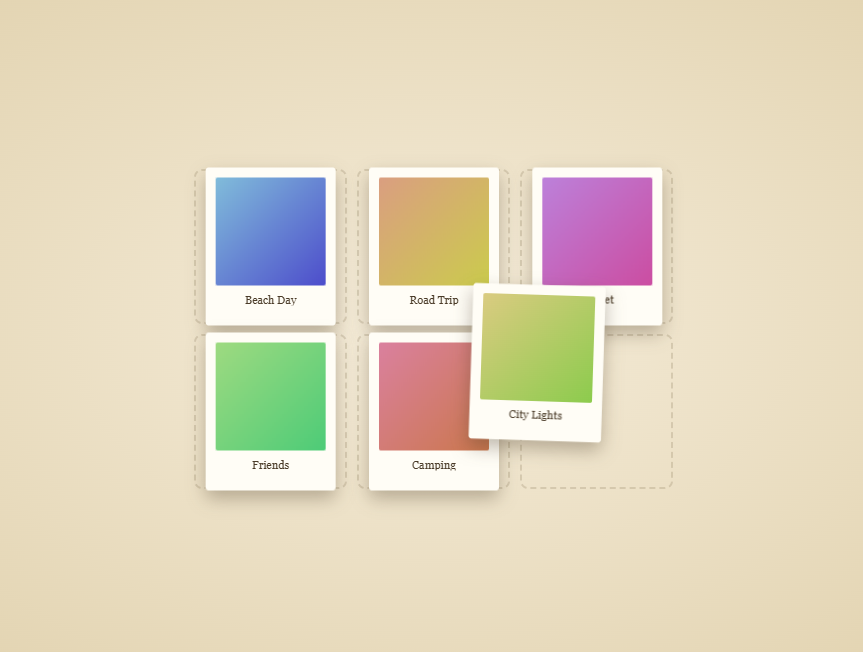
This snippet starts with a messy pile of randomly-rotated polaroid photo cards and, as the user scrolls, peels them off one at a time with a subtle 3D lift before flying each one into its own cell of a neat underlying grid — a satisfying "getting organized" transformation.
Randomized resting rotation via CSS custom properties
Each .polaroid sets its own --mr (mess rotation) custom property consumed by transform: rotate(var(--mr)), giving the initial pile a natural, hand-tossed look where no two photos sit at the same angle — all defined inline in the HTML so the messy arrangement is easy to art-direct per photo.
Measuring real target positions with getBoundingClientRect
Rather than hardcoding each photo's final grid position, a hidden .grid-slots CSS Grid layout defines the actual target cells, and getSlotOffset() measures the pixel offset from the stack's origin to each slot using getBoundingClientRect() at runtime — so the grid can be reflowed (different columns, gaps, or a responsive breakpoint) without ever touching the animation's position math.
Two-part motion per card: peel, then settle
Each polaroid's segment is split into two tweens: first a small lift-and-tilt (rotateX: -40, scale: 1.05, a negative y and boosted zIndex) simulating a card being physically picked up off the pile with a 3D peel using transform-style: preserve-3d and the stage's perspective, then a second tween flying it to its measured grid offset while resetting rotation and scale to flat and neutral — reading as the photo being placed down into its slot.
Sequential ordering via fractional timeline segments
The familiar segStart = i / n pattern (also used in Scroll Book Shelf Slide and Scroll Terrain Contour Lines) gives each polaroid its own slice of the scroll range so they peel and settle one after another rather than all at once, with ascending zIndex ensuring later cards in the original stack visually sit on top while still in the pile.
Fully reversible
Every tween lives on one scrub: true timeline, so scrolling back up lifts each photo back out of its grid slot, tilts it back in 3D, and drops it back into its messy pile position and rotation — undoing the sort in reverse order.
Pair this with Scroll Card Deck Shuffle for a related stack-transformation technique.
Step by step
How to Use
- 1Scroll through the previewScroll down slowly — each polaroid lifts off the messy pile with a 3D tilt, then flies into its own slot in the neat grid below.
- 2Add or remove photosAdd a .polaroid element to #stack with its own --hue and --mr custom properties, and a matching .slot element to #gridSlots — the JS reads both arrays' lengths automatically.
- 3Use real photosReplace the .photo div's gradient background with an <img> or background-image pointing at your own image.
- 4Change the grid layoutEdit grid-template-columns/rows on .grid-slots — getSlotOffset() measures actual rendered slot positions, so any grid layout works without touching the JS.
- 5Adjust the peel height and tiltChange the rotateX, scale and y values in the first tween of each card's segment to make the peel more or less dramatic.
- 6Export in your formatClick "HTML" for a standalone file, "JSX" for a React component, or "Tailwind" for a React + Tailwind version.
Real-world uses
Common Use Cases
Got questions?
Frequently Asked Questions
A hidden CSS Grid of .slot elements defines the real target layout. getSlotOffset() measures each slot's position relative to the stack's origin with getBoundingClientRect() at runtime, so the animation always targets the grid's actual rendered position rather than a hardcoded coordinate.
The stage has a CSS perspective set, each card has transform-style: preserve-3d, and the first tween in each card's segment applies a negative rotateX along with a slight scale-up and lift — combined, this reads as the card tilting up and off the pile in 3D before flying to its slot.
Yes — edit grid-template-columns/rows on .grid-slots and add matching .slot elements; since positions are measured live with getBoundingClientRect, no animation code needs to change.
Replace each .photo div's CSS gradient background with a background-image or swap it for an <img> tag sized to fill the same area — the surrounding polaroid frame and caption styling stay the same.
Call ScrollTrigger.refresh() after a resize (or listen for a resize event) so getSlotOffset() re-measures the slots' new positions; the snippet already calls refresh() once on load to establish correct initial positions.