





Scroll-Triggered Overshoot Counter — Free Spring Count-Up Effect
Scroll-Triggered Overshoot Counter · Scroll · Plain HTML, CSS & JS · Live preview
Copy & paste
Source Code
<section class="oc-intro"><h1>Scroll ↓</h1><p>Each number overshoots its target, then springs back to settle exactly on it.</p></section>
<section class="oc-grid" id="ocGrid">
  <div class="oc-stat"><div class="oc-value" data-target="128400" data-prefix="$" data-suffix="">0</div><div class="oc-label">Revenue this quarter</div></div>
  <div class="oc-stat"><div class="oc-value" data-target="4820" data-prefix="" data-suffix="">0</div><div class="oc-label">Active subscribers</div></div>
  <div class="oc-stat"><div class="oc-value" data-target="97" data-prefix="" data-suffix="%">0</div><div class="oc-label">Uptime this month</div></div>
  <div class="oc-stat"><div class="oc-value" data-target="312" data-prefix="" data-suffix="">0</div><div class="oc-label">New signups today</div></div>
</section>
<section class="oc-outro"><p>Scroll back up and re-enter — it springs again.</p></section>*{box-sizing:border-box;margin:0;padding:0}
body{font-family:system-ui,-apple-system,sans-serif;background:#0a0b13;color:#fff}
.oc-intro,.oc-outro{min-height:70vh;display:flex;flex-direction:column;justify-content:center;align-items:center;text-align:center;gap:10px;padding:24px}
.oc-intro h1{font-size:clamp(34px,7vw,64px);letter-spacing:-.02em}
.oc-intro p,.oc-outro p{color:#9aa0b8;font-size:16px;max-width:480px}
.oc-grid{display:grid;grid-template-columns:repeat(auto-fit,minmax(200px,1fr));gap:20px;max-width:960px;margin:0 auto;padding:14vh 24px}
.oc-stat{padding:28px 24px;border-radius:20px;background:linear-gradient(160deg,#191f36,#11131f);border:1px solid #262d44;text-align:center}
.oc-value{font-size:clamp(32px,5.2vw,48px);font-weight:800;letter-spacing:-.02em;font-variant-numeric:tabular-nums;background:linear-gradient(135deg,#8c9bff,#22d3ee);-webkit-background-clip:text;background-clip:text;color:transparent}
.oc-label{margin-top:8px;font-size:13.5px;color:#9aa0b8}(function () {
var stats = document.querySelectorAll('.oc-stat');
// A real overshoot/spring easing: the classic "back" formula extended
// past 1 before it eases back down. c1/c3 control how far it overshoots.
function easeOutBackOvershoot(t) {
var c1 = 1.9;
var c3 = c1 + 1;
return 1 + c3 * Math.pow(t - 1, 3) + c1 * Math.pow(t - 1, 2);
}
function formatNumber(n) {
return Math.round(n).toLocaleString('en-US');
}
function animateValue(el) {
var target = parseFloat(el.getAttribute('data-target'));
var prefix = el.getAttribute('data-prefix') || '';
var suffix = el.getAttribute('data-suffix') || '';
var duration = 1400;
var start = null;
function frame(ts) {
if (start === null) start = ts;
var elapsed = ts - start;
var t = Math.min(1, elapsed / duration);
var eased = easeOutBackOvershoot(t);
// eased genuinely exceeds 1 partway through, then settles back to
// exactly 1 at t = 1 — the number visibly overshoots then corrects.
var current = target * eased;
el.textContent = prefix + formatNumber(current) + suffix;
if (t < 1) {
requestAnimationFrame(frame);
} else {
el.textContent = prefix + formatNumber(target) + suffix;
}
}
requestAnimationFrame(frame);
}
var observer = new IntersectionObserver(function (entries) {
entries.forEach(function (entry) {
var valueEl = entry.target.querySelector('.oc-value');
if (entry.isIntersecting) {
if (!valueEl.dataset.animated) {
valueEl.dataset.animated = '1';
animateValue(valueEl);
}
} else {
// Re-arm so scrolling away and back triggers the spring again.
valueEl.dataset.animated = '';
valueEl.textContent = (valueEl.getAttribute('data-prefix') || '') + '0' + (valueEl.getAttribute('data-suffix') || '');
}
});
}, { threshold: 0.5 });
stats.forEach(function (stat) { observer.observe(stat); });
})();Extend with AI
Take This Snippet Further With AI
The AI prompt for this one is for Patreon supporters ($3 a month, 7 days free), along with a site with no ads. Supporters enter the passcode once and it is remembered in this browser.
What's included
Features
About this UI Snippet
Scroll-Triggered Overshoot Counter — Numbers That Overshoot, Then Settle
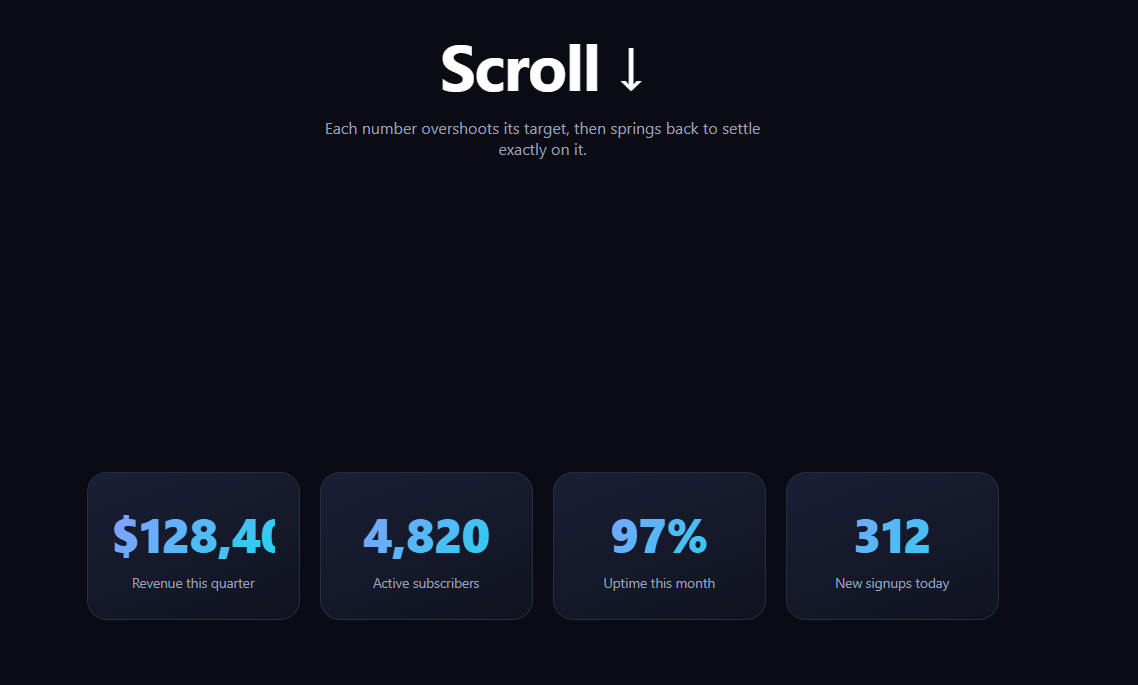
A plain count-up animates linearly from zero to a target and stops. This one does something a real spring does: it runs past the target, then corrects back down to land exactly on the right number — the kind of motion you'd feel from a physical needle or a UI element with real weight. It's built in vanilla JavaScript with an IntersectionObserver trigger and a genuine overshoot easing function, no animation library required.
A real overshoot formula, not a trick
The easing is the classic "back" curve, 1 + c3 * (t-1)^3 + c1 * (t-1)^2, tuned with c1 = 1.9 so the eased value climbs past 1.0 partway through the animation before descending back to exactly 1.0 at t = 1. Multiplying the target value by this eased fraction means the displayed number genuinely exceeds the target mid-animation and then comes back down — this is verifiable by watching the number tick past its final value before settling, not a fixed one-time bounce applied after the fact.
IntersectionObserver, not a scroll listener
Because the trigger only needs to know "has this stat scrolled into view," a single IntersectionObserver with threshold: 0.5 is simpler and cheaper than measuring scroll position on every frame. Each stat animates independently the moment half of it is visible, using its own requestAnimationFrame loop driven by elapsed time and the overshoot easing function.
Resets so it can spring again
When a stat scrolls back out of view, its data-animated flag clears and its display resets to zero. Scrolling it back into view re-triggers the full overshoot-and-settle animation from scratch, which is useful for demoing the effect repeatedly and keeps the section feeling alive rather than "already spent" on a second pass.
Per-stat configuration via data attributes
Each .oc-value reads its target number, prefix, and suffix straight from data-target, data-prefix, and data-suffix attributes, so adding a new stat to the grid is just a markup change — no JS edits needed. Numbers format with toLocaleString for thousands separators as they animate, not only at the end.
Customizing it
Tune c1 for a bigger or smaller overshoot, change duration for a snappier or slower spring, or swap the "back" formula for a true damped-spring simulation if you want multiple decaying oscillations instead of a single overshoot. Pair it with a scroll reveal grid, or compare it against a linear count up and odometer stat counter to see the difference in feel.
Step by step
How to Use
- 1Paste HTML, CSS, and JSAn intro, a stat grid, and an outro render — no dependencies.
- 2Scroll the stat grid into viewEach number counts up, overshoots, then springs back to settle.
- 3Watch the peakNumbers briefly exceed their final value before correcting down.
- 4Scroll away and backThe stat resets to zero and re-triggers the spring on re-entry.
- 5Add a statAdd a .oc-stat with data-target, data-prefix, data-suffix.
- 6Tune the springAdjust c1 for overshoot amount, duration for speed.
Real-world uses
Common Use Cases
Got questions?
Frequently Asked Questions
The eased fraction itself exceeds 1.0 partway through the animation, using the "back" easing formula 1 + c3*(t-1)^3 + c1*(t-1)^2. Since the displayed number is target * easedFraction, when easedFraction is greater than 1 the displayed number is genuinely larger than the target — it's real math producing the overshoot, not a separate bounce animation layered on top.
Yes. The easing formula is constructed so it evaluates to exactly 1.0 at t = 1 (the end of the animation), and the code also forces the final displayed value to the raw target on the last frame to avoid any floating-point rounding drift, so it always settles precisely on the number in data-target.
The effect only needs a one-time trigger — "this stat is now visible" — not a continuous scroll-position value. IntersectionObserver reports exactly that with threshold: 0.5, is cheaper than reading getBoundingClientRect on every scroll event, and automatically handles resizing and layout changes without extra code.
Yes — increase c1 in easeOutBackOvershoot for a larger, more dramatic overshoot, or lower it toward 0 for a subtler settle that barely exceeds the target. You can also shorten or lengthen the duration variable to make the whole spring feel snappier or slower.
Render the stat markup with the same data attributes, then in a mount effect create the IntersectionObserver scoped to a container ref and observe each stat element found within it. Keep the animateValue and easing functions as plain utilities. Return a cleanup that disconnects the observer on unmount.