
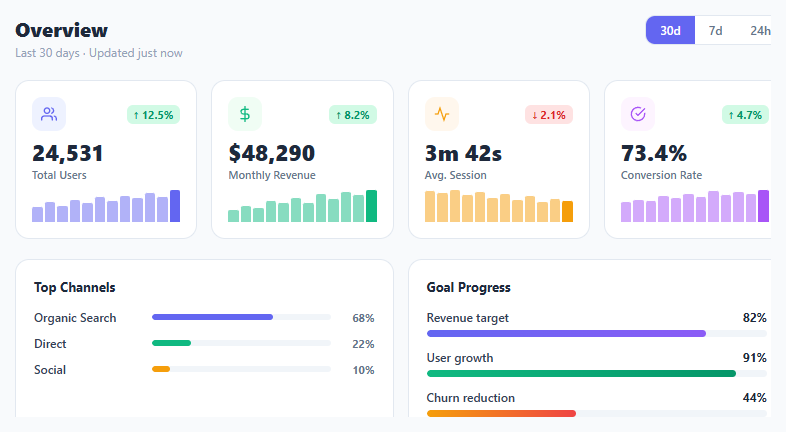
Metric KPI Card Grid

Interact.js Draggable and Resizable Dashboard Panels with Snapping
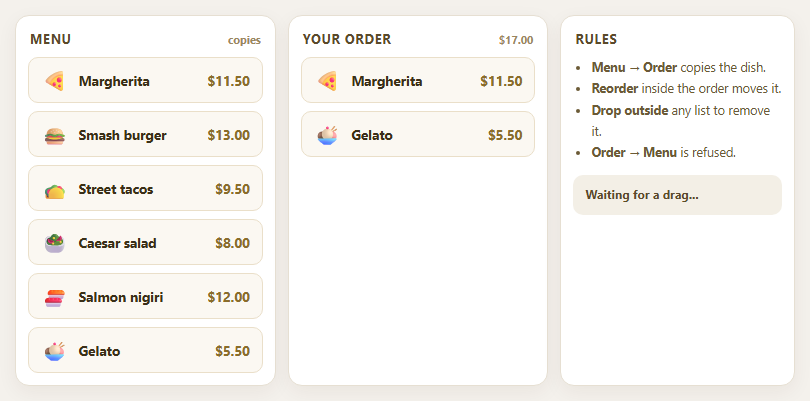
Dragula Copy vs Move Lists with Spill Control

SortableJS Shared Groups: Clone from a Palette into a Page Builder

SortableJS Drag Handle with Pinned and Locked Rows
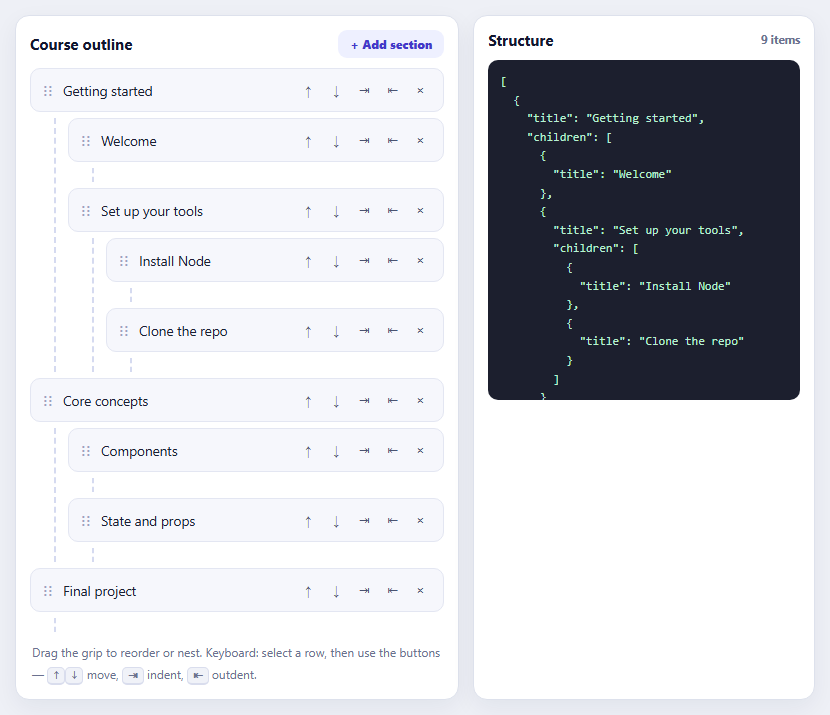
SortableJS Nested Sortable Tree with Keyboard Controls
SEO Score Meter — Free Composable Score Gauge Widget (HTML/CSS/JS)
SEO Score Meter · Dashboards · Plain HTML, CSS & JS · Live preview
Copy & paste
Source Code
<div class="ssm-card">
  <div class="ssm-head">
    <h3>SEO score</h3>
    <p>How this page checks out</p>
  </div>

  <div class="ssm-gauge-wrap">
    <svg class="ssm-gauge" viewBox="0 0 200 116" width="200" height="116">
      <path class="ssm-gauge-track" d="M14 106 A86 86 0 0 1 186 106" />
      <path class="ssm-gauge-fill" id="ssmGaugeFill" d="M14 106 A86 86 0 0 1 186 106" />
    </svg>
    <div class="ssm-gauge-label">
      <span class="ssm-gauge-score" id="ssmScoreNum">0</span>
      <span class="ssm-gauge-max">/100</span>
      <span class="ssm-gauge-tier" id="ssmTier">Needs work</span>
    </div>
  </div>

  <div class="ssm-checks" id="ssmChecks"></div>
</div>*{box-sizing:border-box;margin:0;padding:0}
body{font-family:system-ui,-apple-system,sans-serif;background:#0a0e0c;min-height:100vh;display:flex;align-items:center;justify-content:center;padding:24px}
.ssm-card{background:#10160f;border:1px solid #1e2b1c;border-radius:18px;padding:24px;width:100%;max-width:380px;box-shadow:0 20px 50px rgba(0,0,0,.45)}
.ssm-head h3{font-size:16px;font-weight:800;color:#eefaf0}
.ssm-head p{font-size:12px;color:#7d9481;margin-top:3px;margin-bottom:8px}
.ssm-gauge-wrap{position:relative;display:flex;justify-content:center;margin:6px 0 18px}
.ssm-gauge-track{fill:none;stroke:#1c281c;stroke-width:14;stroke-linecap:round}
.ssm-gauge-fill{fill:none;stroke:#4ade80;stroke-width:14;stroke-linecap:round;stroke-dasharray:270;stroke-dashoffset:270;transition:stroke-dashoffset .5s cubic-bezier(.4,0,.2,1),stroke .3s}
.ssm-gauge-label{position:absolute;bottom:0;left:0;right:0;display:flex;flex-direction:column;align-items:center;gap:0}
.ssm-gauge-score{font-size:34px;font-weight:800;color:#eefaf0;line-height:1}
.ssm-gauge-max{font-size:11px;color:#5c7362;font-weight:700;margin-top:-2px}
.ssm-gauge-tier{margin-top:5px;font-size:10.5px;font-weight:800;text-transform:uppercase;letter-spacing:.04em;padding:3px 10px;border-radius:999px;background:rgba(74,222,128,.14);color:#4ade80}
.ssm-gauge-tier.warn{background:rgba(251,191,36,.14);color:#fbbf24}
.ssm-gauge-tier.bad{background:rgba(248,113,113,.14);color:#f87171}
.ssm-checks{display:flex;flex-direction:column;gap:2px;border-top:1px solid #1e2b1c;padding-top:12px}
.ssm-check{display:flex;align-items:center;gap:11px;padding:9px 4px;cursor:pointer;border-radius:8px;transition:background .15s}
.ssm-check:hover{background:#151f14}
.ssm-check-box{width:18px;height:18px;flex-shrink:0;border-radius:6px;border:1.5px solid #2c3d2a;display:flex;align-items:center;justify-content:center;font-size:11px;color:transparent;transition:background .15s,border-color .15s,color .15s}
.ssm-check.is-on .ssm-check-box{background:#4ade80;border-color:#4ade80;color:#06180d}
.ssm-check-body{flex:1;min-width:0}
.ssm-check-title{font-size:12.5px;font-weight:700;color:#d3e6d6}
.ssm-check.is-on .ssm-check-title{color:#eefaf0}
.ssm-check-pts{font-size:10.5px;color:#5c7362;flex-shrink:0;font-variant-numeric:tabular-nums}
.ssm-check.is-on .ssm-check-pts{color:#4ade80}var CHECKS = [
{ id: 'title', title: 'Title length is 50-60 characters', points: 20, on: true },
{ id: 'meta', title: 'Meta description is present', points: 20, on: true },
{ id: 'h1', title: 'Page has exactly one H1', points: 20, on: true },
{ id: 'alt', title: 'Images have alt text', points: 15, on: false },
{ id: 'links', title: 'Has at least 2 internal links', points: 15, on: true },
{ id: 'speed', title: 'Page loads under 2.5s (LCP)', points: 10, on: false },
];
var TOTAL_POSSIBLE = CHECKS.reduce(function (sum, c) { return sum + c.points; }, 0); // 100
var fillEl = document.getElementById('ssmGaugeFill');
var scoreNumEl = document.getElementById('ssmScoreNum');
var tierEl = document.getElementById('ssmTier');
var checksEl = document.getElementById('ssmChecks');
var ARC_LENGTH = 270; // matches the stroke-dasharray set in CSS for this gauge path
function tierFor(score) {
if (score >= 80) return { label: 'Great shape', cls: '' };
if (score >= 50) return { label: 'Needs work', cls: 'warn' };
return { label: 'Poor', cls: 'bad' };
}
function render() {
var score = CHECKS.reduce(function (sum, c) { return sum + (c.on ? c.points : 0); }, 0);
var pct = score / TOTAL_POSSIBLE;
scoreNumEl.textContent = score;
fillEl.style.strokeDashoffset = ARC_LENGTH - ARC_LENGTH * pct;
var tier = tierFor(score);
tierEl.textContent = tier.label;
tierEl.className = 'ssm-gauge-tier' + (tier.cls ? ' ' + tier.cls : '');
fillEl.style.stroke = tier.cls === 'bad' ? '#f87171' : tier.cls === 'warn' ? '#fbbf24' : '#4ade80';
checksEl.innerHTML = CHECKS.map(function (c) {
return '<div class="ssm-check' + (c.on ? ' is-on' : '') + '" data-id="' + c.id + '">' +
'<span class="ssm-check-box">✓</span>' +
'<span class="ssm-check-body"><span class="ssm-check-title">' + c.title + '</span></span>' +
'<span class="ssm-check-pts">+' + c.points + '</span>' +
'</div>';
}).join('');
}
checksEl.addEventListener('click', function (e) {
var row = e.target.closest('.ssm-check');
if (!row) return;
var check = CHECKS.find(function (c) { return c.id === row.dataset.id; });
if (!check) return;
check.on = !check.on;
render();
});
render();Extend with AI
Take This Snippet Further With AI
The AI prompt for this one is for Patreon supporters ($3 a month), along with a site with no ads. Supporters enter the passcode once and it is remembered in this browser.
What's included
Features
About this UI Snippet
SEO Score Meter — A Gauge That Shows How the Number Is Built
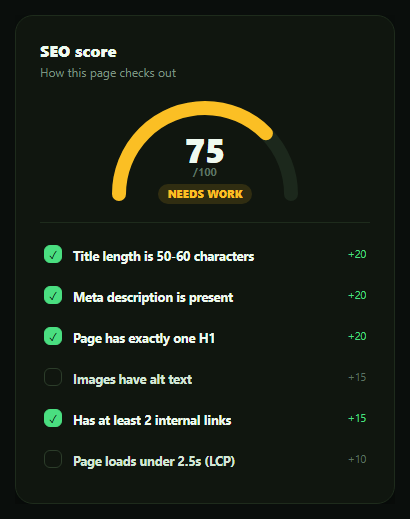
Most SEO score widgets show a single number with no explanation of how it was calculated, which makes the score feel arbitrary and the advice hard to act on. This snippet builds a semicircular gauge paired with a live checklist, in plain HTML, CSS, and vanilla JavaScript, where toggling any individual check immediately moves the gauge — making it obvious that the score is just a sum of point values, not a black box.
The score is a sum, not a mystery
Every check in the CHECKS array carries its own point value — title length worth 20, meta description worth 20, a single H1 worth 20, image alt text worth 15, internal linking worth 15, and page speed worth 10, totalling exactly 100 possible points. render() sums the points of every check currently marked on to get the score. There's no separate "compute score" formula to keep in sync with the checklist — the checklist *is* the formula.
An SVG arc gauge driven by one dash-offset
The gauge is a single SVG arc path drawn twice — a dim track and a colored fill — using stroke-dasharray/stroke-dashoffset to reveal a percentage of the arc's length. render() computes pct = score / 100 and sets the fill's dash-offset to ARC_LENGTH - ARC_LENGTH * pct, so a higher score reveals more of the arc. This is a common, dependency-free technique for progress rings and semicircle gauges that works in any browser without an animation library.
Three tiers, one function
A tierFor(score) function classifies the score as "Great shape" (80+, green), "Needs work" (50-79, amber), or "Poor" (under 50, red), and that same classification drives both the gauge's stroke color and the status label beneath it — so the color and the words can never tell a conflicting story.
Toggle a check, watch the score move
Clicking any checklist row flips its on boolean and calls render() again, instantly recomputing the score, the gauge fill, and the tier. This interactive honesty is the whole point of the widget — a user can see exactly which unchecked item is costing them points, rather than being told "72/100, improve your SEO" with no further detail.
Where it fits
Pair it with a quota usage meter or pricing feature table style checklist for other composed-score dashboards, or an onboarding checklist widget for the same toggle-and-track interaction applied to setup progress instead of a content audit.
Customizing it
Swap in your real SEO checks and point weights, wire each check's on state to an actual page analysis instead of a manual toggle, or add a "why this matters" tooltip per check so the checklist doubles as an educational tool.
Step by step
How to Use
- 1Paste HTML, CSS, and JSA gauge and 6-item checklist render with 4 checks already passing.
- 2Read the initial score20+20+20+15=75 points from the passing checks show on the gauge.
- 3Toggle "Images have alt text"The score jumps by 15 points and the gauge fill grows.
- 4Toggle a passing check offThe gauge shrinks and the tier label may downgrade from green to amber.
- 5Watch the tier change colorBelow 80 shows amber "Needs work"; below 50 shows red "Poor."
- 6Wire up real checksReplace each check's manual toggle with a real automated page analysis.
Real-world uses
Common Use Cases
stroke-dashoffset keeps the maths easy to read.Got questions?
Frequently Asked Questions
Each of the 6 checks has a fixed point value — 20, 20, 20, 15, 15, and 10, totalling exactly 100. The score is the sum of the point values of every check currently marked "on." With the default 4 checks passing (title, meta, H1, links: 20+20+20+15), the starting score is 75.
The score is divided by 100 to get a percentage, which is applied to the SVG arc's stroke-dashoffset — a higher score reveals more of the 270-unit arc length. This is a pure CSS/SVG technique, no canvas or animation library required.
tierFor(score) returns "Great shape" (green) at 80 or above, "Needs work" (amber) from 50 to 79, and "Poor" (red) below 50. That same function's result sets both the gauge's stroke color and the status label text, so they always agree.
Toggling is what demonstrates the score is composed rather than opaque — clicking any check immediately shows how many points it's worth by watching the gauge move. In a production tool you'd likely make passing checks reflect real page analysis instead of a manual click, but the interactive toggle is a clear teaching and demo device.
Move the CHECKS array into component state and derive the score, percentage, and tier with useMemo or a computed property whenever a check's "on" value changes. The SVG arc and its dash-offset binding port directly since it's just a style attribute driven by that derived percentage.