


Live Search Table with Highlighted Matches — Real Substring Highlighting (JS)
Live Search with Highlighted Matches · Tables · Plain HTML, CSS & JS · Live preview
Copy & paste
Source Code
<div class="tsh-wrap">
  <div class="tsh-bar">
    <svg class="tsh-icon" width="15" height="15" viewBox="0 0 24 24" fill="none" stroke="currentColor" stroke-width="2.2" stroke-linecap="round"><circle cx="11" cy="11" r="7"/><line x1="21" y1="21" x2="16.65" y2="16.65"/></svg>
    <input type="text" id="tshInput" class="tsh-input" placeholder="Search across all columns…">
    <span class="tsh-count" id="tshCount"></span>
  </div>
  <table class="tsh-table">
    <thead><tr><th>Ticket</th><th>Subject</th><th>Requester</th><th>Assignee</th></tr></thead>
    <tbody id="tshBody"></tbody>
  </table>
  <p class="tsh-empty" id="tshEmpty" hidden>No rows contain "<span id="tshQ"></span>".</p>
</div>*{box-sizing:border-box;margin:0;padding:0}
body{font-family:system-ui,-apple-system,sans-serif;background:#fdf4ff;min-height:100vh;display:flex;align-items:flex-start;justify-content:center;padding:32px 20px}
.tsh-wrap{background:#fff;border-radius:14px;width:100%;max-width:680px;box-shadow:0 18px 44px rgba(112,26,117,.1);overflow:hidden;border:1px solid #f5d0fe}
.tsh-bar{display:flex;align-items:center;gap:10px;padding:14px 16px;border-bottom:1px solid #fae8ff;background:#fdf4ff}
.tsh-icon{color:#a21caf;flex-shrink:0}
.tsh-input{flex:1;border:1.5px solid #f0abfc;border-radius:9px;padding:8px 12px;font-size:13px;font-family:inherit;color:#3b0764}
.tsh-input:focus{outline:none;border-color:#a21caf;box-shadow:0 0 0 3px rgba(162,28,175,.14)}
.tsh-count{font-size:11px;font-weight:700;color:#a21caf;white-space:nowrap}
.tsh-table{width:100%;border-collapse:collapse;font-size:13px}
.tsh-table th{text-align:left;padding:10px 14px;background:#fdf4ff;border-bottom:1px solid #fae8ff;font-size:10.5px;font-weight:800;text-transform:uppercase;letter-spacing:.03em;color:#a21caf}
.tsh-table td{padding:10px 14px;border-bottom:1px solid #faf5ff;color:#44403c}
.tsh-table tbody tr:hover{background:#fdfaff}
.tsh-table mark{background:#f0abfc;color:#3b0764;border-radius:3px;padding:0 2px;font-weight:700}
.tsh-empty{padding:26px;text-align:center;font-size:13px;color:#a78bfa;font-weight:600}
.tsh-empty[hidden]{display:none}var ROWS = [
['#4021', 'Checkout fails on Safari', 'Aisha Khan', 'Marco Rossi'],
['#4022', 'Add dark mode toggle', 'Tom Becker', 'Lena Park'],
['#4023', 'Slow search on mobile', 'Priya Nair', 'Yuki Tanaka'],
['#4024', 'Export to CSV missing quotes', 'Sara Lind', 'Marco Rossi'],
['#4025', 'Safari autofill breaks form', 'Diego Sosa', 'Priya Nair'],
['#4026', 'Search results out of order', 'Lena Park', 'Tom Becker'],
['#4027', 'Dark mode contrast too low', 'Yuki Tanaka', 'Aisha Khan'],
];
var body = document.getElementById('tshBody');
var input = document.getElementById('tshInput');
var countEl = document.getElementById('tshCount');
var emptyEl = document.getElementById('tshEmpty');
var qEl = document.getElementById('tshQ');
function esc(s) {
return String(s).replace(/[&<>]/g, function (c) { return { '&': '&', '<': '<', '>': '>' }[c]; });
}
// Finds every non-overlapping occurrence of the query (case-insensitive) inside text
// and returns HTML with each occurrence wrapped in <mark>, escaping everything else.
function highlightAll(text, query) {
var t = String(text);
if (!query) return esc(t);
var lower = t.toLowerCase();
var q = query.toLowerCase();
var out = '';
var pos = 0;
var idx;
while ((idx = lower.indexOf(q, pos)) !== -1) {
out += esc(t.slice(pos, idx));
out += '<mark>' + esc(t.slice(idx, idx + q.length)) + '</mark>';
pos = idx + q.length;
}
out += esc(t.slice(pos));
return out;
}
function rowMatches(row, q) {
return row.some(function (cell) { return String(cell).toLowerCase().indexOf(q) !== -1; });
}
function render() {
var raw = input.value.trim();
var q = raw.toLowerCase();
var shown = q ? ROWS.filter(function (r) { return rowMatches(r, q); }) : ROWS;
body.innerHTML = shown.map(function (r) {
return '<tr>' + r.map(function (cell) {
return '<td>' + highlightAll(cell, raw) + '</td>';
}).join('') + '</tr>';
}).join('');
countEl.textContent = q ? (shown.length + ' of ' + ROWS.length) : (ROWS.length + ' tickets');
emptyEl.hidden = shown.length > 0;
if (!shown.length) qEl.textContent = raw;
}
input.addEventListener('input', render);
render();Extend with AI
Take This Snippet Further With AI
The AI prompt for this one is for Patreon supporters ($3 a month), along with a site with no ads. Supporters enter the passcode once and it is remembered in this browser.
What's included
Features
About this UI Snippet
Live Search Table with Highlighted Matches — Real Substring-Position Highlighting
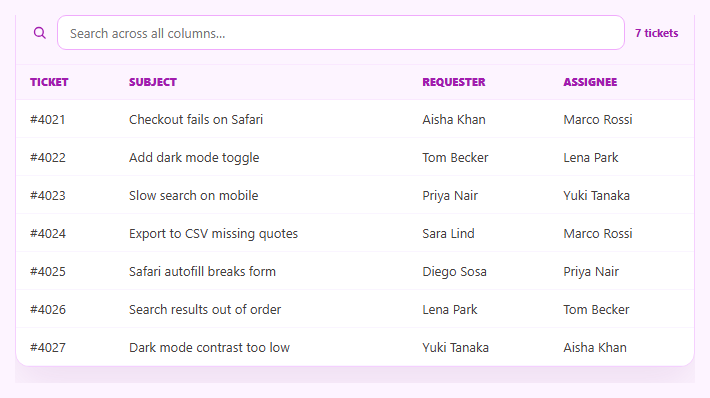
A search box that filters a table is useful; one that also shows *exactly where* the match occurred inside each cell is far more useful, because the user doesn't have to re-scan the row to figure out why it matched. This snippet builds real substring-position highlighting in plain HTML, CSS, and vanilla JavaScript — it finds every occurrence of the query inside each cell's text and wraps only that slice in <mark>, rather than tinting the whole cell or row.
Finding every occurrence, not just the first
highlightAll() walks each cell's text with indexOf in a loop, advancing the search position past each match so it finds *every* non-overlapping occurrence of the query — not just the first. A naive implementation that only highlights the first hit misses repeated terms within the same cell (e.g. "Safari" appearing twice), which looks like a bug the moment a user searches for a common word.
Escape-then-wrap, never innerHTML on raw text
Because the result is injected via innerHTML, every plain-text segment is passed through esc() before being placed in the output string, and only the matched slice is wrapped in <mark>. This escape-then-wrap order means a ticket subject containing < or & renders as literal text instead of being interpreted as markup — the query itself never needs escaping since it's compared against lowercase text and only used to slice the *original* (already-safe-to-escape) string.
Filtering AND highlighting from the same query
A single input drives both behaviors: rows are kept only if *any* column contains the query (case-insensitive), and every kept row's cells run through the same highlighting function. Because filtering and highlighting share one raw/q pair, there's no risk of the visible highlight drifting from what actually caused the row to match.
Real position math, not a CSS trick
The highlighting genuinely locates character offsets with indexOf and slices the string at those offsets — it isn't a background-color applied to a whole <td> or a CSS :contains-style hack (which doesn't exist and couldn't underline a substring anyway). This is the same technique behind real search-result snippets in tools like a code search UI or a command palette.
Count, empty state, and multi-column search
A live "N of M" count and a friendly empty state (echoing back the exact query that matched nothing) round out the interaction. The search runs across every column — ticket number, subject, requester, and assignee — so one input replaces four separate filters. Pair it with a filterable-table when you need independent per-column filters instead of one combined search, or a sortable-table to let users reorder the highlighted results.
Step by step
How to Use
- 1Paste HTML, CSS, and JSA ticket table renders with a search box above it.
- 2Type a queryRows filter live to only those containing the text in any column.
- 3Watch the highlightEvery matching substring inside each visible cell is wrapped in a highlighted mark.
- 4Search a repeated wordType a term that appears twice in one cell (e.g. "Safari") — both occurrences highlight.
- 5Clear the inputThe table returns to unfiltered, unhighlighted rows.
- 6Swap in your dataReplace the ROWS array with your own columns; the search and highlight logic is generic.
Real-world uses
Common Use Cases
indexOf calls.Got questions?
Frequently Asked Questions
This snippet computes the exact character offset of the query inside each cell's text using indexOf, then slices the string at that offset so only the matching substring is wrapped in a mark element. A whole-cell background tells you the row matched somewhere; this shows exactly which characters matched, which is far more useful when scanning longer text.
Yes. highlightAll() runs indexOf in a loop, advancing the search position past each match it finds, so if a term like "Safari" appears twice in one subject line, both occurrences get wrapped — not just the first. This matters because real user data frequently repeats the searched term.
Yes. Every non-matching text segment is HTML-escaped before being placed in the output string, and only the matched slice is wrapped in <mark> afterward. Because escaping happens first, cell data containing < or & can never be interpreted as markup, even though the result is injected via innerHTML.
Yes — rowMatches() checks whether any column in a row contains the query (case-insensitive substring match), so one search box replaces needing a separate filter per field. If you need independent per-column filters instead, see the filterable table snippet.
Keep the query in component state, derive the filtered rows with a filter/some check, and render each cell by splitting its text around the query's indexOf position into escaped-and-mark-wrapped React elements (or use v-html/[innerHTML] bindings with the same escape-then-wrap string logic in Vue/Angular). The matching and highlight algorithm is framework-agnostic.