






Three.js Holographic Globe — Wireframe WebGL Radar Sphere
Three.js Holographic Globe · Animations · Plain HTML, CSS & JS · Live preview
Copy & paste
Source Code
<canvas id="globeCanvas"></canvas>
<div class="hg-badge">Wireframe globe · radar pulse</div>*{box-sizing:border-box;margin:0;padding:0}
html,body{width:100%;height:100%;overflow:hidden;background:#020409}
#globeCanvas{display:block;width:100%;height:100%;cursor:grab}
#globeCanvas:active{cursor:grabbing}
.hg-badge{position:fixed;left:18px;top:18px;padding:7px 13px;border-radius:7px;background:rgba(4,10,16,0.7);border:1px solid rgba(34,211,238,0.3);color:#a5f3fc;font:12px ui-monospace,monospace;backdrop-filter:blur(6px)}const canvas = document.getElementById('globeCanvas');
const renderer = new THREE.WebGLRenderer({ canvas, antialias: true, alpha: true });
renderer.setPixelRatio(Math.min(window.devicePixelRatio, 2));
const scene = new THREE.Scene();
const camera = new THREE.PerspectiveCamera(48, 1, 0.1, 40);
camera.position.set(0, 0, 7);
const controls = new THREE.OrbitControls(camera, renderer.domElement);
controls.enableDamping = true;
controls.dampingFactor = 0.06;
controls.autoRotate = true;
controls.autoRotateSpeed = 0.9;
controls.minDistance = 4;
controls.maxDistance = 14;
scene.add(new THREE.AmbientLight(0x0e7490, 0.5));
const light = new THREE.PointLight(0x22d3ee, 1.8, 30);
light.position.set(4, 4, 6);
scene.add(light);
// A wireframe sphere gives the classic "hologram globe" latitude/longitude
// look for free — no custom line-drawing needed, just a normal
// SphereGeometry rendered with wireframe: true.
const globe = new THREE.Mesh(
new THREE.SphereGeometry(2, 24, 16),
new THREE.MeshBasicMaterial({ color: 0x22d3ee, wireframe: true, transparent: true, opacity: 0.5 })
);
scene.add(globe);
// A second, slightly larger, near-invisible sphere with backside rendering
// adds a soft inner glow at the globe's silhouette edge — a cheap
// stand-in for real rim lighting or Fresnel shading.
const glow = new THREE.Mesh(
new THREE.SphereGeometry(2.08, 24, 16),
new THREE.MeshBasicMaterial({ color: 0x67e8f9, transparent: true, opacity: 0.08, side: THREE.BackSide })
);
scene.add(glow);
// Small marker dots on the globe's surface, placed using the same
// spherical-coordinate formula used elsewhere in this library, standing
// in for "cities" or "data points" on a network globe.
const MARKER_COUNT = 10;
const markers = [];
for (let i = 0; i < MARKER_COUNT; i++) {
const theta = Math.random() * Math.PI * 2;
const phi = Math.acos(2 * Math.random() - 1);
const r = 2.02;
const pos = new THREE.Vector3(
r * Math.sin(phi) * Math.cos(theta),
r * Math.sin(phi) * Math.sin(theta),
r * Math.cos(phi)
);
const marker = new THREE.Mesh(
new THREE.SphereGeometry(0.045, 8, 8),
new THREE.MeshBasicMaterial({ color: 0xfef08a })
);
marker.position.copy(pos);
globe.add(marker);
markers.push(marker);
}
// Radar "ping" rings: flat rings that spawn at zero scale, grow outward
// while fading, and get recycled once fully faded — the same
// spawn-grow-fade-recycle pattern used for any repeating pulse effect.
const RING_COUNT = 4;
const rings = [];
for (let i = 0; i < RING_COUNT; i++) {
const ring = new THREE.Mesh(
new THREE.RingGeometry(0.9, 1, 48),
new THREE.MeshBasicMaterial({ color: 0x22d3ee, transparent: true, opacity: 0, side: THREE.DoubleSide })
);
ring.rotation.x = Math.PI / 2;
scene.add(ring);
rings.push({ mesh: ring, life: (i / RING_COUNT) });
}
function resize() {
const w = canvas.clientWidth, h = canvas.clientHeight;
renderer.setSize(w, h, false);
camera.aspect = w / h;
camera.updateProjectionMatrix();
}
const PULSE_SPEED = 0.006;
function animate() {
requestAnimationFrame(animate);
globe.rotation.y += 0.0016;
rings.forEach(r => {
r.life += PULSE_SPEED;
if (r.life > 1) r.life -= 1;
const scale = 0.4 + r.life * 3.2;
r.mesh.scale.setScalar(scale);
r.mesh.material.opacity = (1 - r.life) * 0.5;
});
controls.update();
renderer.render(scene, camera);
}
resize();
window.addEventListener('resize', resize);
animate();Extend with AI
Take This Snippet Further With AI
The AI prompt for this one is for Patreon supporters ($3 a month, 7 days free), along with a site with no ads. Supporters enter the passcode once and it is remembered in this browser.
What's included
Features
About this UI Snippet
How to Build a Sci-Fi Holographic Globe in Three.js
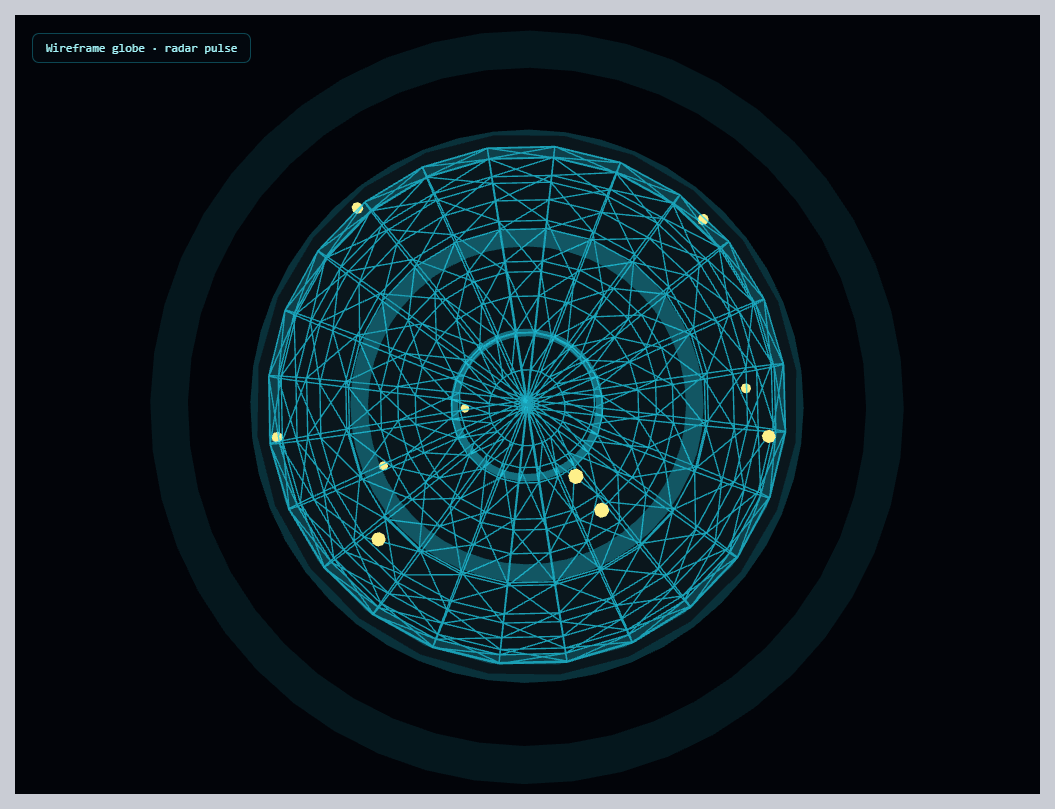
The Three.js Holographic Globe snippet renders a glowing, wireframe sphere — the classic sci-fi "network globe" look — with glowing data-point markers and continuously expanding, fading radar-ping rings, using core Three.js and OrbitControls both loaded from a CDN.
Wireframe SphereGeometry gives the latitude/longitude look for free
Rather than manually drawing latitude and longitude lines with custom Line geometry, the snippet simply renders a normal SphereGeometry with wireframe: true on its material. Three.js's sphere geometry is already built from a grid of latitude and longitude segments internally — setting wireframe mode just reveals that existing triangulated grid structure, immediately producing the recognizable globe-lines look with zero extra geometry work.
A second, larger backside sphere fakes a rim glow
True Fresnel-style rim lighting (where edges of a curved surface glow brighter than its center, viewed head-on) requires a custom shader. This snippet fakes the same effect cheaply: a second sphere, very slightly larger than the wireframe globe, rendered with side: THREE.BackSide and very low opacity, sits just outside it. Because BackSide rendering only draws the *interior* surface of that larger sphere (the side facing inward, toward the camera when looking at the globe's edge), it reads as a soft, glowing halo exactly where the globe's silhouette edge is, without any shader code at all.
Data markers placed with the same spherical-coordinate formula used elsewhere
The small glowing "city" or "data point" markers on the globe's surface use the identical uniform-spherical-distribution formula from the network graph snippet — a random azimuthal angle, a polar angle derived from an arc-cosine, projected onto a fixed radius just outside the globe's surface. Because each marker is added as a *child* of the globe mesh rather than the scene directly, every marker automatically rotates along with the globe with zero additional per-marker rotation code.
Radar pings: a spawn-grow-fade-recycle cycle, not one-shot animations
Each of four ring meshes tracks its own life value from 0 to 1, looping back to 0 once it passes 1. That single value simultaneously drives two things every frame: the ring's scale (growing from small to large) and its opacity (fading from visible to fully transparent) — both derived from the same life number, just mapped differently. Because the four rings' life values are initialized at evenly staggered starting points (i / RING_COUNT), they're never all pulsing in sync; a new ring is always mid-expansion while another is just fading out, producing a continuous, overlapping pulse rather than four rings flashing in unison.
One shared value driving two visual properties
Both the rim-glow sphere and the radar pings demonstrate the same underlying idea: deriving multiple visual properties (scale and opacity, or glow color and edge position) from a single tracked number is what keeps looping, pulsing effects feeling coordinated rather than like several independent animations that happen to run near each other.
Where this technique applies
The wireframe-sphere-plus-radar-ping combination is the standard visual shorthand for "network," "global reach," "scanning," or "tracking" concepts across tech and sci-fi interfaces. Pair it with a network graph for a "local nodes, global reach" two-scene visual, or contrast its cool, technical wireframe look against the warm, faceted glow of the crystal cluster.
Step by step
How to Use
- 1Load both CDN scriptsAdd three.min.js and OrbitControls.js from the CDN panel, in that order.
- 2Paste HTML, CSS, and JSA wireframe globe with glowing markers and expanding radar rings appears immediately.
- 3Drag to inspectRotate the camera to see the markers and rim glow from any angle; release to resume auto-rotation.
- 4Watch the radar pulseFour staggered rings continuously expand and fade, always with at least one mid-pulse.
- 5Adjust marker countChange MARKER_COUNT for more or fewer glowing data points on the globe's surface.
- 6Tune the pulse speedAdjust PULSE_SPEED for a faster, more urgent radar feel or a slower, calmer scan.
Real-world uses
Common Use Cases
Got questions?
Frequently Asked Questions
A standard THREE.SphereGeometry is already internally built from a grid of latitude and longitude segments. Setting wireframe: true on its material simply reveals that existing triangulated grid structure as visible lines, rather than requiring any custom line-drawing geometry.
A second sphere, slightly larger than the wireframe globe, is rendered with side: THREE.BackSide and very low opacity. BackSide rendering only draws a surface's interior face, so viewed from outside, only the parts of that larger sphere angled toward the camera near the globe's silhouette edge become visible, producing a soft glow effect with no shader code required.
Each marker mesh is added as a child of the globe mesh using globe.add(marker), rather than being added directly to the scene. Because Three.js applies a parent's transform to all of its children automatically, rotating the globe rotates every marker along with it with zero additional per-marker code.
Each ring tracks a single life value that continuously increases from 0 to 1 and then wraps back to 0. That one value is used twice: to compute the ring's current scale (mapped so it grows as life increases) and its current opacity (mapped so it fades as life increases) — both properties derive from the same underlying number, which is why they always stay in sync with each other.
Each ring's life value is initialized to a different starting point, evenly spaced across the 0-to-1 range (ring index divided by the total ring count). Because they all advance at the same speed but started at different points, they're always at different stages of the expand-and-fade cycle, producing a continuous, overlapping pulse rather than four rings flashing in unison.
Yes. Click JSX for a React component, Vue for a Vue 3 SFC, Angular for a standalone component, or Tailwind for a React + Tailwind CSS utility-class version. Build the globe, markers, and rings inside a mount effect, and call controls.dispose() plus renderer.dispose() on cleanup.