



Eyes Follow Cursor: Mouse Tracking Mascot in JavaScript
Eyes Follow Cursor: Mouse Tracking Mascot in JavaScript · Animations · Plain HTML, CSS & JS · Live preview
Copy & paste
Source Code
<main class="ey-stage" id="eyStage">
  <div class="ey-face" id="eyFace">
    <div class="ey-brows" aria-hidden="true"><i></i><i></i></div>
    <div class="ey-eyes">
      <div class="ey-eye"><span class="ey-pupil"></span><span class="ey-lid"></span></div>
      <div class="ey-eye"><span class="ey-pupil"></span><span class="ey-lid"></span></div>
    </div>
    <div class="ey-mouth" aria-hidden="true"></div>
  </div>
  <h1>Peeker is watching</h1>
  <p class="ey-sub">The eyes follow your cursor or finger, blink now and then, look down when you scroll, and get excited near the button.</p>
  <button type="button" class="ey-cta" id="eyCta">Say hello</button>
</main>*{box-sizing:border-box;margin:0;padding:0}
body{background:#10131c;color:#eceef6;font-family:system-ui,-apple-system,sans-serif}
.ey-stage{min-height:100vh;display:flex;flex-direction:column;align-items:center;justify-content:center;gap:14px;padding:24px;text-align:center}
.ey-face{position:relative;width:min(280px,72vw);aspect-ratio:1.05;border-radius:44% 44% 40% 40%/46% 46% 54% 54%;background:linear-gradient(160deg,#7c5cff,#4a2fd1);box-shadow:0 22px 44px rgba(60,30,180,.45);display:flex;flex-direction:column;align-items:center;justify-content:center;gap:12px;transition:transform .25s cubic-bezier(.3,1.6,.5,1)}
.ey-face.excited{transform:scale(1.05)}
.ey-brows{position:absolute;top:14%;left:0;right:0;display:flex;justify-content:center;gap:58px}
.ey-brows i{width:38px;height:6px;border-radius:4px;background:#2a1a8c;transition:transform .2s}
.ey-face.excited .ey-brows i{transform:translateY(-9px)}
.ey-eyes{display:flex;gap:22px}
.ey-eye{position:relative;width:64px;height:76px;border-radius:50%;background:#fff;overflow:hidden;box-shadow:inset 0 -5px 0 rgba(0,0,0,.08)}
.ey-pupil{position:absolute;left:50%;top:50%;width:30px;height:30px;margin:-15px 0 0 -15px;border-radius:50%;background:#14142a;transition:width .15s,height .15s,margin .15s}
.ey-pupil::after{content:'';position:absolute;left:7px;top:6px;width:8px;height:8px;border-radius:50%;background:#fff}
.ey-face.excited .ey-pupil{width:38px;height:38px;margin:-19px 0 0 -19px}
.ey-lid{position:absolute;inset:0;background:#6347e8;transform:translateY(-101%);transition:transform .09s}
.ey-face.blink .ey-lid{transform:translateY(0)}
.ey-mouth{width:44px;height:14px;border-bottom:5px solid #1a0f66;border-radius:0 0 30px 30px;transition:all .2s}
.ey-face.excited .ey-mouth{width:30px;height:26px;border:5px solid #1a0f66;border-radius:50%;background:#1a0f66}
.ey-stage h1{margin-top:12px;font-size:clamp(26px,5vw,40px);letter-spacing:-.02em}
.ey-sub{max-width:400px;color:#8f97ad;font-size:14px;line-height:1.55}
.ey-cta{margin-top:6px;font:700 15px system-ui,sans-serif;padding:12px 30px;border:0;border-radius:999px;background:#fbbf24;color:#2b1b00;cursor:pointer}
.ey-cta:focus-visible{outline:3px solid #fff;outline-offset:3px}var stage = document.getElementById('eyStage');
var face = document.getElementById('eyFace');
var cta = document.getElementById('eyCta');
var eyes = Array.prototype.map.call(document.querySelectorAll('.ey-eye'), function (el) {
return { el: el, pupil: el.querySelector('.ey-pupil'), x: 0, y: 0 };
});
var reduce = window.matchMedia('(prefers-reduced-motion: reduce)').matches;
var look = null; // where the eyes should point: {x, y} in page coordinates
var lastMove = 0; // last time the user moved a pointer
var downUntil = 0; // while scrolling, glance down until this time
function aimAt(el) { var r = el.getBoundingClientRect(); return { x: r.left + r.width / 2, y: r.top + r.height / 2 }; }
look = aimAt(cta); // start by looking at the button
window.addEventListener('pointermove', function (e) {
look = { x: e.clientX, y: e.clientY };
lastMove = performance.now();
});
// Scrolling (or a wheel turn) makes the eyes glance down for a moment.
function glanceDown() { downUntil = performance.now() + 700; }
window.addEventListener('scroll', glanceDown, { passive: true });
window.addEventListener('wheel', glanceDown, { passive: true });
// Near the button the face gets excited: bigger pupils, raised brows, open mouth.
function excite(on) { face.classList.toggle('excited', on); if (on) look = aimAt(cta); }
cta.addEventListener('pointerenter', function () { excite(true); });
cta.addEventListener('pointerleave', function () { excite(false); });
cta.addEventListener('focus', function () { excite(true); });
cta.addEventListener('blur', function () { excite(false); });
// Blink at random intervals.
function blink() {
face.classList.add('blink');
setTimeout(function () { face.classList.remove('blink'); }, 140);
setTimeout(blink, 2200 + Math.random() * 3200);
}
// With no pointer for a while, look around by itself.
function wander() {
if (performance.now() - lastMove > 3000) {
var r = stage.getBoundingClientRect();
look = { x: r.left + Math.random() * r.width, y: r.top + Math.random() * Math.min(r.height, window.innerHeight) };
}
setTimeout(wander, 1400 + Math.random() * 1200);
}
if (!reduce) { setTimeout(blink, 1800); wander(); }
function frame() {
var now = performance.now();
eyes.forEach(function (eye) {
var r = eye.el.getBoundingClientRect();
var cx = r.left + r.width / 2, cy = r.top + r.height / 2;
var target = now < downUntil ? { x: cx, y: cy + 400 } : look;
var dx = target.x - cx, dy = target.y - cy;
var dist = Math.hypot(dx, dy) || 1;
var max = Math.min(r.width, r.height) * 0.5 - 22; // keep the pupil inside the eye
var travel = Math.min(max, dist * 0.3);
var tx = (dx / dist) * travel, ty = (dy / dist) * travel;
var k = reduce ? 1 : 0.2; // smoothing
eye.x += (tx - eye.x) * k; eye.y += (ty - eye.y) * k;
eye.pupil.style.transform = 'translate(' + eye.x.toFixed(2) + 'px,' + eye.y.toFixed(2) + 'px)';
});
requestAnimationFrame(frame);
}
requestAnimationFrame(frame);Extend with AI
Take This Snippet Further With AI
Paste this snippet into an AI coding assistant and ask it to explain how each eye computes its own direction to the pointer, how the pupil travel is capped, and how lerp smoothing in requestAnimationFrame produces the natural feel. Follow-ups worth trying: a version with SVG eyebrows that react to the cursor distance, an eyes-only logo for a footer, or a mascot that falls asleep after 30 seconds of idle. Ask it to keep reduced-motion handling.
Prompt to recreate it
Copy this into your AI assistant of choice to build the effect from scratch, or as a jumping-off point for your own variant:
Build a "cursor-tracking eyes mascot" in plain HTML, CSS and JavaScript with no libraries.

Requirements:
- A centred stage with a rounded purple face containing two white oval eyes, each with a dark pupil (with a small white highlight) and an eyelid layer, plus two brows and a mouth. Below the face: a heading, a short paragraph and a call-to-action button.
- A requestAnimationFrame loop. For each eye, read its centre with getBoundingClientRect, compute the vector to the pointer, and move the pupil with a CSS transform by min(maxTravel, distance * 0.3) along that direction. maxTravel is the eye radius minus the pupil size so it stays inside the white. Ease toward the target with a lerp factor of about 0.2.
- Listen to pointermove on the window. Initially look at the button.
- Blink by toggling a class that slides the eyelids down for about 140ms at random intervals of 2 to 5 seconds.
- On scroll or wheel, glance down for about 700ms.
- If the pointer has not moved for 3 seconds, pick random points to look at every 1.4 to 2.6 seconds.
- On button hover or focus (and leave or blur), toggle an "excited" class: face scales up slightly, brows rise, mouth opens, pupils grow.
- If prefers-reduced-motion is set, disable blinking and wandering and remove smoothing.
Want to tighten it up first? Run this prompt through the AI Prompt Studio to score it across 8 quality dimensions, catch anti-patterns, and tune the wording for Claude, ChatGPT, or Gemini before you paste it in.
What's included
Features
About this UI Snippet
Eyes That Follow the Cursor: A Mascot That Reacts to You
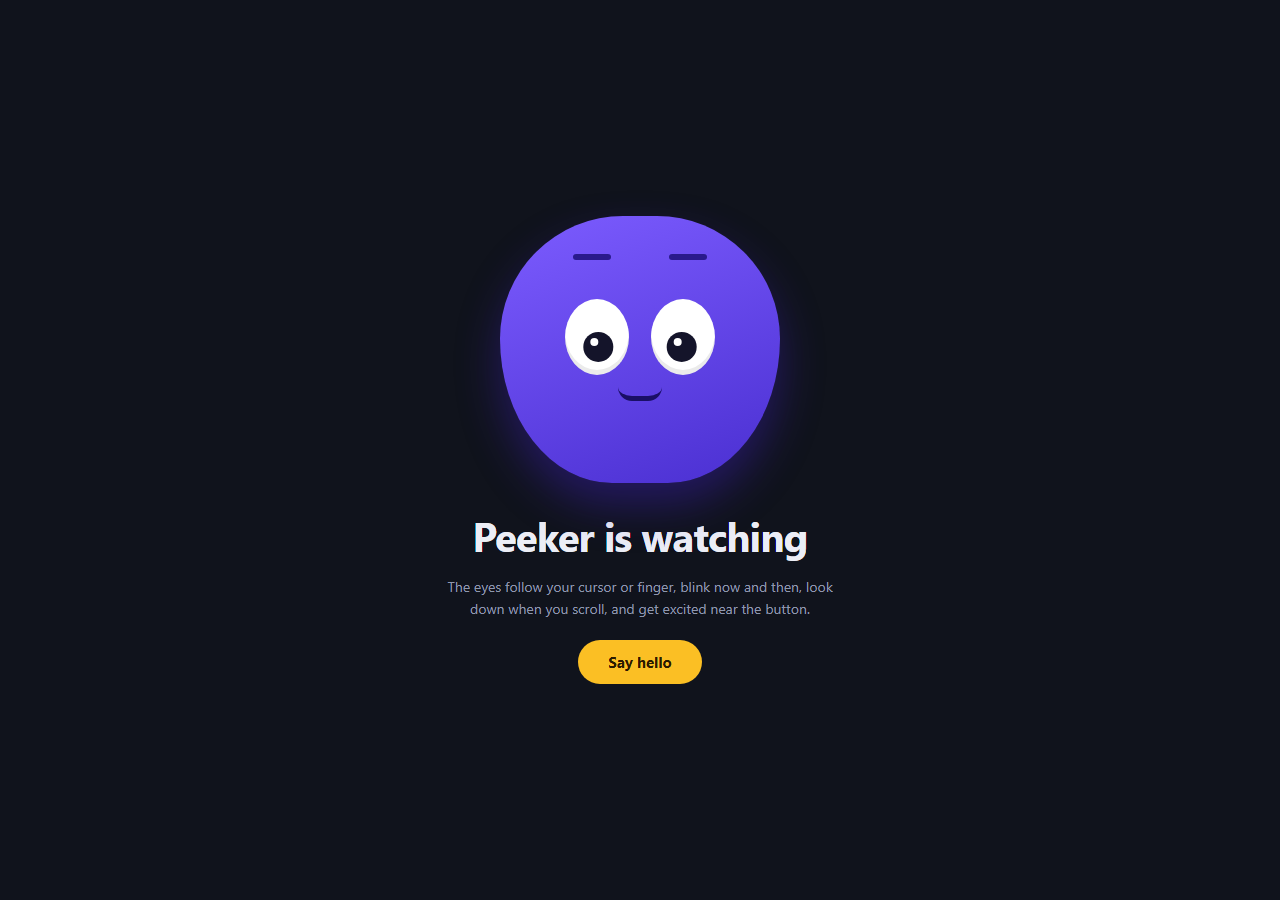
Cursor effects usually leave a trail or add a glow. This one gives the page a character. A purple mascot has two eyes whose pupils slide toward your mouse or finger, blink at random, glance down when you scroll, wander off when you stop moving, and light up when you go near the call-to-action button. It uses plain JavaScript and no library.
Pupils aim from each eye's own centre
Every frame, each eye reads its position with getBoundingClientRect(), measures the vector to the pointer and moves the pupil along it. Because each eye computes its own direction, the pupils converge slightly when the cursor is close, which looks far more alive than moving both by the same offset.
The pupil stays inside the eye
The travel distance is Math.min(max, dist * 0.3), where max is the eye's radius minus the pupil's size. Close to an eye, the pupil moves proportionally. Far away, it stops at the edge instead of leaving the white.
Smoothing makes it feel organic
Position is eased toward the target with eye.x += (tx - eye.x) * 0.2 inside a requestAnimationFrame loop. The slight lag is what makes it read as an eye turning, not a cursor attached to a dot. The code changes only transform, so the animation is cheap.
Behaviours layered on top
A blink timer adds a blink class for 140ms at random intervals. A scroll and wheel listener sets a short "glance down" window. If the pointer has not moved for three seconds, a wander timer picks random points. Hovering or focusing the button toggles an excited class: larger pupils, raised brows and an open mouth.
Touch, keyboard and reduced motion
Pointer events cover mouse, pen and touch. Keyboard focus on the button also triggers the excited state. With prefers-reduced-motion, blinking and wandering are switched off and smoothing is removed, but the pupils still follow the pointer. Pair it with a custom cursor or a magnetic button for a more playful page.
Step by step
How to Use
- 1Paste the HTML, CSS and JSNo library needed. A mascot face with two eyes and a button renders.
- 2Move your mouse or fingerBoth pupils turn toward the pointer, each from its own centre.
- 3Hover or focus the buttonThe face scales up, brows rise, the mouth opens and pupils grow.
- 4Scroll or use the wheelThe eyes glance down for about 0.7 seconds.
- 5Stay still for three secondsThe eyes start to wander around the page.
- 6Restyle the characterChange the face colours, eye sizes and the 0.3 follow factor to suit your brand.
Real-world uses
Common Use Cases
Got questions?
Frequently Asked Questions
A pointermove listener on the window stores the latest clientX and clientY. Each animation frame, every eye measures its own centre with getBoundingClientRect, works out the direction to that point and moves its pupil a limited distance along it.
Yes. Pointer events fire for touch as well as mouse, so the eyes follow a dragging finger. Phones have no hover, so the excited state appears when the button is tapped or receives focus, and idle wandering keeps the face alive.
No. The loop reads two rectangles and writes one transform per eye per frame. Only transform is animated, so the browser does no layout for the movement. The blink and wander use timers, not extra frame loops.
Keep the .ey-eye and .ey-pupil structure and replace the face shape with your own artwork or SVG. Position the eyes where your character's eyes are, and adjust the max travel if your pupils are larger or smaller.