




Three.js Scroll Moon Phases — Orbiting-Light Terminator
Three.js Scroll Moon Phases Cycle · Scroll · Plain HTML, CSS & JS · Live preview
Copy & paste
Source Code
<section class="mnp-stage" id="mnpStage">
  <div class="mnp-intro"><p>Scroll ↓ to pass a lunar month</p></div>
  <canvas id="mnpCanvas"></canvas>
  <div class="mnp-hud" id="mnpPhase">NEW MOON</div>
</section>
<section class="mnp-bottom"><p>A whole month in one scroll.</p></section>*{box-sizing:border-box;margin:0;padding:0}
html,body{background:#05060c;color:#fff;font-family:system-ui,-apple-system,sans-serif}
.mnp-bottom{min-height:70vh;display:flex;justify-content:center;align-items:center;color:#8089a8;font-size:15px;letter-spacing:.08em;text-transform:uppercase}
.mnp-stage{height:100vh;position:relative;overflow:hidden;background:#05060c}
.mnp-intro{position:absolute;inset:0;display:flex;align-items:center;justify-content:center;text-align:center;padding:24px;pointer-events:none;z-index:5;color:#8089a8;font-size:15px;letter-spacing:.08em;text-transform:uppercase;transition:opacity .4s ease}
#mnpCanvas{display:block;width:100%;height:100%}
.mnp-hud{position:absolute;left:24px;bottom:24px;font-size:13px;letter-spacing:.2em;color:#e2e8f0;text-transform:uppercase;opacity:.85}const canvas = document.getElementById('mnpCanvas');
const phaseEl = document.getElementById('mnpPhase');
const introEl = document.querySelector('.mnp-intro');
const renderer = new THREE.WebGLRenderer({ canvas, antialias: true });
renderer.setPixelRatio(Math.min(window.devicePixelRatio, 2));
const scene = new THREE.Scene();
scene.background = new THREE.Color(0x05060c);
const camera = new THREE.PerspectiveCamera(42, 1, 0.1, 400);
camera.position.set(0, 0, 34);
// The entire phase illusion is one DirectionalLight orbiting the moon.
// No masks, no textures with baked shadows — the terminator line falls
// out of Lambert shading, which is why it is always geometrically correct.
const sun = new THREE.DirectionalLight(0xfff6e0, 1.5);
scene.add(sun);
// Earthshine: the faint blue-grey fill that keeps the dark side barely
// visible, exactly like the real "old moon in the new moon's arms".
scene.add(new THREE.AmbientLight(0x2a3448, 0.55));
function rand(seed) {
const x = Math.sin(seed * 141.7 + 92.3) * 46829.4517;
return x - Math.floor(x);
}
// Cratered moon: a displaced sphere. Craters are radial dents pushed into
// the surface at seeded points — cheap, and they catch the terminator
// beautifully as it sweeps.
// Regolith must be CONTINUOUS noise over the surface (a function of the
// direction n, never of the vertex index): white noise per vertex turns
// into streaky normal garbage at the terminator after computeVertexNormals.
function surfNoise(n) {
return (
Math.sin(n.x * 6.3 + n.y * 4.1) * Math.sin(n.y * 5.7 - n.z * 3.9) * 0.5 +
Math.sin(n.x * 14.2 - n.z * 11.3) * Math.sin(n.y * 12.8 + n.x * 9.4) * 0.3 +
Math.sin(n.z * 27.5 + n.y * 24.1) * Math.sin(n.x * 22.3 + n.z * 19.7) * 0.2
);
}
const moonGeo = new THREE.SphereGeometry(9, 160, 160);
const pos = moonGeo.attributes.position;
const v = new THREE.Vector3();
const craters = [];
for (let c = 0; c < 26; c++) {
craters.push({
dir: new THREE.Vector3(rand(c) - 0.5, rand(c + 50) - 0.5, rand(c + 100) - 0.5).normalize(),
size: 0.12 + rand(c + 150) * 0.3,
depth: 0.05 + rand(c + 200) * 0.16,
});
}
// Maria: a few big dark basalt patches, baked as vertex colors.
const maria = [];
for (let m = 0; m < 5; m++) {
maria.push({
dir: new THREE.Vector3(rand(m + 300) - 0.5, rand(m + 350) - 0.5, rand(m + 400) - 0.5).normalize(),
size: 0.45 + rand(m + 450) * 0.45,
});
}
const colors = new Float32Array(pos.count * 3);
for (let i = 0; i < pos.count; i++) {
v.fromBufferAttribute(pos, i);
const n = v.clone().normalize();
let disp = surfNoise(n) * 0.035; // fine regolith roughness (smooth)
let shade = 1 + surfNoise(new THREE.Vector3(n.y, n.z, n.x)) * 0.05;
craters.forEach((cr) => {
const d = n.distanceTo(cr.dir);
if (d < cr.size * 1.15) {
const f = d / cr.size;
if (f < 1) {
// Smooth bowl: deepest at center; floor slightly darkened.
disp -= Math.cos(f * Math.PI / 2) * cr.depth * (1 - f * 0.3);
shade -= (1 - f) * 0.06;
}
// Gaussian rim just outside the bowl — no hard step, no ring artifacts.
const r = (f - 0.95) / 0.16;
disp += cr.depth * 0.22 * Math.exp(-r * r);
}
});
maria.forEach((ma) => {
const d = n.distanceTo(ma.dir);
if (d < ma.size) {
const f = d / ma.size;
shade -= (0.5 + 0.5 * Math.cos(f * Math.PI)) * 0.13; // soft-edged dark patch
}
});
v.copy(n).multiplyScalar(9 + disp);
pos.setXYZ(i, v.x, v.y, v.z);
colors[i * 3] = 0.81 * shade;
colors[i * 3 + 1] = 0.81 * shade;
colors[i * 3 + 2] = 0.84 * shade;
}
moonGeo.setAttribute('color', new THREE.BufferAttribute(colors, 3));
moonGeo.computeVertexNormals();
// Standard material = per-FRAGMENT lighting (Lambert in r128 is per-vertex
// Gouraud, which visibly facets the terminator). Full roughness, no metal —
// chalky regolith. Vertex colors carry the maria/crater-floor albedo.
const moon = new THREE.Mesh(moonGeo, new THREE.MeshStandardMaterial({
color: 0xffffff, vertexColors: true, roughness: 0.97, metalness: 0,
}));
scene.add(moon);
// Starfield.
const starGeo = new THREE.BufferGeometry();
const starPos = new Float32Array(1100 * 3);
for (let i = 0; i < 1100; i++) {
const r = 150 + rand(i + 400) * 200;
const t = rand(i + 500) * Math.PI * 2, p2 = Math.acos(2 * rand(i + 600) - 1);
starPos[i * 3] = r * Math.sin(p2) * Math.cos(t);
starPos[i * 3 + 1] = r * Math.cos(p2);
starPos[i * 3 + 2] = r * Math.sin(p2) * Math.sin(t);
}
starGeo.setAttribute('position', new THREE.BufferAttribute(starPos, 3));
scene.add(new THREE.Points(starGeo, new THREE.PointsMaterial({ color: 0xd6ddf5, size: 0.6, sizeAttenuation: true })));
const PHASES = [
'NEW MOON', 'WAXING CRESCENT', 'FIRST QUARTER', 'WAXING GIBBOUS',
'FULL MOON', 'WANING GIBBOUS', 'LAST QUARTER', 'WANING CRESCENT', 'NEW MOON',
];
gsap.registerPlugin(ScrollTrigger);
// One synodic month: the sun angle sweeps 2π. New moon = light behind.
const month = { a: 0 };
gsap.to(month, {
a: Math.PI * 2,
ease: 'none',
scrollTrigger: { trigger: '#mnpStage', start: 'top top', end: '+=500%', scrub: 0.5, pin: true },
});
function resize() {
const w = canvas.clientWidth, h = canvas.clientHeight;
renderer.setSize(w, h, false);
camera.aspect = w / h;
camera.updateProjectionMatrix();
}
const clock = new THREE.Clock();
function animate() {
requestAnimationFrame(animate);
const t = clock.getElapsedTime();
const a = month.a;
if (introEl) introEl.style.opacity = a > 0.06 ? '0' : '1';
// a = 0: sun directly behind the moon (new). a = π: behind the camera
// (full). The light orbits in the camera-moon plane.
sun.position.set(Math.sin(a) * 60, 8, -Math.cos(a) * 60);
// The moon librates gently and rotates imperceptibly — enough life to
// catch craters on the terminator, not enough to break the "same face".
moon.rotation.y = Math.sin(t * 0.1) * 0.04 + a * 0.02;
moon.rotation.x = Math.sin(t * 0.13) * 0.03;
// Full moon washes out contrast in reality; nudge ambient up near full.
const fullness = (1 - Math.cos(a)) / 2;
sun.intensity = 1.5 + fullness * 0.5;
// Camera drifts on a slow ellipse — a portrait sitting, not a flyby.
camera.position.x = Math.sin(t * 0.12) * 2.2;
camera.position.y = Math.sin(t * 0.09) * 1.4;
camera.lookAt(0, 0, 0);
const idx = Math.round((a / (Math.PI * 2)) * 8);
phaseEl.textContent = PHASES[idx];
renderer.render(scene, camera);
}
resize();
window.addEventListener('resize', resize);
animate();Extend with AI
Take This Snippet Further With AI
The AI prompt for this one is for Patreon supporters ($3 a month), along with a site with no ads. Supporters enter the passcode once and it is remembered in this browser.
What's included
Features
About this UI Snippet
How to Build Scroll-Driven Moon Phases With Three.js and GSAP
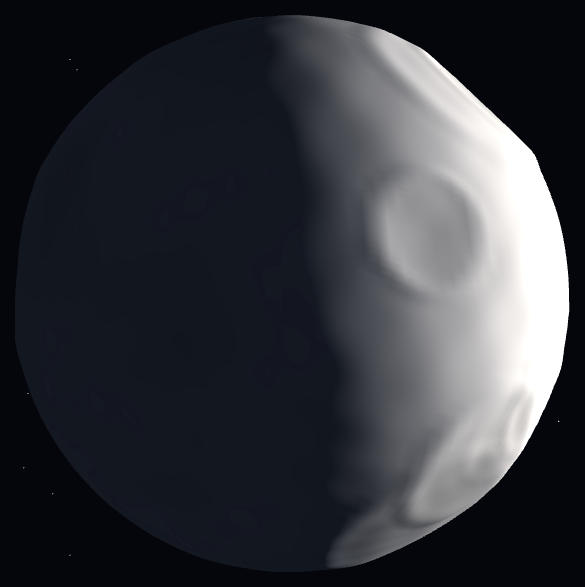
The Three.js Scroll Moon Phases Cycle snippet renders a single cratered moon and takes it through an entire synodic month in one scroll — new moon, waxing crescent, first quarter, gibbous, full, and back — by doing what the solar system does: moving the light, not masking the moon. GSAP's ScrollTrigger scrubs one sun angle from 0 to 2π; every phase, the terminator's curve, and the HUD label fall out of that geometry.
Phases are lighting, not masks
Most moon-phase widgets overlay crescent-shaped masks on a circle — and the terminator (the day/night boundary) never quite curves correctly through the intermediate phases. This snippet has no masks at all: one DirectionalLight orbits in the camera–moon plane, positioned at (sin(a)·60, 8, −cos(a)·60), so at a = 0 the light is behind the moon (new), at π behind the camera (full), and every angle between produces the exact elliptical terminator that real Lambert shading dictates. Waxing gibbous looks right because it *is* right — the same reason the planet approach's day/night line works during its corkscrew.
Craters that perform at the terminator
The moon is a 160-segment sphere with 26 craters pushed into its vertices at seeded directions — each a smooth cosine bowl with a gaussian-raised rim — plus continuous multi-octave regolith noise (a function of surface direction, never vertex index, so normals stay smooth) and five soft-edged dark maria patches baked as vertex colors. Craters exist for one payoff: the terminator. Along the day/night line, light rakes the surface nearly parallel, so every bowl throws its longest shadows exactly where the eye is drawn — the phenomenon that makes real first-quarter moons more dramatic than full ones. As scroll sweeps the terminator across the disc, each crater lights up, performs its shadow play, and fades — depth generated by displacement geometry, computeVertexNormals(), and per-fragment MeshStandardMaterial shading, no normal maps.
Earthshine keeps the dark side alive
A real new moon is not black — the night side glows faintly with sunlight reflected off Earth ("the old moon in the new moon's arms"). A dim blue-grey AmbientLight reproduces this: the dark portion stays barely legible against the starfield at every phase, which both looks correct and keeps the scene readable at new moon when a naive implementation would show nothing. Sun intensity also rises slightly toward full, echoing how a full moon washes out contrast.
Libration, the connoisseur's detail
The real moon rocks a few degrees over a month (libration), letting us see 59% of its surface over time. The snippet's moon wobbles ±0.04 radians on slow clock sines plus a tiny scroll-linked drift — imperceptible as rotation, but it shifts which crater rims catch the terminator, keeping long scrolls from feeling like a static photograph under a moving lamp. The camera drifts on a slow ellipse rather than orbiting: this is a portrait sitting, and the phase angle — not camera position — is the story.
Eight labels from one angle
The HUD phase name indexes a nine-entry array (new appears at both ends) by round(a / 2π × 8), so labels flip exactly at the midpoints between canonical phases. Reverse scrolling wanes the moon back through the month with the terminator sweeping the opposite direction — free, as always in this series, because everything derives from the one scrubbed angle, the same purity as the gear train's crank. Pair it with the seasons tree for a matched set of natural-cycle scrolls.
Step by step
How to Use
- 1Load the three CDN scriptsAdd three.min.js, gsap.min.js, and ScrollTrigger.min.js in that order before the snippet JS.
- 2Paste HTML, CSS, and JSA dark new moon hangs among stars, its night side faintly visible in blue-grey earthshine — the HUD reads NEW MOON.
- 3Scroll to waxA crescent opens on one limb and grows — watch craters light up and throw long shadows as the terminator crosses them.
- 4Pass full moonAt half scroll the light sits behind the camera and the disc floods flat and bright, phase label reading FULL MOON.
- 5Wane back to newThe terminator sweeps in from the opposite limb through gibbous, last quarter, and crescent — one complete synodic month.
- 6Make it yoursChange crater count/depth, earthshine color, or replace the HUD labels with dates for a real lunar-calendar tie-in.
Real-world uses
Common Use Cases
Got questions?
Frequently Asked Questions
Masks approximate; geometry computes. With a DirectionalLight orbiting at angle a — position (sin(a)·60, 8, −cos(a)·60) — the terminator is the exact great-circle boundary Lambert shading produces, which projects as the correct half-ellipse at every intermediate phase. Crescent masks notoriously get gibbous phases wrong (straight or wrongly-curved terminators); orbital lighting cannot, because it is the same geometry the real moon obeys.
Vertex displacement: 26 seeded directions each define a crater; every sphere vertex within a crater's angular radius is pushed inward on a cosine bowl profile (deepest at center), with a gaussian-profile rim raised just outside the bowl so there is no hard step and no ring artifacts. On top of that, continuous multi-octave trig noise — evaluated from the surface direction, never the vertex index, which would shred the normals into streaks — adds fine regolith roughness, and five soft-edged maria patches darken the vertex colors. computeVertexNormals() afterward makes the dents shade correctly under the per-fragment MeshStandardMaterial. Real geometry means crater shadows lengthen at the terminator automatically — the detail normal maps fake and displacement gets free.
Earthshine — sunlight reflected off Earth dimly illuminating the lunar night side, visible in reality as "the old moon in the new moon's arms" during crescents. A low-intensity blue-grey AmbientLight (0x2a3448 at 0.55) reproduces it, keeping the dark limb legible against the starfield at new moon, where a physically naive scene would render an invisible black disc.
Libration: the real moon's slight rocking that exposes 59% of its surface across a month. Here ±0.04-radian sines on two axes (plus a 0.02-radian scroll drift) are imperceptible as rotation but continuously change which crater rims catch light — especially near the terminator — so a slow scroll never feels like a photo under a moving lamp. It is the idle-life convention of this series applied astronomically.
Yes. Export via the JSX, Vue, Angular, or Tailwind buttons. Build the displaced sphere (a few hundred thousand vertex operations — do it once in the mount effect, never per render), starfield, and ScrollTrigger against a canvas ref. Update the phase label through a ref. On cleanup kill the ScrollTrigger, dispose moon and star geometries/materials, and call renderer.dispose().