





Three.js Scroll Rubik’s Cube Assembly — GSAP Scrub
Three.js Scroll Rubik’s Cube Assembly · Scroll · Plain HTML, CSS & JS · Live preview
Copy & paste
Source Code
<section class="rbx-stage" id="rbxStage">
  <div class="rbx-intro"><p>Scroll ↓ to assemble the cube</p></div>
  <canvas id="rbxCanvas"></canvas>
  <div class="rbx-hud"><span id="rbxPct">0</span>% ASSEMBLED</div>
</section>
<section class="rbx-bottom"><p>Solved.</p></section>*{box-sizing:border-box;margin:0;padding:0}
html,body{background:#0b0b12;color:#fff;font-family:system-ui,-apple-system,sans-serif}
.rbx-bottom{min-height:70vh;display:flex;justify-content:center;align-items:center;color:#8b8ba3;font-size:15px;letter-spacing:.08em;text-transform:uppercase}
.rbx-stage{height:100vh;position:relative;overflow:hidden;background:#0b0b12}
.rbx-intro{position:absolute;inset:0;display:flex;align-items:center;justify-content:center;text-align:center;padding:24px;pointer-events:none;z-index:5;color:#8b8ba3;font-size:15px;letter-spacing:.08em;text-transform:uppercase;transition:opacity .4s ease}
#rbxCanvas{display:block;width:100%;height:100%}
.rbx-hud{position:absolute;left:24px;bottom:24px;font-variant-numeric:tabular-nums;font-size:13px;letter-spacing:.14em;color:#fbbf24;text-transform:uppercase;opacity:.85}const canvas = document.getElementById('rbxCanvas');
const pctEl = document.getElementById('rbxPct');
const introEl = document.querySelector('.rbx-intro');
const renderer = new THREE.WebGLRenderer({ canvas, antialias: true });
renderer.setPixelRatio(Math.min(window.devicePixelRatio, 2));
const scene = new THREE.Scene();
scene.background = new THREE.Color(0x0b0b12);
const camera = new THREE.PerspectiveCamera(50, 1, 0.1, 200);
scene.add(new THREE.AmbientLight(0xffffff, 0.65));
const key = new THREE.DirectionalLight(0xffffff, 0.9);
key.position.set(8, 12, 10);
scene.add(key);
// Classic face colors. Each cubelet gets 6 materials; interior faces stay
// dark plastic so gaps between cubelets read correctly mid-flight.
const FACE = {
px: 0xdc2626, nx: 0xf97316, py: 0xfafafa, ny: 0xfbbf24, pz: 0x16a34a, nz: 0x2563eb,
};
const DARK = new THREE.MeshLambertMaterial({ color: 0x18181f });
const SIZE = 1.9, GAP = 0.12, STEP = SIZE + GAP;
const cubelets = [];
const group = new THREE.Group();
scene.add(group);
// Deterministic pseudo-random scatter so every page load (and every scroll
// back up) produces the identical cloud — Math.random would break scrub
// reversibility across reloads but, more importantly, per-cubelet phase
// offsets below must be stable.
function rand(seed) {
const x = Math.sin(seed * 127.1 + 311.7) * 43758.5453;
return x - Math.floor(x);
}
let idx = 0;
for (let x = -1; x <= 1; x++) for (let y = -1; y <= 1; y++) for (let z = -1; z <= 1; z++) {
const mats = [
x === 1 ? new THREE.MeshLambertMaterial({ color: FACE.px }) : DARK,
x === -1 ? new THREE.MeshLambertMaterial({ color: FACE.nx }) : DARK,
y === 1 ? new THREE.MeshLambertMaterial({ color: FACE.py }) : DARK,
y === -1 ? new THREE.MeshLambertMaterial({ color: FACE.ny }) : DARK,
z === 1 ? new THREE.MeshLambertMaterial({ color: FACE.pz }) : DARK,
z === -1 ? new THREE.MeshLambertMaterial({ color: FACE.nz }) : DARK,
];
const m = new THREE.Mesh(new THREE.BoxGeometry(SIZE, SIZE, SIZE), mats);
const home = new THREE.Vector3(x * STEP, y * STEP, z * STEP);
const theta = rand(idx) * Math.PI * 2, phi = Math.acos(2 * rand(idx + 100) - 1);
const r = 16 + rand(idx + 200) * 18;
const scatter = new THREE.Vector3(
r * Math.sin(phi) * Math.cos(theta),
r * Math.cos(phi),
r * Math.sin(phi) * Math.sin(theta)
);
const spin = new THREE.Vector3(rand(idx + 300) * 6, rand(idx + 400) * 6, rand(idx + 500) * 6);
group.add(m);
// Stagger: outer cubelets arrive later than the core, so the cube grows
// from its center outward.
const delay = home.length() / (STEP * Math.sqrt(3)) * 0.35;
cubelets.push({ m, home, scatter, spin, delay });
idx++;
}
gsap.registerPlugin(ScrollTrigger);
const asm = { p: 0 };
gsap.to(asm, {
p: 1,
ease: 'none',
scrollTrigger: { trigger: '#rbxStage', start: 'top top', end: '+=400%', scrub: 0.6, pin: true },
});
function resize() {
const w = canvas.clientWidth, h = canvas.clientHeight;
renderer.setSize(w, h, false);
camera.aspect = w / h;
camera.updateProjectionMatrix();
}
const clock = new THREE.Clock();
function easeOutCubic(x) { return 1 - Math.pow(1 - x, 3); }
function animate() {
requestAnimationFrame(animate);
const t = clock.getElapsedTime();
const p = asm.p;
if (introEl) introEl.style.opacity = p > 0.03 ? '0' : '1';
// First 80% of the scroll assembles the cube; the last 20% presents it
// with a full turntable rotation.
const build = Math.min(1, p / 0.8);
const present = Math.max(0, (p - 0.8) / 0.2);
let arrived = 0;
cubelets.forEach((c) => {
// Each cubelet's local progress is the global build progress shifted by
// its stagger delay, then eased — a hand-rolled stagger that stays
// perfectly scrubbable in both directions.
const lp = easeOutCubic(Math.min(1, Math.max(0, (build - c.delay) / (1 - 0.35))));
c.m.position.lerpVectors(c.scatter, c.home, lp);
c.m.rotation.set(c.spin.x * (1 - lp), c.spin.y * (1 - lp), c.spin.z * (1 - lp));
if (lp > 0.985) arrived++;
});
group.rotation.y = 0.4 + t * 0.08 + present * Math.PI * 2;
group.rotation.x = 0.28 + Math.sin(t * 0.4) * 0.04 - present * 0.1;
const dist = 26 - present * 5;
camera.position.set(0, 3, dist);
camera.lookAt(0, 0, 0);
pctEl.textContent = Math.round((arrived / cubelets.length) * 100);
renderer.render(scene, camera);
}
resize();
window.addEventListener('resize', resize);
animate();Extend with AI
Take This Snippet Further With AI
The AI prompt for this one is for Patreon supporters ($3 a month, 7 days free), along with a site with no ads. Supporters enter the passcode once and it is remembered in this browser.
What's included
Features
About this UI Snippet
How to Build a Scroll-Scrubbed Rubik’s Cube Assembly With Three.js and GSAP
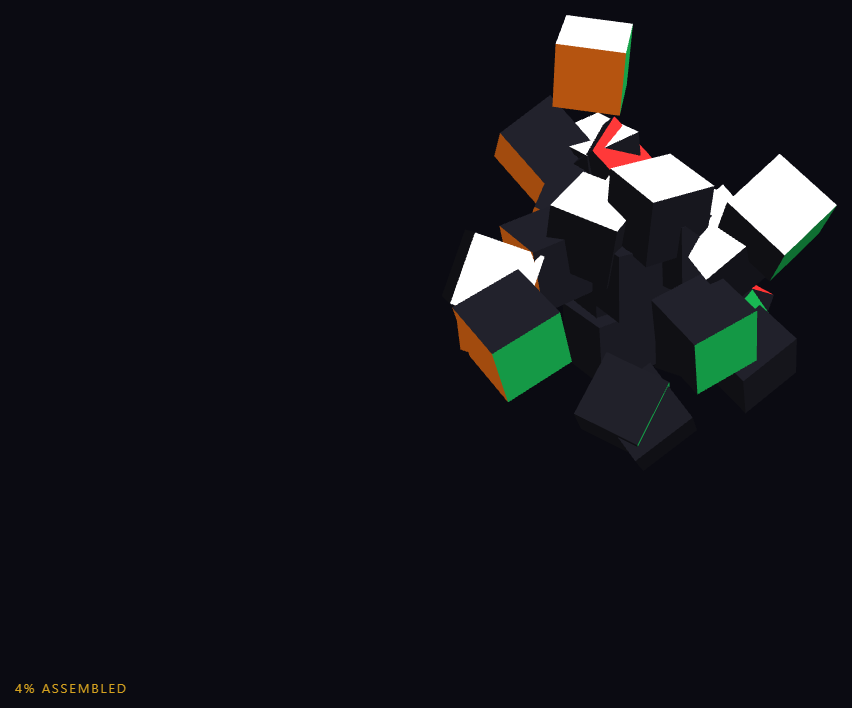
The Three.js Scroll Rubik’s Cube Assembly snippet scatters 27 colored cubelets across a wide spherical cloud and lets scroll pull them into a solved 3×3×3 Rubik’s cube, finishing with a turntable presentation spin — all scrubbed through one GSAP ScrollTrigger value with a hand-rolled, fully reversible stagger. It shares DNA with the particle assembly snippet but works at mesh scale: 27 solid boxes with per-face materials rather than thousands of points, which makes material choices and stagger design the interesting problems.
Per-face materials so the interior reads as plastic
A real Rubik’s cube only shows color on outward faces; the interior is black plastic. Each BoxGeometry cubelet receives an array of six materials, and a face gets its classic color only when the cubelet sits on that face of the 3×3×3 grid (x === 1 gets red, y === 1 gets white, and so on) — every other side shares one dark material instance. This matters mid-flight: as scattered cubelets tumble toward home you see their dark interior sides, and when the cube closes up, the thin dark gaps between stickers appear automatically, with no texture work.
Deterministic scatter from a seeded hash
Scatter positions come from a tiny sin-hash function (Math.sin(seed × 127.1 + 311.7) × 43758.5453, take the fraction) instead of Math.random(). Each cubelet derives its scatter direction, radius, and tumble spin from its index, so the cloud is identical on every page load. That determinism is what keeps the scrub honest: scroll down, up, and down again and every cubelet retraces exactly the same flight path, something unseeded randomness regenerated on any rebuild would silently break.
A hand-rolled stagger that scrubs in both directions
GSAP timelines offer stagger, but this snippet computes stagger manually so everything stays a pure function of one scrubbed value: each cubelet's local progress is (build − delay) / (1 − 0.35) clamped to 0–1 and shaped by an ease-out cubic, where delay is proportional to the cubelet's distance from the cube center. The result is a cube that grows from its core outward — the center cubelet snaps in first, corners arrive last — and reverses into an outward explosion when scrolling up. Position uses lerpVectors(scatter, home, lp) while rotation multiplies the tumble spin by (1 − lp), so every cubelet lands at exactly zero rotation.
A phase split: 80% build, 20% presentation
The scrubbed progress is split into two windows, the same pattern as the staging in product stages: the first 80% drives assembly, the final 20% drives a full 360° turntable rotation plus a 5-unit camera dolly-in. Because present is derived (not a separate tween), the handoff point cannot drift, and reversing through it un-spins the cube before disassembling it.
A live percentage from arrival counting
The HUD counts cubelets whose local progress exceeds 0.985 and shows the fraction as a percentage. Counting arrivals rather than echoing raw scroll progress makes the number honest — it sits at 0% while everything is still tumbling, climbs as pieces click in center-out, and reaches 100% just as the presentation spin begins, giving the user a satisfying sense of completion mechanics similar to the gate counter in the portal gate sequence.
Step by step
How to Use
- 1Load the three CDN scriptsAdd three.min.js, gsap.min.js, and ScrollTrigger.min.js in that order before the snippet JS.
- 2Paste HTML, CSS, and JSA pinned view shows 27 colored cubelets tumbling in a slow-rotating scattered cloud with a 0% ASSEMBLED HUD.
- 3Scroll to assembleCubelets fly home center-out — the core snaps in first, corners last — while each one untumbles to land at zero rotation.
- 4Watch the finishPast 80% progress the completed cube performs a full turntable spin as the camera dollies in five units.
- 5Scroll back upThe cube un-spins, then explodes outward along the exact same flight paths — the seeded scatter makes reversal pixel-identical.
- 6Restyle itSwap the six FACE colors for a brand palette, or change STEP and the delay multiplier to alter cube tightness and stagger spread.
Real-world uses
Common Use Cases
Got questions?
Frequently Asked Questions
The scrub must be a pure function of scroll position: scrolling down, up, and down again has to retrace identical flight paths. Math.random() would generate a new cloud on every reload and make per-cubelet phase relationships unstable. The sin-hash (fract of Math.sin(seed × 127.1 + 311.7) × 43758.5453) gives each index a fixed pseudo-random direction, radius, and spin — random-looking, but permanent.
GSAP staggers offset start times inside a playing timeline, but this scene is scrubbed, not played. Instead each cubelet stores a delay proportional to its distance from the cube center, and every frame computes local progress as (build − delay) / 0.65, clamped and eased. That makes stagger a pure function of the single scrubbed value, so it reverses perfectly — corners leave first on the way back out.
A real Rubik's cube is black plastic with colored stickers on outward faces only. Passing a material array to a Mesh assigns one material per BoxGeometry face group: a cubelet gets red only if it sits on the x = +1 layer, white only on y = +1, and so on, with all interior faces sharing a single dark material instance. Mid-flight tumbles show dark undersides, and the assembled cube shows sticker-gap lines for free.
Position uses lerpVectors(scatter, home, lp) which hits home exactly at lp = 1, and rotation is spin × (1 − lp), which reaches exactly zero at the same moment. Since the ease-out cubic maps input 1 to output 1 precisely, there is no residual drift to snap or correct — arrival is mathematically exact, not approximated with a tolerance.
Yes. Use the JSX, Vue, Angular, or Tailwind export buttons. Build the cubelet loop and ScrollTrigger inside a mount effect against a canvas ref; on cleanup kill the ScrollTrigger, dispose each BoxGeometry and every non-shared face material (dispose the shared dark material once), and call renderer.dispose() so the pin and WebGL context release on unmount.