



Vibration API Pattern Demo — Free navigator.vibrate() UI
Vibration API Pattern Demo · Buttons · Plain HTML, CSS & JS · Live preview
Copy & paste
Source Code
<section class="vpd-wrap">
  <span class="vpd-tag">navigator.vibrate</span>
  <h1>Vibration patterns</h1>
  <p id="vpdStatus">Tap a button to fire a real navigator.vibrate() pattern on supporting devices.</p>

  <div class="vpd-pulse-stage">
    <div class="vpd-pulse" id="vpdPulse"></div>
  </div>

  <div class="vpd-grid">
    <button class="vpd-btn" id="vpdShort" data-pattern="120">
      <span class="vpd-btn-title">Short pulse</span>
      <span class="vpd-btn-sub">120ms · single buzz</span>
    </button>
    <button class="vpd-btn" id="vpdDouble" data-pattern="80,90,80">
      <span class="vpd-btn-title">Double tap</span>
      <span class="vpd-btn-sub">80·90·80ms pattern</span>
    </button>
    <button class="vpd-btn" id="vpdLong" data-pattern="450">
      <span class="vpd-btn-title">Long buzz</span>
      <span class="vpd-btn-sub">450ms · sustained</span>
    </button>
    <button class="vpd-btn" id="vpdSos" data-pattern="90,60,90,60,90,180,220,60,220,60,220,180,90,60,90,60,90">
      <span class="vpd-btn-title">SOS pattern</span>
      <span class="vpd-btn-sub">morse-style burst</span>
    </button>
  </div>

  <button class="vpd-stop" id="vpdStop">Cancel vibration</button>
  <p class="vpd-note" id="vpdNote">Checking for Vibration API support…</p>
</section>*{box-sizing:border-box;margin:0;padding:0}
body{font-family:system-ui,-apple-system,sans-serif;background:radial-gradient(120% 90% at 50% 0%,#0f1d16,#050a07 60%);color:#fff;min-height:100vh;display:flex;align-items:center;justify-content:center;padding:26px}
.vpd-wrap{width:100%;max-width:520px;text-align:center}
.vpd-tag{display:inline-block;font-size:10.5px;font-weight:700;letter-spacing:.14em;text-transform:uppercase;color:#6ee7b7;background:rgba(110,231,183,.1);border:1px solid rgba(110,231,183,.3);padding:5px 12px;border-radius:99px;margin-bottom:14px}
.vpd-wrap h1{font-size:clamp(28px,6vw,38px);font-weight:800;letter-spacing:-.03em}
.vpd-wrap p{font-size:14px;color:#9db8ac;margin-top:8px;line-height:1.6}
.vpd-pulse-stage{display:flex;align-items:center;justify-content:center;height:120px;margin:20px 0}
.vpd-pulse{width:56px;height:56px;border-radius:50%;background:linear-gradient(135deg,#34d399,#059669);box-shadow:0 0 0 0 rgba(52,211,153,.5);transition:transform .08s ease}
.vpd-pulse.buzz{animation:vpdBuzz .12s ease}
@keyframes vpdBuzz{0%{transform:scale(1) translateX(0)}25%{transform:scale(1.18) translateX(-3px)}50%{transform:scale(1.05) translateX(3px)}75%{transform:scale(1.15) translateX(-2px)}100%{transform:scale(1) translateX(0)}}
.vpd-grid{display:grid;grid-template-columns:1fr 1fr;gap:10px;margin-top:6px}
.vpd-btn{padding:14px 12px;border-radius:12px;border:1px solid rgba(255,255,255,.14);background:rgba(255,255,255,.04);color:#e8f5ee;cursor:pointer;text-align:left;display:flex;flex-direction:column;gap:3px;transition:background .15s,border-color .15s,transform .08s}
.vpd-btn:hover{background:rgba(255,255,255,.09)}
.vpd-btn:active{transform:scale(.97)}
.vpd-btn-title{font-weight:700;font-size:14px}
.vpd-btn-sub{font-size:11px;color:#8fae9e}
.vpd-stop{margin-top:12px;width:100%;padding:11px;border-radius:10px;border:1px solid rgba(248,113,113,.35);background:rgba(248,113,113,.08);color:#fca5a5;font:600 13px system-ui;cursor:pointer}
.vpd-stop:hover{background:rgba(248,113,113,.15)}
.vpd-note{font-size:11.5px;color:#6f8a7c;max-width:460px;margin:14px auto 0;line-height:1.6}var statusEl = document.getElementById('vpdStatus');
var noteEl = document.getElementById('vpdNote');
var pulseEl = document.getElementById('vpdPulse');
var stopBtn = document.getElementById('vpdStop');
var buttons = document.querySelectorAll('.vpd-btn');
// Feature detection: navigator.vibrate exists on most Android browsers but is
// entirely absent on iOS Safari and on desktop browsers, and even where it
// exists, calling it can silently return false (no error thrown) if the
// document isn't in an "active" state, if a sandboxed iframe's Permissions
// Policy disallows it, or if the OS has vibration disabled system-wide.
var supported = typeof navigator !== 'undefined' && typeof navigator.vibrate === 'function';
function parsePattern(str) {
var parts = str.split(',').map(function (n) { return parseInt(n, 10); });
return parts.length === 1 ? parts[0] : parts;
}
// Play a synced on-screen pulse animation so the demo reads as "doing
// something real" even on desktops where hardware vibration is either
// unsupported or physically imperceptible. The pulse timing mirrors the
// actual pattern passed to navigator.vibrate so the two stay honest twins.
function animatePulse(pattern) {
var seq = Array.isArray(pattern) ? pattern : [pattern];
var t = 0;
seq.forEach(function (ms, i) {
var isVibrate = i % 2 === 0;
if (isVibrate) {
(function (delay, dur) {
setTimeout(function () {
pulseEl.classList.remove('buzz');
void pulseEl.offsetWidth; // restart animation
pulseEl.style.transitionDuration = dur + 'ms';
pulseEl.classList.add('buzz');
}, delay);
})(t, ms);
}
t += ms;
});
}
function fire(pattern, label) {
animatePulse(pattern);
if (supported) {
var ok = false;
try {
ok = navigator.vibrate(pattern);
} catch (err) {
ok = false;
}
if (ok) {
statusEl.textContent = 'Fired: ' + label + ' — navigator.vibrate() returned true.';
} else {
// Support exists but the call was refused (common inside a sandboxed
// preview iframe, on a backgrounded tab, or with vibration disabled
// at the OS level). Fall back to explaining the on-screen simulation.
statusEl.textContent = label + ' requested, but the device/browser declined the vibration (silently returns false in that case) — watch the on-screen pulse instead.';
}
} else {
statusEl.textContent = label + ' — no Vibration API here, so this is a simulated pulse only.';
}
}
buttons.forEach(function (btn) {
btn.addEventListener('click', function () {
var pattern = parsePattern(btn.getAttribute('data-pattern'));
var label = btn.querySelector('.vpd-btn-title').textContent;
fire(pattern, label);
});
});
stopBtn.addEventListener('click', function () {
if (supported) {
try { navigator.vibrate(0); } catch (err) {}
}
pulseEl.classList.remove('buzz');
statusEl.textContent = 'Vibration cancelled.';
});
if (supported) {
noteEl.textContent = 'Vibration API detected. On desktop browsers the call typically succeeds but produces no physical sensation — the on-screen pulse is synced to the exact same pattern so the timing is always visible.';
} else {
noteEl.textContent = 'navigator.vibrate is not available in this browser (iOS Safari and most desktop browsers never implement it, and some sandboxed iframes block it). Every button still works — the on-screen pulse simulates the pattern precisely.';
}Extend with AI
Take This Snippet Further With AI
The AI prompt for this one is for Patreon supporters ($3 a month, 7 days free), along with a site with no ads. Supporters enter the passcode once and it is remembered in this browser.
What's included
Features
About this UI Snippet
Vibration API Pattern Demo — Real Haptic Patterns With a Visible Twin
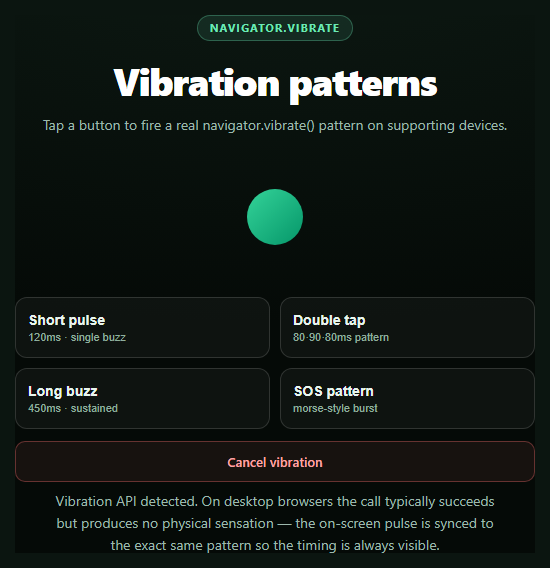
This snippet fires genuine navigator.vibrate() calls with distinct timing patterns, then mirrors each one as an on-screen pulse animation so the demo communicates what happened even when you can't feel it — which, on a desktop browser previewing this snippet, is every time.
Patterns as arrays, not just numbers
navigator.vibrate() accepts either a single millisecond number for one buzz, or an array like [80, 90, 80] meaning vibrate 80ms, pause 90ms, vibrate 80ms. This snippet uses both forms: a plain number for the short pulse and long buzz, and arrays for the double-tap and SOS patterns, parsed from a data-pattern attribute on each button.
The on-screen pulse is timed off the same array
animatePulse() walks the same pattern array the vibration call receives, scheduling a CSS animation restart at every "vibrate" segment (the even-indexed entries) using setTimeout offsets that sum the preceding durations. Because both the haptic call and the visual pulse read from one source of truth, the pulse never drifts out of sync with what the hardware is (or would be) doing.
Honest about what happens on desktop
Vibration hardware is a phone/tablet feature. On desktop Chrome, Firefox, and friends, navigator.vibrate frequently exists as a function and returns true, but produces zero physical sensation since there's no vibration motor to drive — the call isn't fake, it's just inert on that hardware. The status line and note explicitly call this out rather than implying the button "worked" in a way the user can feel.
Feature detection plus a false return
Beyond checking typeof navigator.vibrate === 'function', the demo also branches on the call's own return value: navigator.vibrate() returns false without throwing when the document isn't in an "active"/focused state, when a Permissions-Policy blocks it in a sandboxed iframe, or when the OS has vibration switched off. Both paths — unsupported entirely, and supported-but-declined — get distinct, honest status copy instead of a generic error.
Cancel support
Calling navigator.vibrate(0) (or an empty array) cancels any in-progress pattern immediately; the Cancel button wires this up alongside resetting the on-screen pulse, useful for patterns like the SOS burst that otherwise run for a couple of seconds.
Pair this with a notification permission prompt for a fuller "device capability" showcase, or a badging API demo for another rarely-covered browser capability.
Step by step
How to Use
- 1Paste HTML, CSS, and JSFour pattern buttons and a pulse indicator render.
- 2Click a pattern buttonnavigator.vibrate() fires with that pattern's timing.
- 3Watch the pulseAn on-screen pulse animates in sync, visible even on desktop.
- 4Try it on a phoneSupporting Android browsers produce a real physical buzz.
- 5Cancel mid-patternClick Cancel to stop a long or SOS pattern early.
- 6Read the status lineIt reports supported, declined, or unsupported explicitly.
Real-world uses
Common Use Cases
navigator.vibrate() pattern arrays instead of a simulated stand-in.Got questions?
Frequently Asked Questions
No. As of this writing, iOS Safari (and all browsers on iOS, since they share WebKit) does not implement navigator.vibrate at all — Apple has never shipped it. This snippet detects that absence via typeof navigator.vibrate === 'function' and falls back to the on-screen pulse animation only, with status copy explaining the platform gap rather than pretending it worked.
Vibration requires physical hardware — a vibration motor — which desktop and laptop computers don't have. On many desktop browsers navigator.vibrate is still present as a function and can return true, but there's nothing to actuate. The synced on-screen pulse exists specifically so the demo communicates timing and pattern shape even where hardware feedback is impossible.
The Vibration API is designed to fail silently rather than throw. It returns false (instead of throwing) when the calling document isn't in an active/focused state, when a Permissions-Policy denies the vibrate feature to the current frame (common in sandboxed preview iframes), or when the OS has vibration disabled system-wide. This snippet checks the return value and shows distinct status copy for that case versus total unsupported.
A single number vibrates once for that many milliseconds. An array alternates vibrate/pause/vibrate/pause starting with vibrate — so [80, 90, 80] means vibrate 80ms, pause 90ms, vibrate 80ms. This snippet's SOS button uses a longer array to demonstrate a multi-segment morse-style pattern, and the on-screen pulse reads the same array to time its own animation.
Wrap the pattern-firing logic in a handler that checks typeof navigator.vibrate === 'function' before calling it, and keep the pulse animation as CSS classes toggled by state rather than direct DOM manipulation. Cancel any in-progress vibration (navigator.vibrate(0)) in a cleanup/unmount effect if your component might unmount mid-pattern.