


Copy & paste
Source Code
<div class="src-card">
  <div class="src-icon">
    <svg viewBox="0 0 24 24" fill="none" stroke="currentColor" stroke-width="2" stroke-linecap="round" stroke-linejoin="round">
      <path d="M12 9v4"/><path d="M12 17h.01"/>
      <path d="M10.29 3.86 1.82 18a2 2 0 0 0 1.71 3h16.94a2 2 0 0 0 1.71-3L13.71 3.86a2 2 0 0 0-3.42 0z"/>
    </svg>
  </div>

  <h3>I can't help with that one</h3>
  <p class="src-text">This request involves generating content that could be used to bypass a security system, which falls outside what I'm able to assist with. This isn't a judgment on you — it's a boundary I hold for every request of this kind.</p>

  <div class="src-detail">
    <strong>What I can help with instead:</strong>
    <span>Explaining how the security system works conceptually, reviewing your own code for vulnerabilities, or helping you write a responsible disclosure report.</span>
  </div>

  <div class="src-actions">
    <button type="button" class="src-secondary" id="srcLearnMore">Why was this declined?</button>
    <button type="button" class="src-primary" id="srcRephrase">Rephrase my request</button>
  </div>

  <div class="src-more" id="srcMore" hidden>
    Responses like this are shaped by a fixed set of usage policies applied consistently to every user — they're not personal, and they don't affect your account standing. If you think this was declined in error, you can share more context and I'll take another look.
  </div>
</div>*{box-sizing:border-box;margin:0;padding:0}
body{font-family:system-ui,-apple-system,sans-serif;background:#0b0e17;min-height:100vh;display:flex;align-items:center;justify-content:center;padding:24px}
.src-card{background:#12141c;border:1px solid #232635;border-radius:16px;padding:24px;width:100%;max-width:420px;box-shadow:0 20px 50px rgba(0,0,0,.5)}
.src-icon{width:42px;height:42px;border-radius:12px;background:rgba(148,163,184,.1);border:1px solid rgba(148,163,184,.2);display:flex;align-items:center;justify-content:center;color:#94a3b8;margin-bottom:14px}
.src-icon svg{width:22px;height:22px}
.src-card h3{font-size:16.5px;font-weight:800;color:#f1f5f9;margin-bottom:9px}
.src-text{font-size:13px;line-height:1.65;color:#9aa5c1;margin-bottom:16px}
.src-detail{display:block;background:rgba(99,102,241,.06);border:1px solid rgba(99,102,241,.18);border-radius:11px;padding:12px 14px;margin-bottom:18px;font-size:12.5px;line-height:1.6;color:#a5b4fc}
.src-detail strong{display:block;color:#c7d2fe;margin-bottom:4px;font-size:12.5px}
.src-detail span{color:#9aa5c1}
.src-actions{display:flex;gap:8px}
.src-actions button{flex:1;border:none;border-radius:9px;padding:10px 12px;font-size:12.5px;font-weight:700;cursor:pointer;transition:background .15s}
.src-primary{background:#6366f1;color:#fff}
.src-primary:hover{background:#4f46e5}
.src-secondary{background:#1a1d29;color:#cbd5e1;border:1px solid #262a3a!important}
.src-secondary:hover{background:#20232f}
.src-more{margin-top:14px;font-size:12px;line-height:1.6;color:#7c8aa5;background:#0d0f17;border:1px solid #1e2130;border-radius:10px;padding:12px 14px}
.src-more[hidden]{display:none}var moreEl = document.getElementById('srcMore');
var learnBtn = document.getElementById('srcLearnMore');
var rephraseBtn = document.getElementById('srcRephrase');
learnBtn.addEventListener('click', function () {
var isHidden = moreEl.hidden;
moreEl.hidden = !isHidden;
learnBtn.textContent = isHidden ? 'Hide details' : 'Why was this declined?';
});
rephraseBtn.addEventListener('click', function () {
rephraseBtn.textContent = 'Ready for your new message';
rephraseBtn.disabled = true;
setTimeout(function () {
rephraseBtn.textContent = 'Rephrase my request';
rephraseBtn.disabled = false;
}, 1800);
});Extend with AI
Take This Snippet Further With AI
The AI prompt for this one is for Patreon supporters ($3 a month, 7 days free), along with a site with no ads. Supporters enter the passcode once and it is remembered in this browser.
What's included
Features
About this UI Snippet
AI Safety Refusal Card — Explain, Do Not Punish, Offer a Path Forward
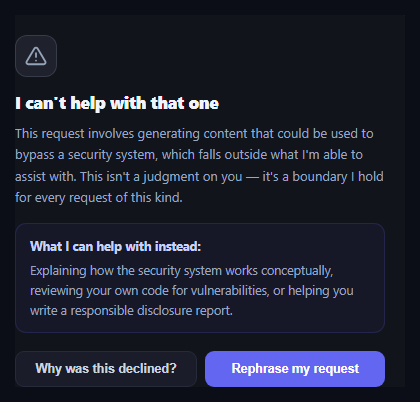
Every responsible AI product needs a UI pattern for the moment an assistant declines a request — and how that moment is designed matters. A refusal that feels like a scolding erodes trust; a refusal that explains itself clearly and offers a path forward keeps the relationship intact. This snippet builds that card in plain HTML, CSS, and vanilla JavaScript: a calm icon, a plain-language explanation, a "what I can help with instead" panel, and Rephrase / Learn more actions.
Tone starts with the icon and heading
The card deliberately avoids red, error-style coloring — the icon uses a muted slate tone rather than alarm red, and the heading reads "I can't help with that one" rather than "Request denied" or "Policy violation." Small wording choices like this determine whether a refusal reads as a wall or as a conversation partner setting a boundary, which is the actual design goal of a refusal UI.
Explain the boundary, then offer an alternative
The body text names the specific reason for the decline in one sentence, then explicitly states it isn't a judgment on the user — followed by a distinct "what I can help with instead" panel listing concrete alternatives. This structure (boundary, reassurance, alternative) is what turns a dead end into a redirect, which matters enormously for retention: a user who gets *only* "no" churns; a user who gets "no, but here's what I can do" often stays.
Two low-friction next actions
"Why was this declined?" expands an inline explanation of the policy without leaving the card, and "Rephrase my request" gives immediate positive feedback (a brief confirmation state) rather than silently returning focus to an input box, so the user knows their next attempt is welcomed rather than pre-judged.
Where this fits in an AI product
Pair it with an AI chat interface as an inline message type, or with an AI action approval card and an AI diff review card to cover the full spectrum of AI response states — approve, review, and decline.
Customizing it
Wire the "Learn more" panel to link to your real usage policy, replace the static alternative suggestions with ones generated per-request, or add a feedback mechanism so users can flag refusals they believe were made in error.
Step by step
How to Use
- 1Paste HTML, CSS, and JSA refusal card renders with an explanation and a "what I can help with instead" panel.
- 2Click "Why was this declined?"An inline panel expands explaining the policy is applied consistently, not personally.
- 3Click "Rephrase my request"The button briefly confirms readiness before returning to its normal label.
- 4Read the tone choicesMuted colors and plain language avoid an alarming or punitive feel.
- 5Edit the copyReplace the explanation and alternatives with wording specific to your product's policies.
- 6Wire up real actionsConnect Rephrase to clear/refocus the input, and Learn more to your actual policy docs.
Real-world uses
Common Use Cases
Got questions?
Frequently Asked Questions
Red and error-style presentation frame a refusal as something the user did wrong, which increases frustration and erodes trust. A muted slate tone and a calm heading like "I can't help with that one" instead frame it as the assistant stating a boundary, which research on trust and safety UX consistently shows keeps users more willing to continue the relationship after a decline.
A refusal that ends on pure "no" is a dead end and a common churn trigger. Immediately offering concrete alternatives — reviewing code, explaining a concept, or a related but permitted task — converts the decline into a redirect, giving the user a next step instead of leaving them stuck.
Replace the .src-text paragraph with wording specific to why your product declined the request, and update the .src-detail panel with alternatives genuinely relevant to that category of request. Keep the two-part structure — a specific reason, then a non-judgmental reassurance — since that structure is what does the trust-preserving work, not the exact wording.
In this demo it briefly shows a confirmation state. In a real product, wire it to refocus (and optionally clear) the message input, scroll it into view, and possibly pre-fill a softened version of the original request if your backend can suggest one — the goal is to make retrying feel invited, not like starting over from scratch.
Pass the explanation text, alternatives, and refusal category as props so the copy can vary per request type, track the "learn more expanded" state locally, and lift the rephrase action to a callback prop that the parent uses to refocus the actual chat input. The structure and tone choices port unchanged.