
AI Thinking Loader — Free HTML CSS JS Chat Loading Snippet
AI Thinking Loader · Loaders · Plain HTML, CSS & JS · Live preview
Copy & paste
Source Code
<div class="al-stage">
  <div class="al-bubble">
    <div class="al-orb" aria-hidden="true"></div>
    <div class="al-lines">
      <span class="al-status" id="alStatus">Thinking…</span>
      <div class="al-skeleton"><span></span><span></span><span></span></div>
    </div>
  </div>
</div>*{box-sizing:border-box;margin:0;padding:0}
body{font-family:system-ui,-apple-system,sans-serif;background:#0a0a14;color:#fff;display:flex;justify-content:center;align-items:center;min-height:100vh;padding:24px}
.al-bubble{display:flex;gap:14px;align-items:flex-start;max-width:360px;width:100%;background:#13131f;border:1px solid #232336;border-radius:16px;padding:16px 18px}
.al-orb{width:34px;height:34px;border-radius:50%;flex-shrink:0;background:conic-gradient(from 0deg,#6366f1,#ec4899,#22d3ee,#6366f1);animation:alSpin 2.4s linear infinite;position:relative}
.al-orb::after{content:'';position:absolute;inset:4px;border-radius:50%;background:#13131f}
@keyframes alSpin{to{transform:rotate(360deg)}}
.al-lines{flex:1;padding-top:2px}
.al-status{display:inline-block;font-size:13.5px;font-weight:600;
background:linear-gradient(90deg,#6b6b85 0%,#6b6b85 35%,#fff 50%,#6b6b85 65%,#6b6b85 100%);
background-size:220% 100%;-webkit-background-clip:text;background-clip:text;color:transparent;
animation:alShine 1.8s linear infinite}
@keyframes alShine{0%{background-position:120% 0}100%{background-position:-120% 0}}
.al-skeleton{display:flex;flex-direction:column;gap:7px;margin-top:11px}
.al-skeleton span{height:9px;border-radius:5px;background:linear-gradient(90deg,#1d1d2e 25%,#2c2c44 37%,#1d1d2e 63%);background-size:340% 100%;animation:alWave 1.4s ease-in-out infinite}
.al-skeleton span:nth-child(1){width:92%}
.al-skeleton span:nth-child(2){width:78%;animation-delay:.15s}
.al-skeleton span:nth-child(3){width:60%;animation-delay:.3s}
@keyframes alWave{to{background-position:-340% 0}}// Cycle through realistic status phrases while the AI "works", so the loader
// communicates progress rather than just spinning.
var status = document.getElementById('alStatus');
var PHRASES = ['Thinking…', 'Reading context…', 'Drafting a response…', 'Checking facts…', 'Almost there…'];
var i = 0;
setInterval(function () {
i = (i + 1) % PHRASES.length;
status.style.opacity = '0';
setTimeout(function () { status.textContent = PHRASES[i]; status.style.opacity = '1'; }, 220);
}, 1900);
status.style.transition = 'opacity .22s';Extend with AI
Take This Snippet Further With AI
The AI prompt for this one is for Patreon supporters ($3 a month), along with a site with no ads. Supporters enter the passcode once and it is remembered in this browser.
What's included
Features
About this UI Snippet
AI Thinking Loader — A Chat Loading State That Feels Alive
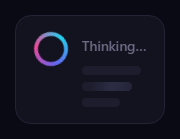
The AI thinking loader is the loading state that has become standard in chat and assistant interfaces: a gradient orb spins, a shimmering "Thinking…" label cycles through status phrases, and a skeleton of shimmer bars hints at the response forming. This snippet builds the whole thing with plain HTML, CSS, and a small vanilla JavaScript phrase cycler — a far more engaging wait than a bare spinner.
The spinning gradient orb
The orb is a circle filled with a four-color conic-gradient that rotates via the alSpin keyframe, with an ::after pseudo-element inset by 4px and filled with the bubble background — turning the solid disc into a glowing ring. This is the classic "AI is working" emblem: a rainbow ring spinning beside the message. It is pure CSS and costs only one rotating element.
Shimmering status text
The status label uses the same clipped-gradient shimmer technique as polished "shiny text": the text is transparent and filled with a gradient that is mostly muted gray with a bright band, animated across the letters so a sheen sweeps through the word. That motion makes the status feel active — the assistant is not just stuck on a static label, it is visibly working. The shimmer is pure CSS via background-clip: text.
Cycling status phrases
Real assistants reassure users by narrating progress, so JavaScript rotates the label through phrases like "Reading context…", "Drafting a response…", and "Checking facts…" on an interval. Each change fades the label out and back in (a quick opacity transition) so the phrases swap smoothly rather than snapping. Communicating steps, even simulated ones, makes a wait feel shorter and more trustworthy than a single unchanging word.
The shimmer skeleton
Below the status, three skeleton bars of decreasing width preview the shape of the incoming answer. Each bar has a moving gradient (alWave) that sweeps a lighter band across it, with staggered animation-delays so the shimmer ripples down the lines. This is the standard content-placeholder technique, here signaling that text is about to stream in — pairing the orb (it is thinking) with the skeleton (a response is coming).
Three coordinated motions, all CSS
The orb spin, the text shimmer, and the skeleton wave are independent CSS animations running together, which is what makes the loader feel rich without any animation library. JavaScript only handles the discrete job of swapping phrases, keeping the per-frame work entirely on the compositor.
Customizing it
Edit the PHRASES array to match your assistant voice, recolor the orb gradient and the shimmer band, change the number and widths of skeleton bars, or retime any of the loops. Drop it into a chat thread as the assistant message placeholder, then replace it with the real streamed response when it arrives. Pair it with an ai chat interface or a typing indicator for a complete conversation UI.
Step by step
How to Use
- 1Paste HTML, CSS, and JSA chat bubble shows a spinning orb and a shimmering status.
- 2Watch the orbA rainbow gradient ring spins beside the text.
- 3Read the statusThe shimmering label cycles through progress phrases.
- 4See the skeletonShimmer bars ripple to preview the incoming answer.
- 5Edit the phrasesChange the PHRASES array to your assistant voice.
- 6Swap in the responseReplace the loader with the streamed reply.
Real-world uses
Common Use Cases
Got questions?
Frequently Asked Questions
The orb is a circle filled with a four-color conic-gradient that rotates on a keyframe, with an ::after pseudo-element inset by 4px and filled with the bubble background. That turns the solid disc into a glowing rainbow ring, the familiar AI-working emblem, using just one rotating element in pure CSS.
The label is transparent and filled with a gradient via background-clip: text — mostly muted gray with a bright band — animated across the letters so a sheen sweeps through the word. The motion makes the status feel active and working rather than a static stuck label, and it is entirely CSS.
Narrating progress reassures users and makes a wait feel shorter. JavaScript rotates the label through phrases like Reading context and Drafting a response on an interval, fading each out and back in so they swap smoothly. Even simulated steps feel more trustworthy than a single unchanging word.
Three bars of decreasing width with a moving shimmer gradient and staggered delays preview the shape of the incoming answer. Combined with the spinning orb, it pairs the message that the assistant is thinking with the message that a response is about to stream in, which sets the right expectation during the wait.
Render it as a chat message placeholder component and keep the phrase index in state, updating it on an interval set up in a mount effect with cleanup. The orb, shimmer, and skeleton are pure CSS. Swap the component for the real response when streaming begins. In Tailwind, define the spin, shine, and wave keyframes in the config and apply them with utilities.