

Alphabet Jump Index — Drag-to-Scrub A–Z Contacts-Style List Navigation
Alphabet Jump Index — Contacts-Style A–Z Scroll Navigation · Mobile · Plain HTML, CSS & JS · Live preview
Copy & paste
Source Code
<div class="demo">
  <div class="phone-frame">
    <div class="contacts-screen">
      <div class="contacts-header">Contacts</div>
      <div class="contacts-scroll" id="contactsScroll"></div>
      <div class="az-index" id="azIndex"></div>
      <div class="az-bubble" id="azBubble" hidden></div>
    </div>
  </div>
</div>
* { box-sizing: border-box; margin: 0; padding: 0; }
body { font-family: system-ui, sans-serif; background: #f8fafc; display: flex; align-items: center; justify-content: center; min-height: 100vh; padding: 24px; }
.demo { display: flex; }
.phone-frame { width: 300px; height: 520px; border-radius: 32px; border: 8px solid #0f172a; background: #0f172a; overflow: hidden; box-shadow: 0 30px 60px rgba(15,23,42,0.25); }
.contacts-screen { height: 100%; background: #fff; position: relative; display: flex; flex-direction: column; }
.contacts-header { padding: 14px 16px; font-size: 14px; font-weight: 800; color: #111827; border-bottom: 1px solid #f1f5f9; flex-shrink: 0; }
.contacts-scroll { flex: 1; overflow-y: auto; padding-right: 26px; scroll-behavior: smooth; }
.az-group-label { position: sticky; top: 0; background: #f8fafc; font-size: 11px; font-weight: 800; color: #6366f1; padding: 4px 16px; z-index: 2; }
.az-contact { display: flex; align-items: center; gap: 10px; padding: 9px 16px; border-bottom: 1px solid #f8fafc; }
.az-avatar { width: 30px; height: 30px; border-radius: 50%; background: #eef2ff; color: #4338ca; font-size: 11px; font-weight: 800; display: flex; align-items: center; justify-content: center; flex-shrink: 0; }
.az-name { font-size: 12.5px; font-weight: 600; color: #334155; }
.az-index { position: absolute; right: 2px; top: 44px; bottom: 8px; width: 20px; display: flex; flex-direction: column; align-items: center; justify-content: space-between; padding: 4px 0; touch-action: none; user-select: none; }
.az-index-letter { font-size: 9px; font-weight: 800; color: #94a3b8; line-height: 1; cursor: pointer; }
.az-index-letter.active { color: #6366f1; }
.az-bubble { position: absolute; right: 30px; top: 50%; transform: translateY(-50%); width: 52px; height: 52px; border-radius: 50%; background: rgba(15,23,42,0.85); color: #fff; font-size: 20px; font-weight: 800; display: flex; align-items: center; justify-content: center; pointer-events: none; }const NAMES = [
'Aaliyah Cruz','Adam Blake','Amir Nasser','Bianca Wolfe','Bruno Silva',
'Carla Mendes','Chen Wei','Dana Whitfield','Diego Reyes','Ella Novak',
'Farid Karimi','Grace Kim','Hana Suzuki','Ivan Petrov','Jasmine Cole',
'Jules Park','Kofi Boateng','Layla Haddad','Liam O\'Connor','Mia Chen',
'Nadia Popescu','Noah Fischer','Omar Farouk','Priya Nair','Quinn Baxter',
'Ravi Singh','Sam Okoye','Tara Lindqvist','Uma Iyer','Victor Alves',
'Wren Sokolov','Xavier Duval','Yara Haidari','Zane Whitfield',
];
const contactsScroll = document.getElementById('contactsScroll');
const azIndex = document.getElementById('azIndex');
const azBubble = document.getElementById('azBubble');
// Group contacts by first letter once, up front — this is the data structure
// both the scrollable list AND the A-Z index bar are built from, so the two
// can never disagree about which letters actually have contacts.
const groups = {};
NAMES.slice().sort((a, b) => a.localeCompare(b)).forEach((name) => {
const letter = name[0].toUpperCase();
(groups[letter] = groups[letter] || []).push(name);
});
const availableLetters = Object.keys(groups);
const ALL_LETTERS = 'ABCDEFGHIJKLMNOPQRSTUVWXYZ'.split('');
function initials(name) {
return name.split(' ').map((p) => p[0]).slice(0, 2).join('').toUpperCase();
}
// Build the scrollable contact list, with a sticky group-label header per letter.
contactsScroll.innerHTML = availableLetters.map((letter) => `
<div class="az-group" id="group-${letter}">
<div class="az-group-label">${letter}</div>
${groups[letter].map((name) => `
<div class="az-contact">
<span class="az-avatar">${initials(name)}</span>
<span class="az-name">${name}</span>
</div>
`).join('')}
</div>
`).join('');
// Build the A-Z index bar showing every letter of the alphabet (not just
// the ones with contacts) — letters with no contacts are still shown, just
// dimmed and inert, so the index's shape stays a recognizable, consistent
// full alphabet rather than a variable-length list that shifts around
// depending on which letters happen to be present.
azIndex.innerHTML = ALL_LETTERS.map((letter) => {
const hasContacts = availableLetters.includes(letter);
return `<span class="az-index-letter${hasContacts ? '' : ' disabled'}" data-letter="${letter}" style="${hasContacts ? '' : 'opacity:0.25;cursor:default;'}">${letter}</span>`;
}).join('');
function jumpToLetter(letter) {
const group = document.getElementById('group-' + letter);
if (!group) return; // letter has no contacts — nothing to jump to
group.scrollIntoView({ behavior: 'smooth', block: 'start' });
}
function showBubble(letter) {
azBubble.textContent = letter;
azBubble.hidden = false;
Array.from(azIndex.children).forEach((el) => {
el.classList.toggle('active', el.dataset.letter === letter);
});
}
function hideBubble() {
azBubble.hidden = true;
Array.from(azIndex.children).forEach((el) => el.classList.remove('active'));
}
// The index bar supports both a tap on a single letter AND a drag/swipe up
// and down the whole bar (like a real contacts app) — touch-based dragging
// is implemented by reading which letter element is under the pointer's
// CURRENT position on every move, via elementFromPoint, rather than only
// responding to discrete tap targets.
let dragging = false;
function letterFromPoint(clientX, clientY) {
const el = document.elementFromPoint(clientX, clientY);
return el && el.classList.contains('az-index-letter') ? el.dataset.letter : null;
}
azIndex.addEventListener('pointerdown', (e) => {
dragging = true;
azIndex.setPointerCapture(e.pointerId);
const letter = letterFromPoint(e.clientX, e.clientY);
if (letter) { showBubble(letter); jumpToLetter(letter); }
});
azIndex.addEventListener('pointermove', (e) => {
if (!dragging) return;
const letter = letterFromPoint(e.clientX, e.clientY);
if (letter) { showBubble(letter); jumpToLetter(letter); }
});
azIndex.addEventListener('pointerup', () => { dragging = false; hideBubble(); });
azIndex.addEventListener('pointercancel', () => { dragging = false; hideBubble(); });Extend with AI
Take This Snippet Further With AI
The AI prompt for this one is for Patreon supporters ($3 a month), along with a site with no ads. Supporters enter the passcode once and it is remembered in this browser.
What's included
Features
About this UI Snippet
Alphabet Jump Index — Building a Real Contacts-App-Style Fast Scroll
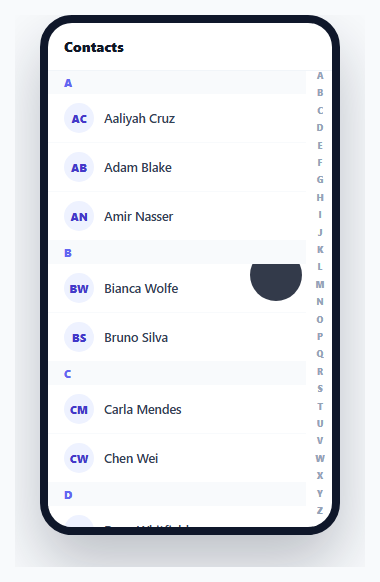
Scrolling through a long alphabetically sorted list one screen-height at a time is slow. The alphabet index familiar from every phone's contacts app solves this by letting a user tap or drag along a thin A–Z strip to jump instantly to any letter — and getting the *drag* behavior right (not just tap) is what makes it feel native rather than like a decorative row of buttons.
One shared data structure drives both the list and the index
The groups object — contacts bucketed by first letter — is built exactly once, up front, and is what *both* the scrollable contact list and the A–Z index bar are generated from. This matters: if the list and the index were built from two separate pieces of logic, they could disagree about which letters actually have contacts (for example, the index showing "Q" as active/available when no contact's name actually starts with Q). Deriving both from the same groups object structurally prevents that kind of mismatch.
Every letter of the alphabet is shown, even ones with no contacts
The index renders all 26 letters, not just the ones with matching names — letters with zero contacts are simply dimmed and made inert (cursor: default, no jump target). This is a deliberate choice: an index that only shows *available* letters would constantly change its own visual layout and letter spacing depending on the dataset, making it much harder to reliably tap or drag to a specific letter's position from muscle memory. A full, fixed 26-letter strip stays visually and spatially consistent regardless of which letters happen to have data.
Dragging works via elementFromPoint, not per-letter event listeners
The key to real drag-to-scrub behavior: rather than relying on pointerenter/pointerleave events on each individual letter (which don't reliably fire correctly once a pointer has been captured by the container during a drag), the pointermove handler calls document.elementFromPoint(clientX, clientY) on every move to directly ask "what element is physically under the pointer right now" — then checks if that element is a letter in the index. This is what makes a single continuous drag gesture, from the top of the strip to the bottom, correctly and smoothly sweep through every letter it passes over, exactly like swiping a finger down a real phone's contacts index.
The large letter bubble gives feedback away from the user's own finger
While dragging, a large, semi-transparent bubble shows the currently-active letter positioned to the left of the index strip — not directly under the finger, where it would be physically obscured by the hand doing the dragging. This mirrors the exact feedback pattern real mobile contacts apps use, giving clear visual confirmation of which letter is currently selected without requiring the user to lift their finger to see it.
Step by step
How to Use
- 1Tap a single letter in the A-Z stripInstantly scrolls the list to that letter's group, if any contacts exist for it.
- 2Press and drag up or down the stripA large letter bubble appears showing the currently-touched letter, and the list continuously jumps to match as you drag through each letter.
- 3Notice dimmed, inert lettersLetters with no matching contacts (like Q or X here) are shown dimmed and simply do nothing when tapped or dragged over — the index still shows the full alphabet for spatial consistency.
- 4Release the dragThe letter bubble disappears and the active-letter highlight in the index clears, leaving the list scrolled to wherever the drag ended.
- 5Adapt to your own datasetReplace the NAMES array with your own data — grouping, index generation, and drag scrubbing all work generically from whatever letters are actually present.
Real-world uses
Common Use Cases
Got questions?
Frequently Asked Questions
A variable-length index that only shows available letters would change its own layout and letter positions depending on the dataset, making it much harder to reliably tap or drag to a specific letter from spatial memory. A fixed, full alphabet keeps the index visually and positionally consistent regardless of which letters actually have data.
On every pointermove event during a drag, the code calls document.elementFromPoint() with the pointer's current coordinates to directly ask which DOM element is physically underneath it right now, then checks whether that element is one of the index letters — this is what allows a single continuous swipe to sweep smoothly through every letter it passes.
Nothing happens for that specific letter — jumpToLetter() checks whether a matching group element exists in the DOM before attempting to scroll, and simply does nothing if it doesn't, since there's no valid scroll target for a letter with zero contacts.
A finger dragging along the strip would physically obscure any feedback placed directly underneath it. Positioning the bubble to the left keeps it clearly visible throughout the entire drag gesture, matching the same feedback placement real mobile contacts apps use.
Both are generated from the exact same groups object, built once from the source data before either is rendered — there is no separate, independently-maintained list of "available letters" that could drift out of sync with what the scrollable list actually contains.
Yes — the interaction is built entirely on Pointer Events, which unify mouse, touch, and pen input under one API, so clicking and dragging with a mouse produces the identical scrubbing behavior as a finger swipe on a touchscreen.