



Mobile Biometric Unlock Screen — Simulated Fingerprint Scan with Real Retry Logic
Mobile Biometric Unlock Screen · Mobile · Plain HTML, CSS & JS · Live preview
Copy & paste
Source Code
<div class="demo">
  <div class="phone">
    <div class="notch"></div>
    <div class="screen" id="screen">
      <div class="lock-top">
        <span class="lock-time">9:41</span>
        <span class="lock-date">Thursday, August 27</span>
      </div>

      <div class="lock-mid">
        <button class="scan-ring" id="scanBtn" aria-label="Scan fingerprint to unlock">
          <svg id="fpIcon" width="34" height="34" viewBox="0 0 24 24" fill="none" stroke="currentColor" stroke-width="1.6" stroke-linecap="round"><path d="M12 3a7 7 0 0 0-7 7c0 2 .5 3 1 4M12 3a7 7 0 0 1 7 7c0 3-1 5-1 5M9 21c-.5-1-1-3-1-5a4 4 0 0 1 8 0c0 1 0 2-.5 3M12 7a5 5 0 0 0-5 5c0 2 .5 3 1 4M12 7a5 5 0 0 1 5 5c0 1.5-.3 3-1 4.5M12 11a1.5 1.5 0 0 0-1.5 1.5c0 2 .8 3.5 1.5 4.5"/></svg>
          <svg class="progress-ring" width="96" height="96" viewBox="0 0 96 96">
            <circle cx="48" cy="48" r="44" fill="none" stroke="#334155" stroke-width="3" />
            <circle id="progressCircle" cx="48" cy="48" r="44" fill="none" stroke="#34d399" stroke-width="3" stroke-linecap="round" stroke-dasharray="276.5" stroke-dashoffset="276.5" transform="rotate(-90 48 48)" />
          </svg>
        </button>
        <p class="scan-status" id="scanStatus">Tap to scan fingerprint</p>
      </div>

      <div class="lock-bottom">
        <span id="attemptsNote"></span>
      </div>
    </div>
  </div>
</div>
* { box-sizing: border-box; margin: 0; padding: 0; }
body { font-family: system-ui, sans-serif; background: #f8fafc; display: flex; align-items: center; justify-content: center; min-height: 100vh; padding: 24px; }
.phone { width: 280px; height: 580px; background: #0f172a; border-radius: 42px; padding: 12px; box-shadow: 0 24px 60px rgba(15,23,42,0.35); position: relative; }
.notch { position: absolute; top: 12px; left: 50%; transform: translateX(-50%); width: 100px; height: 22px; background: #0f172a; border-radius: 0 0 16px 16px; z-index: 2; }
.screen { background: linear-gradient(160deg,#1e293b,#0f172a); height: 100%; border-radius: 32px; overflow: hidden; display: flex; flex-direction: column; justify-content: space-between; padding: 40px 20px 26px; }
.lock-top { text-align: center; display: flex; flex-direction: column; gap: 3px; }
.lock-time { font-size: 15px; font-weight: 700; color: #f1f5f9; }
.lock-date { font-size: 11px; color: #64748b; font-weight: 600; }
.lock-mid { display: flex; flex-direction: column; align-items: center; gap: 16px; }
.scan-ring { position: relative; width: 96px; height: 96px; background: none; border: none; cursor: pointer; display: flex; align-items: center; justify-content: center; color: #64748b; transition: color 0.2s; }
.scan-ring:hover { color: #94a3b8; }
.scan-ring.scanning { color: #fbbf24; }
.scan-ring.success { color: #34d399; }
.scan-ring.fail { color: #f87171; animation: shake 0.3s; }
.progress-ring { position: absolute; inset: 0; }
#progressCircle { transition: stroke-dashoffset 0.1s linear; }
@keyframes shake { 25% { transform: translateX(-5px); } 75% { transform: translateX(5px); } }
.scan-status { font-size: 12.5px; color: #94a3b8; font-weight: 600; text-align: center; min-height: 16px; }
.lock-bottom { text-align: center; }
#attemptsNote { font-size: 11px; color: #f87171; font-weight: 600; min-height: 14px; }const scanBtn = document.getElementById('scanBtn');
const fpIcon = document.getElementById('fpIcon');
const statusEl = document.getElementById('scanStatus');
const progressCircle = document.getElementById('progressCircle');
const attemptsNote = document.getElementById('attemptsNote');
const CIRCUMFERENCE = 2 * Math.PI * 44; // matches the r=44 circle
let scanning = false;
let failCount = 0;
function setProgress(pct) {
progressCircle.style.strokeDashoffset = String(CIRCUMFERENCE * (1 - pct));
}
function resetVisual() {
scanBtn.classList.remove('scanning', 'success', 'fail');
setProgress(0);
}
function runScan() {
if (scanning) return;
scanning = true;
resetVisual();
scanBtn.classList.add('scanning');
statusEl.textContent = 'Scanning…';
const duration = 1100;
const start = performance.now();
function frame(now) {
const elapsed = now - start;
const pct = Math.min(elapsed / duration, 1);
setProgress(pct);
if (pct < 1) {
requestAnimationFrame(frame);
} else {
finishScan();
}
}
requestAnimationFrame(frame);
}
function finishScan() {
// Real fingerprint sensors occasionally fail to get a clean read —
// simulate roughly a 1-in-4 failure rate to make the retry path real.
const success = Math.random() > 0.25;
if (success) {
scanBtn.classList.remove('scanning');
scanBtn.classList.add('success');
statusEl.textContent = 'Fingerprint recognized — unlocking…';
attemptsNote.textContent = '';
failCount = 0;
} else {
scanBtn.classList.remove('scanning');
scanBtn.classList.add('fail');
failCount += 1;
statusEl.textContent = 'Not recognized — tap to try again';
attemptsNote.textContent = failCount >= 3
? `${failCount} failed attempts — try your passcode instead.`
: `Attempt ${failCount} of 3 before passcode is required.`;
}
scanning = false;
}
scanBtn.addEventListener('click', runScan);Extend with AI
Take This Snippet Further With AI
The AI prompt for this one is for Patreon supporters ($3 a month), along with a site with no ads. Supporters enter the passcode once and it is remembered in this browser.
What's included
Features
About this UI Snippet
Mobile Biometric Unlock Screen — A Scan Sequence With a Real Outcome, Not Just an Icon
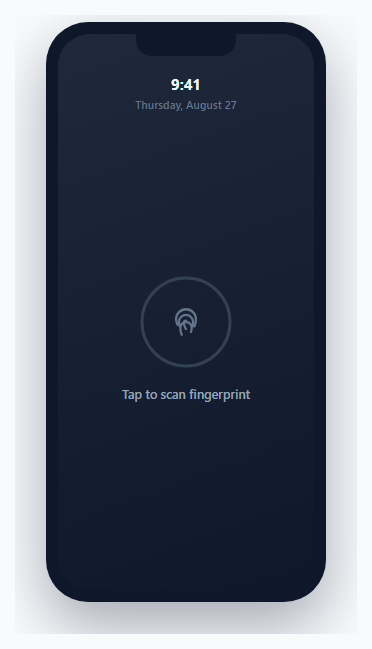
Most lock-screen mockups show a static fingerprint icon with no actual interaction behind it. This one implements the full scan sequence a real biometric unlock goes through: a timed progress ring fills in as the "scan" runs, then resolves to either a success state or — realistically, since real sensors do occasionally fail to get a clean read — a failure state that increments a genuine attempt counter and eventually suggests falling back to a passcode.
The progress ring is driven by elapsed time, not a fixed-step counter
runScan() records a performance.now() timestamp at the start and, inside a requestAnimationFrame loop, computes pct = elapsed / duration on every frame — deriving progress from actual elapsed wall-clock time rather than incrementing a counter by a fixed amount per frame. This keeps the ring's fill rate consistent regardless of the device's actual frame rate; a lower-refresh-rate device gets fewer, larger per-frame progress jumps, while a high-refresh-rate device gets more, smaller ones, but the *total* animation duration stays accurate either way.
Circumference-based stroke-dashoffset, computed once and reused
CIRCUMFERENCE = 2 * Math.PI * 44 is calculated once from the SVG circle's actual radius attribute, and every progress update sets strokeDashoffset as CIRCUMFERENCE * (1 - pct) — the same stroke-dasharray/dashoffset ring-fill technique used elsewhere in this library's loaders, applied here to represent scan progress specifically rather than a generic loading state.
A genuinely randomized failure path, not just a happy-path demo
finishScan() resolves with Math.random() > 0.25 — a real ~25% chance of failure on every scan attempt, deliberately modeling that biometric sensors don't have perfect read rates in practice. A failed scan triggers a distinct visual state (a red icon with a brief shake animation) and increments a persistent failCount that survives across scan attempts until a success resets it back to zero.
The attempt counter changes its own message as it climbs
Below three failed attempts, the note explicitly states how many tries remain before a passcode fallback would be required ("Attempt 2 of 3…"); at three or more, the message itself changes to suggest using a passcode instead — modeling the realistic security UX pattern where a device nudges toward a fallback authentication method after repeated biometric failures, rather than letting a user retry an unreliable scan indefinitely with no escalation.
Step by step
How to Use
- 1Tap the fingerprint icon to run a scanThe ring fills over about 1.1 seconds, then resolves to a success or failure state.
- 2Try scanning several timesAbout 1 in 4 attempts fails — watch the attempt counter and its message change as failures accumulate.
- 3Adjust the scan durationChange the duration constant (in milliseconds) inside runScan() to make the simulated scan faster or slower.
- 4Adjust the simulated failure rateChange the 0.25 threshold in finishScan() — a higher number means a lower failure rate, and vice versa.
- 5Change the passcode-fallback thresholdUpdate the failCount >= 3 check in finishScan() to require more or fewer failed attempts before suggesting a passcode.
Real-world uses
Common Use Cases
Got questions?
Frequently Asked Questions
requestAnimationFrame doesn't guarantee a fixed interval between calls — it varies with the device's actual refresh rate and current load. Computing pct = elapsedTime / totalDuration keeps the animation's real-world duration accurate regardless of how many or how few frames actually get scheduled during that time.
No — finishScan() uses Math.random() > 0.25, giving each attempt roughly a 25% chance of failing, deliberately modeling the reality that biometric sensors occasionally fail to get a clean read, rather than presenting an unrealistic always-succeeds demo.
The failCount variable persists across attempts (resetting only on a successful scan) and the status message changes once it reaches 3 or more, suggesting the user fall back to a passcode instead of continuing to retry — mirroring how real devices handle repeated biometric failures.
It uses the standard SVG stroke-dasharray/stroke-dashoffset technique: the circle's circumference is computed once from its radius, and stroke-dashoffset is set to circumference * (1 - progress) on every animation frame, so the ring visually fills as progress increases from 0 to 1.
Yes — change Math.random() > 0.25 to always return true (e.g. replace it with true), though keeping some randomized failure is what makes the retry-counter and passcode-fallback messaging logic actually demonstrable.
No — this is a purely visual and interaction simulation intended for mockups and prototyping. A production implementation of real biometric authentication would use the WebAuthn API rather than a randomized JavaScript simulation like this one.