



Mobile Voice Message Screen — Hold to Record, Slide Cancel
Mobile Voice Message Recording Screen · Mobile · Plain HTML, CSS & JS · Live preview
Copy & paste
Source Code
<div class="vms-phone">
<div class="vms-screen">
<div class="vms-status"><span>9:41</span><span class="vms-batt"><i></i></span></div>
<header class="vms-head">
<button type="button" class="vms-back" aria-label="Back">‹</button>
<div class="vms-contact">
<span class="vms-avatar">P</span>
<div class="vms-who"><b>Priya</b><small>online</small></div>
</div>
</header>
<div class="vms-thread" id="vmsThread">
<div class="vms-day">Today</div>
<div class="vms-msg vms-them">Hey! Can you send a quick voice note about the launch plan?</div>
<div class="vms-msg vms-me">Sure, one sec</div>
</div>
<div class="vms-toast" id="vmsToast" role="status"></div>
<div class="vms-composer" id="vmsComposer">
<div class="vms-field">
<input class="vms-input" id="vmsInput" placeholder="Message" aria-label="Message" autocomplete="off">
<div class="vms-rec" aria-hidden="true">
<span class="vms-rec-dot"></span>
<span class="vms-timer" id="vmsTimer">0:00</span>
<div class="vms-live-wave" id="vmsWave"></div>
<span class="vms-hint" id="vmsHint"><svg width="11" height="11" viewBox="0 0 24 24" fill="none" stroke="currentColor" stroke-width="3" stroke-linecap="round" stroke-linejoin="round"><path d="m15 18-6-6 6-6"/></svg><span id="vmsHintText">Slide to cancel</span></span>
</div>
</div>
<button type="button" class="vms-mic" id="vmsMic" aria-label="Hold to record a voice message">
<svg class="vms-ic-mic" width="18" height="18" viewBox="0 0 24 24" fill="none" stroke="currentColor" stroke-width="2.2" stroke-linecap="round" aria-hidden="true"><path d="M12 15a3 3 0 0 0 3-3V6a3 3 0 1 0-6 0v6a3 3 0 0 0 3 3Z"/><path d="M19 11a7 7 0 0 1-14 0M12 18v3"/></svg>
<svg class="vms-ic-send" width="17" height="17" viewBox="0 0 24 24" fill="currentColor" aria-hidden="true"><path d="M3 20 21 12 3 4v6l12 2-12 2z"/></svg>
</button>
</div>
</div>
</div>*{box-sizing:border-box;margin:0;padding:0}
html,body{scrollbar-width:none;-ms-overflow-style:none}
html::-webkit-scrollbar,body::-webkit-scrollbar{display:none}
body{font-family:system-ui,-apple-system,sans-serif;background:#1e293b;display:flex;justify-content:center;align-items:center;min-height:100vh;padding:24px}
button{font:inherit;cursor:pointer;border:0}
.vms-phone{width:288px;height:600px;background:#0b1220;border-radius:46px;padding:12px;box-shadow:0 30px 60px -20px rgba(0,0,0,.6),inset 0 0 0 2px #1e293b}
.vms-screen{position:relative;width:100%;height:100%;border-radius:34px;overflow:hidden;background:#eef2f7;color:#0f172a;display:flex;flex-direction:column}
.vms-status{display:flex;justify-content:space-between;align-items:center;padding:13px 24px 0;font-size:13px;font-weight:700;background:#fff}
.vms-batt{width:22px;height:11px;border:1.4px solid currentColor;border-radius:3px;position:relative;display:inline-block}
.vms-batt::after{content:'';position:absolute;right:-3px;top:3px;width:2px;height:5px;background:currentColor;border-radius:0 1px 1px 0}
.vms-batt i{position:absolute;left:1.4px;top:1.4px;bottom:1.4px;width:82%;background:currentColor;border-radius:1px}
.vms-head{display:flex;align-items:center;gap:10px;padding:8px 14px 12px;background:#fff;border-bottom:1px solid #e2e8f0}
.vms-back{background:rgba(15,23,42,.06);width:30px;height:30px;border-radius:50%;font-size:20px;line-height:1;color:#0f172a}
.vms-contact{display:flex;align-items:center;gap:9px}
.vms-avatar{width:30px;height:30px;border-radius:50%;background:#7c3aed;color:#fff;display:flex;align-items:center;justify-content:center;font-size:12px;font-weight:800}
.vms-who{display:flex;flex-direction:column;line-height:1.2}
.vms-who b{font-size:13.5px}
.vms-who small{font-size:10.5px;color:#16a34a;font-weight:600}
.vms-thread{flex:1;overflow-y:auto;padding:12px 14px;display:flex;flex-direction:column;gap:8px;scrollbar-width:none;scroll-behavior:smooth}
.vms-thread::-webkit-scrollbar{display:none}
.vms-day{align-self:center;font-size:10.5px;font-weight:700;color:#64748b;background:rgba(15,23,42,.06);padding:3px 10px;border-radius:99px;margin-bottom:2px}
.vms-msg{max-width:78%;font-size:13px;line-height:1.5;padding:9px 13px;border-radius:16px;word-wrap:break-word;animation:vms-in .25s ease-out}
.vms-them{align-self:flex-start;background:#fff;border-bottom-left-radius:4px;box-shadow:0 1px 2px rgba(0,0,0,.05)}
.vms-me{align-self:flex-end;background:#7c3aed;color:#fff;border-bottom-right-radius:4px}
.vms-voice{align-self:flex-end;display:flex;align-items:center;gap:8px;width:204px;background:#7c3aed;color:#fff;padding:8px 12px 8px 8px;border-radius:16px;border-bottom-right-radius:4px;animation:vms-in .25s ease-out}
.vms-play{width:30px;height:30px;border-radius:50%;background:rgba(255,255,255,.22);color:#fff;display:flex;align-items:center;justify-content:center;flex:none;transition:background .15s}
.vms-play:hover{background:rgba(255,255,255,.34)}
.vms-play:focus-visible{outline:2px solid #fff;outline-offset:2px}
.vms-bars{display:flex;align-items:center;justify-content:space-between;gap:2px;height:22px;flex:1;min-width:0;overflow:hidden}
.vms-bars span{width:2.5px;flex:none;background:rgba(255,255,255,.45);border-radius:2px;transition:background .1s}
.vms-bars span.on{background:#fff}
.vms-dur{font-size:10.5px;font-variant-numeric:tabular-nums;opacity:.9;flex:none}
@keyframes vms-in{from{opacity:0;transform:translateY(8px)}to{opacity:1;transform:none}}
.vms-toast{position:absolute;left:50%;bottom:74px;transform:translate(-50%,8px);background:#0f172a;color:#fff;font-size:11.5px;font-weight:600;padding:7px 12px;border-radius:99px;white-space:nowrap;opacity:0;pointer-events:none;transition:opacity .2s,transform .2s;z-index:3}
.vms-toast.show{opacity:1;transform:translate(-50%,0)}
.vms-composer{display:flex;align-items:center;gap:8px;background:#fff;border-top:1px solid #e2e8f0;padding:10px 12px}
.vms-field{position:relative;flex:1;min-width:0}
.vms-input{width:100%;height:40px;border:1.5px solid #e2e8f0;border-radius:20px;padding:0 15px;font-size:13px;font-family:inherit;outline:none;transition:border-color .15s}
.vms-input:focus{border-color:#7c3aed}
.vms-composer.is-rec .vms-input{visibility:hidden}
.vms-rec{position:absolute;inset:0;display:none;align-items:center;gap:8px;padding:0 14px;border-radius:20px;background:#f5f3ff;border:1.5px solid #ddd6fe;overflow:hidden;transition:background .15s,border-color .15s}
.vms-composer.is-rec .vms-rec{display:flex}
.vms-composer.is-cancel .vms-rec{background:#fef2f2;border-color:#fecaca}
.vms-rec-dot{width:9px;height:9px;border-radius:50%;background:#ef4444;flex:none;animation:vms-blink 1s infinite}
@keyframes vms-blink{50%{opacity:.25}}
.vms-timer{font-size:12.5px;font-weight:700;font-variant-numeric:tabular-nums;flex:none}
.vms-live-wave{flex:1;min-width:0;height:24px;display:flex;align-items:center;gap:2px;overflow:hidden}
.vms-live-wave span{width:2.5px;flex:none;background:#7c3aed;border-radius:2px}
.vms-composer.is-cancel .vms-live-wave span{background:#ef4444}
.vms-hint{position:absolute;right:12px;display:flex;align-items:center;gap:3px;font-size:11px;font-weight:600;color:#64748b;white-space:nowrap;padding-left:22px;background:linear-gradient(90deg,transparent,#f5f3ff 40%);transition:opacity .4s,color .15s}
.vms-composer.is-cancel .vms-hint{color:#dc2626;background:linear-gradient(90deg,transparent,#fef2f2 40%)}
.vms-hint.gone{opacity:0}
.vms-mic{position:relative;width:40px;height:40px;border-radius:50%;background:#7c3aed;color:#fff;display:flex;align-items:center;justify-content:center;flex:none;touch-action:none;-webkit-user-select:none;user-select:none;-webkit-tap-highlight-color:transparent;transition:transform .15s,background .15s}
.vms-mic:focus-visible{outline:2px solid #4c1d95;outline-offset:2px}
.vms-ic-send{display:none}
.vms-composer.has-text .vms-ic-mic{display:none}
.vms-composer.has-text .vms-ic-send{display:block}
.vms-composer.is-rec .vms-mic{transform:scale(1.3)}
.vms-composer.is-rec .vms-mic::after{content:'';position:absolute;inset:0;border-radius:50%;border:2px solid #7c3aed;animation:vms-pulse 1.2s ease-out infinite}
.vms-composer.is-cancel .vms-mic{background:#ef4444}
.vms-composer.is-cancel .vms-mic::after{border-color:#ef4444}
@keyframes vms-pulse{from{transform:scale(1);opacity:.7}to{transform:scale(1.9);opacity:0}}
@media (prefers-reduced-motion:reduce){
.vms-rec-dot,.vms-composer.is-rec .vms-mic::after,.vms-msg,.vms-voice{animation:none}
.vms-thread{scroll-behavior:auto}
}var composer = document.getElementById('vmsComposer');
var input = document.getElementById('vmsInput');
var mic = document.getElementById('vmsMic');
var timerEl = document.getElementById('vmsTimer');
var wave = document.getElementById('vmsWave');
var hint = document.getElementById('vmsHint');
var hintText = document.getElementById('vmsHintText');
var thread = document.getElementById('vmsThread');
var toastEl = document.getElementById('vmsToast');
var CANCEL_DISTANCE = 70; // px to slide left before release cancels
var MIN_MS = 600; // shorter than this counts as an accidental tap
var recording = false, inCancelZone = false;
var startX = 0, startTime = 0, timerId = 0, waveId = 0;
var levels = [], level = 0.5;
var PLAY = '<svg width="11" height="11" viewBox="0 0 24 24" fill="currentColor"><polygon points="7 3 20 12 7 21 7 3"/></svg>';
var PAUSE = '<svg width="11" height="11" viewBox="0 0 24 24" fill="currentColor"><rect x="6" y="4" width="4" height="16" rx="1"/><rect x="14" y="4" width="4" height="16" rx="1"/></svg>';
function fmt(s) { return Math.floor(s / 60) + ':' + (s % 60 < 10 ? '0' : '') + (s % 60); }
function scrollDown() { thread.scrollTop = thread.scrollHeight; }
var toastTimer = 0;
function toast(msg) {
toastEl.textContent = msg;
toastEl.classList.add('show');
clearTimeout(toastTimer);
toastTimer = setTimeout(function () { toastEl.classList.remove('show'); }, 1800);
}
// ---- recording ----
function startRecording(x) {
recording = true; inCancelZone = false;
startX = x; startTime = performance.now();
levels = []; level = 0.5;
wave.innerHTML = '';
timerEl.textContent = '0:00';
hint.classList.remove('gone');
hint.style.transform = '';
hintText.textContent = 'Slide to cancel';
composer.classList.add('is-rec');
composer.classList.remove('is-cancel');
timerId = setInterval(function () {
var ms = performance.now() - startTime;
timerEl.textContent = fmt(Math.floor(ms / 1000));
if (ms > 2200 && !inCancelZone) hint.classList.add('gone');
}, 200);
// A smooth random walk, so the bars rise and fall like speech instead of flickering
waveId = setInterval(function () {
level = Math.max(0.12, Math.min(1, level + (Math.random() - 0.5) * 0.7));
levels.push(level);
var bar = document.createElement('span');
bar.style.height = Math.round(4 + level * 18) + 'px';
wave.appendChild(bar);
var capacity = Math.floor(wave.clientWidth / 4.5);
while (wave.children.length > capacity) wave.removeChild(wave.firstChild);
}, 90);
}
function finish(send) {
if (!recording) return;
recording = false;
clearInterval(timerId); clearInterval(waveId);
var ms = performance.now() - startTime;
composer.classList.remove('is-rec', 'is-cancel');
if (!send) { toast('Recording discarded'); return; }
if (ms < MIN_MS) { toast('Hold to record, release to send'); return; }
addVoice(Math.max(1, Math.round(ms / 1000)), levels);
}
// Pointer events cover mouse, touch and pen. Pointer capture keeps the events coming
// even when the finger slides off the button, so a recording can never get stuck open.
mic.addEventListener('pointerdown', function (e) {
if (input.value.trim() || (e.pointerType === 'mouse' && e.button !== 0)) return; // with text typed, the button just sends
e.preventDefault();
mic.setPointerCapture(e.pointerId);
startRecording(e.clientX);
});
mic.addEventListener('pointermove', function (e) {
if (!recording) return;
var dx = Math.min(0, e.clientX - startX);
inCancelZone = dx < -CANCEL_DISTANCE;
composer.classList.toggle('is-cancel', inCancelZone);
hintText.textContent = inCancelZone ? 'Release to cancel' : 'Slide to cancel';
hint.classList.toggle('gone', false);
hint.style.transform = 'translateX(' + dx * 0.5 + 'px)';
});
mic.addEventListener('pointerup', function () { finish(!inCancelZone); });
mic.addEventListener('pointercancel', function () { finish(false); });
mic.addEventListener('contextmenu', function (e) { e.preventDefault(); });
// Keyboard: hold Space or Enter to record, release to send, Escape to cancel
mic.addEventListener('keydown', function (e) {
if ((e.key === ' ' || e.key === 'Enter') && !e.repeat && !recording && !input.value.trim()) { e.preventDefault(); startRecording(0); }
else if (e.key === 'Escape' && recording) finish(false);
});
mic.addEventListener('keyup', function (e) { if ((e.key === ' ' || e.key === 'Enter') && recording) { e.preventDefault(); finish(true); } });
mic.addEventListener('blur', function () { if (recording) finish(false); });
// ---- text messages: with text typed, the mic becomes a send button ----
input.addEventListener('input', function () {
var has = !!input.value.trim();
composer.classList.toggle('has-text', has);
mic.setAttribute('aria-label', has ? 'Send message' : 'Hold to record a voice message');
});
function sendText() {
var text = input.value.trim();
if (!text) return;
var m = document.createElement('div');
m.className = 'vms-msg vms-me';
m.textContent = text;
thread.appendChild(m);
input.value = '';
composer.classList.remove('has-text');
mic.setAttribute('aria-label', 'Hold to record a voice message');
scrollDown();
}
mic.addEventListener('click', sendText);
input.addEventListener('keydown', function (e) { if (e.key === 'Enter') sendText(); });
// ---- voice bubble: the waveform is the recording's own shape, and it plays back ----
function addVoice(seconds, data) {
var N = 24, bars = '';
for (var i = 0; i < N; i++) {
var l = data[Math.floor(i * data.length / N)] || 0.3;
bars += '<span style="height:' + (3 + Math.round(l * 17)) + 'px"></span>';
}
var b = document.createElement('div');
b.className = 'vms-voice';
b.innerHTML = '<button type="button" class="vms-play" aria-label="Play voice message">' + PLAY + '</button>' +
'<span class="vms-bars">' + bars + '</span><span class="vms-dur">' + fmt(seconds) + '</span>';
thread.appendChild(b);
scrollDown();
var btn = b.querySelector('.vms-play'), spans = b.querySelectorAll('.vms-bars span'), dur = b.querySelector('.vms-dur');
var t = 0, id = 0;
function stop() { clearInterval(id); id = 0; btn.innerHTML = PLAY; btn.setAttribute('aria-label', 'Play voice message'); }
function reset() { spans.forEach(function (s) { s.classList.remove('on'); }); dur.textContent = fmt(seconds); t = 0; }
btn.addEventListener('click', function () {
if (id) { stop(); return; }
btn.innerHTML = PAUSE;
btn.setAttribute('aria-label', 'Pause voice message');
id = setInterval(function () {
t += 100;
var p = Math.min(1, t / (seconds * 1000));
spans.forEach(function (s, i) { s.classList.toggle('on', i < p * spans.length); });
dur.textContent = fmt(Math.floor(t / 1000));
if (p >= 1) { stop(); setTimeout(reset, 400); }
}, 100);
});
}Extend with AI
Take This Snippet Further With AI
The AI prompt for this one is for Patreon supporters ($3 a month), along with a site with no ads. Supporters enter the passcode once and it is remembered in this browser.
What's included
Features
About this UI Snippet
Mobile Voice Message Screen — Hold-to-Record, Slide-to-Cancel and Playable Voice Bubbles
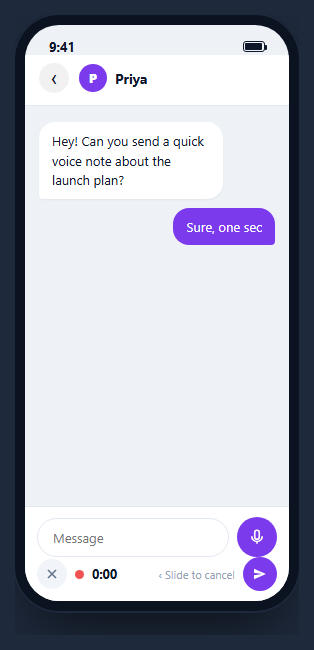
A voice note in a chat app is a gesture, not a button: you press and hold, speak, and either release to send or slide away to throw it out. This snippet builds that whole interaction inside a CSS phone frame in plain HTML, CSS and vanilla JavaScript. Holding the mic swaps the text field for a live timer and waveform, sliding left turns the composer red and cancels on release, and letting go sends a voice bubble into the thread whose waveform is the shape of what you recorded and which actually plays back.
One mic button that never moves
An earlier version hid the mic button while recording, which meant the release event had nowhere to land and the recording could end as soon as the pointer moved. Here the button stays put, scales up with a pulsing ring, and owns the whole gesture through pointer events. pointerdown starts it and calls setPointerCapture, so pointermove and pointerup keep arriving even when the finger drifts off the button; pointercancel discards. One set of handlers covers mouse, touch and pen.
Slide to cancel, for real
pointermove measures how far the pointer has travelled left of where it started. The hint text follows at half speed, and once the distance passes 70px the composer gets an is-cancel class: the field and mic turn red and the hint reads "Release to cancel". Releasing there discards the take with a short "Recording discarded" toast; sliding back before releasing sends normally.
Accidental taps and the text-to-send swap
A press shorter than 600ms is treated as a mistake: nothing is sent and a toast explains "Hold to record, release to send". When there is text in the field, the mic icon becomes a send arrow and the same button posts the message as a normal bubble, which is how the major chat apps behave.
A live waveform with a memory
Every 90ms a bar is added using a smooth random walk, so the levels rise and fall like speech, and the oldest bars are trimmed to fit the width. The levels are also stored. When you send, the bubble samples 24 of them across the whole recording, so its waveform shows the shape of that recording rather than just the last second.
Bubbles that play
The play button toggles between play and pause icons, fills the bars from left to right as time passes, counts up the duration and resets when it ends. Swap the timer for an <audio> element and its timeupdate event when you add real audio.
Keyboard and motion
Hold Space or Enter on the mic to record, release to send, press Escape or move focus away to cancel. The pulse, blinking dot and entrance animations switch off with prefers-reduced-motion.
Going live
The waveform and timing are simulated. To record real audio, request navigator.mediaDevices.getUserMedia({ audio: true }), feed the stream to a MediaRecorder and an AnalyserNode for the levels, and attach the resulting Blob to the bubble. Put the composer inside a mobile chat screen, or compare it with the standalone voice message bubble.
Step by step
How to Use
- 1Paste HTML, CSS and JSA chat screen appears with an input field and a purple mic button; the thread has a date chip and two messages.
- 2Press and hold the micThe input is replaced by a red dot, a running timer and a live waveform, and the mic scales up with a pulsing ring.
- 3Slide leftPast 70px the composer turns red and the hint reads "Release to cancel". Releasing there discards the take with a toast.
- 4Release in placeA voice bubble appears whose waveform was sampled from your recording, with its duration. A press shorter than 0.6s sends nothing.
- 5Play the bubbleThe button switches to pause, the bars fill left to right and the time counts up, then resets at the end.
- 6Type a messageWith text in the field the mic becomes a send arrow, and pressing it posts a normal text bubble.
Real-world uses
Common Use Cases
Got questions?
Frequently Asked Questions
Pointer events give mouse, touch and pen one set of handlers, and setPointerCapture keeps pointermove and pointerup coming to the mic even when the finger slides off it. That removes the stuck-recording bugs that come from mouseleave and separate touchend handling.
On every pointermove it subtracts the starting x from the current x and ignores movement to the right. If the result passes minus 70px, the composer gets the is-cancel class, and releasing in that state calls finish(false) instead of sending. Sliding back before releasing sends normally.
No, the levels are a simulated random walk so the demo works without microphone permission. For real levels, connect getUserMedia to an AnalyserNode and push its amplitude into the levels array on each tick. Recording the Blob with MediaRecorder gives you the audio to play.
Create an audio element from the recorded Blob with URL.createObjectURL, then call play and pause on it from the play button, and set the bars from its timeupdate event instead of the interval timer. Uploading the Blob to your server gives the recipient the same bubble.