




Auto-Growing Textarea with CSS field-sizing: content
Auto-Growing Textarea with CSS field-sizing: content · Forms · Plain HTML, CSS & JS · Live preview
About this UI Snippet
A Textarea That Resizes Itself With One Line of CSS
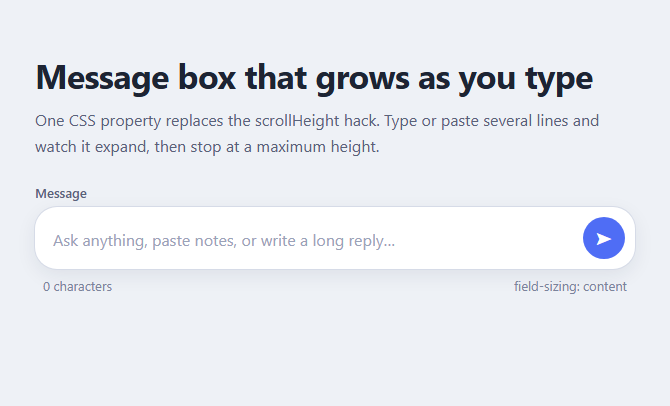
Every chat box, comment form and AI prompt field wants the same thing: start as one line, grow as the text grows, and stop before it takes over the screen. For a decade that needed JavaScript that reset the height and copied scrollHeight. The field-sizing: content property makes the browser do it, and this snippet wraps it in a polished message composer.
The one property
field-sizing: content tells a form control to size itself to its content instead of a default size. Combined with min-height: 1lh and max-height: 9lh, the box is one line tall when empty, grows to nine lines, then scrolls inside itself. The lh unit is one line height, so the limits stay correct if you change the font size.
Layout of the composer
The textarea sits in a flex row with a round send button aligned to the bottom, so the button stays put while the box grows upward. :focus-within on the wrapper draws the focus ring around the whole pill rather than the bare field.
Keyboard behaviour
Enter sends and Shift+Enter inserts a new line, handled in a short keydown listener that calls requestSubmit(). Sent messages are added as bubbles with white-space: pre-wrap so line breaks survive. A character counter updates on every input.
Fallback
The script tests CSS.supports('field-sizing', 'content'). In Firefox, which lacks it, the same cap is applied by setting height from scrollHeight, so the behaviour matches everywhere.
Using it
Keep the label, since a placeholder is not a label. For an AI-style input with a token counter see the AI prompt composer.
Accessibility
The field keeps a real label, the send button has an aria-label, the focus ring is visible on the whole composer, and the message list is an aria-live region so sent messages are announced. The max height keeps the page usable on small screens because the box scrolls instead of pushing the layout down.
What's included
Features
Step by step
How to Use
- 1Start with rows="1"The textarea begins one line tall. field-sizing: content then makes the browser add height as lines are typed or pasted.
- 2Set the limits in line heightsUse min-height: 1lh and max-height: 9lh so the box stops growing after nine lines and scrolls inside, whatever the font size.
- 3Align the send button to the bottomThe wrapper is a flex row with align-items: flex-end, so the button stays at the bottom edge while the box grows upward.
- 4Make Enter sendThe keydown handler calls requestSubmit() on Enter and leaves Shift+Enter alone for a new line.
- 5Keep the pre-wrap on sent bubbleswhite-space: pre-wrap on each message preserves the line breaks the writer typed.
- 6Leave the Firefox fallback inWhere CSS.supports("field-sizing", "content") is false, the script copies scrollHeight (capped at nine lines) to the height on every input.
Real-world uses
Common Use Cases
Got questions?
Frequently Asked Questions
Chrome and Edge from version 123 and Safari from 26.2. Firefox does not support it yet. The snippet detects this with CSS.supports and uses a small scrollHeight fallback, so the behaviour is the same everywhere.
Set max-height on the textarea, as the snippet does with 9lh. Once the content passes that height the field stops growing and scrolls internally. Use a pixel value if you prefer, but lh keeps it tied to the font size.
Yes. field-sizing: content also sizes single-line inputs to their text and selects to the chosen option. For a textarea it is most useful, because the height follows the number of lines you have written.
A placeholder disappears when typing and is not a reliable accessible name. The snippet keeps a real label linked with for and id, so screen readers and voice control can find the field.
Copy & paste
Source Code
<main class="fs-page">
<h1>Message box that grows as you type</h1>
<p class="fs-sub">One CSS property replaces the scrollHeight hack. Type or paste several lines and watch it expand, then stop at a maximum height.</p>
<form class="fs-composer" id="fsForm">
<label class="fs-label" for="fsText">Message</label>
<div class="fs-box">
<textarea id="fsText" class="fs-text" rows="1" placeholder="Ask anything, paste notes, or write a long reply…"></textarea>
<button class="fs-send" type="submit" aria-label="Send message">➤</button>
</div>
<div class="fs-meta"><span id="fsCount">0 characters</span><span id="fsMode"></span></div>
</form>
<ul class="fs-log" id="fsLog" aria-live="polite"></ul>
</main>*{box-sizing:border-box;margin:0;padding:0}
body{font-family:system-ui,-apple-system,'Segoe UI',sans-serif;background:#eef1f6;color:#1d2433;min-height:100vh}
.fs-page{max-width:640px;margin:0 auto;padding:56px 20px}
h1{font-size:clamp(26px,5vw,34px);letter-spacing:-.02em;line-height:1.15}
.fs-sub{margin:12px 0 26px;color:#59627a;line-height:1.6}
.fs-label{display:block;font-size:13px;font-weight:600;color:#59627a;margin-bottom:6px}
.fs-box{display:flex;align-items:flex-end;gap:10px;padding:10px 10px 10px 18px;background:#fff;border-radius:22px;box-shadow:0 0 0 1px #d6dbe7,0 6px 20px rgb(30 40 70 / .08)}
.fs-box:focus-within{box-shadow:0 0 0 2px #4f6df5,0 6px 20px rgb(30 40 70 / .1)}
.fs-text{flex:1;min-width:0;border:0;outline:0;background:none;resize:none;font:16px/1.55 system-ui,sans-serif;color:inherit;padding:6px 0;
/* the whole feature: */
field-sizing:content;min-height:1lh;max-height:9lh;overflow-y:auto}
.fs-text::placeholder{color:#9aa2b8}
.fs-send{flex:none;width:42px;height:42px;border:0;border-radius:50%;background:#4f6df5;color:#fff;font-size:17px;cursor:pointer}
.fs-send:hover{background:#3d57d8}
.fs-send:focus-visible{outline:3px solid #1d2433;outline-offset:2px}
.fs-meta{display:flex;justify-content:space-between;margin-top:8px;padding:0 8px;font-size:13px;color:#7b849c}
.fs-log{list-style:none;margin-top:26px;display:grid;gap:10px}
.fs-log li{align-self:end;justify-self:end;max-width:88%;padding:11px 16px;border-radius:18px 18px 4px 18px;background:#4f6df5;color:#fff;white-space:pre-wrap;overflow-wrap:anywhere;line-height:1.5}
/* Fallback: if field-sizing is unsupported, JS sets the height instead */
@supports not (field-sizing:content){
.fs-text{height:auto;resize:none}
}var form = document.getElementById('fsForm');
var text = document.getElementById('fsText');
var count = document.getElementById('fsCount');
var mode = document.getElementById('fsMode');
var log = document.getElementById('fsLog');
var native = CSS.supports('field-sizing', 'content');
mode.textContent = native ? 'field-sizing: content' : 'JS fallback';
// Only needed where field-sizing is missing: copy scrollHeight to height.
function grow() {
if (native) return;
text.style.height = 'auto';
text.style.height = Math.min(text.scrollHeight, 9 * parseFloat(getComputedStyle(text).lineHeight)) + 'px';
}
text.addEventListener('input', function () {
var n = text.value.length;
count.textContent = n + (n === 1 ? ' character' : ' characters');
grow();
});
// Enter sends, Shift+Enter adds a new line
text.addEventListener('keydown', function (e) {
if (e.key === 'Enter' && !e.shiftKey) {
e.preventDefault();
form.requestSubmit();
}
});
form.addEventListener('submit', function (e) {
e.preventDefault();
var value = text.value.trim();
if (!value) return;
var li = document.createElement('li');
li.textContent = value;
log.appendChild(li);
text.value = '';
count.textContent = '0 characters';
grow();
});Extend with AI
Take This Snippet Further With AI
Paste this snippet into an AI coding assistant and ask it to explain how field-sizing: content and the lh unit control the minimum and maximum height. Useful follow-ups: add an attach-file button, show a streaming reply bubble after sending, or add a slash-command menu. Ask it to keep the label, Enter and Shift+Enter handling, and the Firefox fallback.
Prompt to recreate it
Copy this into your AI assistant of choice to build the effect from scratch, or as a jumping-off point for your own variant:
Build an auto-growing message composer in plain HTML, CSS and JavaScript using the CSS field-sizing property.

Requirements:
- A form with a visible label, a textarea (rows="1") and a round send button in a flex row aligned to the bottom, inside a rounded pill that shows a focus ring with :focus-within.
- Textarea CSS: field-sizing: content; min-height: 1lh; max-height: 9lh; overflow-y: auto; resize: none; no border or outline.
- A character counter under the box and a small label showing whether the native property or the fallback is active.
- Script: feature-detect with CSS.supports('field-sizing', 'content'); if unsupported, set height to min(scrollHeight, 9 line heights) on input. Enter submits via requestSubmit, Shift+Enter inserts a newline.
- On submit, trim the text, ignore empty input, append it to a list as a right-aligned bubble that preserves line breaks (white-space: pre-wrap), clear the field and reset the counter and height.
- Announce new messages with aria-live and work at phone width.
Want to tighten it up first? Run this prompt through the AI Prompt Studio to score it across 8 quality dimensions, catch anti-patterns, and tune the wording for Claude, ChatGPT, or Gemini before you paste it in.