


Bootstrap API Response Viewer — Free HTML CSS JS Snippet
Bootstrap API Response Viewer · Dashboards · Plain HTML, CSS & JS · Live preview
Copy & paste
Source Code
<div class="container py-5 d-flex justify-content-center">
  <div class="card bsapi-card">
    <div class="card-body p-3">
      <div class="d-flex justify-content-between align-items-center mb-2">
        <div class="d-flex align-items-center gap-2">
          <span class="badge text-bg-success">200 OK</span>
          <span class="small text-muted">GET /api/orders/1042</span>
        </div>
        <button type="button" class="btn btn-sm btn-outline-secondary" id="bsapiCopy">Copy JSON</button>
      </div>
      <div class="bsapi-tree" id="bsapiTree"></div>
    </div>
  </div>
</div>
.bsapi-card { width: 440px; max-width: 100%; border: 1px solid #eceef1; border-radius: 14px; }
.bsapi-tree {
background: #14151a; color: #e1e4e8; border-radius: 10px; padding: 12px 14px;
font: 12.5px/1.6 ui-monospace, Menlo, Consolas, monospace; max-height: 320px; overflow: auto;
}
.bsapi-key { color: #7dd3fc; }
.bsapi-string { color: #86efac; }
.bsapi-number { color: #fca5a5; }
.bsapi-bool { color: #fcd34d; }
.bsapi-toggle { cursor: pointer; user-select: none; color: #9ca3af; }
.bsapi-toggle:hover { color: #e1e4e8; }
.bsapi-children { margin-left: 18px; }
.bsapi-children.bsapi-collapsed { display: none; }const DATA = {
id: 1042,
status: 'shipped',
total: 128.5,
paid: true,
customer: { name: 'Dana Reyes', email: '[email protected]' },
items: [
{ sku: 'TR-4021', qty: 2, price: 42 },
{ sku: 'WB-1188', qty: 1, price: 44.5 },
],
};
const tree = document.getElementById('bsapiTree');
function valueSpan(value) {
if (typeof value === 'string') return '<span class="bsapi-string">"' + value + '"</span>';
if (typeof value === 'number') return '<span class="bsapi-number">' + value + '</span>';
if (typeof value === 'boolean') return '<span class="bsapi-bool">' + value + '</span>';
return String(value);
}
let nodeId = 0;
function renderNode(value, keyLabel) {
const isObject = value !== null && typeof value === 'object';
const prefix = keyLabel !== undefined ? '<span class="bsapi-key">"' + keyLabel + '"</span>: ' : '';
if (!isObject) return '<div>' + prefix + valueSpan(value) + '</div>';
const id = 'bsapi-node-' + (nodeId++);
const isArray = Array.isArray(value);
const entries = Object.entries(value);
const openBrace = isArray ? '[' : '{';
const closeBrace = isArray ? ']' : '}';
const children = entries.map(([k, v]) => renderNode(v, isArray ? undefined : k)).join('');
return '<div>' + prefix +
'<span class="bsapi-toggle" data-target="' + id + '">▾ ' + openBrace + '</span>' +
'<div class="bsapi-children" id="' + id + '">' + children + '</div>' +
closeBrace + '</div>';
}
tree.innerHTML = renderNode(DATA);
tree.addEventListener('click', e => {
const toggle = e.target.closest('.bsapi-toggle');
if (!toggle) return;
const child = document.getElementById(toggle.dataset.target);
const collapsed = child.classList.toggle('bsapi-collapsed');
toggle.innerHTML = (collapsed ? '▸ ' : '▾ ') + toggle.textContent.trim().slice(-1);
});
document.getElementById('bsapiCopy').addEventListener('click', () => {
navigator.clipboard.writeText(JSON.stringify(DATA, null, 2));
});Extend with AI
Take This Snippet Further With AI
The AI prompt for this one is for Patreon supporters ($3 a month, 7 days free), along with a site with no ads. Supporters enter the passcode once and it is remembered in this browser.
What's included
Features
About this UI Snippet
Bootstrap API Response Viewer — HTML, CSS & JavaScript
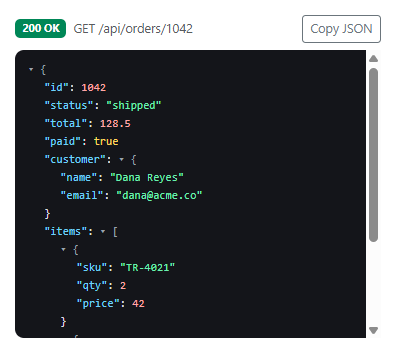
renderNode() is a genuinely recursive function, not a two-level special case for "an object with some flat values" — it calls itself for every nested object or array it encounters, however deep, which is why the sample response's customer object and items array (itself an array of objects) both render correctly with the same function that handles the top-level response. A value's type decides its color entirely through valueSpan(): strings, numbers, and booleans each get their own CSS class, which is what makes the viewer's syntax coloring accurate rather than a single uniform text color for every value.
Each collapsible object or array gets a unique, incrementing id (via a closured nodeId counter) so its toggle arrow and its .bsapi-children block can find each other by that id regardless of how many other collapsible nodes exist elsewhere in the tree — collapsing the items array has zero effect on whether customer is expanded, because they're wired to completely independent ids.
"Copy JSON" copies DATA itself, re-serialized fresh with JSON.stringify(DATA, null, 2), rather than scraping the rendered HTML back into text — which guarantees the copied JSON is always valid and correctly formatted no matter what collapsed/expanded state the tree happens to be showing on screen at the time.
Step by step
How to Use
- 1Load the snippetA full JSON response renders with colored strings, numbers, and booleans, fully expanded.
- 2Click the arrow next to "items ["Just that array collapses to a single line, independent of every other node in the tree.
- 3Click the arrow againIt re-expands to show both order items exactly as before.
- 4Collapse "customer" tooBoth collapsed sections stay collapsed independently — collapsing one never affects the other.
- 5Click "Copy JSON"The complete, correctly formatted JSON is copied to the clipboard, regardless of what's currently collapsed on screen.
Real-world uses
Common Use Cases
renderNode(), which calls itself for every nested object or array it meets, so no fixed-depth special case is ever needed.Got questions?
Frequently Asked Questions
Yes — renderNode() calls itself for every nested object or array regardless of depth, so a response with objects nested five levels deep would render (and collapse) exactly the same way this two-level example does.
Each collapsible node gets its own unique id from an incrementing counter, and its toggle only ever looks up its own matching id's children block — there's no shared or global collapsed state that could leak between unrelated sections.
Yes. Convert renderNode() into a recursive component that renders itself for object/array values, track each node's collapsed state as a boolean (in local component state or a shared collapsed-ids Set), and keep "Copy JSON" serializing the original data object rather than reading rendered markup.
Replace the DATA constant with the parsed JSON body from an actual fetch response — renderNode() makes no assumptions about the specific shape of the object, only that it's valid JSON-compatible data (objects, arrays, strings, numbers, booleans, null).