


Bootstrap HTTP Status Badge — Free HTML CSS JS Snippet
Bootstrap HTTP Status Badge · Buttons · Plain HTML, CSS & JS · Live preview
Copy & paste
Source Code
<div class="container py-5 d-flex justify-content-center">
  <div class="card bshttp-card">
    <div class="card-body p-4">
      <label class="form-label small fw-semibold">Enter a status code</label>
      <input type="text" class="form-control mb-3" id="bshttpInput" placeholder="e.g. 404" maxlength="3">

      <div class="d-flex align-items-center gap-2 mb-4" id="bshttpResult">
        <span class="text-muted small">Type a 3-digit code above.</span>
      </div>

      <p class="small fw-semibold text-muted mb-2">Common codes</p>
      <div class="d-flex flex-wrap gap-2" id="bshttpCommon"></div>
    </div>
  </div>
</div>
.bshttp-card { width: 380px; max-width: 100%; border: 1px solid #eceef1; border-radius: 14px; }
.bshttp-common-chip { cursor: pointer; border: none; }const FAMILIES = [
{ test: c => c >= 200 && c < 300, tone: 'success', label: 'Success' },
{ test: c => c >= 300 && c < 400, tone: 'info', label: 'Redirect' },
{ test: c => c >= 400 && c < 500, tone: 'warning', label: 'Client Error' },
{ test: c => c >= 500 && c < 600, tone: 'danger', label: 'Server Error' },
];
const COMMON = [
[200, 'OK'], [201, 'Created'], [301, 'Moved'], [304, 'Not Modified'],
[400, 'Bad Request'], [401, 'Unauthorized'], [403, 'Forbidden'],
[404, 'Not Found'], [429, 'Too Many Requests'], [500, 'Server Error'], [503, 'Unavailable'],
];
const input = document.getElementById('bshttpInput');
const result = document.getElementById('bshttpResult');
const common = document.getElementById('bshttpCommon');
function familyFor(code) {
return FAMILIES.find(f => f.test(code));
}
function render(code) {
if (!code || code < 100 || code > 599) {
result.innerHTML = '<span class="text-muted small">Type a 3-digit code above.</span>';
return;
}
const family = familyFor(code);
result.innerHTML = '<span class="badge text-bg-' + family.tone + ' fs-6">' + code + '</span>' +
'<span class="small text-muted">' + family.label + '</span>';
}
input.addEventListener('input', () => {
const digits = input.value.replace(/[^0-9]/g, '');
input.value = digits;
render(digits ? Number(digits) : null);
});
common.innerHTML = COMMON.map(([code, label]) => {
const tone = familyFor(code).tone;
return '<button type="button" class="btn btn-sm btn-outline-secondary bshttp-common-chip" data-code="' + code + '">' +
'<span class="badge text-bg-' + tone + ' me-1">' + code + '</span>' + label + '</button>';
}).join('');
common.addEventListener('click', e => {
const btn = e.target.closest('.bshttp-common-chip');
if (!btn) return;
input.value = btn.dataset.code;
render(Number(btn.dataset.code));
});Extend with AI
Take This Snippet Further With AI
The AI prompt for this one is for Patreon supporters ($3 a month, 7 days free), along with a site with no ads. Supporters enter the passcode once and it is remembered in this browser.
What's included
Features
About this UI Snippet
Bootstrap HTTP Status Badge — HTML, CSS & JavaScript
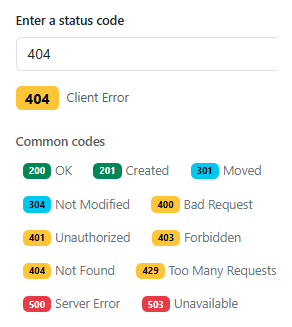
Every status code's color and label are derived from one small FAMILIES array of range tests, not a giant lookup table mapping each of the hundreds of possible 3-digit codes individually — familyFor(code) just finds the first family whose test(code) returns true, which is what correctly colors a code like 418 (a real, if joking, HTTP status) as a client error even though it never appears in the COMMON list at all.
The input itself is scrubbed on every keystroke with input.value.replace(/[^0-9]/g, ''), so pasting or typing a non-digit character never produces a broken or misleading badge — the field can only ever contain digits, and render() explicitly handles the "nothing typed yet" and "out of the valid 100-599 range" cases with a neutral placeholder rather than guessing at a family for invalid input.
Clicking a common-code chip and typing the same number by hand both funnel through the exact same render() function, so the live badge above always reflects one consistent piece of state regardless of which interaction produced it.
Step by step
How to Use
- 1Load the snippetThe input is empty and a neutral placeholder message shows above the common-codes list.
- 2Type "404"A yellow "404" badge appears immediately labeled "Client Error".
- 3Change it to "500"The badge turns red and relabels itself "Server Error" live as you finish typing.
- 4Try typing a letterIt's silently stripped out — the field only ever accepts digits.
- 5Click any common-code chip below, like "429"The input updates to match and the badge reflects that code, exactly as if you'd typed it.
Real-world uses
Common Use Cases
Got questions?
Frequently Asked Questions
Yes — familyFor() tests the numeric value against a range, not a name lookup, so any valid code from 100-599 gets classified correctly by family even if it never appears among the labeled reference chips.
render() explicitly checks for a missing value or one outside 100-599 and shows a neutral "type a code" placeholder rather than forcing an incorrect family guess onto invalid input.
Yes. Keep FAMILIES and COMMON as plain data, track the current code in component state, and derive the badge's color/label with the same familyFor() logic inside the render function.
Add a small lookup object mapping specific codes to their official reason phrases, and fall back to just the family label (as this snippet does) for any code not explicitly listed.