


Bootstrap Bulk Action Toolbar — Free HTML CSS JS Snippet
Bootstrap Bulk Action Toolbar · Tables · Plain HTML, CSS & JS · Live preview
Copy & paste
Source Code
<div class="container py-5 d-flex justify-content-center">
  <div class="card bsbulk-card">
    <div class="card-body p-3">

      <div class="d-flex justify-content-between align-items-center mb-2 bsbulk-header" id="bsbulkDefaultHeader">
        <h6 class="fw-bold mb-0">Team members</h6>
        <span class="small text-muted">5 total</span>
      </div>

      <div class="d-flex justify-content-between align-items-center mb-2 bsbulk-toolbar d-none" id="bsbulkToolbar">
        <span class="small fw-semibold" id="bsbulkCount">0 selected</span>
        <div class="d-flex gap-2">
          <button type="button" class="btn btn-sm btn-outline-secondary" id="bsbulkArchive">Archive</button>
          <button type="button" class="btn btn-sm btn-outline-danger" id="bsbulkDeleteBtn">Delete</button>
          <button type="button" class="btn btn-sm btn-link text-decoration-none" id="bsbulkClear">Clear</button>
        </div>
      </div>

      <table class="table table-sm align-middle mb-0">
        <thead>
          <tr>
            <th style="width:36px"><input type="checkbox" class="form-check-input" id="bsbulkSelectAll"></th>
            <th>Name</th>
            <th>Status</th>
          </tr>
        </thead>
        <tbody id="bsbulkBody">
          <tr data-row><td><input type="checkbox" class="form-check-input bsbulk-row-check"></td><td>Dana Reyes</td><td><span class="badge text-bg-success">Active</span></td></tr>
          <tr data-row><td><input type="checkbox" class="form-check-input bsbulk-row-check"></td><td>Marcus Lee</td><td><span class="badge text-bg-success">Active</span></td></tr>
          <tr data-row><td><input type="checkbox" class="form-check-input bsbulk-row-check"></td><td>Priya Nair</td><td><span class="badge text-bg-secondary">Invited</span></td></tr>
          <tr data-row><td><input type="checkbox" class="form-check-input bsbulk-row-check"></td><td>Sofia Chen</td><td><span class="badge text-bg-success">Active</span></td></tr>
          <tr data-row><td><input type="checkbox" class="form-check-input bsbulk-row-check"></td><td>Wale Adeyemi</td><td><span class="badge text-bg-warning">Suspended</span></td></tr>
        </tbody>
      </table>
    </div>
  </div>
</div>

<div class="modal fade" id="bsbulkModal" tabindex="-1" aria-hidden="true">
  <div class="modal-dialog modal-dialog-centered">
    <div class="modal-content">
      <div class="modal-header">
        <h5 class="modal-title fw-bold">Delete selected members?</h5>
        <button type="button" class="btn-close" data-bs-dismiss="modal"></button>
      </div>
      <div class="modal-body">
        <p class="mb-0" id="bsbulkModalBody">This will remove them from the team.</p>
      </div>
      <div class="modal-footer">
        <button type="button" class="btn btn-outline-secondary" data-bs-dismiss="modal">Cancel</button>
        <button type="button" class="btn btn-danger fw-bold" id="bsbulkDeleteConfirm">Delete</button>
      </div>
    </div>
  </div>
</div>
.bsbulk-card { width: 480px; max-width: 100%; border: 1px solid #eceef1; border-radius: 14px; }
.bsbulk-toolbar { background: #eef0ff; border-radius: 8px; padding: 8px 10px; }
tr.bsbulk-archived td { opacity: .45; }
tr.bsbulk-row-selected { background: #f8f9fb; }const selectAll = document.getElementById('bsbulkSelectAll');
const defaultHeader = document.getElementById('bsbulkDefaultHeader');
const toolbar = document.getElementById('bsbulkToolbar');
const countEl = document.getElementById('bsbulkCount');
const body = document.getElementById('bsbulkBody');
const modal = new bootstrap.Modal(document.getElementById('bsbulkModal'));
const modalBody = document.getElementById('bsbulkModalBody');
function rowChecks() {
return Array.from(body.querySelectorAll('.bsbulk-row-check'));
}
function refresh() {
const checks = rowChecks();
const checked = checks.filter(c => c.checked);
const n = checked.length;
checks.forEach(c => c.closest('tr').classList.toggle('bsbulk-row-selected', c.checked));
toolbar.classList.toggle('d-none', n === 0);
defaultHeader.classList.toggle('d-none', n > 0);
countEl.textContent = n + ' selected';
selectAll.checked = n > 0 && n === checks.length;
selectAll.indeterminate = n > 0 && n < checks.length;
}
selectAll.addEventListener('change', () => {
rowChecks().forEach(c => { c.checked = selectAll.checked; });
refresh();
});
body.addEventListener('change', e => {
if (e.target.classList.contains('bsbulk-row-check')) refresh();
});
document.getElementById('bsbulkClear').addEventListener('click', () => {
rowChecks().forEach(c => { c.checked = false; });
refresh();
});
document.getElementById('bsbulkArchive').addEventListener('click', () => {
rowChecks().filter(c => c.checked).forEach(c => {
c.closest('tr').classList.add('bsbulk-archived');
c.checked = false;
c.disabled = true;
});
refresh();
});
document.getElementById('bsbulkDeleteBtn').addEventListener('click', () => {
const n = rowChecks().filter(c => c.checked).length;
modalBody.textContent = 'This removes ' + n + ' member' + (n === 1 ? '' : 's') + ' from the team. This can\'t be undone.';
modal.show();
});
document.getElementById('bsbulkDeleteConfirm').addEventListener('click', () => {
rowChecks().filter(c => c.checked).forEach(c => c.closest('tr').remove());
modal.hide();
refresh();
});
refresh();Extend with AI
Take This Snippet Further With AI
The AI prompt for this one is for Patreon supporters ($3 a month, 7 days free), along with a site with no ads. Supporters enter the passcode once and it is remembered in this browser.
What's included
Features
About this UI Snippet
Bootstrap Bulk Action Toolbar — HTML, CSS & JavaScript
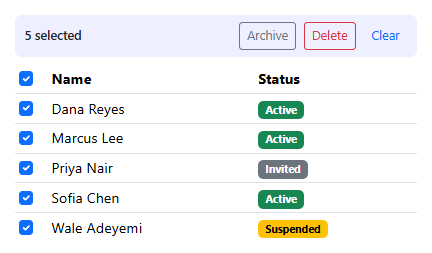
The core idea is that the toolbar and the default header are two mutually exclusive views of the same table state, not two independent pieces of UI that happen to swap — a single refresh() function reads how many .bsbulk-row-check boxes are checked and toggles both d-none classes from that one number, so the toolbar and the header can never both be visible (or both hidden) at once.
The header checkbox's tri-state behavior — checked, unchecked, or the visually distinct indeterminate dash — is recomputed the same way every time: selectAll.checked is true only when every row is checked, and selectAll.indeterminate is true only when some but not all are, both derived directly from the same checked/checks.length comparison rather than tracked as separate flags that could fall out of sync with the actual row state.
Delete and Archive intentionally behave differently because they're different levels of destructive: Archive is reversible in spirit (rows fade and their checkboxes disable, standing in for "moved out of the active view"), so it runs immediately. Delete actually removes rows from the DOM, so it's gated behind a real confirmation modal whose body text is generated fresh from the current selection count — "This removes 3 members," not a generic message that doesn't reflect what's actually about to happen.
Step by step
How to Use
- 1Load the snippetThe table shows its normal "Team members" header with no toolbar visible.
- 2Check one row's checkboxThe header instantly swaps for a bulk toolbar reading "1 selected" with Archive, Delete, and Clear actions.
- 3Check a few more rowsThe count updates live, and the header checkbox becomes a visually distinct indeterminate dash.
- 4Check every remaining rowThe header checkbox becomes fully checked instead of indeterminate.
- 5Click "Delete"A confirmation modal names exactly how many members will be removed before anything happens.
- 6Click "Clear" insteadEvery checkbox unchecks at once and the toolbar swaps back to the default header.
Real-world uses
Common Use Cases
Got questions?
Frequently Asked Questions
Archive is modeled as a soft, easily-reversible action (rows fade and stay visible, just inactive), while Delete permanently removes rows from the DOM — the difference in friction matches the difference in how hard each action is to undo.
They're independent — an archived row can still be selected and deleted, since archiving only disables its checkbox after deselecting it, not the row itself.
The indeterminate property is a real DOM/IDL property (not an HTML attribute) set directly in JavaScript inside refresh() — it has no effect if set only as an HTML attribute, which is a common mistake when implementing this pattern from scratch.
Yes. Track selected row IDs in a Set in component state, derive the toolbar visibility and header checkbox's checked/indeterminate props from that Set's size on every render, and bind the indeterminate property via a ref since it isn't a settable JSX/template attribute in any of the three.
Yes — add a new button next to Archive and Delete and wire it to rowChecks().filter(c => c.checked) the same way both existing actions read the current selection; no changes to refresh() are needed.