

Bootstrap Inline Table Cell Editing — Free HTML CSS JS Snippet
Bootstrap Inline Table Cell Editing · Tables · Plain HTML, CSS & JS · Live preview
Copy & paste
Source Code
<div class="container py-5 d-flex justify-content-center">
  <div class="card bscell-card">
    <div class="card-body p-3">
      <h6 class="fw-bold mb-2">Inventory</h6>
      <table class="table table-sm align-middle mb-0">
        <thead><tr><th>Item</th><th>Qty</th><th>Unit price</th></tr></thead>
        <tbody id="bscellBody"></tbody>
      </table>
      <p class="small text-muted mt-2 mb-0">Click Qty or Unit price to edit. Enter saves, Escape cancels.</p>
    </div>
  </div>
</div>
.bscell-card { width: 400px; max-width: 100%; border: 1px solid #eceef1; border-radius: 14px; }
.bscell-editable { cursor: pointer; border-radius: 5px; padding: 2px 6px; }
.bscell-editable:hover { background: #f0f1f5; }
.bscell-editing input { width: 80px; }let rows = [
{ id: 1, name: 'USB-C Cable', qty: 42, price: 9.99 },
{ id: 2, name: 'Wireless Mouse', qty: 18, price: 24.5 },
{ id: 3, name: 'Laptop Stand', qty: 7, price: 39 },
];
const body = document.getElementById('bscellBody');
function render() {
body.innerHTML = rows.map(r =>
'<tr data-id="' + r.id + '">' +
'<td>' + r.name + '</td>' +
'<td><span class="bscell-editable" data-field="qty">' + r.qty + '</span></td>' +
'<td><span class="bscell-editable" data-field="price">$' + r.price.toFixed(2) + '</span></td>' +
'</tr>'
).join('');
}
function startEdit(cell) {
const td = cell.closest('td');
const tr = cell.closest('tr');
const rowId = Number(tr.dataset.id);
const field = cell.dataset.field;
const row = rows.find(r => r.id === rowId);
const rawValue = field === 'price' ? row.price : row.qty;
td.classList.add('bscell-editing');
td.innerHTML = '<input type="number" class="form-control form-control-sm" value="' + rawValue + '" ' +
(field === 'price' ? 'step="0.01"' : 'step="1"') + '>';
const input = td.querySelector('input');
input.focus();
input.select();
// Removing the input from the DOM (which render() does) itself fires a
// native blur event on it — without this guard, pressing Escape would
// call commit(false), re-render, and then that synthetic blur would
// immediately fire commit(true) again with the same stale input value,
// silently overwriting the discard with an unwanted save.
let committed = false;
function commit(save) {
if (committed) return;
committed = true;
if (save) {
const parsed = Number(input.value);
if (!Number.isNaN(parsed) && parsed >= 0) {
row[field] = field === 'price' ? Math.round(parsed * 100) / 100 : Math.round(parsed);
}
}
render();
}
input.addEventListener('blur', () => commit(true));
input.addEventListener('keydown', e => {
if (e.key === 'Enter') { e.preventDefault(); commit(true); }
if (e.key === 'Escape') { e.preventDefault(); commit(false); }
});
}
body.addEventListener('click', e => {
const cell = e.target.closest('.bscell-editable');
if (cell && !cell.closest('.bscell-editing')) startEdit(cell);
});
render();Extend with AI
Take This Snippet Further With AI
The AI prompt for this one is for Patreon supporters ($3 a month, 7 days free), along with a site with no ads. Supporters enter the passcode once and it is remembered in this browser.
What's included
Features
About this UI Snippet
Bootstrap Inline Table Cell Editing — HTML, CSS & JavaScript
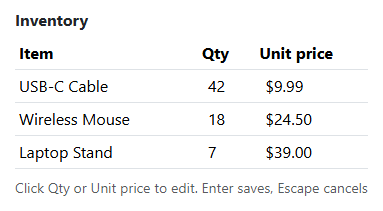
Editing happens entirely inside the clicked <td> — startEdit() reads the row's current raw numeric value directly from the rows data array (not by parsing the displayed, already-formatted "$39.00" text back out of the DOM), swaps the cell's content for a real number input pre-filled with that value, and focuses and selects it so typing immediately replaces the old value.
commit(save) is the single function both the blur listener and the keydown handler funnel through — blurring the input (clicking away) and pressing Enter both save, while Escape calls commit(false), which re-renders without touching rows at all, discarding whatever was typed. Centralizing both outcomes in one function is what guarantees "save" always means the same thing regardless of which path triggered it.
A save is only actually applied when the parsed value passes !Number.isNaN(parsed) && parsed >= 0 — typing garbage or a negative number into the cell and pressing Enter silently keeps the row's previous value rather than corrupting it with NaN or a nonsensical negative quantity, and price values are additionally rounded to two decimal places to avoid accumulating floating-point artifacts like 24.500000000000004.
A committed flag guards commit() against running twice for a subtle reason: render() removes the <input> from the DOM, and removing a focused element from the DOM itself fires a native blur event on it. Without the guard, pressing Escape would discard the edit, re-render, and then that synthetic blur would immediately fire commit(true) a second time with the same stale input value — silently overwriting the discard with an unwanted save a moment later.
Step by step
How to Use
- 1Load the snippetA three-row inventory table shows, with Qty and Unit price cells styled as clickable.
- 2Click a Qty cellIt becomes a real number input, pre-filled and already selected, ready to type over.
- 3Type a new number and press EnterThe cell saves and reverts to plain text showing the new value.
- 4Click a price cell, type a new value, and click elsewhere on the pageBlurring the input also saves, exactly like pressing Enter does.
- 5Click a cell, type something, then press EscapeThe edit is discarded and the cell reverts to its previous, unchanged value.
- 6Try entering a negative number or clearing the field entirelyThe cell keeps its last valid value rather than accepting invalid input.
Real-world uses
Common Use Cases
Got questions?
Frequently Asked Questions
Directly from the underlying rows data array (row.qty or row.price), never by parsing the displayed, already-formatted cell text — this avoids re-parsing a "$39.00" string back into a number, which is both unnecessary and error-prone.
The parsed value fails the !Number.isNaN(parsed) && parsed >= 0 check inside commit(), so the save is silently skipped and the cell reverts to its last valid value rather than accepting invalid data.
It saves — the blur event calls commit(true), the same as pressing Enter; only pressing Escape explicitly discards the edit via commit(false).
Yes. Track which cell (row id + field) is currently being edited in component state, conditionally render an input or plain text per cell based on that state, and validate/commit the parsed value the same way on blur, Enter, or Escape.