



Bootstrap Sticky Table Header on Scroll — Free HTML CSS JS Snippet
Bootstrap Sticky Table Header on Scroll · Tables · Plain HTML, CSS & JS · Live preview
Copy & paste
Source Code
<div class="container py-5 d-flex justify-content-center">
  <div class="card bssticky-card">
    <div class="card-body p-3">
      <h6 class="fw-bold mb-2">Order history</h6>
      <div class="bssticky-scroll" id="bsstickyScroll">
        <table class="table table-sm mb-0">
          <thead>
            <tr>
              <th>Order</th>
              <th>Customer</th>
              <th>Total</th>
              <th>Status</th>
            </tr>
          </thead>
          <tbody id="bsstickyBody"></tbody>
        </table>
      </div>
    </div>
  </div>
</div>
.bssticky-card { width: 460px; max-width: 100%; border: 1px solid #eceef1; border-radius: 14px; }
.bssticky-scroll { max-height: 260px; overflow-y: auto; border: 1px solid #eceef1; border-radius: 8px; }
.bssticky-scroll thead th {
position: sticky;
top: 0;
background: #fff;
z-index: 1;
transition: box-shadow .15s ease;
}
.bssticky-scroll.bssticky-scrolled thead th {
box-shadow: 0 2px 4px rgba(20, 22, 28, .08);
}const scrollBox = document.getElementById('bsstickyScroll');
const body = document.getElementById('bsstickyBody');
const STATUSES = [
['Shipped', 'success'], ['Processing', 'secondary'], ['Delivered', 'success'],
['Delayed', 'warning'], ['Cancelled', 'danger'],
];
const NAMES = ['Dana Reyes', 'Marcus Lee', 'Priya Nair', 'Sofia Chen', 'Wale Adeyemi', 'Ken Sato'];
let rows = '';
for (let i = 1; i <= 24; i++) {
const [label, tone] = STATUSES[i % STATUSES.length];
const name = NAMES[i % NAMES.length];
rows += '<tr><td>#' + (1000 + i) + '</td><td>' + name + '</td><td>$' + (20 + i * 7) +
'.00</td><td><span class="badge text-bg-' + tone + '">' + label + '</span></td></tr>';
}
body.innerHTML = rows;
// The sticky header is pure CSS (position: sticky). The only thing JS adds is
// a shadow that appears once the body has actually scrolled underneath it,
// so the header only looks "elevated" when there's real content behind it.
scrollBox.addEventListener('scroll', () => {
scrollBox.classList.toggle('bssticky-scrolled', scrollBox.scrollTop > 0);
});Extend with AI
Take This Snippet Further With AI
The AI prompt for this one is for Patreon supporters ($3 a month), along with a site with no ads. Supporters enter the passcode once and it is remembered in this browser.
What's included
Features
About this UI Snippet
Bootstrap Sticky Table Header on Scroll — HTML, CSS & JavaScript
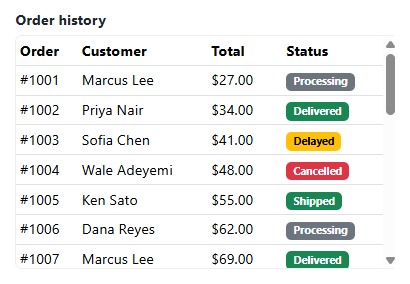
The header staying in place is entirely CSS — position: sticky; top: 0; on every thead th, scoped to the .bssticky-scroll container's own scrollbar rather than the page's. That scoping matters: position: sticky sticks relative to its nearest scrolling ancestor, so the container needs its own overflow-y: auto and a real height limit (max-height: 260px here) for the header to have anything to stick within — without that, the whole page would need to scroll before the header engaged at all.
The one piece of actual JavaScript exists purely to answer a question CSS can't: has the body content actually moved out from under the header yet? A single scroll listener toggles bssticky-scrolled based on scrollBox.scrollTop > 0, and that class is what applies the header's drop shadow — so the shadow only appears once there's genuinely something to visually separate the header from, rather than showing a permanent shadow that implies scrollable content even when the table is sitting at the very top.
A background color on the sticky th elements (background: #fff) is required for this to look right, not optional — without an opaque background, the header would stay positioned correctly but the table rows scrolling underneath it would show through, defeating the whole point of a header that's supposed to stay legible above moving content.
Step by step
How to Use
- 1Load the snippetA 4-column table appears with 24 rows inside a fixed-height scroll box, header at the top with no shadow.
- 2Scroll down inside the tableThe column headers stay pinned to the top of the box while every row scrolls underneath them.
- 3Watch the header as you start scrollingA subtle drop shadow fades in under the header the instant scrollTop leaves zero.
- 4Scroll back to the very topThe shadow disappears again, since there's nothing left scrolled underneath the header.
Real-world uses
Common Use Cases
Got questions?
Frequently Asked Questions
position: sticky sticks relative to the nearest ancestor with real, scrollable overflow. Without a bounded height and overflow-y: auto on .bssticky-scroll, the container never scrolls on its own, so the header has no scroll context to stick within — the browser would fall back to normal static positioning.
A sticky element keeps its position but not automatic opacity — without a solid background, table rows scrolling past would visibly show through the header text, since sticky elements paint in normal document flow rather than as an overlay.
The same position: sticky mechanism extends to a first column (with left: 0 instead of top: 0) for a frozen-column effect, though combining sticky rows and sticky columns for a fully frozen corner cell needs a small amount of extra CSS to handle the overlap.
Yes — the sticky behavior is pure CSS and needs no framework changes at all; only the scroll-shadow toggle needs to move into a scroll event handler attached in a mount lifecycle hook (useEffect, onMounted, ngAfterViewInit).
Yes — position: sticky has had solid support in all major mobile browsers for years, including inside a scrollable div rather than only the page body.