

Bootstrap Table Column Visibility Toggle — Free HTML CSS JS Snippet
Bootstrap Table Column Visibility Toggle · Tables · Plain HTML, CSS & JS · Live preview
Copy & paste
Source Code
<div class="container py-5 d-flex justify-content-center">
  <div class="card bscolvis-card">
    <div class="card-body p-3">
      <div class="d-flex justify-content-between align-items-center mb-2">
        <h6 class="fw-bold mb-0">Customers</h6>
        <div class="dropdown">
          <button class="btn btn-sm btn-outline-secondary dropdown-toggle" type="button" data-bs-toggle="dropdown" data-bs-auto-close="outside">Columns</button>
          <ul class="dropdown-menu p-2" id="bscolvisMenu"></ul>
        </div>
      </div>
      <div class="table-responsive">
        <table class="table table-sm mb-0" id="bscolvisTable"></table>
      </div>
    </div>
  </div>
</div>
.bscolvis-card { width: 460px; max-width: 100%; border: 1px solid #eceef1; border-radius: 14px; }
.bscolvis-menu-item { display: flex; align-items: center; gap: 8px; padding: 4px 8px; font-size: 12.5px; white-space: nowrap; }
th.bscolvis-hidden, td.bscolvis-hidden { display: none; }const COLUMNS = [
{ key: 'name', label: 'Name', locked: true },
{ key: 'email', label: 'Email', locked: false },
{ key: 'plan', label: 'Plan', locked: false },
{ key: 'mrr', label: 'MRR', locked: false },
{ key: 'signup', label: 'Signed up', locked: false },
];
const ROWS = [
{ name: 'Dana Reyes', email: '[email protected]', plan: 'Pro', mrr: '$29', signup: '2024-01-04' },
{ name: 'Marcus Lee', email: '[email protected]', plan: 'Team', mrr: '$99', signup: '2024-03-19' },
{ name: 'Priya Nair', email: '[email protected]', plan: 'Free', mrr: '$0', signup: '2024-06-02' },
];
let visible = new Set(COLUMNS.map(c => c.key));
const menu = document.getElementById('bscolvisMenu');
const table = document.getElementById('bscolvisTable');
function renderMenu() {
menu.innerHTML = COLUMNS.map(c =>
'<li><label class="bscolvis-menu-item"><input type="checkbox" class="form-check-input" data-key="' + c.key + '" ' +
(visible.has(c.key) ? 'checked' : '') + (c.locked ? ' disabled' : '') + '> ' + c.label + '</label></li>'
).join('');
}
function renderTable() {
const cols = COLUMNS.filter(c => visible.has(c.key));
table.innerHTML =
'<thead><tr>' + cols.map(c => '<th>' + c.label + '</th>').join('') + '</tr></thead>' +
'<tbody>' + ROWS.map(row =>
'<tr>' + cols.map(c => '<td>' + row[c.key] + '</td>').join('') + '</tr>'
).join('') + '</tbody>';
}
menu.addEventListener('change', e => {
const key = e.target.dataset.key;
if (!key) return;
if (e.target.checked) visible.add(key); else visible.delete(key);
renderTable();
});
renderMenu();
renderTable();Extend with AI
Take This Snippet Further With AI
The AI prompt for this one is for Patreon supporters ($3 a month), along with a site with no ads. Supporters enter the passcode once and it is remembered in this browser.
What's included
Features
About this UI Snippet
Bootstrap Table Column Visibility Toggle — HTML, CSS & JavaScript
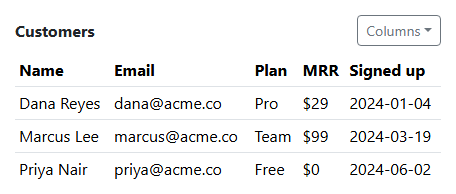
Visible columns are tracked as a Set of column keys rather than a boolean flag per column scattered across variables, which is what makes renderTable() a one-line filter — COLUMNS.filter(c => visible.has(c.key)) — instead of a chain of individual if-checks per column. Both the header row and every body row map over that exact same filtered cols array, so a header and its corresponding data cells can never fall out of sync about which columns actually exist.
The Name column is marked locked: true and its checkbox renders disabled — table content with no visible identifying column at all is close to meaningless, so removing the one column every row needs to make sense isn't offered as an option in the first place, rather than being technically possible and just discouraged.
The dropdown uses Bootstrap's real data-bs-auto-close="outside" option, the same technique this collection uses in bootstrap-multi-select-dropdown and bootstrap-notification-center-dropdown — without it, Bootstrap's default dropdown behavior closes the menu the instant the first checkbox is clicked, which would make toggling more than one column at a time frustratingly slow.
Step by step
How to Use
- 1Load the snippetA five-column customer table shows in full, with a "Columns" dropdown button above it.
- 2Click "Columns"A checklist opens showing all five columns checked, with Name greyed out and unclickable.
- 3Uncheck "MRR"The MRR column disappears from the table immediately, and the dropdown stays open.
- 4Uncheck "Signed up" too, without closing the dropdown firstBoth columns can be toggled off in one open dropdown session, since it doesn't auto-close on the first click.
- 5Try to uncheck "Name"Its checkbox is disabled — it can never be hidden.
Real-world uses
Common Use Cases
Got questions?
Frequently Asked Questions
A row with every identifying column hidden would be meaningless — locking the one column every row needs to actually be readable prevents a user from accidentally hiding every useful piece of context at once.
Bootstrap's dropdown closes itself by default on any click inside it, including a checkbox click — without this option, toggling a second or third column would require reopening the dropdown after every single click.
Yes — add an entry to the COLUMNS array with a key, label, and locked flag, and add matching data to each row in ROWS keyed the same way; renderMenu() and renderTable() both iterate the array generically.
Yes. Keep the visible column keys in a Set (or equivalent) in component state, and derive both the checklist and the filtered table columns from it in your render function — the locked-column logic carries over directly.