


Bootstrap Data Table Loading Skeleton — Free HTML CSS JS Snippet
Bootstrap Data Table Loading Skeleton · Tables · Plain HTML, CSS & JS · Live preview
Copy & paste
Source Code
<div class="container py-5 d-flex justify-content-center">
  <div class="card bsskel-card">
    <div class="card-body p-3">
      <div class="d-flex justify-content-between align-items-center mb-2">
        <h6 class="fw-bold mb-0">Team members</h6>
        <button type="button" class="btn btn-sm btn-outline-secondary" id="bsskelReload">Reload data</button>
      </div>
      <table class="table table-sm align-middle mb-0">
        <thead>
          <tr><th>Name</th><th>Email</th><th>Role</th><th>Status</th></tr>
        </thead>
        <tbody id="bsskelBody"></tbody>
      </table>
    </div>
  </div>
</div>
.bsskel-card { width: 480px; max-width: 100%; border: 1px solid #eceef1; border-radius: 14px; }
.bsskel-bar {
display: inline-block; height: 10px; border-radius: 4px;
background: linear-gradient(90deg, #eceef1 25%, #f5f6f8 37%, #eceef1 63%);
background-size: 400% 100%;
animation: bsskel-shimmer 1.4s ease infinite;
}
@keyframes bsskel-shimmer { 0% { background-position: 100% 50%; } 100% { background-position: 0 50%; } }const body = document.getElementById('bsskelBody');
const reloadBtn = document.getElementById('bsskelReload');
const ROWS = [
['Dana Reyes', '[email protected]', 'Engineering', 'Active', 'success'],
['Marcus Lee', '[email protected]', 'Design', 'Active', 'success'],
['Priya Nair', '[email protected]', 'Product', 'Invited', 'secondary'],
['Sofia Chen', '[email protected]', 'Engineering', 'Active', 'success'],
['Wale Adeyemi', '[email protected]', 'Support', 'Suspended', 'warning'],
];
// Column-width hints so the skeleton's bars roughly match the real content's
// shape, instead of five identical rectangles that don't resemble a table.
const WIDTHS = ['70%', '85%', '60%', '50%'];
function renderSkeleton() {
let rows = '';
for (let i = 0; i < 5; i++) {
rows += '<tr>' + WIDTHS.map(w =>
'<td><span class="bsskel-bar" style="width:' + w + '"></span></td>'
).join('') + '</tr>';
}
body.innerHTML = rows;
}
function renderData() {
body.innerHTML = ROWS.map(([name, email, role, status, tone]) =>
'<tr><td>' + name + '</td><td class="text-muted">' + email + '</td><td>' + role +
'</td><td><span class="badge text-bg-' + tone + '">' + status + '</span></td></tr>'
).join('');
}
function load() {
renderSkeleton();
reloadBtn.disabled = true;
setTimeout(() => {
renderData();
reloadBtn.disabled = false;
}, 1400);
}
reloadBtn.addEventListener('click', load);
load();Extend with AI
Take This Snippet Further With AI
The AI prompt for this one is for Patreon supporters ($3 a month), along with a site with no ads. Supporters enter the passcode once and it is remembered in this browser.
What's included
Features
About this UI Snippet
Bootstrap Data Table Loading Skeleton — HTML, CSS & JavaScript
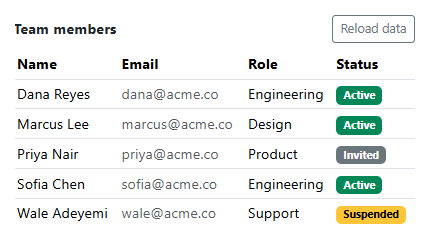
A skeleton only works if it roughly matches the shape of what's coming — five identical gray rectangles read as generic "loading," while bars sized to each column's typical content read as "this table, loading." That's what the WIDTHS array does here: each of the four <td> bars gets a different percentage width (70%, 85%, 60%, 50%) echoing that a name is usually shorter than an email, which is usually longer than a role label.
The shimmer itself is a single CSS background-position animation on a gradient that's four times wider than the element (background-size: 400% 100%) — animating its position sweeps a lighter band across each bar continuously, entirely on the compositor thread, with no JavaScript driving the visual effect frame by frame. JavaScript's only job is swapping which markup is in #bsskelBody at all: renderSkeleton() for the loading state, renderData() for the resolved one, both writing into the exact same tbody so nothing about the surrounding table needs to change between states.
The Reload button disables itself for the duration of the simulated fetch specifically so a second click can't restart the skeleton mid-load and leave two competing timers racing to populate the same tbody — the same overlapping-request problem bootstrap-form-autosave-status solves for a save action instead of a fetch.
Step by step
How to Use
- 1Load the snippetFive shimmering skeleton rows appear immediately, each bar sized differently per column.
- 2Wait about 1.4 secondsThe skeleton rows are replaced by five real rows of names, emails, roles, and status badges.
- 3Click "Reload data"The skeleton reappears and the button disables itself until the simulated fetch resolves again.
- 4Click Reload again quicklyNothing happens while it's disabled — a second load can't start until the first one finishes.
Real-world uses
Common Use Cases
Got questions?
Frequently Asked Questions
A spinner (see bootstrap-loading-spinner-overlay) communicates "something is happening" with no hint of what. A skeleton shaped like the real table communicates the eventual layout immediately, which most research on perceived performance shows feels faster even at the identical actual load time.
Uniform bars read as a generic loading placeholder; bars sized like real content (a name column narrower than an email column) make the skeleton specifically resemble this table rather than any table, which is what makes the transition to real data feel seamless instead of jarring.
No — it is a pure CSS @keyframes animation on background-position over an oversized gradient. JavaScript is only responsible for swapping the skeleton markup for real data once the (simulated) load finishes.
Yes. Track a loading boolean in component state and conditionally render either a mapped array of skeleton rows or the real data rows from the same array-mapping logic — the CSS shimmer class needs no changes.
Replace the setTimeout in load() with an actual fetch, calling renderData() with the resolved response inside .then() and keeping the skeleton visible (and Reload disabled) for the full duration of the real request.