



Bootstrap Notification Center Dropdown — Free Snippet
Bootstrap Notification Center Dropdown · Navigation · Plain HTML, CSS & JS · Live preview
Copy & paste
Source Code
<div class="container py-5 text-center">
  <div class="dropdown">
    <button class="btn btn-light position-relative" data-bs-toggle="dropdown" data-bs-auto-close="outside" aria-expanded="false">
      <svg width="18" height="18" viewBox="0 0 24 24" fill="none" stroke="currentColor" stroke-width="2" stroke-linecap="round" stroke-linejoin="round"><path d="M18 8A6 6 0 0 0 6 8c0 7-3 9-3 9h18s-3-2-3-9"/><path d="M13.73 21a2 2 0 0 1-3.46 0"/></svg>
      <span class="badge rounded-pill bg-danger position-absolute top-0 start-100 translate-middle" id="bsnotifBadge">3</span>
    </button>
    <div class="dropdown-menu dropdown-menu-end bsnotif-panel p-0">
      <div class="d-flex justify-content-between align-items-center px-3 py-2 border-bottom">
        <strong class="small">Notifications</strong>
        <button class="btn btn-link btn-sm p-0" id="bsnotifReadAll">Mark all read</button>
      </div>
      <div id="bsnotifList">
        <a href="javascript:void(0)" class="dropdown-item bsnotif-item bsnotif-unread py-2">
          <div class="d-flex gap-2"><span class="bsnotif-dot"></span><div><div class="small">Sara commented on your PR</div><div class="text-muted" style="font-size:11px">2m ago</div></div></div>
        </a>
        <a href="javascript:void(0)" class="dropdown-item bsnotif-item bsnotif-unread py-2">
          <div class="d-flex gap-2"><span class="bsnotif-dot"></span><div><div class="small">Deploy to production succeeded</div><div class="text-muted" style="font-size:11px">1h ago</div></div></div>
        </a>
        <a href="javascript:void(0)" class="dropdown-item bsnotif-item bsnotif-unread py-2">
          <div class="d-flex gap-2"><span class="bsnotif-dot"></span><div><div class="small">Weekly report is ready</div><div class="text-muted" style="font-size:11px">3h ago</div></div></div>
        </a>
      </div>
    </div>
  </div>
</div>
.bsnotif-panel { width: 300px; }
.bsnotif-dot { width: 8px; height: 8px; border-radius: 50%; background: #6366f1; margin-top: 5px; flex-shrink: 0; }
.bsnotif-item.bsnotif-unread { background: #f8f9ff; }
.bsnotif-item:not(.bsnotif-unread) .bsnotif-dot { background: transparent; }const badge = document.getElementById('bsnotifBadge');
const list = document.getElementById('bsnotifList');
const readAllBtn = document.getElementById('bsnotifReadAll');
function updateBadge() {
const unread = document.querySelectorAll('.bsnotif-unread').length;
badge.textContent = unread;
badge.style.display = unread > 0 ? '' : 'none';
}
// Clicking one notification marks only that one read. The dropdown stays
// open through that click because of the trigger's data-bs-auto-close="outside"
// attribute — Bootstrap's default (autoClose: true) closes on ANY click inside
// the menu too, not just outside it, which would dismiss the panel after the
// very first notification a visitor tried to read.
list.addEventListener('click', e => {
const item = e.target.closest('.bsnotif-item');
if (!item) return;
item.classList.remove('bsnotif-unread');
updateBadge();
});
readAllBtn.addEventListener('click', () => {
document.querySelectorAll('.bsnotif-unread').forEach(item => item.classList.remove('bsnotif-unread'));
updateBadge();
});
updateBadge();Extend with AI
Take This Snippet Further With AI
The AI prompt for this one is for Patreon supporters ($3 a month), along with a site with no ads. Supporters enter the passcode once and it is remembered in this browser.
What's included
Features
About this UI Snippet
Bootstrap Notification Center Dropdown — HTML, CSS & JavaScript
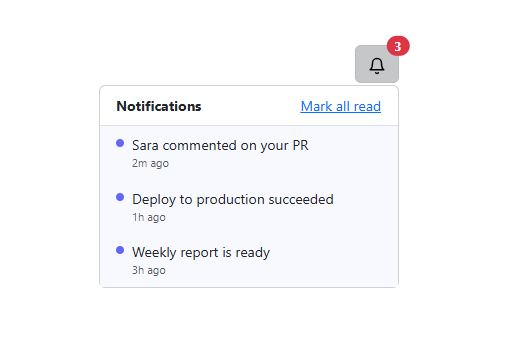
The badge count on this bell icon isn't a static "3" — it's derived live from how many .bsnotif-item elements currently carry the .bsnotif-unread class, recalculated by updateBadge() after every change and hidden entirely once it reaches zero, all inside real Bootstrap 5.3's Dropdown component.
Keeping the menu open past the first click
Bootstrap's Dropdown closes on any click by default — autoClose: true closes it both on an outside click *and* on a click anywhere inside the menu, including a notification item. Left as the default, marking one notification read would immediately dismiss the whole panel, making it impossible to read a second one without reopening it. The trigger button's data-bs-auto-close="outside" attribute changes that to Bootstrap's other documented mode: the menu now closes only on a genuine outside click, so clicking through several notifications in one open dropdown works as expected. A separate "Mark all read" control clears every unread notification in one action for the case where reading each individually isn't worth the effort.
Step by step
How to Use
- 1Load the snippetClick the snippet in the sidebar Library tab. The preview loads a bell icon with a red "3" badge.
- 2Open the dropdownClick the bell — Bootstrap's real Dropdown component opens showing three unread (tinted) notifications.
- 3Click one notificationIt loses its unread tint and dot, the badge updates to "2", and the dropdown stays open.
- 4Click "Mark all read"Every remaining notification clears at once and the badge disappears entirely.
Real-world uses
Common Use Cases
Got questions?
Frequently Asked Questions
Yes — it uses Bootstrap 5.3's actual Dropdown component via data-bs-toggle="dropdown", loaded from the genuine CDN, for the open/close and outside-click behavior.
updateBadge() re-counts how many elements currently carry the .bsnotif-unread class every time a notification is read (individually or via "mark all"), so the number always reflects the real current state rather than a separately maintained counter.
The trigger button carries data-bs-auto-close="outside", one of Bootstrap's built-in Dropdown options. Left at the default (autoClose: true), Bootstrap closes the menu on any click inside it too, which would dismiss the whole panel after marking just the first notification read — "outside" mode closes it only on a genuine click outside the menu instead.
The badge hides itself entirely (display: none) once the unread count reaches zero, rather than showing a "0" badge, which would be visual noise.
Yes — insert a new .dropdown-item.bsnotif-item.bsnotif-unread element into #bsnotifList and call updateBadge() afterward; both the click-to-read and mark-all-read handlers pick it up automatically since they query by class, not by a fixed list.
Yes. While the Bootstrap Notification Center Dropdown snippet gives you one pattern to copy, the free Responsive Navbar Builder at webdevpuneet.com/navbar-builder/ designs a whole navigation bar: logo, links and dropdown menus, a mobile hamburger menu (dropdown panel, slide-in drawer or full screen) and a scroll effect (sticky, shrink, hide on scroll or transparent). It has six presets, a live preview that runs the real code, and exports HTML + CSS + vanilla JS, React, Tailwind, Vue 3 or Angular — or you can click Fork & Edit to keep editing it in My Code.