
Fuse.js Fuzzy Command Palette — Free JS Snippet
Fuse.js Fuzzy Command Palette · Navigation · Plain HTML, CSS & JS · Live preview
What's included
Features
About this UI Snippet
Fuse.js Fuzzy Command Palette — HTML, CSS & JavaScript

A command palette lives or dies on its matching. If it only matches exact substrings, users must remember precisely how a command is worded, and the whole point — reaching a feature without hunting through menus — is lost. People type "tgl dark" for "Toggle dark mode" and "nw fle" for "New file"; a good palette understands them. Fuse.js is a lightweight fuzzy-search library that scores approximate matches with the Bitap algorithm, so abbreviations, dropped letters and typos still find the right command.
The configuration carries the design. keys accepts weights, so a hit in the command name counts three times as much as one in its keywords, and the section counts least; typing "night" finds "Toggle dark mode" through its keyword list but ranks below any command actually named for it. threshold controls tolerance — 0 requires a perfect match, 1 matches almost anything — and 0.4 is forgiving without returning noise. ignoreLocation is easy to miss and important here: by default Fuse penalises matches that occur far from the start of the string, which suits searching within a short field but ranks "Save all files" badly when you type "files". Turning it off matches anywhere in the string.
The highlighting works from includeMatches, which returns character index ranges for each matched key. Those ranges can overlap or touch, so the highlight function sorts and merges them before wrapping the pieces in mark elements, and escapes every fragment of text so a command name can never inject HTML. Showing which characters matched is what makes fuzzy results feel trustworthy rather than random.
The interaction follows the WAI-ARIA combobox pattern: the input has role="combobox" with aria-controls, the list is a listbox of options, and aria-activedescendant points at the highlighted item, so screen readers announce the selection while focus stays in the input. Arrow keys move the highlight, Enter runs it, Escape clears, the active row scrolls into view, and hovering also moves the highlight — mouse and keyboard stay in sync. Section headings appear only in the unfiltered list, because grouping breaks down once results are ranked by relevance.
Step by step
How to Use
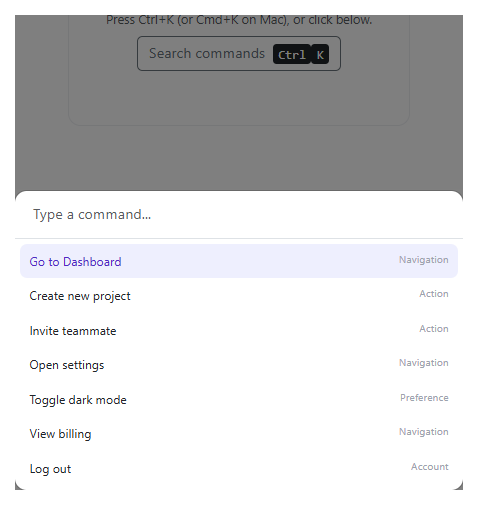
- 1Browse the listWith the field empty, every command is shown grouped under File, View, Generate, Edit, Settings and Account.
- 2Type an abbreviationType "tgl dark" or "nw fle". Fuzzy matching finds Toggle dark mode and New file despite the missing letters.
- 3Search by synonymType "night" or "logout". Keywords surface the right command even though the words are not in its title.
- 4Navigate with the keyboardUse the up and down arrows to move, Enter to run a command, and Escape to clear the search.
- 5Watch the highlightingMatched characters are underlined in each result, showing why it was returned.
Real-world uses
Common Use Cases
Got questions?
Frequently Asked Questions
It sets how fuzzy matching is allowed to be: 0.0 requires a perfect match, 1.0 matches anything. Values around 0.3 to 0.4 suit most command lists.
By default Fuse scores matches near the start of a string higher. Disabling location makes a match anywhere in the text count equally.
includeMatches returns [start, end] index pairs for each matched key. The code merges overlapping ranges and wraps them in mark elements.
Add a keywords field to each command and include it in keys with a lower weight, so synonyms match without outranking title matches.
It uses the combobox and listbox roles with aria-activedescendant so the highlighted option is announced while focus stays in the input.
Fuse searches in memory and stays fast for a few thousand entries. For very large sets, pre-index on a server or use a dedicated search engine.
Yes. Use the JSX, Vue, Angular or Tailwind export buttons on this page to convert the markup and styles. The behaviour comes from Fuse.js, so in a framework project install it with npm install fuse.js instead of the CDN tag, build the index with useMemo / computed / a service, keyed on the data, and release it with nothing (it holds no DOM listeners) when the component unmounts.
Yes. While the Fuse.js Fuzzy Command Palette snippet gives you one pattern to copy, the free Responsive Navbar Builder at webdevpuneet.com/navbar-builder/ designs a whole navigation bar: logo, links and dropdown menus, a mobile hamburger menu (dropdown panel, slide-in drawer or full screen) and a scroll effect (sticky, shrink, hide on scroll or transparent). It has six presets, a live preview that runs the real code, and exports HTML + CSS + vanilla JS, React, Tailwind, Vue 3 or Angular — or you can click Fork & Edit to keep editing it in My Code.
Build with AI
Build, Understand, Optimize, and Extend It With AI
Ask an AI assistant like Claude to add a global Ctrl+K shortcut with a modal overlay, remember recently run commands and rank them first, or support nested commands with a second-level menu.
Prompt to recreate it
Copy this into your AI assistant of choice to build the effect from scratch, or as a jumping-off point for your own variant:
Build a keyboard-driven command palette using Fuse.js 7 loaded from a CDN.

Requirements:
- Create a Fuse index over a list of commands with weighted keys (name 3, keywords 1, section 0.5), threshold 0.4, ignoreLocation: true, includeMatches: true and minMatchCharLength: 2.
- Highlight matched characters in the command name by merging the [start, end] ranges from the matches and escaping all text.
- Show section headings only when the search box is empty; otherwise show a relevance-ranked list with a result count.
- Implement the ARIA combobox pattern (role="combobox", listbox/option roles, aria-activedescendant), with ArrowUp/ArrowDown/Enter/Escape handling and mouse-hover sync.
- Running a command shows a confirmation message.
Want to tighten it up first? Run this prompt through the AI Prompt Studio to score it across 8 quality dimensions, catch anti-patterns, and tune the wording for Claude, ChatGPT, or Gemini before you paste it in.
Source Code
<div class="fc-wrap">
<div class="fc-box">
<div class="fc-search">
<svg width="18" height="18" viewBox="0 0 24 24" fill="none" stroke="currentColor" stroke-width="2.4" stroke-linecap="round"><circle cx="11" cy="11" r="7"/><path d="m20 20-3.5-3.5"/></svg>
<input id="fcInput" type="text" placeholder="Type a command... try "tgl dark" or "nw fle"" autocomplete="off" role="combobox" aria-expanded="true" aria-controls="fcList" aria-autocomplete="list">
<kbd>esc</kbd>
</div>
<ul class="fc-list" id="fcList" role="listbox"></ul>
<div class="fc-foot"><span><kbd>↑</kbd><kbd>↓</kbd> navigate</span><span><kbd>↵</kbd> run</span><span id="fcCount"></span></div>
</div>
<div class="fc-toast" id="fcToast" role="status" aria-live="polite"></div>
</div>body { background: #e9ecf5; padding: 26px 16px; font-family: system-ui, sans-serif; }
.fc-wrap { max-width: 560px; margin: 0 auto; position: relative; }
.fc-box { background: #fff; border: 1px solid #d9deec; border-radius: 16px; box-shadow: 0 24px 48px rgba(25,35,80,.16); overflow: hidden; }
.fc-search { display: flex; align-items: center; gap: 10px; padding: 0 16px; border-bottom: 1px solid #e6e9f3; color: #6b7290; }
.fc-search input { flex: 1; border: 0; outline: 0; background: none; padding: 17px 0; font: 500 16px/1.2 system-ui, sans-serif; color: #12162e; }
kbd { font: 600 11px/1 ui-monospace, Menlo, monospace; color: #6b7290; background: #f0f2f9; border: 1px solid #dde1ef; border-bottom-width: 2px; border-radius: 5px; padding: 3px 6px; margin-right: 4px; }
.fc-list { list-style: none; margin: 0; padding: 6px; max-height: 330px; overflow-y: auto; scrollbar-width: none; }
.fc-list::-webkit-scrollbar { display: none; }
.fc-sec { padding: 8px 10px 4px; font-size: 11px; font-weight: 800; letter-spacing: .07em; text-transform: uppercase; color: #8b92ad; }
.fc-item { display: flex; align-items: center; gap: 12px; padding: 9px 10px; border-radius: 10px; cursor: pointer; color: #1a1f3a; }
.fc-item[aria-selected="true"] { background: #eef0ff; }
.fc-ico { width: 30px; height: 30px; border-radius: 8px; background: #f1f3fb; display: grid; place-items: center; font-size: 14px; flex: none; }
.fc-item[aria-selected="true"] .fc-ico { background: #dfe3ff; }
.fc-name { font-size: 14px; font-weight: 600; }
.fc-name mark { background: none; color: #4338ca; font-weight: 800; text-decoration: underline; text-decoration-color: rgba(67,56,202,.35); text-underline-offset: 3px; }
.fc-hint { margin-left: auto; font-size: 12px; color: #8b92ad; }
.fc-empty { padding: 26px 12px; text-align: center; color: #6b7290; font-size: 14px; }
.fc-foot { display: flex; gap: 16px; align-items: center; padding: 10px 16px; border-top: 1px solid #e6e9f3; font-size: 12px; color: #7b829e; background: #fafbfe; }
.fc-foot #fcCount { margin-left: auto; font-variant-numeric: tabular-nums; }
.fc-toast { margin-top: 14px; min-height: 22px; text-align: center; font-size: 13px; font-weight: 700; color: #4338ca; }const COMMANDS = [
{ id: 'new-file', name: 'New file', section: 'File', icon: '➕', keywords: 'create add document blank' },
{ id: 'open-file', name: 'Open file...', section: 'File', icon: '📂', keywords: 'browse load import' },
{ id: 'save-all', name: 'Save all files', section: 'File', icon: '💾', keywords: 'write persist' },
{ id: 'export-pdf', name: 'Export as PDF', section: 'File', icon: '📄', keywords: 'download print' },
{ id: 'toggle-dark', name: 'Toggle dark mode', section: 'View', icon: '🌙', keywords: 'theme night appearance light' },
{ id: 'zoom-in', name: 'Zoom in', section: 'View', icon: '🔍', keywords: 'bigger magnify increase' },
{ id: 'zoom-out', name: 'Zoom out', section: 'View', icon: '🔎', keywords: 'smaller reduce decrease' },
{ id: 'fullscreen', name: 'Enter full screen', section: 'View', icon: '⛶', keywords: 'maximize expand' },
{ id: 'new-flexbox', name: 'New flexbox layout', section: 'Generate', icon: '🧱', keywords: 'css align justify' },
{ id: 'new-grid', name: 'New grid template', section: 'Generate', icon: '📐', keywords: 'css columns rows' },
{ id: 'gen-palette', name: 'Generate color palette', section: 'Generate', icon: '🎨', keywords: 'colour swatches theme' },
{ id: 'format-doc', name: 'Format document', section: 'Edit', icon: '✨', keywords: 'prettier indent beautify' },
{ id: 'find-repl', name: 'Find and replace', section: 'Edit', icon: '🔍', keywords: 'search substitute regex' },
{ id: 'comment', name: 'Toggle line comment', section: 'Edit', icon: '💬', keywords: 'uncomment disable' },
{ id: 'open-settings', name: 'Open settings', section: 'Settings', icon: '⚙️', keywords: 'preferences options config' },
{ id: 'shortcuts', name: 'Keyboard shortcuts', section: 'Settings', icon: '⌨️', keywords: 'keybindings hotkeys' },
{ id: 'sign-out', name: 'Sign out', section: 'Account', icon: '🚪', keywords: 'logout exit leave' },
];
const fuse = new Fuse(COMMANDS, {
keys: [
{ name: 'name', weight: 3 }, // titles matter most
{ name: 'keywords', weight: 1 }, // synonyms catch "night" -> dark mode
{ name: 'section', weight: 0.5 },
],
threshold: 0.4, // 0 = exact, 1 = matches anything
ignoreLocation: true, // match anywhere in the string, not just near the start
includeMatches: true, // gives character ranges for highlighting
minMatchCharLength: 2,
});
const input = document.getElementById('fcInput');
const list = document.getElementById('fcList');
const countEl = document.getElementById('fcCount');
const toast = document.getElementById('fcToast');
let results = [];
let active = 0;
function esc(s) { return s.replace(/[&<>"]/g, function (c) { return { '&': '&', '<': '<', '>': '>', '"': '"' }[c]; }); }
// Wrap the matched character ranges in <mark>. Ranges from Fuse can overlap, so merge first.
function highlight(text, indices) {
if (!indices || !indices.length) return esc(text);
const merged = [];
indices.slice().sort(function (a, b) { return a[0] - b[0]; }).forEach(function (r) {
const last = merged[merged.length - 1];
if (last && r[0] <= last[1] + 1) last[1] = Math.max(last[1], r[1]); else merged.push([r[0], r[1]]);
});
let out = '', pos = 0;
merged.forEach(function (r) {
out += esc(text.slice(pos, r[0])) + '<mark>' + esc(text.slice(r[0], r[1] + 1)) + '</mark>';
pos = r[1] + 1;
});
return out + esc(text.slice(pos));
}
function run(q) {
if (!q.trim()) {
results = COMMANDS.map(function (c) { return { item: c, matches: [] }; });
} else {
results = fuse.search(q);
}
active = 0;
render();
}
function render() {
if (!results.length) {
list.innerHTML = '<li class="fc-empty">No commands match "' + esc(input.value) + '"</li>';
countEl.textContent = '0 results';
return;
}
let html = '', lastSec = null;
const grouped = !input.value.trim(); // section headings only for the unfiltered list
results.forEach(function (r, i) {
const c = r.item;
if (grouped && c.section !== lastSec) { html += '<li class="fc-sec" role="presentation">' + c.section + '</li>'; lastSec = c.section; }
const m = (r.matches || []).filter(function (x) { return x.key === 'name'; })[0];
html += '<li class="fc-item" role="option" id="fc-' + c.id + '" data-i="' + i + '" aria-selected="' + (i === active) + '">' +
'<span class="fc-ico">' + c.icon + '</span><span class="fc-name">' + highlight(c.name, m && m.indices) + '</span>' +
'<span class="fc-hint">' + c.section + '</span></li>';
});
list.innerHTML = html;
countEl.textContent = results.length + ' result' + (results.length === 1 ? '' : 's');
input.setAttribute('aria-activedescendant', 'fc-' + results[active].item.id);
const el = list.querySelector('[aria-selected="true"]');
if (el) el.scrollIntoView({ block: 'nearest' });
}
function exec(i) {
if (!results[i]) return;
toast.textContent = 'Ran: ' + results[i].item.name;
}
input.addEventListener('input', function () { run(input.value); });
input.addEventListener('keydown', function (e) {
if (e.key === 'ArrowDown') { e.preventDefault(); active = Math.min(results.length - 1, active + 1); render(); }
else if (e.key === 'ArrowUp') { e.preventDefault(); active = Math.max(0, active - 1); render(); }
else if (e.key === 'Enter') { e.preventDefault(); exec(active); }
else if (e.key === 'Escape') { input.value = ''; run(''); }
});
list.addEventListener('mousemove', function (e) {
const li = e.target.closest('.fc-item');
if (li && Number(li.dataset.i) !== active) { active = Number(li.dataset.i); render(); }
});
list.addEventListener('click', function (e) {
const li = e.target.closest('.fc-item');
if (li) exec(Number(li.dataset.i));
});
run('');