



Bootstrap Drag-to-Reorder List — Free HTML CSS JS Snippet
Bootstrap Drag-to-Reorder List · Layouts · Plain HTML, CSS & JS · Live preview
Copy & paste
Source Code
<div class="container py-5 d-flex justify-content-center">
  <div class="card bsdrag-card">
    <div class="card-body p-3">
      <h6 class="fw-bold mb-2">Priority order</h6>
      <ul class="list-unstyled mb-0" id="bsdragList"></ul>
      <p class="small text-muted mt-2 mb-0">Drag the handle to reorder.</p>
    </div>
  </div>
</div>
.bsdrag-card { width: 340px; max-width: 100%; border: 1px solid #eceef1; border-radius: 14px; }
.bsdrag-row {
display: flex; align-items: center; gap: 10px; padding: 9px 6px;
border-radius: 8px; background: #fff; margin-bottom: 4px; border: 1px solid #eceef1;
}
.bsdrag-handle { cursor: grab; color: #9ca3af; font-size: 14px; user-select: none; }
.bsdrag-row.bsdrag-dragging { opacity: .4; }
.bsdrag-row.bsdrag-over { border-top: 2px solid #6366f1; }
.bsdrag-rank { font: 700 11px ui-monospace, monospace; color: #9ca3af; width: 16px; }let items = [
{ id: 1, text: 'Fix checkout bug' },
{ id: 2, text: 'Ship dark mode' },
{ id: 3, text: 'Write Q3 report' },
{ id: 4, text: 'Onboard new hire' },
];
const list = document.getElementById('bsdragList');
let draggedId = null;
function render() {
list.innerHTML = items.map((item, i) =>
'<li class="bsdrag-row" draggable="true" data-id="' + item.id + '">' +
'<span class="bsdrag-handle">☰</span>' +
'<span class="bsdrag-rank">' + (i + 1) + '</span>' +
'<span>' + item.text + '</span>' +
'</li>'
).join('');
}
list.addEventListener('dragstart', e => {
const row = e.target.closest('.bsdrag-row');
if (!row) return;
draggedId = Number(row.dataset.id);
row.classList.add('bsdrag-dragging');
e.dataTransfer.effectAllowed = 'move';
});
list.addEventListener('dragend', () => {
document.querySelectorAll('.bsdrag-row').forEach(r => r.classList.remove('bsdrag-dragging', 'bsdrag-over'));
draggedId = null;
});
list.addEventListener('dragover', e => {
// Required: without preventDefault() here, the browser refuses the drop
// entirely and no "drop" event ever fires on this element.
e.preventDefault();
const row = e.target.closest('.bsdrag-row');
document.querySelectorAll('.bsdrag-row').forEach(r => r.classList.remove('bsdrag-over'));
if (row && Number(row.dataset.id) !== draggedId) row.classList.add('bsdrag-over');
});
list.addEventListener('drop', e => {
e.preventDefault();
const targetRow = e.target.closest('.bsdrag-row');
if (!targetRow || draggedId === null) return;
const targetId = Number(targetRow.dataset.id);
if (targetId === draggedId) return;
const fromIndex = items.findIndex(i => i.id === draggedId);
const toIndex = items.findIndex(i => i.id === targetId);
const [moved] = items.splice(fromIndex, 1);
items.splice(toIndex, 0, moved);
render();
});
render();Extend with AI
Take This Snippet Further With AI
The AI prompt for this one is for Patreon supporters ($3 a month), along with a site with no ads. Supporters enter the passcode once and it is remembered in this browser.
What's included
Features
About this UI Snippet
Bootstrap Drag-to-Reorder List — HTML, CSS & JavaScript
This uses the browser's actual native HTML5 Drag and Drop API — draggable="true" on each row plus dragstart/dragover/drop listeners — rather than a pointer-events-based reimplementation, the same approach this collection's bootstrap-kanban-board-cards uses for moving cards between columns, applied here to reordering within a single list instead.
The one line that's easy to leave out and silently breaks everything is e.preventDefault() inside the dragover handler — without it, the browser's default behavior refuses the drop entirely, and the drop event never fires on the element at all, no matter how correct the rest of the drop logic is.
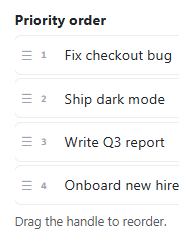
The actual reordering is a genuine array move, not a DOM-only shuffle: items.splice(fromIndex, 1) removes the dragged item from its old position, and items.splice(toIndex, 0, moved) reinserts it at the new one, then render() rebuilds the whole list from that updated array — including the visible rank number next to each row, which is what makes the numbers 1 through 4 always correctly reflect the list's true current order rather than needing separate logic to keep them in sync with whatever the drag-and-drop just did visually.
Step by step
How to Use
- 1Load the snippetFour priority items list in order, each numbered 1 through 4 with a drag handle icon.
- 2Press and drag the handle on item 3It fades to semi-transparent while dragging, and rows show a blue top border as you hover over a valid drop target.
- 3Drop it above item 1The list reorders immediately, and every row's rank number updates to reflect the new true order.
- 4Drag item 1 (now originally item 3) down to the bottomIt moves correctly, and the numbering stays accurate throughout.
- 5Try dropping an item onto itselfNothing changes — dropping a row where it already is is correctly treated as a no-op.
Real-world uses
Common Use Cases
Got questions?
Frequently Asked Questions
Browsers refuse a drop by default unless something explicitly opts in during dragover — omitting that one call means the drop event never fires at all on that element, regardless of how correct the rest of the drop-handling logic is.
Yes — the reorder is a real Array.splice() operation on the items array itself, and render() rebuilds the entire list (including the rank numbers) from that array afterward, so the visible order is never just a disconnected DOM rearrangement.
The native HTML5 Drag and Drop API has inconsistent and often poor support on mobile touch browsers; a production implementation targeting mobile should use a pointer-events-based drag library or fallback instead of relying on this API alone.
Yes. Keep items as an array in component state, and perform the same splice-based reorder inside your drop handler, updating state immutably (a new array, not a mutated one) per your framework's conventions.